10 Best Card Scanner Apps in 2026: OCR Accuracy, Contact Sync, Batch Scan Speed, and Language Support
Written by
Sridhar Ranganathan
Last Updated :
July 13, 2026
Skim in:
12
mins
TL;DR
The ten best card scanner apps in 2026 are B2Brain, Covve, CamCard, Contacts+, Popl, HiHello, Blinq, Zoho Card Scanner, HubSpot Business Card Scanner, and iCapture.
We score every app on four axes that decide usefulness: OCR accuracy, contact sync model, batch scan speed, and language support.
Covve leads on accuracy across 60+ languages, CamCard owns CJK batch scanning, and CRM-native scanners from HubSpot and Zoho win if you already live in one.
For booth teams, capture was never the bottleneck; roughly 87% of trade-show leads never get proper follow-up and up to 80% never reach the CRM.
B2Brain tracks Leads-to-Meeting, or LTM, at about 52% on the floor versus an 8% industry average, and no rival scanner measures it.
Match the tool to where the cards come from, and for events score cost per booked meeting rather than price per scan.
Q1: What Are the 10 Best Card Scanner Apps in 2026 (and Which Is Right for You)? [toc=1. Best Card Scanner Apps]
The 10 best card scanner apps in 2026, scored on OCR accuracy, contact sync, batch speed, and language support, are B2Brain, Covve, CamCard, Contacts+, Popl, HiHello, Blinq, Zoho Card Scanner, HubSpot Business Card Scanner, and iCapture. Pick a pure OCR reader for personal contacts, a CRM-native scanner if you already live in one, or an event-grade lead capture app for trade shows if the cards come from a booth.
First, a fork in the road. Search "best card scanner app" and Google hands you two different worlds. One is trading-card and TCG value scanners for Pokemon and Magic collectors. The other is business and contact scanners, which is what this guide covers. If you landed here for graded-card prices, you are in the wrong room. If you want to turn paper and badges into clean, usable contacts, keep reading.
Second, most listicles score apps on a single axis, usually "does the OCR read the card." That is table stakes. We score every app on four things that actually decide whether the contact becomes useful: OCR accuracy, contact sync model (native real-time versus a dead CSV export), batch scan speed, and language support. One contrarian buyer put the stakes plainly.
"Do not rely on the badge scanner. It collects leads for them, it does nothing for you." Field-marketing practitioner, operator brief, 2026
That line is why "who owns the data, and how fast" is a scoring dimension, not a footnote. For the deeper version of that argument, see how a conference badge scanner stops at the CSV.
⭐ Our Evaluation Criteria
Here is what we assessed for each app, and why it matters to a busy reader.
OCR accuracy: How cleanly the app reads a card, including busy layouts and non-English names. Bad reads mean manual clean-up later.
Contact sync model: Native real-time sync into a CRM versus a CSV export you import by hand. The CSV is where deals go to die.
Batch scan speed: How fast you can clear a stack or a booth queue. Slow apps get abandoned mid-event.
Language support: Latin scripts are easy. CJK (Chinese, Japanese, and Korean) and mixed-script cards separate the leaders.
Free tier reality: What is actually free versus paywalled after the first scan.
Platform and offline mode: iOS, Android, and whether it works when the venue Wi-Fi dies.
✅ Who This Guide Is For
Professionals digitizing a personal stack of business cards after a conference.
Field and event marketing heads running booths at 5 to 15 shows a year who must prove per-show pipeline.
Founders taking a small booth team to a first major US show.
💰 The 10 Apps at a Glance
The 10 Best Card Scanner Apps in 2026 at a Glance
Provider
Best For
OCR Accuracy
Contact Sync
Batch Speed
Languages
Free Tier
Active 2026
B2Brain
Booth teams turning scans into booked meetings and pipeline
Voice-first capture with structured output
Native Salesforce and HubSpot, real-time
Offline-ready, ~4.2s capture
English-first
First event free
Yes
Covve
Most accurate personal contact scanner
Highest-rated for hard layouts
Export and integrations
Single-card focus
60+ languages
Limited, subscription for full use
Yes
CamCard
Multilingual batch scanning
Strong, CJK-capable
CRM export
Good batch mode
Multi-language, strong CJK
Freemium
Yes
Contacts+
Contact de-duplication and cleanup
Solid
Contact-manager sync
Moderate
Multi-language
Freemium
Yes
Popl
Reps who want a digital card with light capture
Badge scan can be unreliable
CRM integrations
Rep-led, one at a time
English-first
Trial, paid plans
Yes
HiHello
Digital business card sharing
QR-first, weak card OCR
Limited CRM sync
Not built for batch
English-first
Free tier
Yes
Blinq
Digital card exchange, team scaling
QR-dependent, connectivity-sensitive
CRM integrations
Not a batch scanner
English-first
Freemium
Yes
Zoho Card Scanner
Zoho CRM users
Good
Native to Zoho
Moderate
Multi-language
Free with Zoho
Yes
HubSpot Card Scanner
HubSpot users
Good
Native to HubSpot only
Moderate
English-first
Free with HubSpot
Yes
iCapture
Enterprise booth badge capture
Reliable badge, weaker business-card OCR
Syncs to systems, CRM varies
Reliable at scale
English-first
Custom quote
Yes
One honest note before the deep dives. Blinq holds the #1 social-proof wall on G2 with thousands of reviews, and Popl and Cvent carry large review counts too. B2Brain has 17. We are not going to counter volume with volume. We counter on the outcome the others do not measure: whether a scan becomes a booked meeting. If you want the benchmark behind that, our event lead capture software guide for 2026 lays out the LTM math.
1.1 B2Brain: Best for booth teams turning scans into booked meetings and pipeline [toc=1.1 B2Brain]
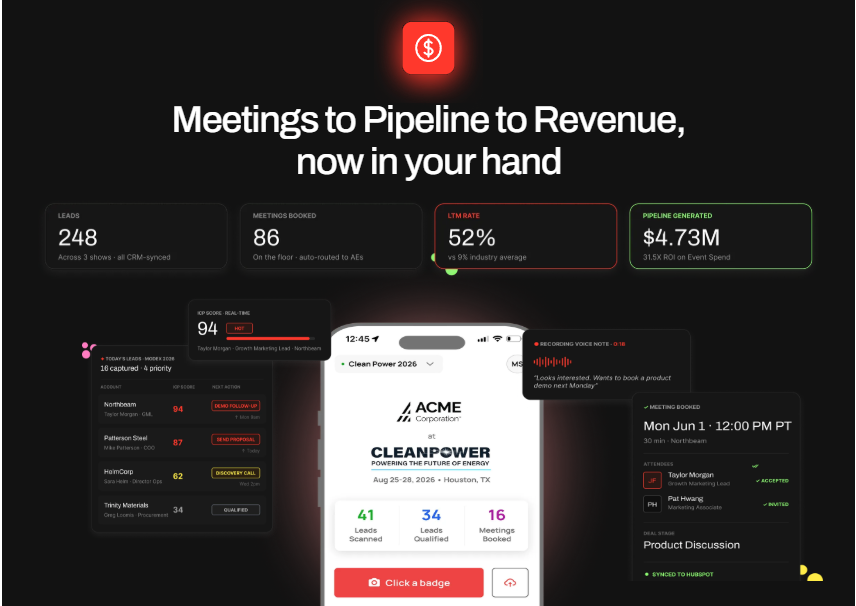
B2Brain converts booth scans into booked meetings with a 52% Leads-to-Meeting rate
Overview
I will be upfront, since this is our guide: I am the co-founder of B2Brain, and I will keep the analyst hat on. B2Brain is an event lead capture app built for B2B teams whose pipeline comes from trade shows, not a general contact digitizer. It is not a badge scanner and not a digital business card. It sits one layer up, capturing the conversation with context, booking the meeting at the booth, and writing the record to your CRM. You can see how event lead capture works across the three motions.
Core Services
Voice-first capture: tap a badge or card, talk for about 30 seconds, get a structured CRM record in roughly 4.2 seconds.
On-the-floor meeting booking that pulls the AE's live calendar and sends a dual invite before the prospect walks away.
Pre-event briefings built from the customer's own CRM pipeline, not a cold prediction database.
A morning-after offline-to-pipeline report showing meetings booked, pipeline sourced, and attribution by show, rep, or segment.
Key Features Against Our Criteria
OCR accuracy: Capture is voice-first and context-first, so the structured output does not depend on OCR alone.
Contact sync: Native, real-time, and bi-directional to Salesforce and HubSpot with de-duplication.
Batch speed: Offline-ready with a "Recent Leads" mode for the rush-hour "scan now, add notes later" problem.
Language support: English-first; not the tool for a multilingual personal card stack.
Why Companies Consider B2Brain
The buyer math drives it. Spend roughly $70K on a booth, and the boss wants about 10x pipeline back. At a 20% close rate that is about 2x revenue ROI, which means roughly 1 in 5 booth visitors has to become a qualified meeting. A contact list cannot answer that. A booked meeting synced to the CRM can. As I tell operators, contact information is not where anything happens; pipeline is where their world moves. That is the whole point of going from offline to pipeline.
The owned number is the Leads-to-Meeting rate, or LTM, the share of booth scans that become booked qualified meetings. B2Brain tracks about 52% LTM on the floor against an 8% industry average for post-event follow-up. No other tool on this list measures LTM at all.
Ideal Customer Profile
Mid-market B2B in manufacturing, supply chain, energy, or construction.
5 to 15 shows a year, $20K to $200K booth spend, ACV $25K and up.
Salesforce or HubSpot in the stack, 2 to 25 booth reps.
Buyer: Field/Event Marketing head, VP Sales, or RevOps.
Pricing
Per-event "Show Pass" and annual "Pipeline" plans, with a first-event-free trial. Exact list pricing is not publicly posted, so confirm what B2Brain costs per event directly.
✅ When to Shortlist
You exhibit regularly and get asked "where is the pipeline?" after every show.
Reps get paid on meetings booked, not badges scanned.
You run Salesforce or HubSpot and need clean, attributed records.
❌ When Not to Shortlist
Solo booths, consumer-facing sellers, or one-off attendance.
Teams with no CRM.
You mainly need a multilingual personal card scanner (this is not that).
Honest gaps: the native app is iOS-first, third-party enrichment depth is lighter than Popl or Mobly, and there is no digital business card.
Customer Reviews
The public G2 reviews reflect B2Brain's account-intelligence roots, and they are candid about where it is thin.
"The AI Conversation Summarization and Auto-CRM Entry feature is a standout, significantly better than other tools we've tried. Reps actually rave about it instead of dreading another sales tool." Ole O. B2Brain G2 Verified Review
"Reporting is basic. We can see usage and lead stats, but there are no rep performance dashboards, no clear ROI reporting like time saved or deals influenced." Ole O. B2Brain G2 Verified Review
1.2 Covve: Best for the most accurate personal contact scanner [toc=1.2 Covve]
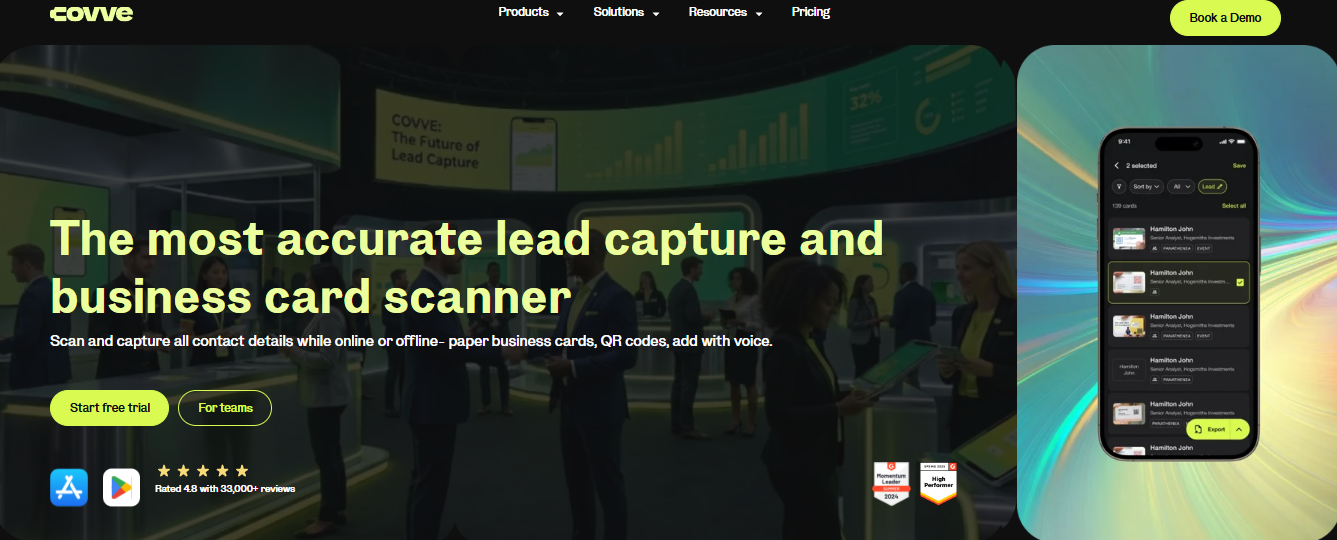
Covve, the most accurate business card scanner, captures cards online, offline, and by voice
Overview
Covve is a personal contact-management app with a business card scanner at its core. It serves professionals who meet a lot of people and want a clean, searchable address book, not a booth team chasing pipeline. On the four criteria, it is the accuracy leader, especially where other apps stumble.
Core Services
Business card scanning with human-verified OCR accuracy.
Contact management with reminders to stay in touch.
Multi-language reading across 60+ languages.
Export and integration options for syncing contacts out.
Key Features Against Our Criteria
OCR accuracy: The recurring answer for non-English names and non-standard layouts. This is Covve's strongest column.
Contact sync: Reads into its own address book with export options; it is not a native CRM writer like the event tools.
Batch speed: Built around careful single-card accuracy, not booth-queue throughput.
Language support: 60+ languages, the widest on this list, which is why it wins for international contacts.
Why Companies Consider Covve
If your pain is a drawer full of cards from global conferences, Covve reads them cleanly and keeps the address book tidy. The decision logic is simple: you value read accuracy on hard cards over CRM plumbing. The trade-off is cost. The store reviews show a clear subscription-fatigue pattern, with users frustrated that basic scanning sits behind a paywall.
Ideal Customer Profile
Individual professionals, consultants, and relationship-driven roles.
People who collect cards in multiple languages.
Anyone who wants a personal CRM-lite, not a sales pipeline tool.
Pricing
Free tier with limits; full scanning requires a subscription, reported by users at around $119 per year. Confirm current pricing in-app.
⚠️ When to Shortlist
You need the most accurate read on multilingual or busy cards.
You want a personal contact organizer, not a CRM connector.
❌ When Not to Shortlist
You need scans to write natively into Salesforce or HubSpot.
You are equipping a booth team for rush-hour batch capture.
Customer Reviews
Covve is a consumer app outside the event-capture review set, so the strongest verified signal is its app-store profile: a 4.7-star rating across roughly 19,600 reviews and 1M+ downloads, with the most common complaint being the subscription gate on scanning.
1.3 CamCard: Best for multilingual batch scanning [toc=1.3 CamCard]
Overview
CamCard is one of the oldest dedicated business card scanners, built around fast OCR (optical character recognition, the tech that turns a photo of text into editable data) and strong multi-language reading. It serves professionals who collect cards in bulk, especially across Asian and Latin scripts. Independent testing keeps it on the list for batch capture and language breadth.
Core Services
Single and batch business card scanning with OCR.
Multi-language reading, including strong CJK (Chinese, Japanese, and Korean) support.
Contact management and card exchange.
Export and integrations to push contacts outward.
Key Features Against Our Criteria
OCR accuracy: Solid on standard cards, with a long track record.
Contact sync: Export and CRM connectors, not native real-time writing.
Batch speed: A genuine batch mode, which is why it earns this slot.
Language support: Among the strongest for CJK scripts on this list.
Why Companies Consider CamCard
If you routinely clear a stack of cards from an international show, CamCard's batch mode and language range do the heavy lifting. The decision logic is throughput plus scripts, not CRM depth. Buyers weighing it usually care about clearing volume, not proving pipeline. Teams that do need to prove pipeline tend to move toward a lead retrieval app for trade shows instead.
Ideal Customer Profile
Individuals and small teams with high card volume.
Users working across Asian-language cards.
Anyone who wants batch digitization over CRM automation.
Pricing
Freemium, with paid tiers unlocking higher scan volumes and features. Confirm current tiers in-app.
⚠️ When to Shortlist
You process large stacks in multiple languages.
You want proven batch OCR over pipeline features.
❌ When Not to Shortlist
You need native, real-time CRM writing and attribution.
You are equipping a booth team to book meetings on the floor.
Customer Reviews
No verified customer reviews were available in the provided source set for this provider.
1.4 Contacts+: Best for contact de-duplication and cleanup [toc=1.4 Contacts Plus]
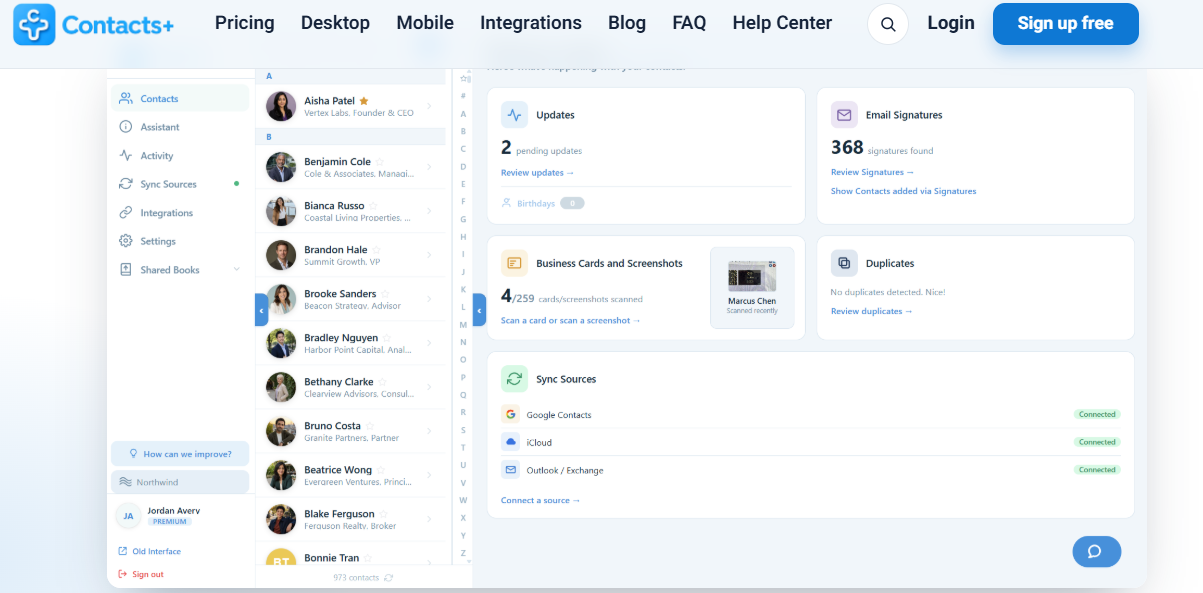
Contacts+ scans cards while merging duplicates and syncing across Google, iCloud, and Outlook
Overview
Contacts+ pairs a card scanner with a contact-management engine focused on merging duplicates and keeping an address book clean. It serves people whose real problem is a messy contact list, not just capture. Independent roundups include it as a solid, tested option.
Core Services
Business card scanning with OCR.
Duplicate detection and contact merging.
Contact syncing across accounts and devices.
Enrichment of existing records.
Key Features Against Our Criteria
OCR accuracy: Reliable on standard cards.
Contact sync: Syncs across contact managers; it cleans more than it writes to a CRM.
Batch speed: Moderate; built for tidy records, not booth queues.
Language support: Multi-language, though not the CJK leader.
Why Companies Consider Contacts+
The buyer here is drowning in duplicate contacts across Google, Outlook, and their phone. Contacts+ scans the new card and de-duplicates the old mess in one place. It is a hygiene tool first, and a scanner second.
Ideal Customer Profile
Individuals with fragmented contact lists across accounts.
Small teams wanting a shared, clean address book.
Users who value merge-and-dedupe over pipeline reporting.
Pricing
Freemium, with paid tiers for higher limits and team features. Confirm current pricing in-app.
✅ When to Shortlist
Your contact list is a duplicate-riddled mess.
You want scanning plus cleanup in one app.
❌ When Not to Shortlist
You need booth-grade capture and on-floor booking.
You need native CRM attribution for events.
Customer Reviews
No verified customer reviews were available in the provided source set for this provider.
1.5 Popl: Best for reps who want a digital card with light capture [toc=1.5 Popl]
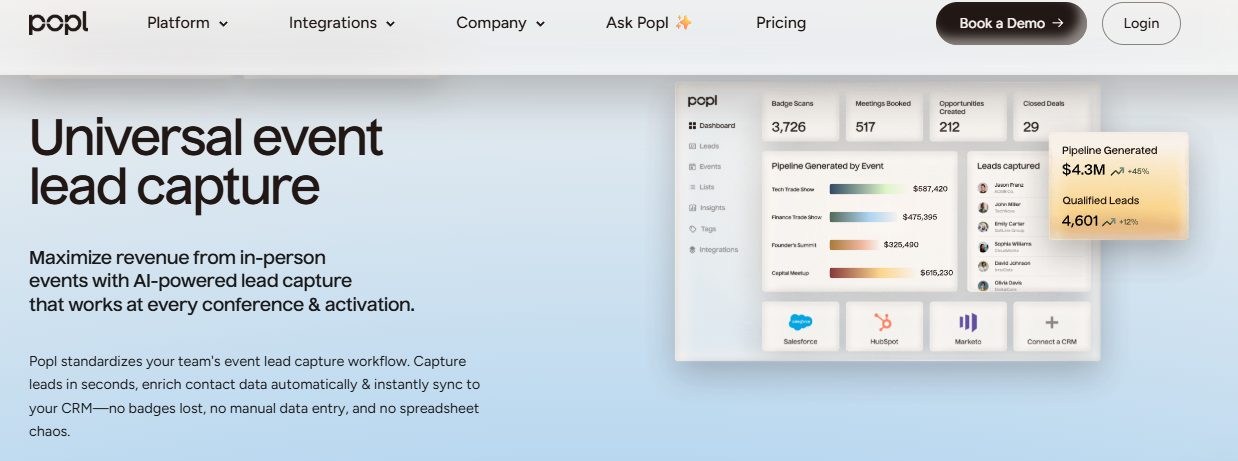
Popl's dashboard tracks badge scans, meetings booked, and pipeline generated by event
Overview
Popl started as a digital business card, a tap-or-QR way for a rep to share their own details, and added lead capture later. It serves individual reps and networkers more than pipeline-accountable booth teams. The core motion is rep-side sharing, with capture bolted on. For teams outgrowing that model, we cover the Popl alternatives in depth.
Core Services
Digital business card sharing by tap or QR.
Lead capture forms and badge scanning.
CRM integrations for pushing contacts.
Team card management.
Key Features Against Our Criteria
OCR accuracy: Card and badge scanning exists but draws reliability complaints in reviews.
Contact sync: CRM integrations, though the recipient often has to act to complete the exchange.
Batch speed: One-at-a-time, rep-led; not a batch tool.
Language support: English-first.
Why Companies Consider Popl
The pull is the physical or digital card that feels modern at a networking event. The recurring friction, visible in reviews, is that recipients get pushed to create an account and the exchange stalls. For a booth team measured on pipeline, that is the structural gap: Popl leads with the rep's card, not the prospect's booked meeting.
Ideal Customer Profile
Individual reps and networkers.
Small teams wanting digital cards over pipeline reporting.
Users at frequent one-to-one networking events.
Pricing
Trial and paid plans; users report annual pricing around $140, with no full free tier. Confirm current pricing.
✅ When to Shortlist
Your reps want a slick digital card to share.
Capture is a nice-to-have, not the KPI.
❌ When Not to Shortlist
You need reliable badge scanning that "just works" at a busy booth.
You are measured on booked meetings and per-show pipeline, not contacts shared.
Customer Reviews
"I didn't really use Popl because it didn't scan bar codes like I thought it would. Scanning badges should have given the name and contact info, but it didn't work when I tried it." Drew D. Popl G2 Verified Review
"The only reason we use it is for the lead capture form. I HATE the notification spam. I get push, email, AND a text when I scan a Popl card." Verified User in Real Estate Popl G2 Verified Review
1.6 HiHello: Best for digital business card sharing [toc=1.6 HiHello]
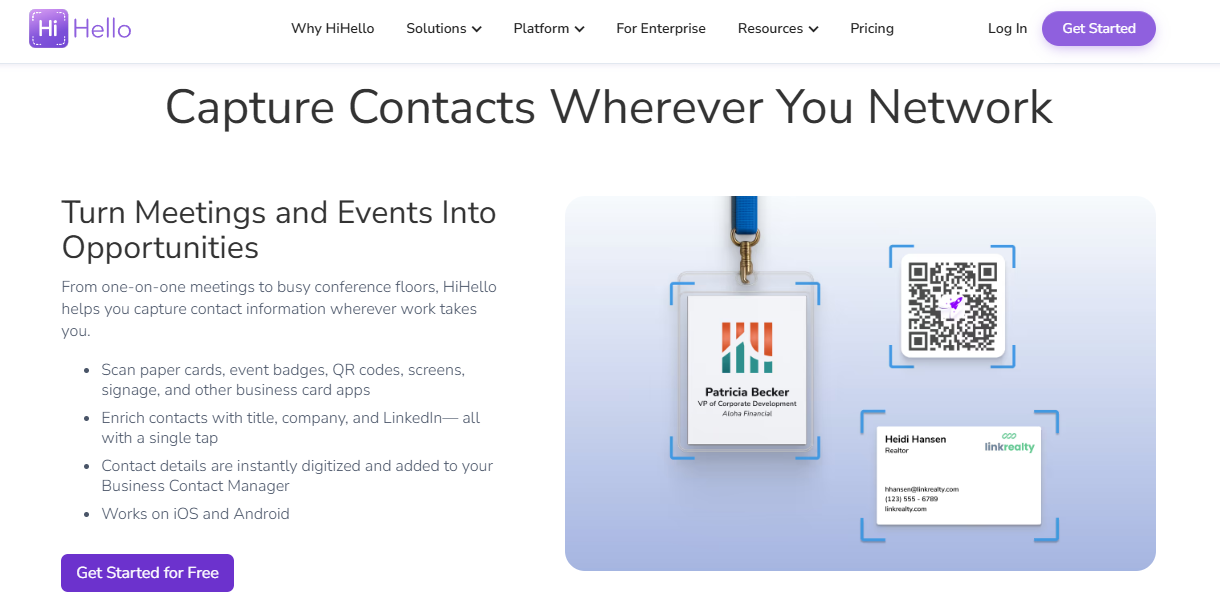
HiHello captures contacts from paper cards, event badges, and QR codes anywhere
Overview
HiHello is a digital business card platform centered on QR-based sharing and email-signature branding. It is a networking-identity tool, not an event capture engine. Reviews make clear its scanning and CRM depth are limited.
Core Services
Digital business card creation and sharing.
QR code exchange.
Email signature and profile branding.
Basic contact saving.
Key Features Against Our Criteria
OCR accuracy: Card OCR is not its strength; the flow is QR-first.
Contact sync: Users report it does not sync to the CRM.
Batch speed: Not built for batch capture.
Language support: English-first.
Why Companies Consider HiHello
The appeal is a clean, free way to share a professional identity without paper. The decision logic is personal branding, not pipeline. It is the wrong tool if the job is turning booth traffic into attributed meetings.
Ideal Customer Profile
Individual professionals wanting a polished digital card.
People who share contacts more than they capture leads.
Users who do not need CRM sync.
Pricing
Free tier with paid upgrades for teams and advanced features. Confirm current pricing.
"We tried to use the QR scanner and it would only take us to the download option for HiHello. My digital business card would not load. Android users could not even get the QR function to recognize it." Angela C. HiHello G2 Verified Review
1.7 Blinq: Best for digital card exchange and team scaling [toc=1.7 Blinq]
Overview
Blinq is a digital business card platform with relationship-intelligence features and the largest social-proof wall in this category, ranked #1 on G2 with 8,800+ reviews. It serves teams that want branded digital cards at scale. Capture is QR-and-form based, not booth-grade badge scanning. We break down the head-to-head in our HiHello vs Blinq comparison.
Core Services
Digital business card sharing by QR and link.
Team card management and admin backend.
CRM integrations.
Contact capture forms.
Key Features Against Our Criteria
OCR accuracy: Not a card-OCR tool; exchange is QR-dependent.
Contact sync: CRM integrations exist; reviews flag reliability and admin bugs.
Batch speed: Not a batch scanner; one exchange at a time.
Language support: English-first.
Why Companies Consider Blinq
The volume of reviews signals broad adoption and polished branding. That said, the recurring complaint is connectivity: QR exchange stalls when recipients must download an app or the venue Wi-Fi is weak. For a booth measured on pipeline, that is the structural gap between a shared card and a booked meeting.
Ideal Customer Profile
Teams wanting branded digital cards at scale.
Sales and networking roles in strong-connectivity settings.
Users prioritizing card design over event attribution.
Pricing
Freemium, with paid team tiers. Confirm current pricing.
✅ When to Shortlist
You want a polished, widely adopted digital card.
Your networking happens where Wi-Fi is reliable.
❌ When Not to Shortlist
You need offline-reliable capture on a hostile expo floor.
You need scans tied to per-show pipeline.
Customer Reviews
"It doesn't always work reliably when scanning the barcode, especially in places with poor internet connectivity. This has made it necessary for me to consider purchasing printed business cards as a backup." Kasha A. Blinq G2 Verified Review
"When you do share your info, it saves the person's business card as contact info in their phone. This makes it tough to find again after a big tradeshow, all the follow ups are just in your sea of contacts." Madison Z. Blinq G2 Verified Review
1.8 Zoho Card Scanner: Best for Zoho CRM users [toc=1.8 Zoho Card Scanner]
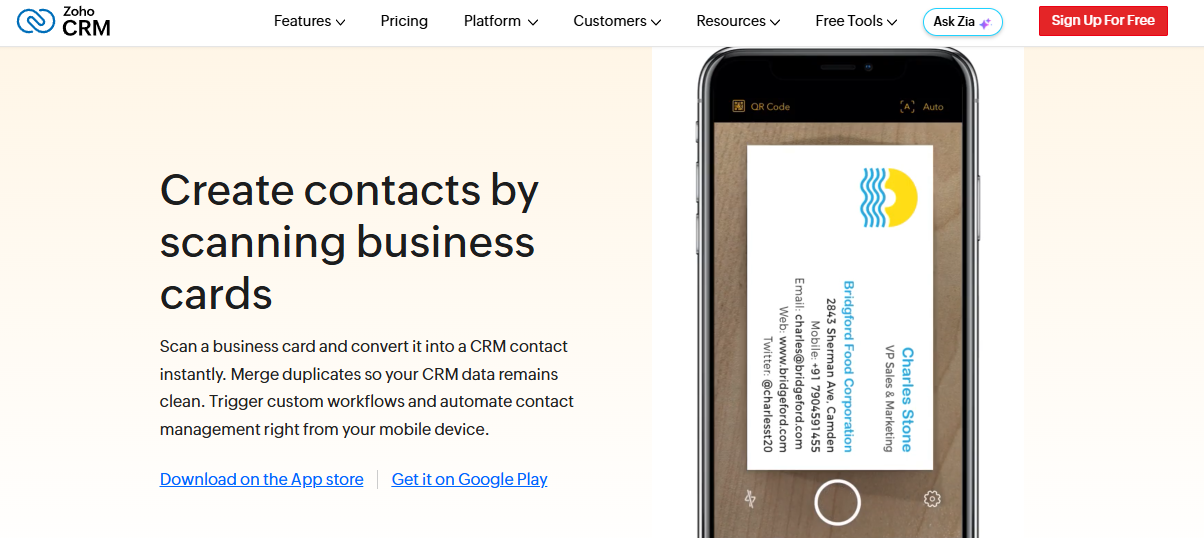
Zoho CRM turns a scanned business card into a native CRM contact instantly
Overview
Zoho Card Scanner is the built-in scanner for teams already running Zoho CRM. It serves the "if you live in a CRM, use its native scanner" buyer. The logic is zero extra tooling and clean native sync.
Core Services
Business card scanning inside the Zoho ecosystem.
Native lead and contact creation in Zoho CRM.
Multi-language OCR.
Mobile capture on iOS and Android.
Key Features Against Our Criteria
OCR accuracy: Good on standard cards.
Contact sync: Native to Zoho CRM, which is the whole point.
Batch speed: Moderate; built for steady capture, not booth rush hour.
Language support: Multi-language.
Why Companies Consider Zoho Card Scanner
If your stack is Zoho, the scanner is free and the record lands natively with no import step. The trade-off is that it stops at contact creation. It does not book meetings on the floor or produce per-show pipeline reporting, which is where a dedicated trade show app pulls ahead.
Ideal Customer Profile
Teams already standardized on Zoho CRM.
SMBs wanting no extra scanning tool.
Users who value native sync over event features.
Pricing
Included with Zoho CRM plans. Confirm current tiers.
✅ When to Shortlist
You already run Zoho CRM.
You want native capture with no new subscription.
❌ When Not to Shortlist
You need on-floor meeting booking and LTM reporting.
You do not use Zoho.
Customer Reviews
No verified customer reviews were available in the provided source set for this provider.
1.9 HubSpot Business Card Scanner: Best for HubSpot users [toc=1.9 HubSpot Card Scanner]
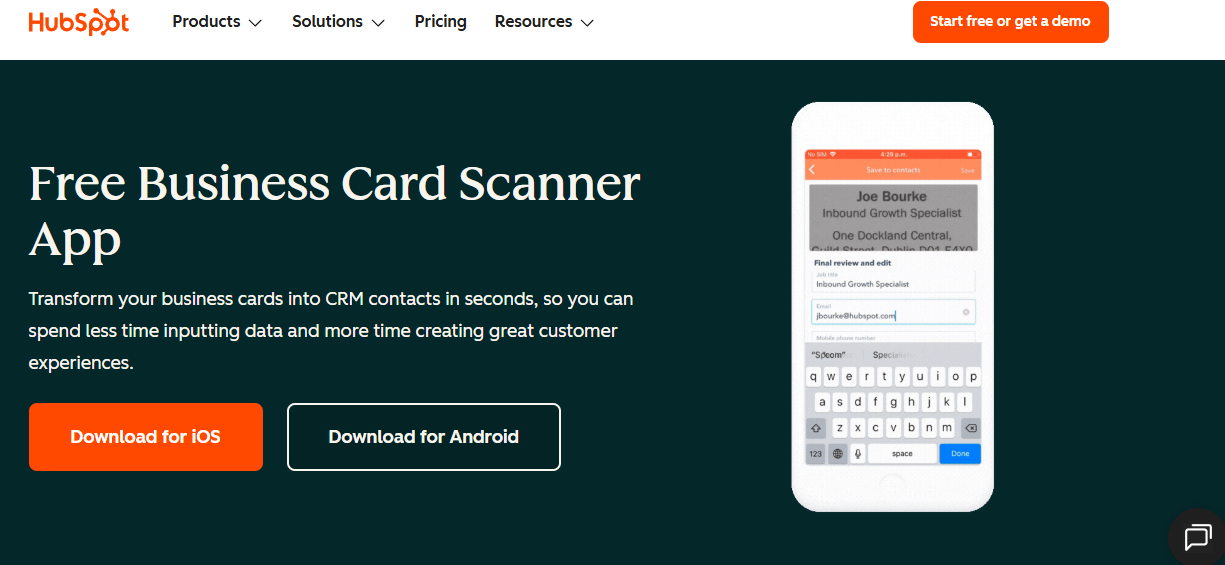
HubSpot's free scanner writes business cards into HubSpot CRM contacts in seconds
Overview
HubSpot's Business Card Scanner is the native scanner inside the HubSpot mobile app. It serves HubSpot shops that want scans to become contacts without leaving the CRM. It syncs only to HubSpot, so non-HubSpot users need an extra step.
Core Services
Card scanning inside the HubSpot mobile app.
Native contact creation in HubSpot CRM.
Mobile capture on iOS and Android.
Basic field mapping.
Key Features Against Our Criteria
OCR accuracy: Good on standard cards.
Contact sync: Native to HubSpot only; reaching Salesforce needs a workaround.
Batch speed: Moderate; not a booth-rush tool.
Language support: English-first.
Why Companies Consider HubSpot's Scanner
If you already pay for HubSpot, the scanner is free and the contact lands natively. The decision is convenience and zero added cost. The ceiling is the same as other CRM-native scanners: it ends at the contact, not the booked meeting or the pipeline report. Bridging that gap is exactly what our Salesforce and HubSpot lead capture guide covers.
Ideal Customer Profile
Teams standardized on HubSpot CRM.
SMBs wanting free native capture.
Users who do not need cross-CRM sync.
Pricing
Included with HubSpot plans. Confirm current tiers.
✅ When to Shortlist
You run HubSpot and want native capture at no extra cost.
Occasional scanning, not high-volume events.
❌ When Not to Shortlist
You need Salesforce sync without a workaround.
You need on-floor booking and per-show attribution.
Customer Reviews
No verified customer reviews were available in the provided source set for this provider.
1.10 iCapture: Best for enterprise booth badge capture [toc=1.10 iCapture]
Overview
iCapture is an enterprise lead-retrieval platform built for reliable badge capture across many shows. It serves large exhibitors who run 10-plus events a year and want consistent onsite capture and metrics. The lane is enterprise reliability, without an AI-forward narrative. We compare its capture model in our Popl vs iCapture breakdown.
Core Services
Universal badge and business card capture.
Custom lead forms and qualification fields.
Onsite metrics and staff performance tracking.
Integrations to downstream systems.
Key Features Against Our Criteria
OCR accuracy: Strong on badges; business-card OCR can be inaccurate, per reviews.
Contact sync: Syncs to systems, though one reviewer notes it "does not natively integrate with our CRM."
Batch speed: Reliable capture at scale, a core strength.
Language support: English-first.
Why Companies Consider iCapture
Big exhibitors pick iCapture for dependable capture and event ROI metrics across a heavy show calendar. The decision logic is reliability and reporting at enterprise scale. The structural gap is that it captures and measures, but it does not book the meeting on the floor or ground pre-event briefings in your CRM pipeline.
Ideal Customer Profile
Enterprise exhibitors, 10-plus shows a year.
Large booth teams needing staff metrics.
RevOps wanting consistent capture and ROI numbers.
Pricing
Custom enterprise quote; commonly referenced around $8K per year, though list pricing is not publicly posted. Confirm directly.
✅ When to Shortlist
You run many shows and need reliable, uniform capture.
You want onsite staffing and ROI metrics.
❌ When Not to Shortlist
You want in-the-moment meeting booking on the floor.
You need CRM-grounded pre-event briefings and LTM reporting.
Customer Reviews
"We recently used iCapture at an event and it was seamless. It made capturing leads and pushing them into our systems incredibly simple." Natalie S. iCapture G2 Verified Review
"Business card transactions can be inaccurate at times, which has caused incorrect email addresses or phone numbers in a few cases." Verified User in Transportation/Trucking/Railroad iCapture G2 Verified Review
How We Evaluated These Providers [toc=1.11 How We Evaluated]
Primary sources: Provider documentation, the B2Brain Competitor Reviews file (G2), independent 2026 tested roundups, and app-store review data for consumer apps.
Criteria selected: OCR accuracy, contact sync model, batch speed, and language support, because the article title promises those four dimensions.
Criteria de-prioritized: Aesthetic and social features, which do not affect whether a scan becomes usable pipeline.
Data gaps: No verified reviews were available for CamCard, Contacts+, Zoho, or HubSpot's scanner in the source set, so those entries rely on documentation.
B2Brain's honest gaps: iOS-first native app, lighter third-party enrichment than Popl or Mobly, and no digital business card.
Which Provider Should You Shortlist? [toc=1.12 Which to Shortlist]
A personal stack in many languages: Covve for accuracy, and CamCard for CJK batch volume.
You live in a CRM: Zoho or HubSpot's native scanner, or Contacts+ if de-duplication is the pain.
Reps who mainly want a digital card: Popl, HiHello, or Blinq, with connectivity caveats.
A field marketer who must prove per-show pipeline: B2Brain, because it ties scans to LTM and attribution. You can Book a Demo to see the reporting.
A VP Sales whose reps get paid on meetings booked: B2Brain for on-floor booking for booth teams, since no rival measures scan-to-meeting.
An enterprise team running 10-plus shows: iCapture for reliable capture, or B2Brain if the boss keeps asking "where is the pipeline?"
Q2: How Should You Score a Card Scanner App: OCR Accuracy, Contact Sync, and Language Support? [toc=2. How to Score an App]
OCR accuracy is only half the job. Detecting text is easy; the hard part is parsing, which means mapping the right string to name, title, company, email, and phone without scrambling them, especially on non-English or design-heavy cards. Score every app on four things: OCR accuracy, contact sync model (native real-time versus CSV import), batch speed, and language support per script.
⚠️ The Clean-Up Tax Nobody Prices In
A bad scan does not save time. It moves the work downstream. The rep scans a card, the app mangles the job title, and now RevOps (the team that owns CRM data) fixes it by hand later.
Multiply that by 300 cards from one show. That is hours of cleanup, and half the records still arrive wrong. The cost of a cheap scanner is paid in dirty data, not in the sticker price. This is exactly the failure mode our conference badge scanner breakdown digs into.
🔍 OCR Versus Parsing (The Distinction That Decides Accuracy)
OCR, short for optical character recognition, turns a photo of a card into raw text. Parsing is the smarter step: deciding which text is the name, which is the title, and which is the email. As one founder in this space puts it, detecting text is the easy part; the hard part is parsing.
This is where apps split. On a clean, English, single-column card, most tools read fine. On a busy layout, a two-line title, or a CJK name (Chinese, Japanese, or Korean script), weak parsers scramble the fields. Some seasoned operators skip OCR risk entirely, photographing the front and back and having an assistant transcribe it right after the conversation. It depends on your volume and your tolerance for errors.
💰 Sync Model: Actionable Record or Dead CSV Row
The sync question is really one question: does the contact become a live CRM record, or a CSV file (a spreadsheet export) nobody opens? Native, real-time sync writes straight into Salesforce or HubSpot. A CSV export is where deals quietly leak, because someone has to remember to import it. If native sync matters to you, our Salesforce lead capture guide covers what "native" should actually mean.
Here is the four-part rubric to apply to every app below.
OCR accuracy: Clean reads on busy and non-English cards, not just easy ones.
Contact sync: Native real-time write to your CRM, not a manual CSV import.
Batch speed: How fast you clear a stack or a booth queue.
Language support: Per-script accuracy, with CJK as the real test.
A quick note on why this rubric matters for event teams specifically. Tools built for the trade-show floor made their capture voice-first and context-first precisely because OCR alone loses the reason you talked to someone. That is the gap the rubric is designed to expose.
Q3: Which Card Scanner Apps Are Best for OCR Accuracy, CRM Sync, and Meeting Booking? [toc=3. The 10 Apps Reviewed]
For raw accuracy, Covve, CamCard, and Contacts+ lead, with Covve strongest on non-English names and CamCard on CJK batch scanning. If you live in a CRM, HubSpot's and Zoho's native scanners win. And where the cards come from a booth, event-grade tools like B2Brain and iCapture score each lead and, in B2Brain's case, book the meeting on the floor.
This section groups the ten apps by the job they do best, then scores each against the Q2 rubric. The deep per-app reviews, pricing, and verified quotes appear in the roster above (items 1.1 to 1.10). Here I focus on the one thing that sorts them: what happens to the scan afterward.
🔍 Tier A: Pure OCR Accuracy (Covve, CamCard, Contacts+)
This tier wins on reading the card cleanly. Covve is the recurring accuracy leader, especially for non-English names and odd layouts, backed by a 4.7-star app-store rating across roughly 19,600 reviews. CamCard owns CJK batch scanning, and Contacts+ pairs scanning with duplicate cleanup.
The trade-off is scope. These are personal-contact tools. They read a card well, but they stop at your address book, not a CRM pipeline or a booked meeting.
💰 Tier B: CRM-Native Scanners (HubSpot, Zoho)
If you already live in a CRM, its built-in scanner is often the right pick. HubSpot's scanner writes natively to HubSpot, and Zoho's writes to Zoho, with no import step. They are free with your existing plan, which is hard to beat on cost.
The ceiling is the same for both. They create a contact, then stop. There is no on-floor meeting booking and no per-show pipeline report, which is where a purpose-built trade show app separates from a CRM add-on.
⚡ Tier C: Event Capture That Scores and Books (B2Brain, iCapture, Popl, HiHello, Blinq)
This tier is built for booth traffic, not a desk. iCapture handles reliable badge capture at enterprise scale. Popl, HiHello, and Blinq lead with the rep's digital card, adding capture as a secondary motion, and reviews flag connectivity and account-friction issues.
Here is where I put on the founder hat. The miss I see with field marketers is treating capture as the finish line. We built B2Brain so the rep scores each lead hot, warm, or cold at the booth, then books the discovery meeting on the AE's live calendar before the prospect walks away. Meetings booked, not cards collected, is the rep's real KPI. As I like to say, the money in a trade show is made in the follow-up, and the fastest follow-up is one booked while the prospect is still standing there. That is the heart of how we generate new pipeline from events.
⏰ The One Metric This Tier Is Judged On
Every tool here can capture a contact. Only one tracks whether that contact became a booked meeting. B2Brain calls it Leads-to-Meeting, or LTM: about 52% on the floor versus an 8% industry average for post-event follow-up. No other app on this list measures it, which is exactly why "score and book" beats "scan and store." You can see the full event lead capture software benchmark behind that number.
"The AI Conversation Summarization and Auto-CRM Entry feature is a standout, significantly better than other tools we've tried. Reps actually rave about it." Ole O. B2Brain G2 Verified Review
"It doesn't always work reliably when scanning the barcode, especially in places with poor internet connectivity." Kasha A. Blinq G2 Verified Review
"Business card transactions can be inaccurate at times, which has caused incorrect email addresses or phone numbers in a few cases." Verified User, Transportation/Trucking/Railroad iCapture G2 Verified Review
Q4: Which Apps Hold Up for Batch Scanning at Speed and Across a Whole Booth Team? [toc=4. Batch Speed and Team Scale]
Accuracy means nothing at 2 p.m. on day two with ten people waiting at your booth. The apps that survive rush hour are offline-first, capture in under five seconds, and queue scans to parse in the background. At team scale, you also need a shared lead pool, per-rep attribution, and de-duplication so two reps scanning the same person do not create two records.
⏰ The Rush-Hour Failure Mode
Here is the moment that breaks most apps. The booth is slammed, the Wi-Fi is choking, and a slow scan spins for eight seconds. So the rep gives up and just takes a photo of the badge, promising to add notes later.
They never do. As one operator's blunt rule goes, scan and note them before you go out drinking, because your brain loses the context by morning. Speed is not a nice-to-have; it is the difference between a captured lead and a blurry photo you cannot use. This is why offline reliability sits at the center of the three-motion workflow.
🔍 What to Actually Test
Do not trust the demo. Test the app under conditions that mimic a real floor.
Scan-to-note latency: Time from tap to a saved, structured record. Under five seconds is the bar.
Offline queue: Turn off Wi-Fi mid-scan. Does it capture and sync later, or fail?
Background batch parse: Can reps keep scanning while the app processes the backlog?
Cross-rep dedup: Do two reps scanning one prospect create one clean record or two messy ones?
Field notes from operators make the same point: offline reliability on a convention floor is a design requirement, not an edge case.
⚡ Team Scale and the Fast-Stack How-To
At team scale, the shared lead pool matters as much as speed. You want every rep's scan flowing into one pool, tagged by rep for attribution, and de-duplicated automatically. This is where B2Brain's design leans in: voice-first capture producing a structured record in about 4.2 seconds, offline-ready, with a "Recent Leads" view so reps can scan now and add context in a lull. Across booths, that throughput lands near 31 productive scans per rep per day, the kind of pace that matters most for booth teams.
Here is the fast way to clear a stack or a queue.
Turn on offline mode before the floor opens.
Scan or voice-capture in rapid succession; do not stop to type.
Let the app parse in the background while you keep moving.
In the next lull, review flagged low-confidence fields.
Bulk-sync to the CRM, then check for cross-rep duplicates.
"Sometimes Mobly can be finicky, where it doesn't sync all the leads I've scanned, without those leads that I scanned but apparently didn't go through, we end up with a lot fewer than we expected." Verified User, Events Services Mobly G2 Verified Review
"I think the contacts made a few duplicates." Verified User, Consumer Goods Mobly G2 Verified Review
Q5: Do You Even Need a Card Scanner App, or Is Your Phone (or the Badge Scanner) Enough? [toc=5. Do You Need One?]
Sometimes you don't need a paid app. Google Lens and Apple Live Text scan a standard English card for free, and digital business cards skip scanning entirely. But if the cards come from a trade-show booth, a generic scanner, or the organizer's rented badge scanner, still leaves you with a contact list nobody acts on. You need capture that attaches context and books the follow-up.
✅ The Free Tools That Are Often Enough
For a personal stack, the phone in your pocket may be all you need. Apple Live Text reads a card straight from the camera. Google Lens does the same on Android, pulling the phone number or email into a tap-to-save action.
Digital business cards go further by skipping the scan entirely. Two people tap or scan a QR code, and the contact transfers. If your need is light and English-only, paying for an app can be overkill. For the wider set of no-cost options, see our roundup of the free lead capture app choices.
⚠️ The Deprecated-App Trap
Here is a trust check most listicles skip. Some popular scanners are effectively dead. ABBYY Business Card Reader ended its cloud sync on September 18, 2023, and BizConnect has been abandoned by its maker.
An app that no longer syncs is worse than no app. Your scans sit trapped on one phone, and the "backup" you assumed existed does not. Before you trust any scanner with a show's worth of leads, confirm it is still actively maintained in 2026.
❌ Why the Booth Case Is Different
Now the honest part for booth teams. The organizer's rented badge scanner captures a contact, then stops at a CSV export. As one field-marketing operator puts it bluntly, do not trust the badge scan, because it collects leads for the organizer and does little for you. The problem was never capture. The problem is follow-up, which is exactly what a conference badge scanner leaves unsolved.
This is the gap B2Brain is built to close. Anything a badge scanner captures, B2Brain captures with context, then books the meeting on the AE's calendar and writes the CRM record before the prospect walks away. The badge scanner is the incumbent you are replacing, not a peer tool. If the cards come from a booth, the question is not "did we scan them," but "did we book them." That shift is the core of the before, during, and after the show workflow.
Q6: Why Do So Many Scanned Leads Never Turn Into Pipeline? [toc=6. Why Scanned Leads Die]
Because capture was never the bottleneck. Follow-up is. Roughly 87% of trade-show leads never get proper follow-up, up to 80% never reach the CRM, and the average response time is around 42 hours. A booth conversation that converts at about 85% within two hours decays to about 9% after a week. A perfect scan sitting in a shoebox is worth nothing.
📉 The Decay Curve Nobody Prices In
Those numbers are the whole ballgame, so sit with them. If 80% of scans never reach the CRM, then four of every five leads you paid a booth to generate simply vanish. And the ones that survive are decaying by the hour.
The window is brutal. Reach a fresh booth lead within two hours, and you convert near 85%; wait a week, and you are down near 9%. I have watched a rep type cards into Salesforce in the cab back to the hotel, half the context already gone by the time they got the app open. Getting scans into Salesforce cleanly and instantly is the first fix.
🔍 The Attribution Gap
The second failure is quieter. Even leads that reach the CRM often carry no event tag, so nobody can prove which show sourced which deal. When the CEO asks "where is the pipeline from that $70K booth," the honest answer is a shrug.
That shrug is why event budgets get cut. Without campaign-level tracking, meaning every lead stamped to the show that created it, a booth looks like a cost, not an engine. B2B cycles are long, so a lead scanned this quarter may close many months out, which makes attribution the only way to defend the spend later. Our event ROI calculator shows how that math holds up over a full season.
💰 What This Means Monday Morning
The fix is two moves, not a new gadget. Act inside the decay window, and force event attribution on every lead. This is the job B2Brain is designed for, and it is where I match our differentiator to the problem.
Manage decay with a number: B2Brain tracks Leads-to-Meeting, or LTM, the share of scans that become booked meetings, at about 52% on the floor versus an 8% industry average post-event.
Prove the pipeline: The morning-after report shows pipeline sourced, meetings booked, and attribution by show, rep, or segment, so the Field Marketer answers the CEO with a figure.
One shared layer: Before, during, and after run on the same intelligence layer, with pre-event briefings grounded in your own CRM pipeline.
No competing scanner tracks LTM at all. That is the moat: not a faster scan, but proof the scan became pipeline generated from events.
Q7: What Does a Card Scanner App Cost, and How Do You Pick the Right One? [toc=7. Cost and How to Choose]
Consumer scanners run from free (with limits) to about $120 a year, and the good OCR is usually paywalled. For event teams the math is different: an organizer badge-scanner rental runs roughly $600 per device per show, so a 5-rep team across 15 shows can burn $30K to $40K a year on contextless lists. Score cost per booked meeting, then pick by where the cards come from.
💸 The Real Cost Picture
Consumer pricing is where subscription fatigue lives. Covve users routinely complain that basic scanning sits behind a roughly $119-a-year paywall, a pattern visible across its store reviews. For personal use, that friction is the main cost.
For booth teams, the sticker price is a rounding error next to the leak. If a booth costs $70K and 80% of leads never reach the CRM, the waste dwarfs any app fee. The right metric is not price per seat; it is cost per booked meeting. You can compare that against B2Brain's Show Pass and Pipeline plans directly.
Card Scanner Cost by Use Case
Use Case
Typical Cost Shape
What You Are Really Paying For
Personal stack
Free to ~$120/year
Clean OCR, ad-free scanning
CRM-native scanner
Included in CRM plan
Native sync, no extra tool
Organizer badge rental
~$600/device/show
A contact list that ends at the CSV
Event-capture platform
Per-event or annual plan
Booked meetings and attributed pipeline
⏰ The How-to-Pick Decision Tree
Match the tool to where the cards come from. That single question sorts almost everyone.
Personal cards, English, and low volume: Use Apple Live Text, Google Lens, or a free tier. Do not pay.
You live in a CRM: Use HubSpot's or Zoho's native scanner, or Contacts+ if de-duplication is the pain.
A booth team measured on pipeline: Score cost per booked meeting, not per scan. This is B2Brain's lane, where a qualified event meeting costs roughly 60% of an outbound meeting and about 40% of paid acquisition.
✅ Do This Monday
Three moves, whatever tool you choose.
Force event attribution: tag every lead to the show that sourced it.
Act inside the decay window: follow up within hours, not days.
Score at capture: mark each lead hot, warm, or cold on the floor, not later.
"The cost is very high considering it's mostly a digital business card sharing app, the cost is too high." Brooke N. Popl G2 Verified Review
"Every time we have a show with lead scanning, I have to purchase an API kit that costs between 700-1200. It's become costly." RebeccaGrace K. Captello G2 Verified Review
Here is the question I am sitting with as more of these apps bolt on AI. When every scanner can read a card perfectly, the only number that will separate them is how many of those cards became meetings. So which would you rather report to your CFO next quarter: how many badges you scanned, or how much pipeline you booked before the prospect left the booth? If you want to talk it through, Book a Demo and bring your real numbers.
FAQ's
What is the best card scanner app in 2026?
There is no single winner, because the best card scanner app depends on where your cards come from and what has to happen after the scan. We score every option on four things that decide whether a contact becomes useful: OCR accuracy, contact sync model, batch scan speed, and language support.
Personal stack: Covve reads hard, non-English cards most cleanly across 60+ languages, and CamCard handles CJK batch scanning.
You live in a CRM: HubSpot's or Zoho's native scanner writes contacts with no import step.
Cards from a booth: event-grade tools capture with context and, in our case, book the meeting on the floor.
For a personal, English-only stack, free tools like Apple Live Text may be enough. For a booth team measured on pipeline, a scan that ends at a contact list is a dead end. That is why we built B2Brain to attach context and book the follow-up, and why our guide to lead capture for trade shows reframes the choice around outcomes, not just reads.
Which card scanner app is most accurate for non-English and multilingual cards?
For raw accuracy on hard cards, Covve is the recurring leader, especially for non-English names and non-standard layouts, backed by a 4.7-star app-store rating across roughly 19,600 reviews. CamCard is the other strong pick, owning CJK (Chinese, Japanese, and Korean) batch scanning where many apps scramble the fields.
The distinction that decides accuracy is not OCR but parsing. OCR turns a photo into raw text, which most tools do well on a clean English card. Parsing is the harder step of mapping the right string to name, title, company, and email, and weak parsers break on busy or mixed-script layouts.
Covve: widest language range, best single-card accuracy.
CamCard: strongest CJK and genuine batch mode.
Contacts+: solid reads plus duplicate cleanup.
These are personal-contact tools, so they stop at your address book rather than a CRM pipeline. If the cards come from a booth and need context and follow-up, that is a different job, one we cover in our breakdown of the conference badge scanner gap.
Do I even need a paid card scanner app, or is my phone enough?
Sometimes your phone is genuinely enough. Apple Live Text and Google Lens read a standard English card for free, and digital business cards skip scanning entirely with a tap or QR exchange. If your need is light and English-only, paying for an app can be overkill.
Two cautions matter, though.
The deprecated-app trap: some popular scanners are effectively dead, so an app that no longer syncs traps your scans on one phone. Confirm any tool is actively maintained in 2026 before you trust a show's worth of leads to it.
The booth case is different: the organizer's rented badge scanner captures a contact, then stops at a CSV export, which does little for you.
For a booth team, the problem was never capture; it is follow-up. Anything a badge scanner records, we capture with context, then book the meeting and write the CRM record before the prospect walks away. If you want to weigh the no-cost options first, see our roundup of the free lead capture app choices.
Why do so many scanned leads never turn into pipeline?
Because capture was never the bottleneck. Follow-up is. Roughly 87% of trade-show leads never get proper follow-up, up to 80% never reach the CRM, and the average response time is around 42 hours.
The decay curve is brutal. A booth conversation that converts at about 85% within two hours falls to about 9% after a week, so a perfect scan sitting in a shoebox is worth nothing. The second, quieter failure is attribution: even leads that reach the CRM often carry no event tag, so nobody can prove which show sourced which deal.
Act inside the decay window, following up in hours rather than days.
Force event attribution, stamping every lead to the show that created it.
Score each lead hot, warm, or cold at capture, not later.
We track Leads-to-Meeting, or LTM, the share of scans that become booked meetings, at about 52% on the floor versus an 8% industry average. No competing scanner measures it, which is why we frame the work as generating new pipeline from events rather than collecting contacts.
How much does a card scanner app cost, and how do I choose the right one?
Consumer scanners run from free (with limits) to about $120 a year, and the good OCR is usually paywalled; Covve users, for example, report a roughly $119-a-year gate on basic scanning. For event teams the math is different. An organizer badge-scanner rental runs roughly $600 per device per show, so a 5-rep team across 15 shows can burn $30K to $40K a year on contextless lists.
The right metric for a booth team is not price per seat; it is cost per booked meeting. Match the tool to where the cards come from.
Personal, English, low volume: use Apple Live Text, Google Lens, or a free tier, and do not pay.
You live in a CRM: use HubSpot's or Zoho's native scanner, or Contacts+ for de-duplication.
A booth team measured on pipeline: score cost per booked meeting, where a qualified event meeting costs roughly 60% of an outbound meeting.

.png)
.png)

.png)
.png)





