7 Free Lead Capture Apps for Events: What's Really Free
Written by
Sridhar Ranganathan
Last Updated :
June 29, 2026
Skim in:
12
mins
TL;DR
-A free lead capture app is enough for one or two shows, a solo booth, and clean digital contacts, but rarely beyond that. -Most free apps are freemium: capture is free, while CRM sync, exports, lead caps, and attribution sit behind paid plans. -The organizer badge scanner is the data-hostage model; it captures leads for them, ends at the export, and loses the conversation. -Speed decides pipeline: conversion sits near 85% within two hours and falls to roughly 9% after a week, so late CSVs kill deals. -Scan count is a vanity metric; Leads-to-Meeting (LTM) is what leadership funds, near 8% post-event versus about 52% booked on the floor. -We position B2Brain as the offline-to-pipeline layer: capture with context, book the meeting at the booth, and prove per-show pipeline.
7 Free Lead Capture Apps for Events: What's Really Free [toc=1. Best Free Apps 2026]
The best free lead capture apps for events in 2026 are B2Brain (First Event Free), Blinq, EventMobi Lead Capture, fpLeads, Wave Connect, Cvent LeadCapture, and Simple Lead Capture. Most are free to scan but gate the parts that turn a scan into pipeline: CRM sync, lead volume, multi-user access, or export. "Free" usually means free capture, not free follow-up.
I have watched a rep type business cards into Salesforce in the cab back to the hotel, half the context already gone. That ride is where most "free" lead capture dies. The app was free. The lost deal was not.
💸 Why "free" is the wrong first question
So before I rank anything, let me reframe the search. The real question is not "what costs nothing." It is "what gets a qualified prospect into your CRM, with context, before they forget your booth existed."
One field marketer put the trap bluntly. The badge scanner "collects leads for them, it does nothing for you," and roughly one in twenty businesses ever act on that list, usually months later. A free tool that produces a list nobody works is the most expensive thing on the show floor.
⏰ The decay clock most free apps ignore
Here is the number that should drive your choice. Conversion probability on a fresh booth lead sits near 85% within two hours and falls to roughly 9% after a week, per the lead-decay research B2Brain tracks. Speed, not storage, is the variable.
So I rank these seven on whether the free tier respects that clock. Capture is table stakes. Sync, context, and the booked meeting are where the pipeline lives, which is the whole point of an offline to pipeline approach.
Our Evaluation Criteria
I picked these seven criteria because they decide whether a free app earns a real pipeline number, not because they flatter any one tool.
On-floor capture speed: how fast a scan becomes a usable record at 2pm on day two, when Wi-Fi is bad and the booth is three deep.
Offline reliability: whether the app keeps working when the convention-hall signal drops, then syncs on reconnect.
CRM sync model: native, real-time sync to Salesforce or HubSpot versus a manual CSV import you clean up later.
In-booth meeting booking: can a rep book the follow-up meeting before the prospect walks away, or does that wait for an SDR.
What the free tier actually includes: lead caps, user caps, export limits, and whether sync is gated behind a paid plan.
Context capture: notes, voice, or qualification fields, so you know why you talked to someone, not just who.
Pipeline attribution: whether the tool can tie scans to per-show pipeline a CMO or CFO will accept.
Who This Guide Is For
Field or event marketing heads who must answer "where is the pipeline?" after a $20K to $200K booth, not show a contact list.
VP Sales or CRO running booth-ROI math, where reps get paid on meetings booked, not badges scanned.
Founders taking a vertical B2B company to its first major US show on a tight first budget.
RevOps leads who own CRM hygiene and have been burned by a capture tool whose sync silently broke.
The 7 free lead capture apps at a glance
The 7 Free Lead Capture Apps at a Glance
Provider
Best For
Key Strength
Pricing Model
B2Brain
Field marketers proving per-show pipeline to the CMO
Books the meeting on the floor, then writes the CRM record with context
First Event Free, then per-event Show Pass or annual Pipeline plan
Blinq
Solo networkers wanting a free digital card and quick scans
Fast card sharing, huge review base, free card tier
Free digital card; scanning and team features on paid plans
EventMobi Lead Capture
Exhibitors at EventMobi-run shows
Booth-staff scanning tied to the event app
Free app; full access depends on the organizer's event plan
fpLeads
Individual reps wanting a no-cost badge scanner
Simple phone-based scanning
Free app listing
Wave Connect
Teams wanting a free badge scanner with export
Free badge scanning, CRM sync on paid tiers
Free tier; sync and team features paid
Cvent LeadCapture
Exhibitors at Cvent-run shows (displacement reference)
Organizer-ecosystem scanning
Per-device rental via the organizer, often a sunk show cost
Simple Lead Capture
Very small booths capturing basic contacts
Lightweight capture
Free with in-app purchases
A quick honesty note before the detail. I run B2Brain, so I will be explicit about where we fit and where we do not. We are not for solo booths, consumer-facing sellers, no-CRM teams, or one-off attendance. If that is you, one of the lighter free tools below is the smarter call.
1.1 B2Brain: Best for field marketers proving per-show pipeline to the CMO
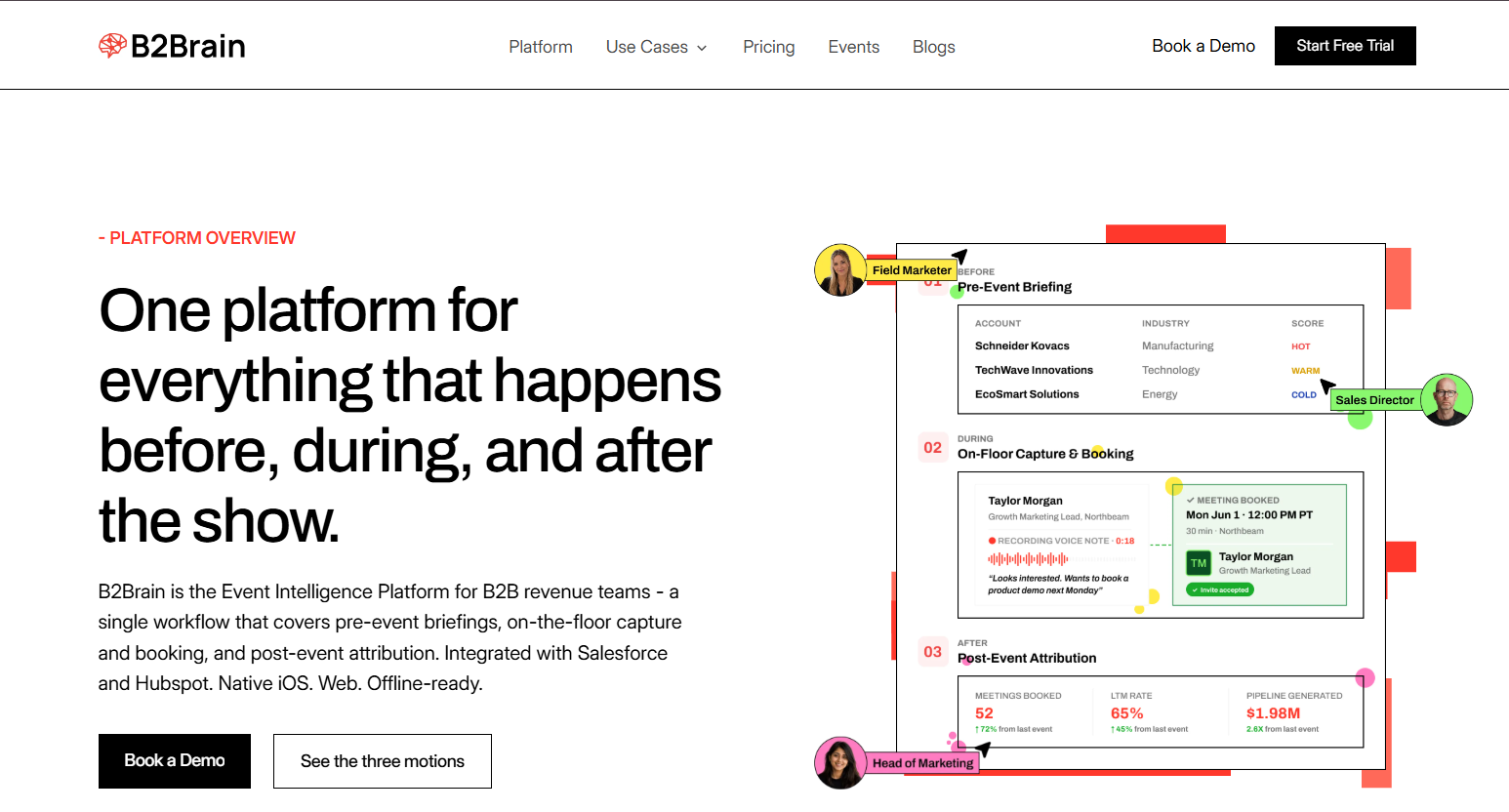
B2Brain workflow screen maps before, during, and after the show, pairing voice capture and booked meetings with LTM rate and per-show pipeline attribution beyond a free lead capture app.
Overview
B2Brain is an event lead capture app for booth teams whose pipeline comes from trade shows and industry events. We capture every booth conversation with context, book the follow-up meeting on the floor, and sync it to Salesforce or HubSpot with show attribution intact. The "First Event Free" tier lets a small team run one full event at no cost, sync included.
Core Services
Voice-first capture: tap a badge, talk about 30 seconds, get a structured CRM record out in roughly 4.2 seconds, about a fifth of the time of typed notes.
On-spot meeting booking: pull the AE's live calendar and book the 30-minute follow-up before the prospect leaves.
Pre-event briefings grounded in the customer's own CRM pipeline, not a cold prediction database.
Morning-after offline-to-pipeline report: pipeline sourced, meetings booked, LTM, and attribution by show, rep, and segment.
Native Salesforce and HubSpot sync, offline-ready for hostile expo-hall Wi-Fi.
Key Features against the criteria
Capture speed: fast, voice-first, with a "Recent Leads" mode for the rush-hour scan-now-note-later problem.
Offline reliability: works offline, syncs on reconnect.
CRM sync model: native real-time to Salesforce and HubSpot, not a CSV import.
In-booth meeting booking: yes, dual invite to prospect and the right AE.
Free tier: First Event Free covers one event, with CRM sync included.
Pipeline attribution: per-show pipeline reporting plus the Leads-to-Meeting (LTM) metric.
Why companies consider B2Brain
The decision usually starts after a bad season. The booth cost six figures, the boss asked for pipeline, and the team had a contact list. We answer that with a number: 52% LTM on the floor versus an 8% industry average post-event, where LTM is the share of qualified booth leads that become booked meetings. No badge scanner tracks that at all, which is why teams come to read about the three-motion workflow.
Ideal Customer Profile
Mid-market B2B, manufacturing, supply chain, energy, or construction, plus growth-stage vertical SaaS.
5 to 15 shows a year, $20K to $200K spend per show, ACV above $25K.
2 or more booth reps, Salesforce or HubSpot in the stack.
Buyer: Field or Event Marketing head as champion, with VP Sales and RevOps.
Pricing
First Event Free for one event. After that, a per-event Show Pass for seasonal teams, or an annual Pipeline plan with full attribution. Per-event pricing tends to land better with cash-sensitive teams than an annual-first contract, and you can see what B2Brain costs per event directly.
When to shortlist
You run multiple shows a year and must report per-show pipeline to leadership.
Your reps are measured on meetings booked, not leads scanned.
You use Salesforce or HubSpot and care about clean attribution.
When not to shortlist
You staff a solo booth or attend one-off events.
You sell consumer-facing or have no CRM.
You need a polished digital business card; we do not ship one, and our native app is iOS-only with lighter third-party enrichment than Popl or Mobly.
Customer reviews
I will be straight here. Our public G2 reviews are mostly for B2Brain's account-intelligence work, not the event app, so I am not going to dress them up as booth-floor proof. They do speak to the CRM-entry quality our event users rely on.
"The AI Conversation Summarization and Auto-CRM Entry feature is a standout... Reps actually rave about it instead of dreading another sales tool." Ole O. B2Brain G2 Verified Review
"Reporting is basic. We can see usage and lead stats, but there are no rep performance dashboards, no clear ROI reporting like time saved or deals influenced." Ole O. B2Brain G2 Verified Review
That second quote is fair, and it is exactly why the morning-after report and LTM dashboard exist. We are also honest that we hold 17 G2 reviews against Blinq's thousands. We compete on the LTM outcome, not the review wall, and you can Book a Demo to see the pipeline report yourself.
1.2 Blinq: Best for solo networkers wanting a free digital card and quick scans
Overview
Blinq is a digital business card and contact-sharing app with a genuinely free tier. It is the social-proof leader in this space, sitting at the top of G2 with thousands of reviews. For an individual handing out a card and grabbing a few contacts, the free version does the job.
Core Services
Free digital business card with social and contact links.
QR-code sharing and basic contact capture.
Card scanning and team management on paid plans.
Key Features against the criteria
Capture speed: fast for card sharing; badge scanning at scale sits on paid tiers.
Offline reliability: reviewers report QR and load failures in poor connectivity.
CRM sync model: not a native real-time booth-to-CRM model for the free tier.
In-booth meeting booking: not a core function.
Free tier: the digital card is the strong free offering.
Pipeline attribution: not designed for per-show pipeline reporting.
Why companies consider Blinq
For a founder who just wants to stop carrying paper and capture the occasional contact for free, Blinq is reasonable and well-reviewed. The structural limit shows up at a real booth: it is built around card exchange, not around booking the meeting or proving pipeline.
Ideal Customer Profile
Solo professionals, small teams, and networkers.
Light event use rather than a multi-rep industrial booth.
Pricing
Free digital card tier. Scanning, team features, and integrations move to paid plans.
When to shortlist
You want a free, good-looking digital card.
Your event needs are light and individual.
When not to shortlist
You run a multi-rep booth and need offline reliability at scale.
You need native CRM sync and per-show attribution.
Customer reviews
The reviews praise the idea and flag the same recurring friction: it works until the recipient needs the app, or the QR fails on a weak signal.
"Too many people had issues reading the QR code, either their phone requested a download of the app or the code just didn't register at all. It worked correct maybe 1/5 times in practice." Verified User in Construction Blinq G2 Verified Review
"When you do share your info, it saves the person's business card as contact info in their phone. This makes it tough to find again after a big tradeshow." Madison Z. Blinq G2 Verified Review
That second review is the whole problem with card-first tools at events. Contacts scatter into your phone, and the follow-up loop never closes into pipeline, which is the gap that what gets captured on the floor is designed to solve.
1.3 EventMobi Lead Capture: Best for exhibitors at EventMobi-run shows
Overview
EventMobi Lead Capture is the exhibitor scanning tool inside EventMobi's event platform. Booth staff use a personalized access code to scan and qualify leads on site. It is free to download, but the real access is tied to the organizer's event setup.
Core Services
Badge scanning for booth staff via the event app.
On-site lead qualification fields.
Lead export tied to the event.
Key Features against the criteria
Capture speed: adequate booth scanning within the event app.
Offline reliability: not clearly stated in available sources.
CRM sync model: organizer-app centric; not a native real-time Salesforce or HubSpot booth sync.
In-booth meeting booking: not a core function.
Free tier: the app is free; full functionality depends on the organizer's plan.
Pipeline attribution: not designed for exhibitor-side per-show pipeline reporting.
Why companies consider EventMobi
If the show you are exhibiting at already runs on EventMobi, using its native scanner is the path of least resistance. The trade-off is the same one that defines every organizer-tied tool: it captures the contact, but the workflow tends to end at an export rather than a booked meeting in your CRM.
Ideal Customer Profile
Exhibitors at events the organizer runs on EventMobi.
Teams that want simple capture without a separate platform.
Pricing
Free app download. Access and feature depth depend on the organizer's EventMobi event plan, so the cost is often bundled into the show, not zero in practice.
When to shortlist
Your show is already on EventMobi and you need basic capture.
You want minimal setup for a single event.
When not to shortlist
You exhibit across many shows on different platforms and need one consistent system.
You need native CRM sync and per-show pipeline attribution.
Customer reviews
No verified customer reviews for EventMobi Lead Capture were available in the provided source set for this provider, and I will not manufacture any. The App Store listing positions it for booth-staff scanning and on-site qualification, the kind of capture that the booth-day workflow is built to extend into pipeline.
1.4 fpLeads: Best for individual reps wanting a no-cost badge scanner
Overview
fpLeads, by Fairplicity, is a lightweight phone-based lead capture app listed free on the App Store. It is built for an individual rep who wants to scan badges or cards at a show without renting a device. It is simple by design, which is both its appeal and its ceiling.
Core Services
Phone-based badge and card scanning.
Basic lead list storage on the device and account.
Lead export for follow-up.
Key Features against the criteria
Capture speed: fine for one rep capturing at a steady pace.
Offline reliability: not clearly stated in available sources.
CRM sync model: not a native real-time Salesforce or HubSpot model; export-led.
In-booth meeting booking: not a function.
Free tier: the app is free to download.
Pipeline attribution: not designed for per-show pipeline reporting.
Why companies consider fpLeads
The logic is pure cost. A solo rep at one or two shows wants to stop renting a $300 to $500 organizer scanner and just use their phone. For that narrow job, a free scanner like fpLeads is reasonable. The structural limit is that it ends at a captured list, not a booked meeting in your CRM.
Ideal Customer Profile
Individual reps or very small booths.
Light, occasional event use.
Pricing
Free app download. Any deeper functionality, if offered, is not clearly disclosed in the available listing.
When to shortlist
You are one rep who needs a no-cost scanner for a single show.
You do not need CRM sync or attribution.
When not to shortlist
You run a multi-rep booth that needs dedup and shared access.
You must prove per-show pipeline to leadership.
Customer reviews
No verified customer reviews for fpLeads were available in the provided source set, and I will not manufacture any. The App Store listing positions it as a simple lead capture tool by Fairplicity.
1.5 Wave Connect: Best for teams wanting a free badge scanner with export
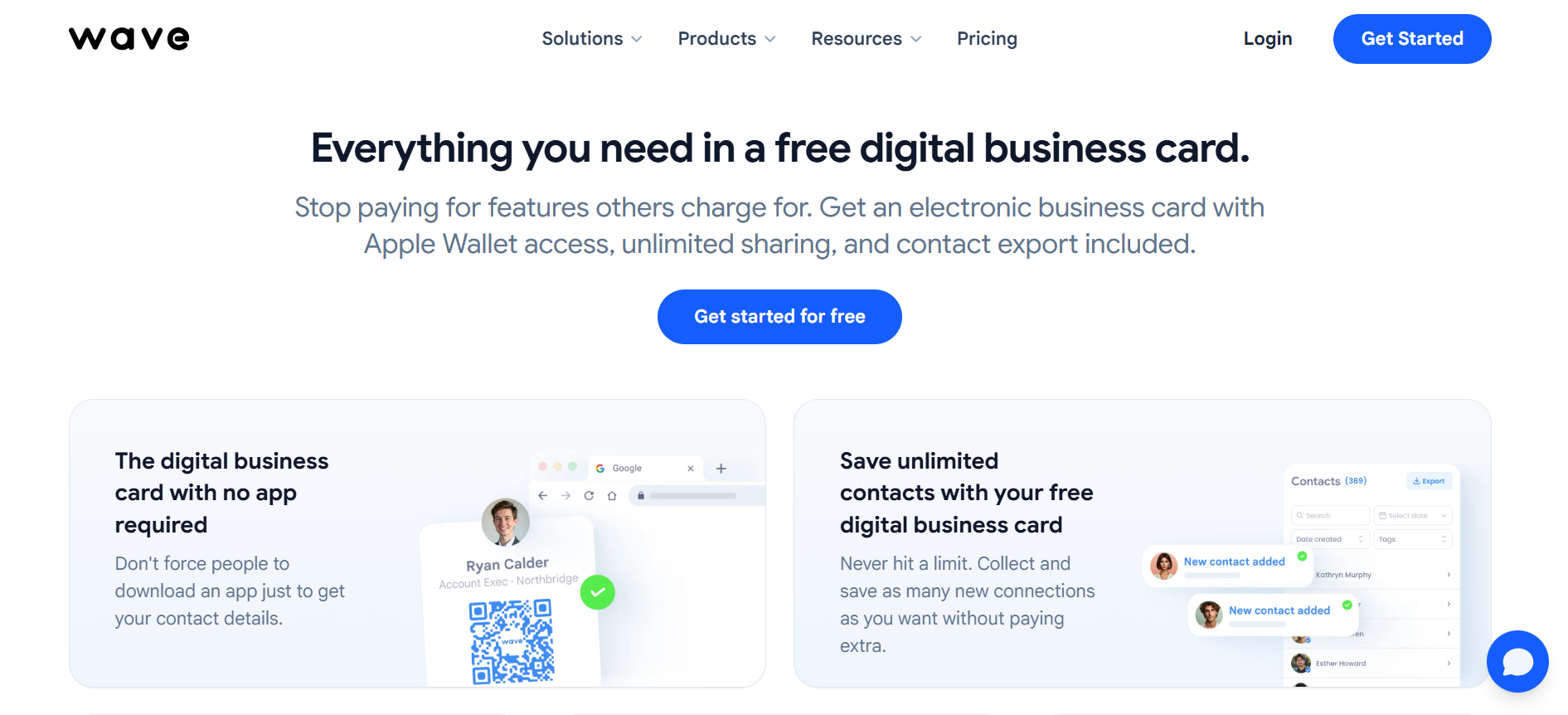
Wave free lead capture app interface highlights a no-app digital business card, Apple Wallet access, unlimited sharing, and exportable saved contacts for booth networking and event follow-up.
Overview
Wave Connect offers a free event badge scanner with CRM sync and instant export, and it carries a SOC 2 certification claim on its own site. It sits between a digital-card tool and a full capture platform. The free badge scanner is the hook; deeper team and sync features sit on paid tiers.
Core Services
Free event badge scanning from any badge.
Contact export and CRM sync on paid plans.
Team and integration features on higher tiers.
Key Features against the criteria
Capture speed: positioned as seconds-per-badge capture.
Offline reliability: not clearly stated in available sources.
CRM sync model: sync is referenced, but real-time native depth and free-tier inclusion are not fully clear.
In-booth meeting booking: not a core function.
Free tier: the badge scanner is the free offering; sync and team features are paid.
Pipeline attribution: not designed for per-show pipeline reporting.
Why companies consider Wave Connect
For a small team that wants free scanning plus a credible security posture, Wave Connect reads as a step up from a bare app. The honest watch-out is the familiar freemium shape: the scan is free, but the parts that move a lead into your CRM and onward to pipeline often sit behind the paid plan.
Ideal Customer Profile
Small to mid teams wanting free scanning with export.
Buyers who care about data-security signals like SOC 2.
Pricing
Free badge-scanner tier. Sync, team management, and integrations move to paid plans, per the provider's own site.
When to shortlist
You want free scanning with an export path and a security claim.
Your follow-up process can live with manual or paid-tier sync.
When not to shortlist
You need native, real-time booth-to-CRM sync included at no cost.
You need in-booth meeting booking and per-show attribution.
Customer reviews
No verified customer reviews for Wave Connect were available in the provided source set, and I will not manufacture any. The free-scanner and SOC 2 claims here come from the provider's own site, which I treat as self-claim, not independent proof.
1.6 Cvent LeadCapture: Best for exhibitors at Cvent-run shows (displacement reference)
Overview
Cvent LeadCapture is the lead retrieval app inside Cvent's organizer ecosystem. I include it not as a peer SaaS product but as the displacement reference, because for a huge share of exhibitors the "free or cheap" default is the scanner the organizer hands you. It saves the contact. The workflow ends at the export.
Core Services
Badge scanning on your own device through Cvent's OnSite solutions.
Lead qualification fields at the booth.
Lead export to the exhibitor portal.
Key Features against the criteria
Capture speed: adequate organizer-grade scanning.
Offline reliability: not clearly stated in available sources.
CRM sync model: portal and export centric; not a native real-time booth-to-CRM model for the exhibitor.
In-booth meeting booking: not a function.
Free tier: typically a per-device rental bundled into the show, so rarely free in practice.
Pipeline attribution: not designed for exhibitor-side per-show pipeline reporting.
Why companies consider Cvent LeadCapture
It is there, it is sanctioned, and setup is one less decision. That convenience is real. The structural cost is the one a field marketer feels at the Monday review: the leads sit in the organizer's portal as a list, the context is gone, and "where is the pipeline?" gets answered with a scan count.
This is the exact pain the operator quote names. The badge scanner "collects leads for them, it does nothing for you," and the list gets acted on, if at all, months later. The fix is to move from a contact list to generate new pipeline from events.
Ideal Customer Profile
Exhibitors at Cvent-run shows wanting the path of least resistance.
One-off or low-frequency booths.
Pricing
Organizer per-device rental, roughly in the $300 to $500 per device per show range as a category reference, often a sunk show cost rather than a true free option.
When to shortlist
Your show runs on Cvent and you only need basic capture for one booth.
You have no CRM or attribution requirement.
When not to shortlist
You exhibit across many shows and need one consistent, CRM-native system.
You must turn scans into booked meetings and per-show pipeline.
Customer reviews
No standalone verified customer reviews for Cvent LeadCapture were available in the provided source set, and I will not manufacture any. Its positioning here reflects Cvent's own product listing, which I treat as a self-claim.
1.7 Simple Lead Capture: Best for very small booths capturing basic contacts
Overview
Simple Lead Capture is a lightweight iOS app for capturing leads at events, free to download with in-app purchases. It does what its name says: gather basic contact details quickly. It is a tool for the smallest, simplest capture job, not a pipeline system.
Core Services
Basic contact and lead capture.
Lightweight list management.
Export for follow-up.
Key Features against the criteria
Capture speed: quick for basic fields.
Offline reliability: not clearly stated in available sources.
CRM sync model: not a native real-time Salesforce or HubSpot model.
In-booth meeting booking: not a function.
Free tier: free to download, with paid in-app upgrades.
Pipeline attribution: not designed for per-show pipeline reporting.
Why companies consider Simple Lead Capture
For a one-person table at a small, niche event, the appeal is zero learning curve and zero upfront cost. That is a legitimate use case. The limit is the same as the rest of this tier: it captures a contact, and the moment you need sync, dedup, or a meeting on the AE's calendar, you have outgrown it.
Ideal Customer Profile
Solo or very small booths.
Niche, low-volume events.
Pricing
Free to download with in-app purchases for added functionality.
When to shortlist
You need the simplest possible capture for one small booth.
You will handle follow-up manually.
When not to shortlist
You staff multiple reps and need shared, deduped data.
You need CRM-native sync and pipeline reporting.
Customer reviews
No verified customer reviews for Simple Lead Capture were available in the provided source set, and I will not manufacture any. The App Store listing positions it as a basic, free-to-download capture app with in-app purchases.
✅ Where this leaves your shortlist so far
Among these first three, the pattern is already clear. Blinq and EventMobi are easy, low-cost ways to capture a contact. B2Brain is the one designed to turn that contact into a booked meeting and a pipeline number, which is why it sits at 1.1 for revenue-accountable teams.
How We Evaluated These Providers
I want this to be auditable, so here is how the shortlist came together and where the gaps are.
Primary sources consulted: each provider's own App Store or website listing for its claims, the B2Brain Competitor Reviews file for verified G2 and Capterra reviews, and the lead-decay and follow-up research B2Brain tracks (the roughly 85% within two hours to 9% after a week curve).
Criteria selected and why: capture speed, offline reliability, CRM sync model, in-booth booking, free-tier reality, context capture, and pipeline attribution, because those are the factors that decide whether a free app produces pipeline rather than a list.
Criteria de-prioritized: design polish, social features, and digital-card aesthetics, which matter for networking but not for booth-to-pipeline outcomes.
Data gaps: verified reviews exist for B2Brain and Blinq in the source set; for EventMobi, fpLeads, Wave Connect, Cvent LeadCapture, and Simple Lead Capture, none were available, so their entries lean on self-claims and are labeled as such.
B2Brain's own gaps, stated plainly: our native app is iOS-only, our third-party enrichment is lighter than Popl, Mobly, or Momencio, and we do not ship a digital business card. If those are your priorities, weigh them honestly.
Which Provider Should You Shortlist?
There is no single winner here, because "free" means different things to different buyers. Match the tool to your actual job.
The field marketer who must prove per-show pipeline to the CMO: start a First Event Free trial with B2Brain, because the LTM number and morning-after report answer the "where is the pipeline?" question directly.
The VP Sales whose reps get paid on meetings booked: prioritize a tool that books the meeting on the floor, which rules out the card-first and export-only options in this list.
The founder taking a 5-rep booth to a first MODEX or IMTS: avoid stitching five free apps together; pick one CRM-native system so attribution survives the show.
The solo networker or one-off booth: a free digital card from Blinq, or a no-cost scanner like fpLeads or Simple Lead Capture, is the sensible, cash-respecting call.
The team whose only requirement is the organizer's sanctioned scanner: Cvent LeadCapture or EventMobi will do basic capture, as long as you accept that the workflow ends at the export.
The RevOps lead burned by a sync that silently broke: weight native, real-time CRM sync above price, since a free tool that loses leads costs far more than its sticker.
If you want to see how booth meeting-booking and per-show attribution work together in one flow, you can Book a Demo.
References
Operator receipt on badge scanners ("collects leads for them, it does nothing for you"), B2Brain field-marketing research brief, 2026.
Ole O., "AI-Powered B2B Sales Tool That Transforms Efficiency," B2Brain G2 Verified Review, 2026. https://www.g2.com/products/b2brain/reviews/b2brain-review-12440798
Verified User in Construction, "Good in idea, but execution lacks a bit," Blinq G2 Verified Review, 2025. https://www.g2.com/products/blinq-me/reviews/blinq-review-11127837
Madison Z., "Easy to share, hard to find contact info later," Blinq G2 Verified Review, 2025. https://www.g2.com/products/blinq-me/reviews/blinq-review-11115633
Lead-decay and follow-up benchmark data (conversion ~85% within two hours to ~9% after a week), CEIR-anchored stat bank, B2Brain category research, 2026.
fpLeads by Fairplicity, App Store listing (self-claim), 2025.
Cvent LeadCapture, App Store and Google Play listings (self-claim), 2024.
EventMobi Lead Capture, App Store listing (self-claim), 2025.
Simple Lead Capture, App Store listing (self-claim), 2019.
Q2: What Does "Free" Actually Mean in a Lead Capture App? [toc=2. Decoding 'Free']
"Free" in lead capture splits four ways: truly free (scan, export, and sync at no cost), freemium (free capture, paid sync or export), free trial (full features that expire), and data-hostage (the scan is free but your leads sit in a portal you pay to unlock). The organizer's badge scanner is usually the last kind. It captures leads for them, not for you.
🧠 The four meanings of "free"
Let me define this plainly, because the word does a lot of hiding. When an app says "free," it is almost always one of four things, and they are not the same.
Truly free: you scan, you export, and you sync to your CRM, all at no cost.
Freemium: capture is free, but sync, export, or lead volume sit behind a paid plan.
Free trial: you get everything, then it expires and the meter starts.
Data-hostage: the scan costs nothing, but your leads live in a portal you must pay to unlock.
Most "free" lead capture apps are freemium. The capture is the bait. The follow-up is the hook, which is why it helps to understand how event lead capture works end to end.
🔒 The data-hostage archetype
Here is the example that matters most, because it is the default for so many exhibitors. The organizer's rented badge scanner, like Cvent LeadCapture, is the data-hostage model in its purest form.
Convention organizers overcharge for the basics, and that model extends to your lead data. They charge for access to your own leads through a proprietary scanner. Your contacts then route through a broker who has to hand them to someone else before you see them.
By the time that list reaches you, it is late and stripped of context. This is part of why up to 80% of event leads never reach the CRM, per the CEIR-anchored research B2Brain tracks. The lead was "captured." It just never became yours in any useful way, which is the entire case for moving offline to pipeline.
✅ A 3-question test for any pricing page
So before you trust the word "free," run any app through three questions. They cut through the marketing in about a minute.
Can I export and sync to my CRM at $0? If sync is paid, it is freemium, not free.
Where do my leads physically live? If they sit in an organizer or vendor portal, you are renting access to your own data.
What expires, and when? A free trial is a countdown, not a plan.
This is exactly where I think the category gets read backwards. People shop for the lowest sticker price, when the real question is ownership. A free tier is only valuable if the leads land in your system. B2Brain's First Event Free tier syncs natively to Salesforce and HubSpot precisely because a lead you cannot reach is not a free lead. It is an unpaid invoice, and you can see what B2Brain costs per event for context.
Q3: Why Do Free Badge Scanners Cost You More Than They Save? [toc=3. The Hidden Cost]
A free badge scanner saves the rental fee but costs you the pipeline. Roughly 87% of trade-show leads never get proper follow-up, 79% get none at all, up to 80% never reach the CRM, and average response time runs about 42 hours. By then conversion probability has fallen from about 85% within two hours to roughly 9% after a week. Free capture, expensive silence.
📦 The shoe-box problem
Picture the rep we will call Jimmy. Monday morning he pulls three business cards out of his bag and means to follow up. Six months later, someone finds the shoe box those cards went into.
That is not a discipline problem. It is a design problem. A scanner that ends at a contextless list almost guarantees the shoe box, whether the list is paper or a CSV file. The free tool did its one job and quietly failed the only job that matters, which is the gap the booth-day workflow is meant to close.
📉 The numbers behind the silence
The data here is brutal, and every figure deserves a comparison so it lands. These come from the CEIR-anchored stat bank and decay research B2Brain tracks.
About 87% of trade-show leads never get proper follow-up, and 79% get none at all. That means roughly four in five booth conversations simply die.
Up to 80% of event leads never reach the CRM. The contact existed; the pipeline never did.
Average response time runs near 42 hours. The decay curve says conversion sits around 85% within two hours and falls to roughly 9% after a week.
Read those two last numbers together. A 42-hour response lands you on the far, flat end of the decay curve, where almost nothing converts.
⏰ The cost-of-delay math
So let me put real money on it. A booth conversation costs roughly $200 for five minutes of a prospect's attention, once you divide the show spend by the people you actually talk to.
Letting that $200 conversation decay into a late CSV is the most expensive "free" there is. There is an old field-sales benchmark, the one-hour rule, that contacting a lead within an hour makes qualification far more likely than waiting a day. The cheap scanner ignores it by design, because the list arrives long after the hour is gone.
💸 The metric free apps quietly fail
Here is the reframe. The money at a trade show is made in the follow-up, not the scan, so speed-to-lead is the real metric, and most free apps have no answer for it.
This is the whole principle behind how B2Brain thinks about the floor. When a rep books the meeting or sends the "great to meet you" note within minutes of the conversation, the lead never enters the decay curve at all. You will not lose the money you already spent to be standing there. A free scanner saves a rental fee and then loses the season, which is why teams shift toward real on-the-floor capture for floor-walking teams.
Q4: What Should You Look for in a Free Lead Capture App? [toc=4. Evaluation Criteria]
Judge a free event lead capture app on seven things: scan-to-note speed at rush hour, offline reliability on a convention floor, in-booth meeting booking, CRM sync model (native real-time versus CSV import), pipeline attribution, custom qualification fields, and the real shape of the free tier (lead, user, and event caps). Most free apps win on capture and lose on the last four.
⚠️ Why floor reality breaks generic apps
Most app comparisons are written for a calm desk. A trade show floor is not a calm desk. It is loud, the Wi-Fi buckles at 2pm, and your booth is three people deep.
That environment is the real test. An app that demos beautifully in an office can fail the moment the signal drops or the rush hits. So the criteria below are tuned to the floor, not the showroom.
✅ The 7-criterion rubric
Here is the rubric I would hand any buyer, with one line on why each item earns its place.
The 7-Criterion Rubric for a Free Lead Capture App
Criterion
Why it matters
Scan-to-note speed at rush hour
At peak, slow capture means reps stop taking notes, and context dies.
Offline reliability
Convention Wi-Fi drops; the app must capture offline and sync on reconnect.
In-booth meeting booking
A booked meeting beats an "interested" tag every time.
CRM sync model
Native real-time sync beats a CSV you clean up days later.
Pipeline attribution
Without it, you cannot answer "where is the pipeline?" with a number.
Custom qualification fields
Your questions, not generic ones, are how follow-up gets personal.
Real shape of the free tier
Lead caps, user caps, and event caps decide if "free" survives one show.
Two of these are non-negotiable: offline reliability and the CRM sync model. Get either wrong and you lose leads you already paid to capture.
⭐ The criterion almost everyone skips
Now the part the category avoids. Most teams never customize their scanner's qualification questions, and that single omission is where personalized follow-up quietly dies.
Think about the floor workflow. A good rep already scores each conversation in their head, hot, warm, or cold, and notes why. If the app captures that on the spot, the qualifying work is done before the rep leaves the booth.
There is an old sales figure worth remembering here: a large share of lost deals trace back to poor qualification, not poor product. Custom fields are your ticket to fix that at the source. This is the line where plain badge scanners, capture-and-enrich tools, and B2Brain diverge. Real-time scoring and custom qualification at the booth are the difference between a contact and a reason to call, the core of the three-motion workflow.
💰 How to weight the criteria for your role
The same rubric, weighted differently, fits each buyer. Match the weights to your job.
Founder at a first show: weight free-tier shape and capture speed; you are cash-tight and time-tight.
Field or event marketing head: weight attribution and meeting booking; you must prove pipeline to the CMO.
RevOps lead: weight the CRM sync model and dedup; a silent sync failure is your nightmare.
I might be slightly biased on which criteria matter most, given what I build. But after watching thousands of booth conversations, the pattern holds: capture is easy, and almost everyone passes it. The pipeline-side four are where free apps fall down, and if you want to see them in action, you can Book a Demo or start with the First Event Free trial.
Q5: When Is a Free App Enough, and When Does "Free" Start Costing Pipeline? [toc=5. Fit and True Cost]
A free app is enough when you attend one or two shows a year, staff a solo booth, and just need clean digital cards. "Free" starts costing pipeline once you run 5+ shows, staff multiple reps, and must prove ROI to a CMO or CFO. At that point CSV exports, lead caps, and missing attribution cost more in lost meetings than any subscription, especially against scanner rentals at $300 to $500 per device per show.
💸 When free is genuinely fine
Let me be honest about the easy case first, because I sell a paid product and you should trust me more for saying this. Sometimes free is the right call.
A free app is plenty when you fit a narrow profile. One or two shows a year, a solo booth or single rep, and a goal that ends at "collect clean digital contacts." If that is you, a free tier does the job, and paying for B2Brain would be overkill.
⚠️ The inflection point where free turns expensive
The math flips at a predictable spot. Once you cross into multiple reps, five or more shows, and a boss who wants ROI, "free" quietly becomes the costly option.
Here is why. At that scale, three things start bleeding pipeline:
CSV exports: leads arrive late and contextless, so follow-up slips past the decay window.
Lead and user caps: the free tier throttles exactly when volume matters most.
Missing attribution: you cannot answer "where is the pipeline?" with a number, so the budget gets questioned.
None of those show up on a pricing page. They show up at the Monday review, which is the moment offline to pipeline reporting earns its keep.
💰 Rent vs free app vs paid, over a season
So compare the real cost across a typical 8-to-15-show season, not a single booth. The organizer rental looks cheap per show and adds up fast.
Rent vs Free App vs Paid Over a Season
Option
Typical cost shape
The hidden cost
Organizer scanner rental
$300 to $500 per device per show
Leads in the organizer's portal; ends at the export
Free app
$0 sticker
Caps, manual sync, no attribution
Paid pipeline tool
Per-event or annual subscription
Pays off only if it books meetings and proves pipeline
Run the booth-ROI math. A field marketer I respect uses a simple rule: every event should return three times its cost in closed-won pipeline. If a tool turns even a handful more conversations into booked meetings, it clears its own cost long before the season ends, which is the point of reviewing what B2Brain costs per event.
⭐ Niche shows versus the big floor
One nuance changes how much capture quality matters. Not all shows are equal.
Niche events often bring a senior audience, the people who can actually write checks. Big shows bring volume, including many practitioners who cannot buy. At a senior, niche show, every conversation is expensive, so losing context hurts more, and that is exactly when a tool like B2Brain earns its keep by booking the meeting before the buyer walks away, the heart of the three-motion workflow.
The CRM-sync pain is real and well-documented. Buyers of capture tools say so plainly.
"It was challenging to get it to sync with Salesforce... The integration process was difficult for my team to accomplish and took a long time." Ece K. Mobly G2 Verified Review
"Every time we have a show with lead scanning, I have to purchase an API kit that costs between $700 to $1200. It's become costly." RebeccaGrace K. Captello G2 Verified Review
That second quote is the "free until it isn't" trap in one line. The scan was cheap; the per-show integration was not. If you want to see the alternative for booth teams, look at the booth-day workflow.
Q6: How Do You Turn a Free Scan Into a Booked Meeting? [toc=6. Scan to Meeting]
Turning a free scan into a meeting takes four moves: capture context (not just a name), score the lead hot, warm, or cold on the spot, book or commit to the meeting before they leave the aisle, and follow up within 24 hours. The app is the easy part. Speed, context, and a same-day touch are what separate a CRM record from a booked meeting.
📸 Get the capture right first
The scan itself is the smallest part, but bad capture poisons everything after it. So get the mechanics right at the booth.
Badge versus card: scan the badge for the contact, but add why you talked.
OCR accuracy: OCR means optical character recognition, the software reading text off a card or badge; it is never perfect.
Photo verification: snap a quick photo of the person, or of them holding their card, so the record has a face.
Sub-5-second offline capture: the app must save fast and work when the Wi-Fi dies.
There is honest debate here. Some operators swear by app OCR; others still photograph cards and send them to a VA later. Both can work. What kills the lead is doing neither in the moment, which is why what gets captured on the floor matters so much.
✅ The four-step floor workflow
Now the part that actually books meetings. Run this loop on every real conversation.
Capture context: not just the name, but the problem they mentioned.
Score on the spot: mark hot, warm, or cold while you remember why.
Book or commit: get the meeting on a calendar before they leave the aisle.
Follow up within 24 hours: a short, specific note while you are still a face, not a logo.
There is a rule I love from a veteran operator: organize your contacts within 48 hours, before you go out drinking, because your brain loses the context fast. Memory is the asset that decays first.
⏰ The follow-up cadence
Speed beats polish here. A same-day, slightly rough note outperforms a perfect email sent next week.
So build a simple cadence. A 24-hour first touch, a specific reference to the booth conversation, and a no-show plan if the booked meeting slips. One team I know sends a quick selfie-style "great to meet you" video within the 15-minute window after the chat. It feels personal because it is.
Use your phone, not their rented tech. That is you controlling the relationship, not the organizer.
🎯 The outcome that matters: meetings, not scans
Here is the number that reframes the whole exercise. An operator told me he scanned 400 badges at FABTECH and booked 4 meetings. That is a conversion problem, not a capture problem.
This is the job B2Brain is built around. We capture context on the floor, then book the discovery meeting straight onto the right AE's live calendar, with a dual invite to the prospect and the rep, before the person walks away. It sits on one shared layer, covering before, during, and after the show, with pre-event briefings drawn from your own CRM pipeline. Reps on r/sales complain about waiting days for the lead CSV; the fix is to book the meeting while the conversation is still warm, the essence of how we generate new pipeline from events.
Q7: How Do You Prove Per-Show Pipeline From a Free App? [toc=7. Proving Pipeline]
Free apps capture leads; almost none prove pipeline. To show ROI you need per-show pipeline reporting, multi-touch CRM attribution, and a single conversion metric leadership trusts: Leads-to-Meeting (LTM), the share of qualified booth leads that become booked meetings. Industry LTM sits near 8% post-event; booking on the floor pushes it toward 52%. That number, not scan count, is what justifies next year's booth budget.
📊 Scan count is a vanity metric
Start with the claim, because it is the one that changes budgets. The number of badges you scanned tells leadership almost nothing.
Scan count feels like progress. It is not pipeline. As I like to put it, contact information is not where anything happens; pipeline is where their world moves. A CFO funds the second thing, never the first.
🔗 What actually proves pipeline
To prove pipeline, you need three capabilities most free tiers simply do not have. This is the architectural gap, not a missing button.
Per-show pipeline reporting: opportunities and dollars tied to a specific show.
Multi-touch attribution: attribution means tracing pipeline back to every touch that influenced it, not just the last click.
A morning-after report: pipeline sourced, meetings booked, and LTM on the CMO's desk by 9am.
The breakage is well-known. One operator described it plainly: the rental system did not talk to the sales system, so the CRM became a mess. Another said he runs five different tools and just wants one to tie them together. Per a 2024 CEIR-anchored figure, only about 47% of exhibitors track leads through the sales cycle at all. You cannot prove what you never connected, which is why booth teams adopt for booth teams a single connected system.
💰 The LTM math that justifies the booth
Here is the payoff, and the number B2Brain owns. LTM stands for Leads-to-Meeting, the percentage of qualified booth leads that become booked meetings.
The industry average is about 8% when teams chase leads after the show. Booking on the floor, while the conversation is alive, pushes that toward 52%. That gap is the whole argument for next year's budget. And the meetings are cheap relative to outbound; a qualified event meeting can carry a meaningfully lower acquisition cost than a paid-channel lead, because you already paid to be in the room.
This is where B2Brain sits, and I will be direct that no competitor I know of even tracks LTM. We are the only tool tying before, during, and after into one attribution layer, with per-customer Next-Best-Action configurability so the workflow mirrors your sales process, not ours. You can see the full system on how event lead capture works.
🤔 The question I am sitting with
So here is what I keep turning over, and I genuinely do not have it fully settled. If LTM is the truest measure of a show, why does the whole category still sell on scan speed and badge counts?
My hunch is that scan count is easy to demo and LTM is hard to earn. But I might be wrong on the timing. If you are running booths this season and tracking meetings booked on the floor, I would genuinely like to compare notes on what your real LTM looks like, so Book a Demo and bring your numbers.
References
Operator receipt, "scanned 400 badges at FABTECH, booked 4 meetings," B2Brain field-marketing research brief, 2026.
Operator receipt, the 3x event-ROI rule and "$300 to $450 cost per head," B2Brain research brief, 2026.
Operator receipt, "organize contacts within 48 hours" and the 15-minute selfie follow-up, B2Brain research brief, 2026.
Operator receipt, "the rental system didn't talk to the sales system, the CRM's a mess," B2Brain research brief, 2026.
Ece K., "User-Friendly but Needs Better Salesforce Integration," Mobly G2 Verified Review, 2026. https://www.g2.com/products/mobly/reviews/mobly-review-12608059
RebeccaGrace K., "It's been a good experience," Captello G2 Verified Review, 2024. https://www.g2.com/products/captello/reviews/captello-review-10551873
CEIR, "exhibitor lead-tracking benchmark (only ~47% track leads through the sales cycle)," 2024.
Lead and memory decay benchmark, "conversion ~85% within two hours to ~9% after one week," B2Brain category research, 2026.
B2Brain, "Leads-to-Meeting (LTM) and Pipeline" methodology (52% on floor vs 8% industry), 2026.
prospeo.io, rent-vs-own cost math and organizer scanner rental (~$300 to $500 per device per show) benchmark, 2025.
FAQ's
What is the best free lead capture app for events?
The honest answer is that the best free lead capture app depends on your job, not a single winner. We rank seven, and each fits a different buyer.
Solo networker: a free digital card like Blinq does the job.
One-off booth: a no-cost scanner such as fpLeads or Simple Lead Capture is fine.
Multi-rep, multi-show team: you need context, in-booth meeting booking, and native CRM sync, which is where free tiers stop short.
For revenue-accountable teams, we built B2Brain with a First Event Free tier so you can run one full show, sync included, before paying anything. The structural test is simple: can you export and sync to your CRM at zero cost, and where do your leads physically live?
If they sit in an organizer portal, you are renting access to your own data. To see how capture, booking, and attribution work together, read how event lead capture works. We are not for solo booths or no-CRM teams, and we say so plainly.
Does a free lead capture app really cost nothing?
Rarely. We see four meanings of the word free, and only one is truly free.
Truly free: you scan, export, and sync to your CRM at no cost.
Freemium: capture is free, while sync, export, or lead volume sit behind a paid plan.
Free trial: everything works, then it expires.
Data-hostage: the scan is free, but your leads live in a portal you pay to unlock.
Most event apps are freemium, and the organizer badge scanner is the data-hostage model. There is also a hidden cost beyond money. A scanner rental runs roughly 300 to 500 dollars per device per show, and a late, contextless CSV pushes follow-up past the decay window where most deals die.
So free capture often becomes expensive silence. We think the real question is ownership, not sticker price, which is why our free tier syncs natively rather than trapping leads. You can compare Show Pass and Pipeline plans against what a free tier actually includes.
How do you turn a free scan into a booked meeting?
The app is the easy part. We see four moves separate a CRM record from a booked meeting.
Capture context: not just a name, but the problem they mentioned.
Score on the spot: mark the lead hot, warm, or cold while you remember why.
Book or commit: get the meeting on a calendar before they leave the aisle.
Follow up within 24 hours: a short, specific note while you are still a face, not a logo.
Speed beats polish. A same-day, slightly rough note outperforms a perfect email sent next week, because conversion falls fast once the conversation cools.
This is exactly the gap we built B2Brain to close. We capture context by voice in seconds, then book the discovery meeting on the right account executive's live calendar before the prospect walks away. To see what gets captured during the conversation, read about what gets captured on the floor. A free app that scans 400 badges but books four meetings has a conversion problem, not a capture problem.
Can a free lead capture app prove ROI to my CMO or CFO?
Almost none can, and that is the quiet failure of most free tiers. Free apps capture leads; they rarely prove pipeline.
To show return on investment, we think you need three things most free tiers lack:
Per-show pipeline reporting: opportunities and dollars tied to a specific show.
Multi-touch attribution: tracing pipeline back to every touch, not just the last click.
A single trusted metric: Leads-to-Meeting, the share of qualified booth leads that become booked meetings.
Industry LTM sits near 8 percent when teams chase leads after the show, while booking on the floor pushes it toward 52 percent. That number, not scan count, is what justifies next year's booth budget. We built B2Brain to own that metric and deliver a morning-after report by 9am: pipeline sourced, meetings booked, and attribution by show, rep, and segment. To see how we turn booth conversations into a number leadership funds, read how we generate new pipeline from events.
When should you upgrade from a free app to a paid lead capture tool?
We see a predictable inflection point. Free is genuinely fine for one or two shows, a solo booth, and a goal that ends at clean digital contacts.
Free starts costing pipeline once three things become true:
You run five or more shows a year, so manual CSV cleanup adds up fast.
You staff multiple reps, so dedup and shared access matter.
You must prove ROI to a CMO or CFO, so attribution is non-negotiable.
At that point, CSV exports, lead caps, and missing attribution cost more in lost meetings than any subscription. We use a simple rule a field marketer taught us: every event should return three times its cost in closed-won pipeline. If a tool turns even a handful more conversations into booked meetings, it clears its own cost before the season ends. For booth teams crossing that line, see the booth-day workflow, and weigh it against your real show count and goals before deciding.
Enjoyed the read? Join our team for a quick 30-minute chat — no pitch, just a real conversation on how we’re rethinking Event Intelligence in B2b.

.png)
.png)

.png)
.png)