B2Brain vs iCapture: Compared on Qualifying Forms, Offline Reliability, and CRM Sync
Written by
Sridhar Ranganathan
Last Updated :
August 21, 2026
Skim in:
13
mins
TL;DR
iCapture fits enterprise teams standardizing badge capture across many shows on a flat annual contract of roughly $8,000 with unlimited users and events.
B2Brain fits pipeline-accountable field marketers who need the meeting booked at the booth, reporting 52% Leads-to-Meeting on the floor versus an 8% post-event industry average.
Qualifying forms enforce consistency but get skipped at rush hour; voice notes take about one-fifth the time of typed notes, with scoring applied at capture.
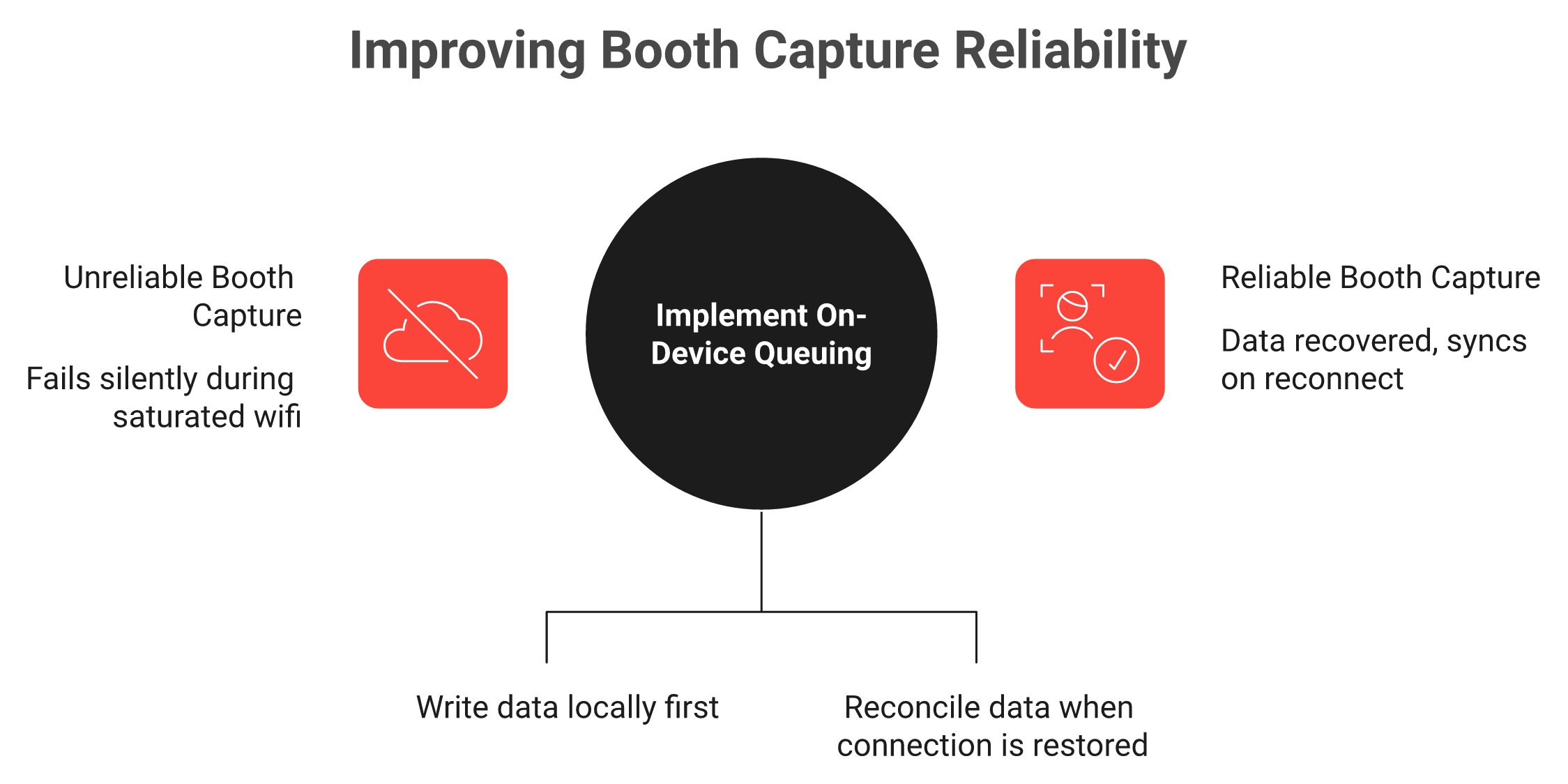
Offline reliability splits by architecture: badge-API dependency fails silently, while an on-device queue writes the record first and syncs on reconnect.
CRM sync tier decides everything, since contact sync gives you a name while opportunity creation gives you a pipeline number your CFO can audit.
Verified evidence is mixed, with iCapture at 4.7 across 96 G2 reviews and B2Brain at 17, so cost per booked meeting beats review count as the deciding number.
Q1. B2Brain vs iCapture: which one should you pick in 2026? [toc=1. Verdict and Matrix]
A Field Marketer I work with counted 412 scans on the flight home from a supply-chain show. Her CEO asked one question on Monday. Not how many badges, how many meetings.
iCapture fits enterprise exhibitors standardizing badge capture and CRM routing across many shows on a flat annual contract. B2Brain fits field-marketing teams that must book the meeting at the booth and defend a per-show pipeline number, capturing scan-to-note in under five seconds with an offline queue that syncs on reconnect and native Salesforce and HubSpot writes.
⭐ This is a displacement decision, not a feature bake-off
Both tools replace the same incumbent, which is the organizer's rented scanner and the CSV it produces. Exhibitors on r/b2bmarketing describe the default plainly: get a scanning license, then upload the lead sheet when the show ends. That is the same pattern documented across lead retrieval at trade shows.
That baseline is why the comparison matters. One operator admitted spending over $35,000 dressing a single booth, then said the money could have been spent far better. The capture tool is the cheapest line in that budget, and it is the one that decides whether the rest earned anything.
Strongest on compliant badge APIs, sync stalls reported on weak Wi-Fi
On-device queue, syncs on reconnect
CRM sync
Native, tier-gated (CRM sync sits at Pro and above on the reported ladder)
Salesforce-native and HubSpot-native in the base plan
Meeting booked on the floor
Not in scope, capture and qualify
Under 30 seconds, dual invite to prospect and routed AE
Reporting
Event analytics, staffing and scan metrics
Per-show pipeline, LTM, morning-after report
Cost shape
Annual, quote-only, roughly $8,000 anchor
Per-event Show Pass from $200, first event free for two users
💬 What buyers say when iCapture is set up properly
Credit where it is due. Reviewers who invested in the setup describe clean routing at scale.
"We recently used iCapture at an event and it was seamless. It made capturing leads and pushing them into our systems incredibly simple." — Natalie S., 4 stars, iCapture G2 Verified Review
"Love how easy it is to use across multiple devices and various levels of tech-savvy employees. Easily allows for ROI calculation on every event." Her dislike, in the same review: "It does not natively integrate with our CRM." — Mcallaster M., 4.5 stars, iCapture G2 Verified Review
✅ Where to go next in this comparison
Pick the section that matches what broke last season. If you want the wider field first, the best event lead capture software of 2026 covers eight tools on the same criteria.
Reps skipping qualification at rush hour, read Q3.
Scans that never synced, read Q4.
A CFO asking where the pipeline went, read Q7.
B2Brain measures this comparison on Leads-to-Meeting, meetings booked divided by qualified booth leads, and reports 52% booked on the floor against an 8% industry average booked post-event.
Q2. What is each tool built to do, and does Cvent ownership constrain you? [toc=2. Scope and Ownership]
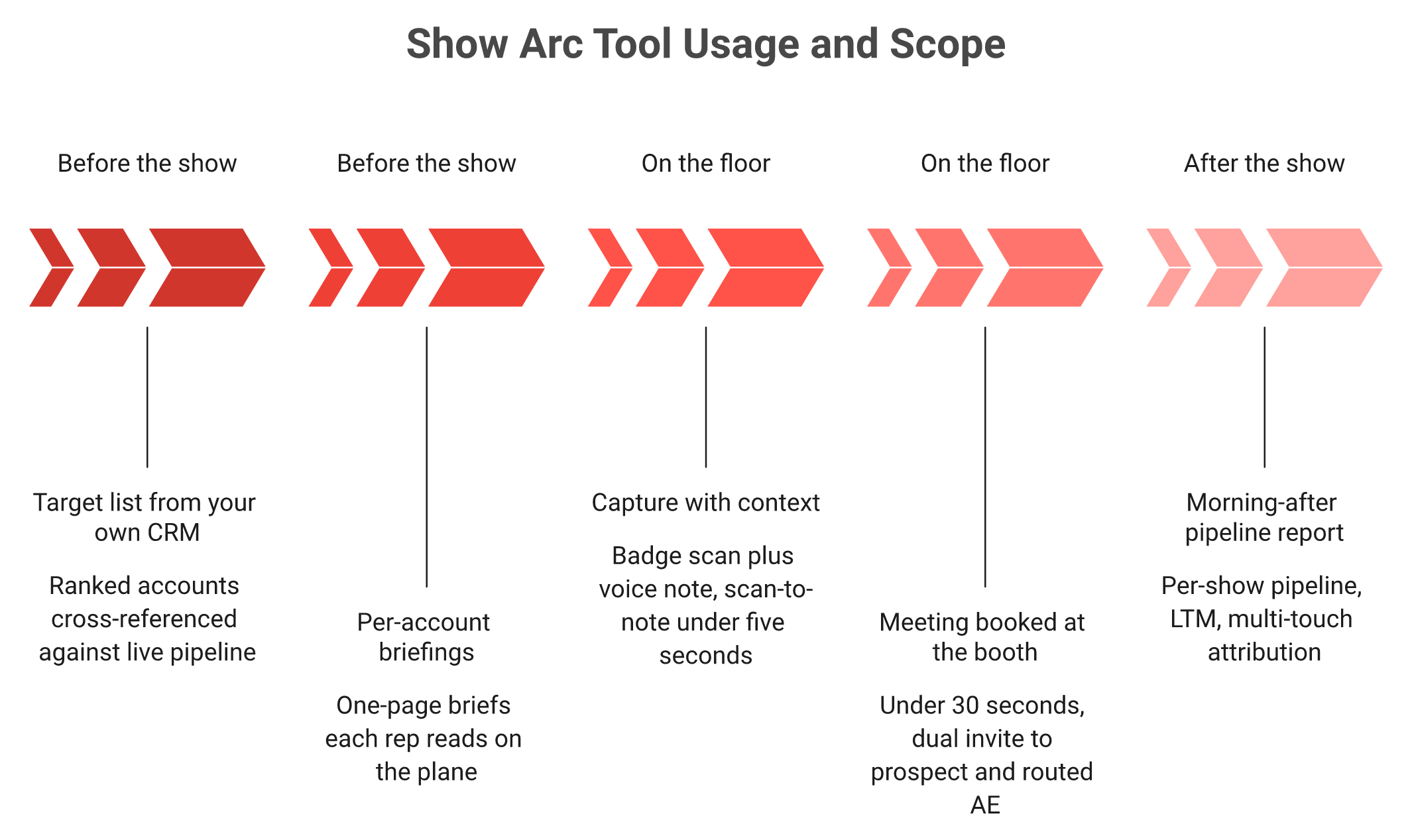
iCapture, acquired by Cvent in January 2024, is universal lead capture built for consistent badge scanning, custom qualifiers, and routing at scale, priced around $8,000 a year flat. B2Brain is an event lead capture app running one shared layer across pre-event briefing, on-floor capture and booking, and post-show pipeline reporting. One optimizes the scan; the other optimizes what the scan becomes.
🧩 The four words buyers keep mixing up
Badge capture starts at the scan and ends at the export. The offline-to-pipeline scope runs from the pre-event target list to the morning-after report.
Badge scanning is the physical act of reading a badge. Lead retrieval is the organizer's rented scanner plus their storage, priced per device per event.
Lead capture is any exhibitor-side method of collecting the lead. Universal lead capture means you own the app and it works across every show you attend. iCapture sits in that fourth box. So does B2Brain, with a conversion layer on top.
🏛️ Where iCapture's lane is genuinely the right lane
Flat-rate annual licensing with unlimited users and unlimited events is unusual, and it is real value above roughly eight shows. A 25-rep team pays the same base as a 5-rep team.
Enterprise programs also buy consistency. One template, one qualifier set, twelve business units, same data shape. If that is your problem, iCapture solves it directly.
⚠️ What Cvent ownership actually changes on your invoice
Two products share the roadmap. Cvent LeadCapture works only at Cvent-managed events, while iCapture is the standalone app usable anywhere, as broken down in the iCapture pricing teardown.
If you already run Cvent, bundling leverage is real. If you do not, you pay full price for platform depth you cannot use. Post-acquisition updates have centered on interface work and badge-scan API maintenance, not on voice notes or AI follow-up.
📉 The lane's structural omission
Look at what happens before and after the scan. iCapture starts when the badge appears and ends when the record is exported or routed.
Nothing in that scope builds the pre-event target list. Nothing in it books the discovery meeting. That is not a defect, it is a boundary, and you should price it as one.
💡 Judge both on data ownership, not feature counts
One operator's read on this stuck with me: software is getting commoditized, so the data becomes the asset. Anybody can read a badge in 2026.
B2Brain builds the pre-event briefing from the customer's own CRM pipeline rather than a third-party attendee prediction database, which is how the three-motion workflow holds together. That is a deliberate choice about whose data you are betting on.
🔍 The question that separates the two scopes
Ask each vendor what shipped in the last twelve months that changed a customer's leads-to-meeting rate. Interface work is not an answer.
Contact information is not where anything happens. Pipeline is where your world moves. My read is that the scope boundary, not the feature grid, is what you are actually buying.
B2Brain is the only one of the two with a shared layer across all three phases, including a pre-event briefing grounded in your own CRM pipeline rather than a third-party attendee database.
Q3. How do the qualifying forms compare when the booth is three-deep? [toc=3. Qualifying Capture]
iCapture's strength is configurable qualifier forms that enforce consistent data across booths and shows. Its weakness is completion under pressure, because long forms get skipped at rush hour. B2Brain pairs a short form with a voice note taking roughly a fifth the time of typing, plus scoring at capture, so qualification happens on the floor instead of in a cleanup queue.
⏰ 11am on Day 2, when forms stop getting filled
Forty people are in the aisle. Two reps are demoing. The third is holding a tablet with nine required fields on it.
What gets typed is the badge. What gets skipped is why the conversation mattered. One field-marketing operator described the downstream result well: every scan gets handed to sales, who then filter out the garbage.
📋 Where iCapture's form design wins
Consistency is the win, and it is not a small one. One template across every booth means one data shape in the CRM.
Compliance fields, consent capture, and mandatory qualifiers all belong in that model. Reviewers confirm the payoff and the cost of getting setup wrong.
"It's essential to ensure that the fields are mapped properly from the registration form all the way to badge creation and onsite capture. If any information is missing at any stage, it won't carry over as expected." — Natalie S., 4 stars, iCapture G2 Verified Review
❌ The friction reps report on the floor
Two patterns repeat in verified reviews. Manual entry when a show has no API, and slow turnaround on form changes.
"Scanners complain it takes too long when having to do a manual entry for events that do not have an API Integration. Overall this is just a training issue." — Beverly G., 4.5 stars, iCapture G2 Verified Review
"That some events have their own software so we cant use iCapture." — Michelle H., 4.5 stars, iCapture G2 Verified Review
🎙️ The scan-now-note-later problem, and the shipped answer
Every booth team invents the same workaround. Scan fast now, add context tonight, lose half of it by then.
B2Brain records voice notes that run about one-fifth the time of typed notes, with scan-to-note under five seconds and a Recent Leads queue for reps who could not stop mid-conversation, which is the core of the booth-day workflow. Reps talk faster than they type, and they will do it while the memory is intact.
✅ A five-field qualifier you can ship this week
Cut your form to what a rep can finish in twenty seconds. Everything else belongs in the voice note.
Fit: does this account look like our ICP, yes or no.
Trigger: what problem did they name out loud.
Timing: this quarter, next quarter, or exploring.
Role: decision maker, influencer, or researcher.
Temperature: hot, warm, or cold, chosen at the booth.
Score at capture and the sales handoff argument disappears. Poor qualification is expensive, with roughly 60% of lost sales traced back to it. The setup sequence is covered step by step in how to collect leads at a trade show.
B2Brain captures scan-to-note in under five seconds and applies hot, warm, or cold scoring at capture, so the qualification decision gets made while the conversation is still audible.
Q4. Which tool holds up when the hall Wi-Fi drops? [toc=4. Offline Reliability]
iCapture rates strongest offline at shows with compliant badge APIs, but verified users report the app randomly cuts out when syncing on hotel or hall Wi-Fi, with one recovering data for roughly a third of captured scans. B2Brain queues captures on device and syncs on reconnect, so the record exists locally before the network is involved.
🔻 The situation nobody models in the RFP
It is 2pm on Day 1. The hall uplink is saturated because 900 exhibitors are all uploading at once.
Your reps keep scanning because the app still looks fine. That gap between looking fine and having written the record is where shows get lost.
⚠️ Two architectures, two failure modes
Offline mode is not a checkbox. The architecture decides whether a failed sync shows up during the show or after it.
Badge-API-dependent capture depends on a live call to the organizer's system. On-device queuing writes locally first, then reconciles later.
The first fails silently. The second fails loudly, which is the failure you want. Verified reports show what silent failure costs.
"The app would show an eternal 'uploading captures' loading icon that would never finish. In the end, we only got data for approximately one-third of the scans we captured." — Verified User, Exhibitor, Cvent iCapture Apple App Store Verified Review
"Scanned leads the whole day only to find out the leads never synced. Paid more than 35k for the conference to get leads and ended up having a very bad experience with this app." — Verified User, Exhibitor, Cvent LeadCapture Google Play Verified Review
✅ The honest counterweight
The picture splits by surface, and I am not going to pretend otherwise. On G2, iCapture holds 4.7 across 96 reviews in lead retrieval, per the iCapture G2 review profile.
My read is that reliability here is configuration-sensitive, not uniformly bad. Field mapping and API setup decide your outcome. I might be reading the split too strongly, though the pattern holds across two years of reviews.
📋 What "offline mode" must mean in your RFP
Do not accept the checkbox. Ask for four specifics in writing.
Where is the record written first, device or server.
What happens to a capture taken with airplane mode on.
How does the app show a rep that a sync is pending.
What is the remedy if a show day fails to sync.
The failed-sync stories in this category share one root cause. Someone trusted a connection they never tested. One operator's account of mismatched systems and half-built nurture flows ends the same way, with a CRM full of mess.
🧪 A three-step reliability test before your next show
Run this at your desk in fifteen minutes, then check the results against Salesforce lead capture field completeness.
Put the phone in airplane mode, capture five leads with notes, confirm they persist after a force-quit.
Reconnect on a throttled hotspot, watch whether all five reach the CRM.
Check the CRM for duplicates when two devices scan the same badge.
B2Brain writes every capture to the device first and syncs on reconnect, which is how the morning-after report still lands after a bad-connectivity day on the floor. If you want that tested against your own show calendar, Book a Demo.
Q5. How deep is CRM sync, native real-time, push, or a mapped import? [toc=5. CRM Sync Depth]
Both integrate with Salesforce and HubSpot, but the tier decides everything. iCapture reviewers report field-mapping friction and cases where leads do not reach the CRM until days after the show. B2Brain writes natively in real time and creates the opportunity record, not just the contact, giving full event-to-CRM attribution the same evening.
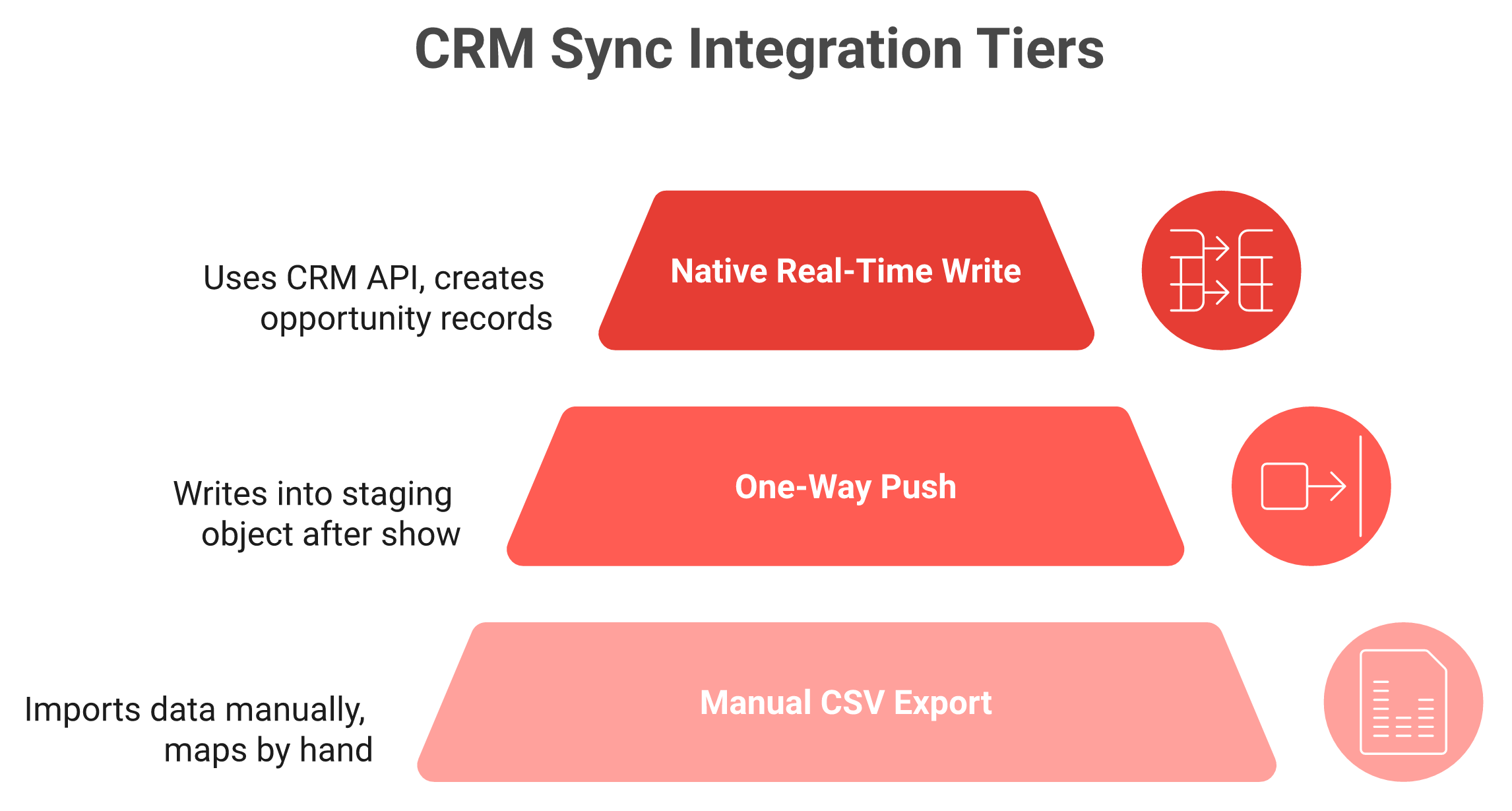
🔌 The three sync tiers, in plain language
All three tiers get marketed as CRM integration. Only one of them puts a pipeline number in front of your CFO the same evening.
Tier one is a manual CSV export that somebody imports later. Tier two is a one-way push into a staging object, usually after the show.
Tier three is a native real-time write into your live objects. Native means the vendor built directly against the CRM's API, not through a middleware connector. Ask which tier you are buying, because all three get marketed as "CRM integration." The mechanics are broken down in Salesforce lead capture.
⚠️ Where iCapture buyers report friction
The complaints are consistent, and they are about setup rather than intent. Mapping has to be right from registration form to badge to onsite capture, or fields silently drop.
CRM sync also sits at Pro tier and above on the reported plan ladder, so entry-level buyers can end up exporting files, as documented in the iCapture pricing breakdown.
"Business card transcriptions can be inaccurate at times, which has caused incorrect email addresses or phone numbers in a few cases." — Verified User in Transportation, Trucking, and Railroad, 4.5 stars, iCapture G2 Verified Review
✅ Credit where the sync works
When mapping is done properly, reviewers describe fast, hands-off routing. That is a real outcome and worth naming.
"Once we capture a lead, it automatically syncs into the system and is assigned to a representative. This has reduced the need for human intervention." — Natalie S., 4 stars, iCapture G2 Verified Review
💰 Contact sync versus opportunity creation
Here is the distinction that decides your budget review. A contact sync gives you a name in the CRM. An opportunity record gives you a pipeline dollar amount tied to a show.
B2Brain writes natively to Salesforce and HubSpot and creates the opportunity, which is what makes 100% event-to-CRM attribution possible and is the spine of how it generates new pipeline from events. Contact information is not where anything happens. Pipeline is where your world moves.
🧹 Dedup when four reps scan the same account
Multi-rep booths create duplicates, and duplicates poison attribution. Two reps scan the same buyer, and now one account has two owners.
Ask how the tool matches on email domain and company, and what happens on conflict. My read is that dedup rules get skipped in most evaluations, then cost RevOps a week of cleanup after every show.
📋 The sandbox test to run before you sign
Do this in a CRM sandbox, not on a slide.
Capture one lead and confirm which objects get written, Lead, Contact, Account, or Opportunity.
Confirm the campaign field populates with the show name automatically.
Scan the same badge on two devices and check for a merge or a duplicate.
Time the gap between capture and CRM visibility, in minutes.
Speed matters because the window closes fast. Follow-up emails sent within 24 hours open at about 48%, against roughly 21% after a week. One operator's rule fits this exactly: organize contacts within 48 hours, at the hotel, before the night gets away from you.
B2Brain syncs natively and in real time to Salesforce and HubSpot and creates the opportunity record, delivering event-to-CRM attribution the same evening instead of a list you reconcile later.
Q6. Which tool books the meeting before the visitor leaves the booth? [toc=6. On-Floor Booking]
iCapture captures, qualifies, and routes; booking the meeting stays a post-show SDR task. B2Brain books it at the booth in under 30 seconds, sending a dual calendar invite to the prospect and the routed AE. The measurable gap is Leads-to-Meeting, at 52% booked on the floor versus an 8% industry average booked post-event.
⏰ Capture is not conversion
Every tool in this category is good at capture now. Reading a badge stopped being a differentiator around 2019.
The unsolved part is commitment. A scan records that a conversation happened. A calendar invite records that the buyer agreed to continue it.
📉 The decay curve nobody prices in
Conversion probability from a booth conversation runs around 85% within two hours, then falls to roughly 9% after a week. That is not a marketing claim, it is why the post-show sequence underperforms.
Roughly 79% of trade show leads never receive follow-up at all. A 2026 benchmark across 20 major US shows put zero-follow-up leads at 80%. Your tool choice is competing against that baseline, not against a feature grid.
🗂️ The shoe box has not changed, only the format
An operator told me the version I still think about. All the cards go in a shoe box, Jimmy carries it back, pulls three out on Monday, and six months later somebody finds the box.
Replace the shoe box with a CSV and the story is identical. The money in a trade show is made in the follow-up, and the follow-up decays while you sleep. That failure pattern is mapped out in lead capture apps for trade shows.
⭐ What booking on the floor actually requires
Booking is not a button. It needs four things working at once, in about 30 seconds.
The AE's live calendar, not a generic scheduling link.
Routing logic that picks the right AE by territory or segment.
A dual invite so the prospect and the AE both hold the slot.
A CRM write so the meeting appears against the account.
B2Brain pulls the AE's live calendar and books the 30-minute follow-up before the visitor walks away, with the invite landing on both calendars, which is how event lead capture works across the three motions.
✅ Compute your own LTM this week
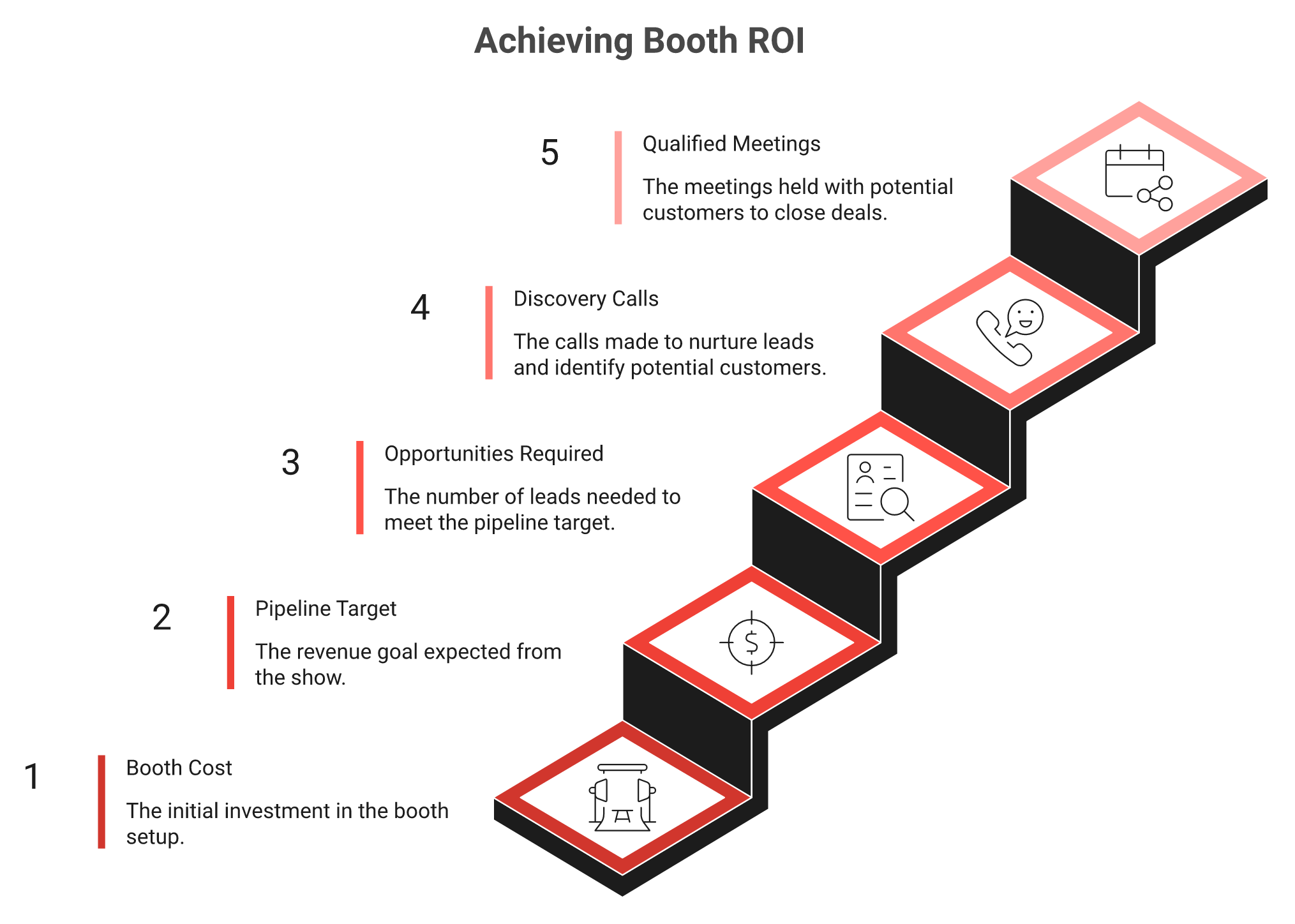
The booth math runs backwards: from booth cost to pipeline target to the one-in-five visitors who must become a qualified meeting.
You do not need a vendor to run this math. Pull last season's numbers.
Count qualified booth leads per show, not total scans.
Count meetings actually held from those leads.
Divide meetings by qualified leads. That is your LTM.
Most teams land in single digits and are surprised. Sridhar's booth math is the sanity check: a $70,000 booth chasing $1M in pipeline needs roughly 50 opportunities and 180 discovery calls, so about one in five booth visitors must become a qualified meeting.
⚠️ The honest caveat on this criterion
Meeting booking is commoditizing. BoothIQ, BoothMaven, and Zuddl all ship a version of it now, so the feature alone will not hold as a differentiator for long.
B2Brain's durable difference is the shared three-phase layer underneath, plus per-customer next-best-action configuration that mirrors each team's sales process. I could be wrong about the timeline, though the direction looks settled to me.
B2Brain books the meeting on the floor in under 30 seconds with a dual invite to prospect and routed AE, which is how it reports 52% LTM against an 8% post-event industry average.
Q7. Which one can prove per-show pipeline to your CFO? [toc=7. Pipeline Reporting]
iCapture reports on capture activity, including scans, qualifier completion, routing, and event-level analytics. B2Brain reports on outcome, with a morning-after offline-to-pipeline report, per-show pipeline, show-over-show comparison, multi-touch attribution, and LTM. That gap matters because only about 47% of exhibitors track leads through the sales cycle at all.
📉 The reporting risk is a budget risk
A 2024 CEIR analysis found roughly 47% of exhibitors track leads through the sales cycle. The other half walk into the budget review with activity counts.
Activity counts lose budget arguments. When events are the least-attributed line item, they are the easiest line item to cut. The full method sits in measuring event ROI.
📊 What each tool puts in front of you
Both produce reports. They answer different questions.
Reporting depth: iCapture, B2Brain, and the organizer scanner
Report layer
iCapture
B2Brain
Organizer scanner
Scans and rep activity
Yes, with busiest-time staffing data
Yes, plus 31 scans per day rep benchmark
Yes, basic counts
Qualifier completion
Yes
Yes, with capture-time scoring
No
Meetings booked
Not tracked
Tracked as the primary outcome
No
Pipeline sourced per show
Not native
Yes, per show and show-over-show
No
LTM
Not tracked
Headline metric
No
Reviewers value iCapture's operational reporting, and rightly so. One described using multi-year event data to plan staffing and grade rep performance.
"Metrics to show us the busiest times at events so that we can staff accordingly. I love being able to tell who is really performing at events, who is lagging behind, and who isn't even using the app at all." — Verified User in Transportation, Trucking, and Railroad, 4.5 stars, iCapture G2 Verified Review
💰 What a CFO-ready report actually contains
Four lines, and nothing else matters at that meeting.
Sourced pipeline, meaning opportunities created from show leads.
Influenced pipeline, meaning open deals the show touched.
Cost per booked meeting, including booth and travel.
LTM, so the number is comparable across shows.
B2Brain delivers this as a morning-after offline-to-pipeline report, with attribution broken out by show, rep, and segment. The report is deliberately unbranded, because the Field Marketer should be the one presenting it.
⚠️ Get the CRM plumbing right first
No report survives bad plumbing. One field-marketing operator put the requirement bluntly: every event lives in Salesforce, organized by campaign, tracking every lead and conversation.
Without campaign-level tagging, sourced and influenced pipeline cannot be separated. That distinction is the whole argument at the QBR.
✅ Build this before your next show
Set the target before you buy the booth. A common operator rule is 3x return on event spend in closed-won revenue, and the event ROI calculator does the arithmetic.
Set the pipeline target from your booth cost, then work backward to meetings needed.
Create the campaign in your CRM before badges are printed.
Report LTM and cost per meeting within 48 hours of the show closing.
Compare it against the same show last year, not against a national average.
Show comparison is where the budget conversation gets easy. Two shows at similar spend with very different LTM tells you where next year's money goes.
B2Brain delivers a morning-after offline-to-pipeline report to the CMO by 9am, carrying per-show pipeline, show-over-show comparison, and LTM as the headline number.
Q8. What does each one cost per show, and per booked meeting? [toc=8. Cost Shape]
iCapture is quote-only and annual, with a roughly $8,000-per-year public reference covering unlimited users and events, which is strong value above eight shows. B2Brain sells a per-event Show Pass from $200 with the first event free for two users, plus an annual tier. Below eight shows, per-event pricing wins; the deciding number is cost per booked meeting.
💰 Two pricing shapes, stated plainly
iCapture publishes no pricing, so every buyer negotiates blind against a quote. The widely cited reference point is about $8,000 a year, flat, with unlimited users and events.
Per-event pricing works the opposite way. You pay per show, which fits teams whose show calendar changes every year, and the tiers are listed under Show Pass and Pipeline plans.
💸 The baseline everyone forgets
The comparison is not just tool against tool. It is tool against the organizer's rental.
Badge-only scanner rental runs roughly $380 to $500 per user per event at legacy providers. Three reps at four shows puts you past $4,500 for scanning that ends at a CSV. Convention economics work this way throughout, from trash service to lead data, which is why the conference badge scanner route stays expensive.
📊 The crossover math
Run it with your own show count.
Season cost by pricing shape
Season shape
Annual flat (~$8,000)
Per-event (from $200)
Scanner rental ($380 to $500 per user)
3 shows, 3 reps
$8,000
Roughly $600 plus tier
$3,420 to $4,500
8 shows, 4 reps
$8,000
Roughly $1,600 plus tier
$12,160 to $16,000
15 shows, 6 reps
$8,000
Annual tier makes sense
$34,200 to $45,000
Flat annual pricing wins on paper at high volume. Per-event pricing wins when your calendar is uncertain or your booth count shifts mid-year.
⭐ Convert licenses into cost per meeting
License cost is the wrong denominator. Meetings are the right one.
Add booth, travel, and tool cost for one show.
Divide by meetings actually held from that show.
Compare that number against your outbound cost per meeting.
B2Brain's published benchmark puts a qualified event meeting at about 60% of an equivalent outbound meeting and 40% of paid acquisition cost. One operator's cost-per-head guide is a useful cross-check: $300 to $450 per attendee, travel included.
⚠️ Where the cheap option gets expensive
A $200 show pass that produces four booked meetings beats an $8,000 license that produces a clean CSV. The reverse is also true.
Cheap capture with no CRM write costs you the follow-up window, and the follow-up window is where the money sits. Do not evaluate the tool line, evaluate the pipeline line. The "free" tiers get audited in free lead capture apps.
✅ The spreadsheet to build Monday morning
Five columns, one row per show from last season.
Total show cost, all in.
Qualified leads captured.
Meetings held.
Pipeline created.
Cost per meeting and LTM, calculated.
Sort by cost per meeting. That ranking, not a vendor quote, tells you what to pay for capture this year.
B2Brain prices per event from $200 with the first event free for two users, so a five-show team can test the full model on one booth before committing a season budget. If you want that run against your own show calendar, Book a Demo.
Q9. What do verified reviewers actually report about each tool? [toc=9. Review Evidence]
iCapture holds 4.7 out of 5 across 96 G2 reviews, praised for setup support and ease of use, scoring 9.0 for lead capture and 9.3 for lead analysis. App-store feedback is harsher on sync stalls and field mapping. B2Brain's base is smaller at 17 G2 reviews, so treat it as early-stage evidence and verify with customer references.
📊 The ratings split by surface
The same product looks different depending on where you read about it. On G2, where field-marketing admins review, iCapture sits at 4.7 across 96 reviews.
On the app stores, where reps review after a bad show day, the picture is rougher. Neither surface is lying. They are measuring different jobs, a split also visible across the best event lead capture software of 2026.
Review evidence by surface: iCapture, B2Brain, and category context
Evidence surface
iCapture
B2Brain
Category context
G2 volume
96 reviews, 4.7 average
17 reviews
Blinq leads the category with 8,800 plus
Dimension scores
Lead capture 9.0, lead analysis 9.3
Not scored at this volume
Cvent holds 2,100 plus lead-capture reviews
App-store sentiment
Mixed, sync reliability complaints
Limited volume
Rep-side reviews are consistently harsher
⭐ What iCapture reviewers consistently praise
Two themes repeat, and both are real strengths. Support quality, and reporting that helps you staff a booth properly.
"iCapture is user-friendly and the team is fantastic to work with." — Beverly G., 4.5 stars, iCapture G2 Verified Review
"Metrics to show us the busiest times at events so that we can staff accordingly. I love being able to tell who is really performing at events, who is lagging behind, and who isn't even using the app at all." — Verified User in Transportation, Trucking, and Railroad, 4.5 stars, iCapture G2 Verified Review
⚠️ The complaint clusters that repeat
Three patterns show up across years, not just in one bad review. Mapping fragility, badge-API coverage gaps, and sync reliability on poor connections.
"That some events have their own software so we cant use iCapture." — Michelle H., 4.5 stars, iCapture G2 Verified Review
That third pattern is the one practitioners talk about most bluntly. One operator's warning about organizer lead lists was that roughly one in twenty businesses ever acts on them, and usually months late, which is the case for universal lead capture you own.
❌ The honest disclosure about our own numbers
Here is where I have to be straight with you. B2Brain has 17 G2 reviews against iCapture's 96, which is thin social proof by any standard.
We are running a review-velocity campaign, and it will take quarters, not weeks. Do not take a review count as evidence either way. Ask for references you can actually call.
✅ What to substitute for review volume
Named customers beat star ratings when the sample is small. Zetwerk, Adobe, FourKites, Auditoria, Increff, and Atomicwork are on the customer list, and industrial exhibitors among them will take a reference call.
Ask any vendor three questions on that call. What was your LTM before, what is it now, and what broke in the first show.
B2Brain has 17 G2 reviews against iCapture's 96, which is thinner social proof, offset by named industrial references you can call before signing anything.
Q10. How much setup does each need, and how hard is switching mid-season? [toc=10. Setup and Migration]
iCapture's consistency comes from upfront configuration, including templates, qualifier sets, and routing rules per business unit, which reviewers describe as detail-heavy work. Switching either direction is a two-week job. Export historical captures, remap qualifier fields to CRM objects, rebuild routing, and retrain reps at one show. The real constraint is that annual contracts renew before your next major show.
⏰ Honest setup estimates
At three shows a year with one booth, either tool takes two to four hours of configuration. Forms, fields, users, done.
At fifteen shows across business units, the number changes. Budget two to three weeks for template design, CRM mapping, routing rules, and rep training. Reviewers point at mapping as the make-or-break step.
"It's essential to ensure that the fields are mapped properly from the registration form all the way to badge creation and onsite capture. If any information is missing at any stage, it won't carry over as expected." — Natalie S., 4 stars, iCapture G2 Verified Review
"Scanners complain it takes too long when having to do a manual entry for events that do not have an API Integration. Overall this is just a training issue." — Beverly G., 4.5 stars, iCapture G2 Verified Review
🧰 The five migration steps, with owners
Sequence matters more than speed here. Skip step two and you will be cleaning records for a month.
Export all historical captures to CSV and archive them, owned by field marketing.
Map qualifier fields to CRM objects in a sandbox, owned by RevOps.
Rebuild routing and territory rules, owned by RevOps with sales leadership sign-off.
Train reps on one small show, owned by field marketing.
Confirm dedup behavior with two devices on the same badge, owned by RevOps.
B2Brain supports only the integrations this market actually runs, Salesforce and HubSpot natively, and builds a new one in about a day when a customer needs it, which is the shape of Salesforce lead capture here. Fewer connectors means less mapping surface to break.
⚠️ The timing trap nobody plans for
Annual, quote-only contracts renew on their own schedule, not yours. If your renewal lands two months before IMTS, you have no leverage and no time to test.
Check your renewal date before you start evaluating. That single calendar entry decides whether this is a real decision or a formality, and the iCapture pricing detail explains why quotes move slowly.
✅ Run both tools at one show
This is the test I would insist on. Same booth, same reps, split the aisle, both apps live.
Compare four things afterward: LTM, CRM record completeness, meetings booked, and rep complaints. A feature grid cannot tell you which app a tired rep will actually open at 4pm on Day 2, which is the whole point of the booth-day workflow.
💰 One platform or several, honestly
Consolidation is not always right. One field marketer described running five technologies at once because no single tool covered her job. An event-platform founder argues the opposite, that one house beats stitching.
My read is that consolidation wins where the data must connect, and stitching survives where it does not. Capture, meeting, and CRM record must connect. Gamification does not.
B2Brain offers a first-event-free tier for two users, which exists for exactly this parallel run, letting you compare LTM and CRM record quality before touching an annual contract.
Q11. Which tool fits your team, and when is neither the answer? [toc=11. Fit by Scenario]
Pick iCapture if you run 10 or more shows across multiple business units and need one enforced capture standard on a flat annual contract. Pick B2Brain if you run 5 to 15 industrial shows, carry pipeline accountability, and need meetings booked on the floor. Pick neither if you exhibit once a year, work a solo booth, or have no CRM.
🏛️ Scenario A: enterprise standardization across business units
Twelve business units, forty reps, twenty shows. Your problem is not conversion, it is consistency.
iCapture's flat annual pricing with unlimited users and events fits this shape well. One template, one data standard, predictable budget line. Take it.
📈 Scenario B: the pipeline-accountable field marketer
Five to fifteen industrial shows, three to six booth reps, and a CMO who asks for pipeline by Monday. Your problem is conversion and proof.
B2Brain is built for this shape, on Salesforce or HubSpot with ACVs above $25,000, where one meeting booked on the floor outweighs a hundred unworked scans, which is how it generates new pipeline from events. The math backs the urgency: about 81% of trade show attendees hold buying authority, and roughly 20% of show leads convert within six months.
🚀 Scenario C: the founder at a first US show
Three to eight shows, a $50,000 budget, and a board asking about US pipeline. India-headquartered industrial sellers exhibiting at US shows are a real pattern here, not a hypothetical.
Per-event pricing fits, because your calendar is still forming. Buy one show, prove the model, then commit, using the Show Pass and Pipeline plans. Long cycles punish slow capture, and one operator's longest enterprise deal ran 524 days from first contact.
❌ When neither tool is the right buy
I would rather lose the deal than watch a bad fit fail. Skip both if any of these describe you.
One show a year, solo booth, no reps to coordinate.
No CRM, or a CRM nobody maintains.
Consumer-facing selling where the badge is not a buyer.
Developer or AI-summit events where badge scanning is not the motion.
Rent the organizer's scanner in those cases and spend the difference on the booth. The trade-offs are laid out in lead retrieval apps for trade shows.
⚠️ Where B2Brain is genuinely weaker
Three gaps, stated plainly. B2Brain runs a native app on iOS only, with a web app elsewhere, so all-Android booth teams should wait or plan around it.
Third-party enrichment depth is lighter than Popl, Mobly, or Momencio. There is no digital business card, so reps get no between-show habit from us.
📊 The one-line fit table
Fit by team shape
Team shape
Best fit
Why
10 plus shows, multi-BU
iCapture
Flat annual, enforced standard
5 to 15 industrial shows, pipeline-accountable
B2Brain
On-floor booking, LTM, per-show pipeline
1 to 3 shows, first US booth
Per-event pricing
Test before committing a season
Solo booth, no CRM
Neither
Organizer scanner is sufficient
💰 The prediction I am sitting with
Meeting booking will be table stakes within eighteen months. Differentiation moves up the stack, to pipeline activation and per-customer next-best-action logic.
B2Brain's read is that the badge itself becomes worthless and the captured context becomes the asset. I could be wrong on the timeline. If you are running a booth this fall, tell me what your LTM was last season, and I will tell you honestly whether either of these tools fixes it, or Book a Demo and we will run the numbers together.
FAQ's
What is the real difference between B2Brain and iCapture?
Both tools replace the organizer's rented badge scanner, but they solve different halves of the problem.
iCapture is universal lead capture, acquired by Cvent in January 2024. It optimizes the scan itself: configurable qualifier forms, human-transcribed accuracy, consistent routing, and event-level analytics on a flat annual contract.
B2Brain optimizes what the scan becomes. It runs one shared layer across three motions: a pre-event briefing built from your own CRM pipeline, on-floor capture with context plus meeting booking, and a morning-after pipeline report.
B2Brain measures the gap with Leads-to-Meeting, meetings booked divided by qualified booth leads, and reports 52% booked on the floor against an 8% industry average booked after the show. That is the practical difference: one tool hands you a clean contact record, the other hands you a calendar invite and an opportunity in Salesforce or HubSpot.
Neither is universally better. If your problem is inconsistent data across twelve business units, iCapture solves it directly. If your problem is a CMO asking where the pipeline went, you need the conversion layer. We explain the mechanics in how event lead capture works across before, during, and after the show.
Does iCapture work offline at trade shows, and how does B2Brain handle a dead connection?
iCapture rates strongest offline at shows with compliant badge APIs, so on well-supported floors it holds up. The verified complaints cluster around sync rather than scanning.
One exhibitor reported an eternal uploading indicator that never finished, recovering data for roughly one-third of the scans captured. Another reported scanning all day and discovering the leads never synced. These are rep-side reviews, written after a bad show day, and they contradict the calmer picture on G2.
B2Brain writes every capture to the device first, then syncs on reconnect, so the record exists locally before the network is involved. That is why the morning-after report still lands after a day of saturated hall wifi.
Before you sign with anyone, run a fifteen-minute test:
Put the phone in airplane mode, capture five leads with notes, then force-quit and confirm they survive.
Reconnect on a throttled hotspot and check that all five reach the CRM.
Scan the same badge on two devices and look for a merge or a duplicate.
Ask where the record is written first, because that single answer predicts your worst show day. The broader trade-offs are laid out in lead capture apps for trade shows.
How much does iCapture cost compared with B2Brain?
iCapture publishes no pricing, so every buyer negotiates against a quote. The widely cited public reference is about $8,000 a year, flat, covering unlimited users and unlimited events. Above roughly eight shows a year, that shape is genuinely strong value.
B2Brain prices per event, with a Show Pass from $200 and the first event free for two users, plus an annual tier for teams running eight or more shows. Below eight shows, or when your calendar shifts mid-year, per-event pricing usually wins.
The baseline both should be measured against is the organizer's rental, which runs roughly $380 to $500 per user per event at legacy providers. Three reps at four shows already passes $4,500 for scanning that ends at a CSV file.
Then convert licenses into the only denominator that matters:
Add booth, travel, and tool cost for one show.
Divide by meetings actually held from that show.
Compare against your outbound cost per meeting.
B2Brain's published benchmark puts a qualified event meeting at about 60% of an equivalent outbound meeting and 40% of paid acquisition cost. Current tiers are listed under Show Pass and Pipeline plans.
Is iCapture's CRM sync native, and what does that mean for attribution?
There are three sync tiers, and vendors market all three as CRM integration.
Tier one: a manual CSV export that somebody imports later.
Tier two: a one-way push into a staging object, usually after the show.
Tier three: a native real-time write into your live CRM objects.
iCapture integrates with Salesforce and HubSpot, but reviewers report field-mapping fragility, cases where leads reach the CRM days after the show, and one four-and-a-half-star reviewer who stated plainly that it does not natively integrate with their CRM. On the reported plan ladder, CRM sync also sits at Pro tier and above, so entry-level buyers can end up exporting files.
B2Brain writes natively and in real time to Salesforce and HubSpot, and creates the opportunity record rather than only the contact, which is what makes full event-to-CRM attribution possible the same evening. Contact information is not where anything happens; pipeline is where your world moves.
Test it in a sandbox before signing. Confirm which objects get written, whether the campaign field populates with the show name automatically, and what happens when two reps scan the same badge. The object-level detail sits in Salesforce lead capture.
Which tool should we pick, and when is neither the right choice?
Match the tool to the failure mode you had last season.
Pick iCapture if you run ten or more shows across multiple business units and need one enforced capture standard on a predictable annual line item.
Pick B2Brain if you run five to fifteen industrial shows on Salesforce or HubSpot, carry pipeline accountability, and need the meeting booked before the visitor leaves the booth.
Pick neither if you exhibit once a year, work a solo booth, sell consumer-facing where the badge is not a buyer, or have no CRM anyone maintains. Rent the organizer's scanner and spend the difference on the booth.
B2Brain is honest about three gaps: the native app is iOS only with a web app elsewhere, third-party enrichment depth is lighter than Popl, Mobly, or Momencio, and there is no digital business card to keep reps engaged between shows.
The test that settles it is a parallel run at one mid-size show, both apps live in the same booth, then compare Leads-to-Meeting, CRM record completeness, meetings booked, and rep complaints. That is what the first-event-free tier exists for, and you can walk through the fit on a call when you Book a Demo.
Enjoyed the read? Join our team for a quick 30-minute chat — no pitch, just a real conversation on how we’re rethinking Event Intelligence in B2b.

.png)

.png)
.png)





