10 Best Conference Badge Scanner Apps: How They Work Anywhere
Last Updated :
June 28, 2026
Skim in:
12
mins
.png)
Q1. What Are the 10 Best Conference Badge Scanner Apps in 2026 (and How Do They Compare)? [toc=1. The 10 Best Apps]
The 10 best conference badge scanner apps in 2026 are B2Brain, iCapture, Captello, Popl, Momencio, Blinq, BoothIQ, Mobly, Cvent LeadCapture, and BoothMaven. They split into three tiers: bare capture-and-export tools, capture-plus-enrich apps, and tools that book meetings on the floor and prove pipeline. Your right pick depends on whether you need a contact list or attributable revenue.
The Shoe-Box Problem Nobody Wants to Name
A friend once described his trade-show process to me. The team collects every badge and card, drops them in a box, and Jimmy carries the box home. Monday morning, Jimmy pulls out three cards. Six months later, somebody finds the box again.
That box is still here. It just lives in a CSV now.
The badge scanner you rent from the organizer saves a contact and ends there. The conversation, the reason you talked, the "this one is real" feeling, all of it evaporates by the time the export lands. I have watched a rep type cards into Salesforce in the cab back to the hotel, half the context already gone. The tool worked. The pipeline still didn't show up.
So the real question behind "best badge scanner app" is not which one scans fastest. It is which one turns a scan into a booked meeting and a number your CFO will accept, which is exactly what turning offline conversations into pipeline requires.
🧱 The Three Tiers You Are Actually Choosing Between
Most of these apps look similar on a feature page. They are not. They sit in three structural tiers, and the tier decides what you get on Monday.
- Capture-and-export: reads the badge, hands you a list. Reliable, cheap, ends at the CSV (Cvent LeadCapture, basic iCapture, CompuLead).
- Capture-and-enrich: reads the badge, auto-fills email, title, and company. Fixes data completeness, not follow-up (Popl, Mobly, Momencio, Blinq).
- Capture-to-meeting: reads the badge with context, books the meeting on the floor, and reports per-show pipeline (B2Brain, BoothIQ, BoothMaven).
This split matters because the booth is already paid for. Booth spend runs $20K to $200K per show, and that money is sunk the moment you arrive. The badge-scan dump dies in about 72 hours, while lead conversion decays from roughly 85% within two hours to about 9% after a week. A faster scanner does not fix a workflow that ends at a contact list, which is why the three-motion workflow across before, during, and after the show matters more than scan speed.
⚠️ One Honest Note on Categories
There is a real debate here. Jon Kazarian of Accelevents argues for one consolidated platform that brings capture, marketing automation, and CRM into a single house. Field marketer Kayla Drake counters that she "does a lot of peacemealing" and runs five different technologies to get her job done. Both are right depending on team size. I lean toward consolidation when pipeline accountability sits on one person, and toward point tools when it doesn't.
Our Evaluation Criteria
I scored every app on the factors that actually move a purchase decision for a B2B exhibitor running 5 to 15 shows a year.
- On-floor capture speed: how fast a scan becomes a usable, noted record (scan-to-note latency).
- Offline reliability: whether it keeps working when convention-center Wi-Fi dies at 2pm on day two.
- In-booth meeting booking: whether a rep can book the follow-up before the prospect walks away.
- CRM sync model: native real-time write to Salesforce or HubSpot, versus a post-show CSV import.
- Pipeline attribution: whether it reports per-show pipeline, not just badges scanned.
- Vertical fit: how well it suits industrial, manufacturing, logistics, and energy buyers.
- Pricing shape: per-event (Show Pass) versus annual contract versus organizer per-device rental.
Who This Guide Is For
- VP Sales or CRO running the booth-ROI math, who needs meetings booked, not "interested" tags.
- Field and Event Marketing heads who must prove per-show pipeline to the CMO or CFO.
- Founders taking a vertical B2B company to its first major US show.
- RevOps leads owning CRM hygiene, dedup, and event attribution.
- Teams switching off an organizer badge scanner, iCapture, Captello, or Popl.
This guide is not for solo booths, consumer-facing sellers, no-CRM teams, or one-off attendees. If that is you, a free organizer app is enough.
The 10 Apps at a Glance
- B2Brain: Best for B2B teams proving per-show pipeline with on-floor meeting booking.
- iCapture: Best for enterprise event teams that want reliable, multi-show lead capture and metrics.
- Captello: Best for teams wanting booth gamification plus lead capture in one platform.
- Popl: Best for reps who want a digital business card with lead capture attached.
- Momencio: Best for marketers who want post-capture microsites and automated follow-up.
- Blinq: Best for individuals and small teams wanting a polished digital business card.
- BoothIQ: Best for exhibitors focused on in-booth meeting booking.
- Mobly: Best for sales teams wanting AI enrichment and voice notes on scan.
- Cvent LeadCapture: Best for teams already standardized on the Cvent event stack.
- BoothMaven: Best for booths centering the workflow on scheduled meetings.
Master Comparison Table
Note: iCapture annual pricing reflects buyer-reported figures, not an official list price; treat as directional.
1.1 B2Brain: Best for B2B teams proving per-show pipeline
Overview
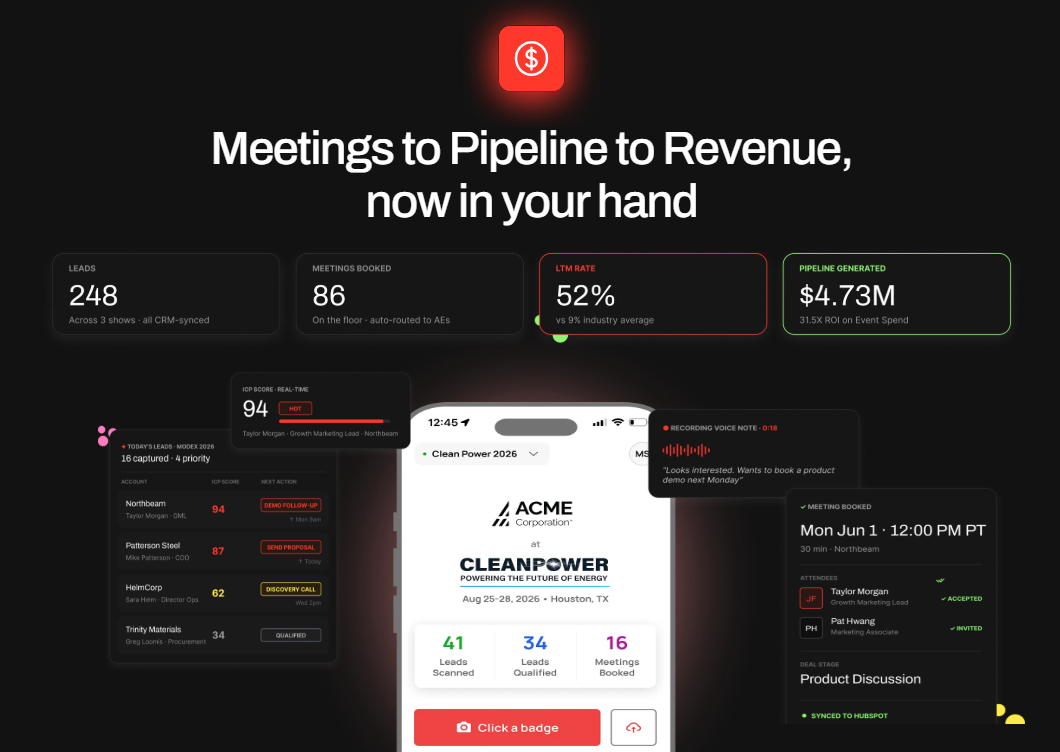
B2Brain is an event lead capture app, not a badge scanner and not "lead retrieval" as an identity. It sits as an offline-to-pipeline layer on top of universal capture. The idea is simple: anything a badge scanner captures, B2Brain captures with context, then books the meeting and writes the CRM record. We built it for booth teams selling into industrial and enterprise markets.
Core Services
- Voice-first capture: tap once, talk for about 30 seconds, get a structured CRM record in roughly 4.2 seconds.
- On-spot meeting booking: pull the AE's live calendar and book the follow-up before the prospect leaves.
- Pre-event briefings grounded in the customer's own CRM pipeline, not a cold prediction database.
- Salesforce-native and HubSpot-native sync (parity), not a one-way CSV import.
- A morning-after offline-to-pipeline report covering pipeline sourced, meetings booked, and attribution.
Key Features
- On-floor capture speed: voice capture targets about 4.2 seconds per record, roughly one-fifth the time of typed notes.
- Offline reliability: built to keep working in hostile expo-hall Wi-Fi and sync on reconnect.
- In-booth meeting booking: dual calendar invite to prospect and the right AE, then syncs to the CRM.
- CRM sync model: native real-time write to Salesforce and HubSpot.
- Pipeline attribution: the owned LTM (Leads-to-Meeting) number, reported per show, booth area, rep, and segment.
- Vertical fit: built for B2B teams at industrial, logistics, and enterprise shows.
Why Companies Consider B2Brain
The buyer math is the honest hook. A roughly $70K booth where the boss wants 10x pipeline means about $700K, and at a 20% close rate that is roughly 2x revenue ROI. To hit that, roughly one in five booth visitors has to become a qualified meeting. A contact list does not get you there; a booked meeting does.
The owned metric is LTM: B2Brain customers report about 52% Leads-to-Meeting on the floor, against an 8% industry average for post-event follow-up. No competitor tracks LTM at all, which is exactly why the budget conversation usually defaults to "badges scanned."
Ideal Customer Profile
- Company running 5 to 15 shows a year, with ACV of $25K and up.
- Verticals: manufacturing, supply chain and logistics, energy, infrastructure, construction.
- Buyer roles: Field/Event Marketing head (champion), VP Sales, RevOps, Founder.
- Stack: Salesforce or HubSpot already in place.
- Booth setup: typically 2 or more reps working the floor.
Pricing
Per-event (Show Pass) and annual (Pipeline plan) options, with first-event terms available. Exact list pricing is not publicly disclosed; ask for the Show Pass and Pipeline plans based on your show count.
When to Shortlist
- You are measured on pipeline and meetings, not lead volume.
- You run multiple shows a year on Salesforce or HubSpot.
- You need pre-event target lists built from your own CRM.
When Not to Shortlist
- You run solo booths or sell consumer-facing products.
- You have no CRM, or attend one-off, developer, or AI-summit events.
- You need a polished digital business card or deep third-party enrichment; that is not the core, and the native app is iOS-first.
Customer Reviews
"The AI Conversation Summarization and Auto-CRM Entry feature is a standout, it's significantly better than other tools we've tried. Reps actually rave about it instead of dreading another sales tool."
Ole O. B2Brain G2 Verified Review (4/5)
"Reporting is basic. We can see usage and lead stats, but there are no rep performance dashboards, no clear ROI reporting like time saved or deals influenced."
Ole O. B2Brain G2 Verified Review (4/5)
I will note the obvious: B2Brain has 17 G2 reviews against Blinq's 8,800-plus. That is a young review wall, and we are running a velocity campaign to fix it. I would rather you judge us on the LTM outcome than the review count.
1.2 iCapture: Best for enterprise teams running 10+ events a year
Overview
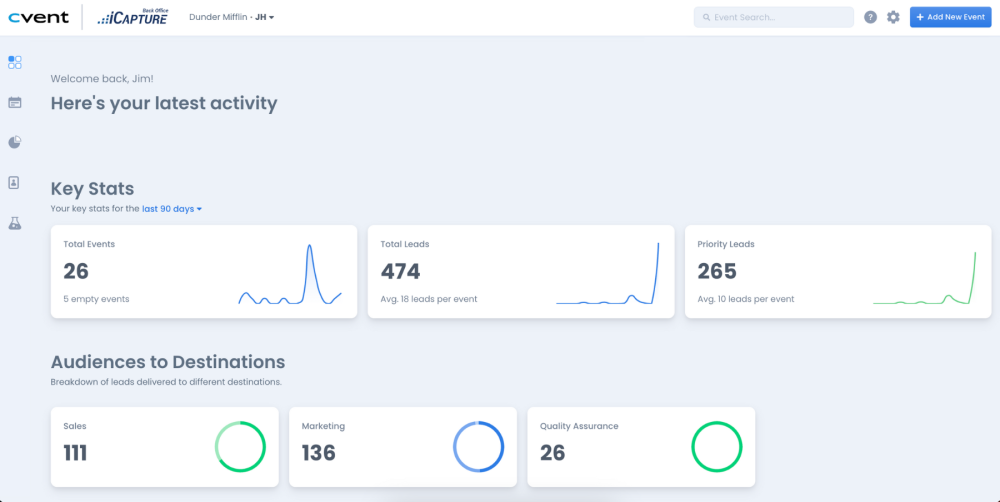
iCapture is a lead capture platform built for larger event programs that run many shows a year. It serves event and marketing teams who want reliable capture across devices plus solid back-office metrics. It sits firmly in the capture-and-report lane, with a strong reputation for "it just works."
Core Services
- Cross-device lead capture at trade shows and hosted events.
- Business card and badge scanning with field mapping.
- Back-office analytics on busiest times, rep activity, and event ROI.
- Lead routing and assignment to reps.
Key Features
- On-floor capture speed: users describe it as seamless and reliable in practice.
- Offline reliability: stable across multiple devices and event types.
- In-booth meeting booking: not a core feature; iCapture centers on capture and metrics.
- CRM sync model: one reviewer notes it "does not natively integrate with our CRM," so check your specific integration path.
- Pipeline attribution: strong event metrics and ROI reporting, though not meeting-based LTM.
Why Companies Consider iCapture
The decision logic is reliability plus accountability. Teams running 10-plus shows a year want one tool that holds up across every booth and gives leadership clean metrics. iCapture is frequently chosen precisely because it removes drama from the floor and produces defensible event numbers.
Ideal Customer Profile
- Mid-market to enterprise event teams.
- 10 or more events a year.
- Buyer role: event marketing operations.
- Needs cross-device reliability and ROI metrics.
Pricing
Buyers commonly report an annual subscription in the ~$8K range, but iCapture does not publicly disclose list pricing. Treat that figure as directional and request a quote.
When to Shortlist
- You run a high volume of events and value reliability above all.
- You need event metrics to grade staff and plan staffing.
- You want a mature, proven capture tool.
When Not to Shortlist
- You need on-floor meeting booking as a core workflow.
- You require guaranteed native CRM sync without verifying the integration first.
Customer Reviews
"We recently used iCapture at an event and it was seamless. It made capturing leads and pushing them into our systems incredibly simple. Easy to use, efficient, and it just works!"
Natalie S. iCapture G2 Verified Review (4/5)
"It does not natively integrate with our CRM."
Mcallaster M. iCapture G2 Verified Review (4.5/5)
1.3 Captello: Best for teams wanting gamification plus capture
Overview
Captello combines lead capture with booth engagement and gamification. It serves marketing teams who want to draw a crowd and collect leads in one platform. It fits the capture-and-engage corner of the category, with a buildable form layer that pushes into a CRM.
Core Services
- Lead capture with customizable, buildable forms.
- Booth gamification and engagement activities.
- CRM import of captured leads.
- Multi-event lead consolidation.
Key Features
- On-floor capture speed: reviewers say it helped them capture leads faster.
- Offline reliability: depends on whether the conference provides an API kit for integration.
- In-booth meeting booking: not a core differentiator; engagement is the headline.
- CRM sync model: imports into the CRM via a buildable form.
- Pricing friction: reviewers flag recurring per-show API/lead-kit costs.
Why Companies Consider Captello
The pull is engagement. If your booth strategy leans on games, contests, and interactive activations to attract foot traffic, Captello bundles that with capture. Teams pick it to combine "get a crowd" and "collect leads" in one stack.
Ideal Customer Profile
- Marketing teams running activation-heavy booths.
- Mid-market to enterprise event programs.
- Buyer role: field/event marketing.
- Multiple shows where engagement drives traffic.
Pricing
Annual platform pricing, plus reviewers report buying an API or lead-scanning kit per show, often cited between $700 and $1,200. Confirm the per-show add-on cost during evaluation.
When to Shortlist
- Booth gamification is central to your strategy.
- You want capture and engagement from one vendor.
When Not to Shortlist
- You need booking-and-pipeline as the core outcome, not engagement.
- Per-show API kit fees would break your cost model across a season.
Customer Reviews
"Every time we have a show with lead scanning, I have to purchase an API kit that costs between 700-1200. It's become costly."
Rebecca-Grace K. Captello G2 Verified Review (4/5)
"It does not always work with every conference, if the conference does not provide and API kit for integration."
Verified User in Consulting Captello G2 Verified Review (3.5/5)
1.4 Popl: Best for reps wanting a digital card with capture
Overview
Popl started as a digital business card and added event lead capture more recently. It serves individual reps and teams who want to share contact details by tap or QR, with capture attached. It sits in the capture-and-enrich tier, but its center of gravity is still the digital card.
Core Services
- Digital business card sharing (tap or QR).
- QR-based lead capture forms.
- Contact enrichment and team management.
- CRM export.
Key Features
- On-floor capture speed: the QR lead-capture form is the most-praised piece.
- Offline reliability: not clearly disclosed; the flow depends on the recipient acting at the point of contact.
- In-booth meeting booking: bolted on, not the core design.
- CRM sync model: export-based; reviewers describe friction.
- Friction point: multiple reviewers dislike that recipients are pushed toward creating a Popl account, plus notification spam.
Why Companies Consider Popl
The appeal is the rep-side card. For sellers who network constantly, a slick digital card that doubles as a capture tool feels efficient. Teams adopt it to kill paper cards first and capture leads second.
Ideal Customer Profile
- Individual reps and small sales teams.
- Heavy networkers who want a digital card.
- Buyer role: individual seller or SMB sales lead.
Pricing
Seat-based annual subscription. Reviewers cite figures around $140/year for individual use and flag the cost as high for what is largely a card-sharing app.
When to Shortlist
- A digital business card is your primary need.
- You want light QR lead capture attached to that card.
When Not to Shortlist
- You need badge barcode scanning that reliably returns contact info.
- You want a frictionless flow that does not push recipients to make an account.
Customer Reviews
"I didn't really use Popl because it didn't scan bar codes like I thought it would. Scanning badges should have given the name and contact info, but it didn't work when I tried it."
Drew D. Popl G2 Verified Review (0.5/5)
"I HATE the notification spam. I get push, email, AND a text when I scan a popl card. Why!?"
Verified User in Real Estate Popl G2 Verified Review (1/5)
1.5 Momencio: Best for marketers wanting microsite follow-up
Overview
Momencio is an event lead capture and engagement tool built around post-capture follow-up. It serves marketers who present at events and want to turn an interaction into a tracked, nurtured lead. Its signature is the LiveMicrosite, a personalized asset the prospect gets after capture, paired with automated follow-up email.
Core Services
- Business card and badge capture with auto follow-up email.
- LiveMicrosite, a personalized content page per lead.
- CRM integration for captured leads.
- Engagement analytics on content the lead opened.
Key Features
- On-floor capture speed: reviewers praise effortless card capture, though some flag slow logins and SSO issues.
- Offline reliability: not clearly stated in available sources.
- In-booth meeting booking: not the core; the headline is microsite-and-nurture.
- CRM sync model: integrates with CRMs; reviewers report a smooth connection.
- Pipeline attribution: content engagement signals, not meeting-based LTM.
Why Companies Consider Momencio
The pull is the after-show. If your weak point is follow-up, the automated email plus a content microsite gives each lead a reason to re-engage. Teams replacing a "clunky incumbent" pick Momencio specifically for that nurture layer plus CRM fit.
Ideal Customer Profile
- Marketing teams that present at events and run booths.
- Content-rich sellers who can feed a microsite.
- Buyer role: Head of Marketing or field marketing.
Pricing
Subscription model; pricing is not publicly disclosed. Request a quote based on seats and event volume.
When to Shortlist
- Post-event follow-up and content nurture are your biggest gaps.
- You want engagement analytics on what each lead opened.
When Not to Shortlist
- You need the meeting booked on the floor, not nurtured later.
- You need confirmed offline reliability for a hostile expo hall.
Customer Reviews
"We were on the market for a lead acquisition software to replace our clunky incumbent solution. After reviewing the market we found that Momencio fit our needs perfectly in terms of CRM integration and capabilities."
Martin D. Momencio G2 Verified Review (5/5)
"Logins are a little slow, and the single sign on does not work, it requires syncing on the mobile app."
Jia Li T. Momencio G2 Verified Review (4/5)
1.6 Blinq: Best for individuals wanting a polished digital card
Overview
Blinq is a digital business card platform with relationship-intelligence features. It serves individuals and teams who want a clean, branded way to share contact details. It holds the strongest social-proof wall in the category, sitting at #1 on G2 with 8,800-plus reviews. Its core identity is the card, not booth lead retrieval.
Core Services
- Digital business card sharing via QR and link.
- Contact and team management.
- Social and CRM integrations.
- Lead-capture forms.
Key Features
- On-floor capture speed: depends on the recipient scanning a QR and often filling a form.
- Offline reliability: reviewers report QR and barcode failures in poor connectivity.
- In-booth meeting booking: not a feature; this is a card tool.
- CRM sync model: integrations exist; backend admin is described as buggy by some.
- Retrieval gap: several reviewers say leads scatter into phone contacts, hard to find after a show.
Why Companies Consider Blinq
The appeal is polish and ubiquity. For one-to-one networking, Blinq looks great and is easy to hand out. The huge review base reassures buyers who weigh social proof heavily.
Ideal Customer Profile
- Individuals and small teams.
- Networking-led sellers wanting a branded card.
- Buyer role: individual professional or SMB.
Pricing
Freemium with paid tiers. Confirm the team-plan cost during evaluation.
When to Shortlist
- A polished, reliable-looking digital card is the priority.
- You network one-to-one more than you run booths.
When Not to Shortlist
- You need post-show lead organization for follow-up, not contacts buried in your phone.
- You need reliable scanning when expo Wi-Fi is weak.
Customer Reviews
"When you do share your info, it saves the person's business card as contact info in their phone. This makes it tough to find again after a big tradeshow, event, etc. With Blinq, all the follow ups are just in your sea of contacts."
Madison Z. Blinq G2 Verified Review (2/5)
"It doesn't always work reliably when scanning the barcode, especially in places with poor internet connectivity. This has made it necessary for me to consider purchasing printed business cards as a backup."
Kasha A. Blinq G2 Verified Review (1.5/5)
I will be fair here. Blinq's 8,800-plus reviews dwarf B2Brain's 17. But the reviews themselves show the structural point: a digital card optimizes sharing your info, not capturing theirs with context and turning it into a meeting.
1.7 BoothIQ: Best for exhibitors centering on booked meetings
Overview
BoothIQ is a meeting-booking challenger built for exhibitors who want the follow-up meeting scheduled at the booth, not chased later. It sits in the capture-to-meeting tier alongside B2Brain and BoothMaven. The pitch is straightforward: turn a booth conversation into a calendar slot before the prospect walks away.
Core Services
- Lead capture at the booth.
- In-booth meeting scheduling.
- Lead organization and follow-up.
- CRM hand-off.
Key Features
- On-floor capture speed: capture plus scheduling in one flow.
- Offline reliability: not publicly disclosed; verify before a Wi-Fi-hostile show.
- In-booth meeting booking: this is the core differentiator.
- CRM sync model: not clearly stated in available sources; confirm native versus export.
- Pipeline attribution: booking-centric; LTM-style reporting is not a stated feature.
Why Companies Consider BoothIQ
The logic is conversion at the moment of intent. A meeting booked on the floor converts far better than a lead emailed three days later. Teams that grade reps on meetings booked, not badges scanned, look at BoothIQ for exactly this.
This is also where the honest objection lives. Booking-as-a-feature is being commoditized, and I expect buyers to ask, "BoothIQ also books meetings, so what's different about B2Brain?" The fair answer is not the booking button. It is whether the tool also carries a CRM-grounded pre-event briefing, a shared Before/During/After layer, and an owned LTM number, rather than just the scheduling step. That is exactly where our offline-to-pipeline approach separates from a standalone scheduler.
Ideal Customer Profile
- Exhibitors prioritizing booked meetings.
- B2B teams with AEs whose calendars can be booked live.
- Buyer role: VP Sales or field marketing.
Pricing
Pricing is not publicly disclosed. Request a quote and clarify per-event versus annual terms.
When to Shortlist
- On-floor meeting booking is your single most important outcome.
- You want a tool purpose-built for scheduling, not a card.
When Not to Shortlist
- You need pre-event CRM-grounded briefings and post-event pipeline attribution as one layer.
- You require confirmed native CRM sync and offline reliability before committing.
Customer Reviews
No verified customer reviews were available in the provided source set for this provider.
1.8 Mobly: Best for sales teams wanting AI enrichment and voice notes
Overview
Mobly is an AI-powered event lead capture tool that scans badges and business cards, then enriches the data and pushes it to the CRM. It serves sales teams who want richer records than a bare scan, with voice notes to add context. It sits in the capture-and-enrich tier, with Salesforce as a common target.
Core Services
- Badge and business card scanning, plus manual name/company entry.
- AI enrichment of captured contacts.
- Voice notes on a lead.
- Salesforce and CRM push.
Key Features
- On-floor capture speed: users like the clean interface, but several report sync hiccups.
- Offline reliability: reviewers flag Wi-Fi-dependent sync that can drop scanned leads.
- In-booth meeting booking: not a core feature; enrichment is the headline.
- CRM sync model: Salesforce push, with some reviewers reporting difficult setup.
- Cost note: per-match contact enrichment cost is flagged as high by users.
Why Companies Consider Mobly
The draw is richer records with less typing. The voice-notes feature lets a rep capture context fast, and AI enrichment fills the gaps. For teams tired of bare badge data, that is a real upgrade over a legacy scanner.
Ideal Customer Profile
- B2B sales teams on Salesforce.
- Teams wanting enriched contact records from events.
- Buyer role: sales operations or field sales.
Pricing
Subscription plus a per-match contact enrichment cost; reviewers describe the match cost as high. Confirm the match-pricing model before committing.
When to Shortlist
- You want AI enrichment and quick voice notes on each lead.
- Richer contact records are your main goal.
When Not to Shortlist
- You need rock-solid offline sync; reviewers report finicky behavior.
- You need on-floor meeting booking and per-show pipeline reporting.
Customer Reviews
"Sometimes Mobly can be finicky, where it doesn't sync all the leads I've scanned... without those leads that I scanned but apparently didn't go through, we end up with a lot fewer than we expected."
Verified User in Events Services Mobly G2 Verified Review (3.5/5)
"It was challenging to get it to sync with Salesforce... The cost of matches per contact, I think, is kinda high."
Ece K. Mobly G2 Verified Review (4/5)
1.9 Cvent LeadCapture: Best for teams on the Cvent stack
Overview
Cvent LeadCapture is the lead-retrieval layer inside the broader Cvent event-management ecosystem. It serves teams already standardized on Cvent who want capture to live inside the same stack. Note that the organizer-rented scanner is the displacement reference for this whole guide; Cvent LeadCapture is the SaaS product version of that lane.
Core Services
- Badge scanning and lead capture at events.
- Qualifying questions and lead ratings.
- Integration with the Cvent event platform.
- Lead export to CRM.
Key Features
- On-floor capture speed: standard badge capture with qualifiers.
- Offline reliability: not clearly stated in available sources.
- In-booth meeting booking: not a core feature; this lane ends closer to the contact list.
- CRM sync model: export-oriented within the Cvent ecosystem.
- Pipeline attribution: event-level metrics, not meeting-based LTM.
Why Companies Consider Cvent LeadCapture
The logic is stack consolidation. If you already run registration, badges, and event management on Cvent, keeping capture in-house is the path of least resistance. The decision is usually "we already pay Cvent," not "this is the best capture tool."
Ideal Customer Profile
- Enterprise teams standardized on Cvent.
- Event-ops led buyers.
- Programs where the organizer relationship already runs through Cvent.
Pricing
Typically a per-device rental or license inside a Cvent agreement; the organizer per-device rental reference point is roughly $600 per device per show. Confirm your specific terms with Cvent.
When to Shortlist
- You already run the Cvent stack and want one vendor.
- Your need ends at capture plus event metrics.
When Not to Shortlist
- You want on-floor meeting booking and per-show pipeline as the core outcome.
- You do not already live inside Cvent and would buy it only for capture.
Customer Reviews
No verified customer reviews were available in the provided source set for this provider.
1.10 BoothMaven: Best for booths built around scheduled meetings
Overview
BoothMaven is a meeting-first booth tool in the capture-to-meeting tier. It serves exhibitors who organize the entire booth experience around scheduled conversations rather than walk-up scans. The design assumes the meeting is the unit of value, not the badge.
Core Services
- Booth meeting scheduling.
- Lead capture tied to meetings.
- Follow-up coordination.
- CRM hand-off.
Key Features
- On-floor capture speed: centered on booking rather than raw scan throughput.
- Offline reliability: not publicly disclosed.
- In-booth meeting booking: the core design choice.
- CRM sync model: not clearly stated in available sources; confirm native versus export.
- Pipeline attribution: meeting-centric; LTM-style reporting is not a stated feature.
Why Companies Consider BoothMaven
The logic mirrors BoothIQ: if meetings are the outcome you measure, a meeting-first tool fits the mental model. Teams that already think in booked slots rather than scanned badges find this natural.
The same honest caveat applies. A booking-first tool ships the scheduling step well, but buyers should check whether it also carries the pre-event CRM-grounded briefing and the post-event pipeline report on one shared layer, or just the booking itself.
Ideal Customer Profile
- Exhibitors running a meeting-driven booth.
- B2B teams with structured pre-booked agendas.
- Buyer role: field marketing or VP Sales.
Pricing
Pricing is not publicly disclosed. Request a quote and clarify the structure.
When to Shortlist
- Your booth strategy is built around scheduled meetings.
- You want scheduling as the central workflow.
When Not to Shortlist
- You need the full Before/During/After layer with CRM-grounded briefings and LTM reporting.
- You need confirmed offline reliability and native CRM sync.
Customer Reviews
No verified customer reviews were available in the provided source set for this provider.
How We Evaluated These Providers
- Primary sources consulted: provider documentation and self-claims, the "B2Brain Competitor Reviews" file, and verified G2 reviews with exact URLs. Industry benchmarks (CEIR, lead-decay data) are flagged for primary-source verification before publication.
- Criteria selected and why: on-floor capture speed, offline reliability, in-booth meeting booking, CRM sync model, pipeline attribution, vertical fit, and pricing shape, because these are the factors that decide whether a sunk booth spend turns into pipeline.
- Criteria de-prioritized: raw scan-count benchmarks and review-count totals, which reward vanity metrics over the booked-meeting outcome.
- Data gaps: no verified reviews were available in the provided source set for BoothIQ, Cvent LeadCapture, or BoothMaven; their feature claims should be confirmed directly with each vendor.
- B2Brain's own gaps, stated honestly: the native app is iOS-first, third-party enrichment depth is lighter than Popl, Mobly, or Momencio, and there is no digital business card. The review wall is also young at 17, against Blinq's 8,800-plus.
Which Provider Should You Shortlist?
- The field marketer who must prove per-show pipeline to the CMO: shortlist a capture-to-meeting tool with LTM reporting, such as B2Brain, over a capture-only scanner.
- The VP Sales whose reps get paid on meetings booked: test the meeting-booking tier (B2Brain, BoothIQ, BoothMaven) and grade on booked-meeting rate.
- The founder taking a 5-rep booth to a first MODEX: start with a per-event option you can run without IT, and confirm native Salesforce or HubSpot sync.
- The RevOps lead burned by a tool whose CRM sync silently broke: prioritize native real-time sync and dedup; pressure-test the integration before signing (the Mobly and iCapture reviews show why).
- The team that wants a polished digital card for one-to-one networking: Blinq or Popl fit that job, though neither is built for booth pipeline.
- The team that just needs the cheapest scanner for a one-off booth: the organizer's rented scanner or a free app is enough; do not over-buy.
If you run 5 to 15 shows a year and want to see what gets captured on the floor turn into a booked meeting, the fastest way to judge it is on your own show. Book a Demo and bring one upcoming event to pressure-test the workflow.
Q2: How Do App-Based Badge Scanners Actually Work Anywhere, Even Offline? [toc=2. How They Work Anywhere]
App-based badge scanners read the badge's QR code or barcode, or use on-device OCR (the phone reading printed text) to capture a name and company when there's no code. The best ones work offline. They queue captures locally and sync once Wi-Fi returns. That's why they work anywhere: a 2pm-day-two booth with dead Wi-Fi won't lose your leads, and you need no rented device.
📲 What a Badge Scanner Actually Reads
A conference badge scanner is an app that turns any phone into a lead-capture device. It pulls contact details off the badge in one of three ways.
- QR code: a square pattern holding the attendee's record. The app reads it and fills the fields.
- Barcode: an older stripe format. Same idea, less data, still common on legacy floors.
- On-device OCR: when there's no code, the phone reads the printed name and company like a camera reading a sign.
That third method is why "works anywhere" is even possible. NexaLink reports its on-device OCR captures a badge in about 1.2 seconds at 97% plus accuracy, with no code required.
⏰ The 4-Step Capture Loop
Here's the loop a good app runs, start to finish.
- Point the phone at the badge and capture the QR, barcode, or printed text.
- Add a note or score the lead hot, warm, or cold while the memory is fresh.
- Queue the record locally if the Wi-Fi is dead.
- Sync to the CRM (your customer database) the moment a signal returns.
ATIV's EventPilot lead-retrieval app is built around that offline queue, capturing leads with no connection and syncing later. That offline step is not a nice-to-have. It is the whole game, and it is the foundation of what gets captured on the floor.
⚠️ The Rush-Hour Test Nobody Demos
Every app looks fast in a quiet sales demo. The real test is 2pm on day two, when a line forms at your booth and the hall Wi-Fi buckles under ten thousand phones.
If the app hesitates for even three seconds, the rep gives up. I've watched this happen. The rep starts snapping phone photos of badges instead, promising to type it in later.
Later never comes clean. The human brain decides in about seven seconds whether something is worth attention, and that conversation context fades almost as fast. A photo of a badge saves the name and loses the reason you talked.
✅ Why Offline-First Is a Non-Negotiable Filter
So when you shortlist, two filters matter more than flashy features.
- Sub-5-second capture, tested under load, not in a quiet room.
- True offline-first, where leads queue locally and sync on reconnect.
We built B2Brain to clear both bars. Capture works offline in hostile expo-hall Wi-Fi, and the record syncs to Salesforce or HubSpot once you reconnect. A "Recent Leads" view fixes the rush-hour problem directly: scan now, add the context a moment later, before the memory decays. You can see how event lead capture works across the full flow.
Here's the honest caveat. The standard read says OCR accuracy is the spec that matters. From what surfaces when you actually run a booth, the spec that matters is whether the rep trusts the app enough to not reach for the camera. Speed and offline reliability earn that trust. Accuracy alone doesn't.
Q3: How Did We Score These Apps, and Why Doesn't the Organizer's Scanner Make the List? [toc=3. Scoring and the Organizer Scanner]
Every app here is scored on seven criteria: on-floor capture speed, offline reliability, in-booth meeting booking, CRM sync model (native real-time versus CSV import), pipeline attribution, vertical fit, and pricing shape. The organizer's rented scanner, roughly $600 per device per show, isn't a peer app. It hands you a delayed contact-list file and charges you to reach your own leads. It's the thing these apps replace.
📋 The Seven Criteria, and Why Speed Alone Is a Vanity Filter
Most buyers compare badge scanners on scan speed and stop there. That's how you end up with a fast tool that still produces a contact list nobody acts on. Speed gets you the contact. The other six criteria decide whether that contact becomes pipeline.
💸 Why the Organizer's Scanner Is a Reference, Not a Rival
The rented badge scanner is the default most teams start with. It costs around $600 per device per show, and it saves a contact. Then the workflow ends at a CSV the organizer sends days later.
Convention economics explain the gap. Organizers make money by charging for basics, and lead data is one of them. You pay to rent a device that accesses your own leads, then wait for a file.
There's a structural delay underneath, too. The lead often passes through a broker, then another handler, before it reaches you. That's why so many lists get acted on three months later, when the buyer has forgotten the conversation entirely. Moving from that file to offline to pipeline is the whole point of the newer tools.
"Trade show ROI is basically zero for us, we scan a ton of badges and almost none of it converts."
u/[deleted], r/b2bmarketing Reddit Thread
I treat it as the displacement target, not a ranked entry. This is a displacement sale, not a SaaS bake-off.
⭐ The Real Scoring Lens: Leads-to-Meeting
Here's the reframe. Stop scoring on leads scanned, which is a vanity number. Score on Leads-to-Meeting, or LTM: booked meetings divided by qualified scans.
That single ratio tells you whether a tool moves the pipeline or just fills a box. The best booth reps already think this way. They score each scan hot, warm, or cold in the moment, so qualification is done before they walk away.
At B2Brain we coined LTM as our north-star metric, and we see 52% on the floor against an 8% industry average for post-event follow-up. Use it as a benchmark to judge any tool on this list, not just ours, and see how the booth-day workflow produces it. A number means nothing without a comparison, which is exactly why "52% versus 8%" matters more than "52%" alone.
Q4: Capture-Only or Capture-Plus-Enrich, Which Tier Fits, and Where Does Each Hit a Ceiling? [toc=4. Capture and Enrich Tiers]
Capture-only tools (Cvent LeadCapture, basic iCapture, free organizer apps) reliably read a badge and hand you a CSV. That's fine for one show a year with manual follow-up. Capture-plus-enrich apps (Popl, Mobly, Blinq) auto-fill email, title, and LinkedIn, fixing data completeness. Neither fixes data decay: a perfectly enriched lead emailed three days late still lands in the graveyard.
📦 Tier One: Capture-and-Export, and Where It Stops
The capture-only tier does one thing well. It reads the badge and gives you a clean file. For a small team at a single show, with no CRM and time to follow up by hand, that can genuinely be enough.
The ceiling shows up fast for anyone doing more. There's no scoring, no booking, and weak attribution. The leads sit in a CSV waiting for a manual import, and the conversation context is already gone.
"It does not natively integrate with our CRM."
Mcallaster M. iCapture G2 Verified Review
One operator put the broader problem bluntly: the badge scan collects leads for the organizer and does little for you. That's harsh, but from the booth floor, it's often true.
🔗 Tier Two: Enrichment Fixes Completeness, Not Decay
The capture-plus-enrich tier is smarter. Scan a name and company, and the tool fills in email, title, and LinkedIn automatically. For a rep walking the floor, that's a real time-saver, and Mobly's voice-notes feature adds useful context.
But enrichment solves the wrong half of the problem. It makes the record complete. It does not slow the decay clock or guarantee CRM hygiene (clean, deduplicated data).
"We really like the voice notes feature because when you're short on time between talking to people, it's very easy to get information on a lead."
Ece K. Mobly G2 Verified Review
"Sometimes Mobly can be finicky, where it doesn't sync all the leads I've scanned, we end up with a lot fewer than we expected."
Verified User in Events Services Mobly G2 Verified Review
When multiple reps scan the same person, you also get duplicates to clean later. Mobly reviewers flag exactly that. And these tools target the rep, not the field marketer who funds the booth and must show pipeline.
⏰ The Decay Clock Both Tiers Ignore
Here's the number that reframes both tiers. Lead conversion runs roughly 85% within the first two hours and collapses to about 9% after a week.
So the question isn't "did I capture the lead?" It's "did I act while the lead was still warm?" A booth visitor who gets a personal email within fifteen minutes still remembers your conversation. The same email three days later lands cold.
✅ What Actually Converts: Enrichment Plus Same-Day Action
The combination that works is enrichment plus immediate, context-grounded follow-up. Complete the record, yes, but fire the next step while the memory is fresh.
That's the line B2Brain sits on. We capture with context by voice, dedup smartly when multiple reps scan one person, and draft the follow-up grounded in what was actually said at the booth, ready to send same-day. Anything a scanner captures, we capture with context, then move it toward a booked meeting through the three-motion workflow.
I'll be honest about our gaps here. Our third-party enrichment depth is lighter than Popl, Mobly, or Momencio, the native app is iOS-only, and we don't offer a digital business card. If pure enrichment volume is your only need, those tools enrich more fields. To weigh the trade-off against cost, compare the Show Pass and Pipeline plans before you decide. The next tier, booking the meeting on the floor, is where the real pipeline gap closes, and you can Book a Demo to see it run.
Q5: Which Apps Book the Meeting at the Booth, and Why Does On-Floor Booking Change the Math? [toc=5. In-Booth Meeting Booking]
A handful of apps, including B2Brain, BoothIQ, BoothMaven, Zuddl, and Captello's field module, let a rep send a calendar invite while the prospect is still at the booth. That matters because a meeting booked on the floor converts far better than a lead chased days later. It also collapses the post-show SDR triage that loses momentum. Booking is the structural escape from the CSV.
🎯 Why Booking Beats the Chase
A scan saves a contact. A booked meeting saves the deal. That's the whole difference between the tiers below and the ones above.
When you book on the floor, you skip the part where a sales development rep (the SDR who chases new leads) sorts 500 cold names a week later. The momentum is already there. You captured the prospect at the exact moment they cared.
There's a contrarian edge to this, too. The best booth leads often come in the last forty minutes of a show, when every other vendor has packed up. Some attendees only reach the expo hall as it's closing, and a booked slot beats a "let's connect later" every time.
💰 The Booth-Cost-to-Pipeline Math
Here's the math that should drive the decision. Say your booth costs around $70,000 all-in. Your boss wants 10x that in pipeline, so $700,000, which at a 20% close rate returns roughly 2x in revenue.
To hit a $1M pipeline target, the chain looks like this:
- About 50 opportunities to create that pipeline.
- About 180 discovery calls to produce those opportunities.
- So roughly 1 in 5 qualified booth visitors must become a booked meeting.
Cost-per-head at a show runs about $300 to $450 once you add travel. When each booth conversation costs that much, "I'll email them next week" is a budget leak. Booking on the floor is how you protect the spend, and it is the core of offline to pipeline.
⭐ Booking as a Core Workflow, Not a Bolt-On
Not all booking is built the same. Some tools added a calendar feature on top of capture. Others were designed around the booked meeting from the start.
At B2Brain, the workflow is scan, add context, then execute the next-best action, which today is usually booking the meeting. The app pulls the account executive's (AE's) live calendar, books a 30-minute follow-up, and sends a dual invite to both the prospect and the right AE, syncing to Salesforce or HubSpot. See the booth-day workflow for how it runs in practice.
I expect the fair pushback: "BoothIQ also books meetings, so what's different?" Honestly, the booking click itself is becoming commoditized. The durable edge is what sits underneath it: a shared before, during, and after the show intelligence layer, pre-event briefings grounded in your own CRM pipeline, and a measured 52% Leads-to-Meeting rate on the floor versus an 8% industry average post-event. That last number is the proof, not the feature.
Q6: How Do These Apps Prove Trade-Show ROI to a CFO Who Only Sees a Contact List? [toc=6. Proving Pipeline ROI]
Most badge scanners stop at "leads captured," which no CFO accepts as ROI. To prove a show paid off, you need per-show pipeline attribution: meetings booked, opportunities created, and deals influenced, all tied back to the event in your CRM. The Leads-to-Meeting (LTM) rate, booked meetings divided by qualified scans, is the metric that reframes the budget conversation.
📊 "We Scanned 500 Badges" Is Not a Pipeline Number
Picture the Monday after the show. The CEO asks the field marketer one question: where is the pipeline? A stack of 500 contacts is not an answer.
The reason this hurts is structural. Most tools end at the contact, so the field marketer who funded a $36,000 booth has activity to report, not outcomes. Contact information is not where anything happens. Pipeline is where the buyer's world actually moves.
⚠️ Native Attribution Versus CSV-Only
The gap between tools shows up exactly here. A CSV-only tool gives you a file. You then stitch it to the CRM by hand, hoping nothing breaks.
That stitching is where ROI dies. One operator described the mess plainly: the systems didn't talk to each other, the CRM was a mess, and the data arrived broken. A 2025 CEIR report found only about 47% of exhibitors track leads through the sales cycle, which means more than half simply can't answer the CFO.
The fix is attribution built into capture, not bolted on later. The reporting artifact should show pipeline sourced, meetings booked, and influence, broken down by show, booth area, rep, and segment. That is what teams use to generate new pipeline from events they can defend.
✅ From "Did This Show Work?" to "Which Shows Repeat?"
This is the section where B2Brain competes hardest on attribution, not booking. We produce a morning-after offline-to-pipeline report, in the CMO's inbox by 9am, that the field marketer brings straight to the budget review.
It answers the real questions:
- How much pipeline did this show source?
- What was the LTM rate, meetings divided by qualified scans?
- Which booth area, rep, or segment performed?
One honest caveat: with enterprise cycles of three months to a year, never claim closed revenue from a single event. Claim meetings booked and pipeline sourced. Owning LTM as a tracked number is the move that turns a vanity scan count into a budget the CFO renews, and it shifts the yearly question from "did this show work?" to "which shows should we repeat?" If you want to see the reporting layer, Book a Demo.
Q7: Which Badge Scanner App Is Right for Your Show Schedule, Stack, and Budget? [toc=7. Choosing Your App]
Match the tool to your schedule and stack. One show a year with no CRM? A free organizer app is enough. A 5-to-15-show B2B team on Salesforce or HubSpot, measured on pipeline? Choose an app that books meetings on the floor and proves per-show pipeline. Weigh cost per booked meeting, not cost per scan, against the roughly $600-per-device organizer rental.
💸 The Pricing Reality Check
Price the outcome, not the scan. A cheap scanner that produces a dead CSV costs you the whole booth spend in lost pipeline.
Pricing here is named by structure, with figures only where verified by reviews or vendor materials. To compare against the rental anchor, check the Show Pass and Pipeline plans.
🎯 Match the Tool to the Scenario
Pick by who you are, not by feature count.
- Single show, no CRM, manual follow-up: a free organizer app or the rented scanner is genuinely enough. Don't overbuy.
- A 5-to-15-show B2B team on Salesforce or HubSpot, paid on pipeline: shortlist an on-floor booking app like B2Brain and pilot it at one show.
- Manufacturing, logistics, or energy verticals with technical buyers: prioritize vertical fit and offline reliability on a hostile floor.
- An individual rep who networks heavily: a digital card like Popl or Blinq fits that job better than a pipeline tool.
"Mobly was a breath of fresh air compared to conference scanners! I was able to not have to put notes into a spreadsheet."
Will N. Mobly G2 Verified Review
❌ When B2Brain Is the Wrong Pick
Operator honesty matters more than a sale here. B2Brain is not the right tool for solo booths, consumer-facing sellers, no-CRM teams, one-off attendance, or developer and AI-summit events. If that's you, the organizer scanner wins on cost.
The real gaps are worth naming, too. Our native app is iOS-only, our third-party enrichment depth is lighter than Popl, Mobly, or Momencio, and we don't offer a digital business card. For teams that do fit, see how what gets captured on the floor turns into pipeline.
⏰ The One Habit That Beats Any Tool
Whatever you choose, the discipline matters more than the app. Organize and act on your contacts within 48 hours, before the memory fades. As one operator put it, do it before you go out that night, because your brain will lose the context by morning.
And don't ghost. The instinct to "give them a few days to settle in" is exactly backward; the warm window closes fast.
Here's the question I'm sitting with as you head into your next season. If you booked even one in five booth conversations into a real meeting on the floor, would your QBR change from a contact count to a pipeline number? If that's the gap you want to close, test the workflow at one show and watch the LTM rate, not the scan count.
FAQ's
What is a conference badge scanner and how does it work?
A conference badge scanner is an app that turns any phone into a lead-capture device. It reads contact details off an attendee badge in one of three ways.
- QR code: a square pattern holding the attendee record, read in one tap.
- Barcode: an older stripe format, still common on legacy floors.
- On-device OCR: the phone reads the printed name and company when there is no code.
The capture loop is simple: point, capture, add a note or score the lead, then sync to your CRM. The best scanners queue captures locally and sync once Wi-Fi returns, which is why they work anywhere.
We built our capture to clear two bars: sub-5-second speed and true offline-first reliability. You can see how event lead capture works across the full flow, including the context layer that a bare scan misses.
Do conference badge scanners work offline at a busy show?
Yes, the good ones do, and offline reliability should be a non-negotiable filter. Hall Wi-Fi buckles under thousands of phones, usually right at 2pm on day two when your booth line is longest.
An offline-first scanner queues each capture on the device and syncs the moment a signal returns. Without that, leads vanish or double-enter, and reps revert to snapping badge photos that lose the conversation context.
Here is the operator truth we have lived: speed claims get demoed in quiet rooms, not at rush hour. If the app hesitates for even three seconds, the rep gives up on it.
- Test capture under load, not in a calm demo.
- Confirm leads queue locally and sync on reconnect.
- Check that context, not just the badge, is saved.
Our capture works in hostile expo-hall Wi-Fi and syncs to Salesforce or HubSpot on reconnect. See what gets captured on the floor so nothing slips during the rush.
Is the organizer's rented badge scanner worth it, or should I use an app?
For one show a year with no CRM and manual follow-up, the rented scanner can be enough. For a team measured on pipeline, it rarely is.
The organizer's device costs roughly $600 per device per show, and the workflow ends at a CSV the organizer sends days later. You pay to rent a device that accesses your own leads, then wait for a file.
There is a structural delay underneath, too. The lead often passes through a broker before it reaches you, which is why so many lists get acted on three months later, when the buyer has forgotten the conversation.
- Rental: saves a contact, ends at a delayed CSV.
- App-based scanner: adds context, scoring, and CRM sync.
- Pipeline-grade tool: books the meeting on the floor.
We treat the rental as the thing we replace, not a rival. To move from a file to offline to pipeline, you need capture, context, and a booked meeting on one layer.
Which conference badge scanner can book meetings and prove trade-show ROI?
Most scanners stop at leads captured, which no CFO accepts as ROI. To prove a show paid off, you need per-show pipeline attribution: meetings booked, opportunities created, and deals influenced, all tied to the event in your CRM.
A handful of apps let a rep send a calendar invite while the prospect is still at the booth. A meeting booked on the floor converts far better than a lead chased days later, and it skips the post-show triage that loses momentum.
The metric that reframes the budget conversation is Leads-to-Meeting, or LTM, which is booked meetings divided by qualified scans. We see 52% on the floor against an 8% industry average post-event, and a number only means something paired with a comparison.
- Book the meeting before the prospect leaves.
- Report pipeline by show, booth area, rep, and segment.
- Never claim closed revenue from one event; claim meetings and pipeline.
See how the booth-day workflow turns a scan into a booked meeting and a pipeline number.
How do I choose the right conference badge scanner for my budget and stack?
Match the tool to your schedule, stack, and budget, and weigh cost per booked meeting rather than cost per scan.
- One show, no CRM, manual follow-up: a free organizer app or the rental is genuinely enough. Do not overbuy.
- A 5-to-15-show B2B team on Salesforce or HubSpot: choose an app that books meetings on the floor and proves per-show pipeline.
- Manufacturing, supply chain, energy, or construction: prioritize vertical fit and offline reliability on a hostile floor.
- An individual networker: a digital card tool fits better than a pipeline tool.
We are honest about fit. We are not the right pick for solo booths, consumer-facing sellers, no-CRM teams, or one-off attendance, and our native app is iOS-only with lighter enrichment depth than some rivals.
For teams that do fit, compare the Show Pass and Pipeline plans against the rental anchor, and act on contacts within 48 hours before the memory fades.
.png)

.png)
.png)