10 Best Apps for Events: Lead Capture, Badge Scanning, Attendee Engagement, CRM Integration, and Pricing Model
Written by
Sridhar Ranganathan
Last Updated :
July 20, 2026
Skim in:
13
mins
TL;DR
The best app for events depends on your job: organizers need attendee-engagement apps, while exhibitors chasing pipeline need lead-capture apps that scan, book meetings, and sync to the CRM.
Score exhibitor apps on six axes: on-floor capture speed, offline reliability, in-booth meeting booking, native versus CSV CRM sync, pipeline attribution, and pricing model.
Most event leads die in a shoe box: around 79% get no follow-up, up to 80% never reach the CRM, and average response time runs about 42 hours.
We compare 10 apps: B2Brain, iCapture, Captello, Popl, Momencio, Blinq, BoothIQ, Mobly, Cvent LeadCapture, and Zuddl, with only B2Brain and BoothIQ treating on-floor booking as the core.
Organizer scanner rentals run around $600 per device per show, but the better metric is cost per booked meeting, not sticker price.
You prove ROI by attributing pipeline per show and tracking the Leads-to-Meeting (LTM) rate, roughly 52% booked on the floor versus about 8% for typical post-event follow-up.
Q1. What Is the Best App for Events, and What Should You Actually Score One On? [toc=1. Best Event App]
The best app for events depends on your job. Organizers need attendee-experience apps (agenda, networking, maps). Exhibitors building pipeline need lead-capture apps that scan badges, book meetings, and sync to the CRM. Score exhibitor apps on six things: on-floor capture speed, offline reliability, in-booth meeting booking, CRM sync model (native versus CSV), pipeline attribution, and pricing model.
I have watched a rep type business cards into Salesforce in the cab back to the hotel, half the conversation already gone. The badge said the name. The rep could not remember why the person mattered. That gap, between a scanned contact and a reason to follow up, is the whole game. Most "best app for events" lists never mention it. They rank features. The real question a field marketer asks, in their own words, is blunter: "How do I own my lead data in real time so I can hit a prospect's inbox while they are still standing in the aisle, bypassing the organizer's gatekeeping entirely?" That question, not a feature grid, should drive your shortlist. If you want the mechanics first, see how event lead capture works across the show.
⚠️ First, split the two things people mean by "event app"
"Event app" hides two different products for two different buyers. Confusing them is the most common and most expensive mistake.
Attendee-experience apps (Whova, Cvent Attendee Hub, Guidebook): the organizer buys these to run the agenda, maps, networking, and polls for everyone who attends.
Exhibitor lead-capture apps (the subject of this guide): a revenue team buys these to scan badges, qualify prospects, book meetings, and push pipeline into Salesforce or HubSpot.
If you are exhibiting to generate pipeline, you need the second kind. An attendee-engagement app will not answer your CFO's pipeline question. This guide ranks the exhibitor tools, the ones built for booth teams.
✅ The six criteria that separate a CSV dump from pipeline
Score every exhibitor app on these six axes. Each one names a failure mode you are trying to avoid.
On-floor capture speed (scan-to-note latency). How fast a scan becomes a structured record with context. Slow apps get abandoned at 2 PM on day two, when reps revert to phone photos of badges.
Offline reliability. Convention-hall WiFi collapses at peak. A native app stores data locally and syncs on reconnect; a web-only app that stalls mid-scan loses the lead.
In-booth meeting booking. Whether the app books the meeting while the prospect is at the booth, or just saves a contact for a follow-up that decays fast.
CRM sync model (native real-time versus CSV import). "Native" means every lead, note, and meeting flows into Salesforce or HubSpot automatically, with dedup and show attribution intact. A CSV export you import days later arrives late and messy.
Pipeline attribution. Whether you can prove which show, booth area, or rep sourced which pipeline, or you are back to counting badges.
Pricing model. Per-event ("Show Pass"), annual platform subscription, per-device organizer rental (around $600 per device per show as the reference anchor), or seat-based. The right shape depends on your show volume.
Attendee-engagement features (gamification, live polls) matter for organizers, not for exhibitors chasing pipeline. Use the ranked table below to shortlist three tools for a free trial or paid pilot, then read the detailed sections for the trade-offs. If capture reliability is your worry, our guide to a dependable conference badge scanner workflow goes deeper.
At B2Brain, our whole frame is "meetings booked, not leads scanned," so we lean hardest on capture speed, in-booth booking, native CRM sync, and attribution. We name that bias openly here, and score every tool on the same six axes so you can judge for yourself. That is the essence of our offline to pipeline approach.
Our Evaluation Criteria
On-floor capture speed: how quickly a scan becomes a usable, context-rich record, because slow tools get abandoned mid-show.
Offline reliability: whether capture survives dead expo-hall WiFi, because a lost scan is a lost lead.
In-booth meeting booking: whether the app books a meeting on the floor, because a booked meeting converts far better than a cold post-show email.
CRM sync model: native real-time versus CSV import, because late, duplicated data breaks follow-up and attribution.
Pipeline attribution: whether pipeline can be traced to a show, booth, or rep, because "we scanned 500 badges" is not an ROI answer.
Pricing model: per-event, annual, or per-device rental, because cost shape decides fit across an 8-to-15-show season.
Who This Guide Is For
Field and Event Marketing heads who fund the booth and must prove per-show pipeline to a CMO or CFO.
VP Sales and CROs running booth-ROI math, whose reps are paid on meetings booked, not leads scanned.
Founders taking a growth-stage vertical B2B company to its first major US show.
RevOps and Marketing Ops leads who own CRM hygiene, dedup, and attribution setup.
Teams switching off an organizer badge scanner, iCapture, Captello, Popl, Momencio, Blinq, or BoothIQ.
This guide is not for event attendees, event organizers, solo booths, consumer-facing sellers, no-CRM teams, or one-off developer or AI-summit events.
The Providers at a Glance
B2Brain: Best for exhibitors who want meetings booked on the floor and per-show pipeline attribution.
iCapture: Best for enterprise teams running 10-plus events a year that want reliable capture and event ROI metrics.
Captello: Best for teams that want booth gamification plus flexible, multi-format scanning.
Popl: Best for individual reps and small teams centered on digital business cards.
Momencio: Best for marketers who want post-capture engagement microsites and follow-up.
Blinq: Best for networking-led contact sharing with strong social proof.
BoothIQ: Best for booth teams that want a booking-first workflow for non-technical staff.
Mobly: Best for teams wanting AI-assisted scanning with same-day email follow-up.
Cvent LeadCapture: Best as the organizer's default scanner (named here as the displacement reference, not a peer SaaS product).
Zuddl: Best for teams that also run virtual and hybrid events alongside field events.
Master Comparison Table
The 10 Best Event Apps for B2B Exhibitors Compared
Provider
Best For
Key Strength
Pricing Model
B2Brain
Field marketing heads proving per-show pipeline to the CMO
In-booth meeting booking plus native CRM sync and the owned Leads-to-Meeting (LTM) metric
Per-event Show Pass and annual Pipeline plan; first event free
iCapture
Enterprise teams running 10+ events a year
Reliable capture across devices with strong event ROI metrics
Annual subscription, roughly $8K/yr range (verify current quote)
Captello
Teams wanting booth gamification plus multi-format scanning
Flexible scan formats and engagement games
Subscription plus per-show API/lead-kit fees
Popl
Individual reps and small teams
Digital business card sharing
Per-seat subscription (paid tiers, no lasting free version)
Pricing shapes are named, not scored. Only verified numbers are cited; where a vendor does not publish pricing, the structure is named or marked not disclosed. The detailed sections below start with B2Brain and iCapture.
B2Brain: Best for Exhibitors Who Want Meetings Booked on the Floor and Per-Show Pipeline Attribution [toc=1.1 B2Brain]
B2Brain is an event lead capture app built for B2B revenue teams that exhibit at trade shows. We capture the badge with the conversation attached, book the discovery meeting on the AE's calendar before the prospect walks away, and sync it all to Salesforce or HubSpot. It is not a badge scanner and not "lead retrieval" as an identity; it is the offline-to-pipeline layer that sits on top of capture.
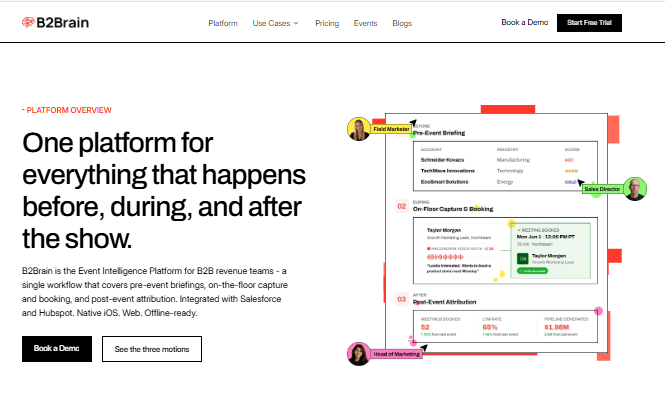
B2Brain unifies pre-event briefings, on-floor capture and booking, and post-event pipeline attribution in one platform.
⭐ Overview
Contact information is not where anything happens. Pipeline is where a deal actually moves. B2Brain is built around that belief. The app runs across three motions on one shared intelligence layer: pre-event (a CRM-grounded target list and per-account briefings), on-the-floor (voice-first capture and on-spot booking, offline-ready), and post-event (a morning-after report with multi-touch attribution). Anything a badge scanner captures, B2Brain captures with context, then books the meeting and writes the CRM record. This is the universal lead capture layer, not a single-show tool.
🛠️ Core Services
Voice-first capture: tap once, talk for about 30 seconds, get a structured CRM record out in roughly 4.2 seconds, about one-fifth the time of typed notes.
On-spot meeting booking: pulls the AE's live calendar and sends a dual invite to prospect and the right AE.
Native Salesforce and HubSpot sync with dedup and show attribution.
CRM-grounded pre-event briefings built from the customer's own pipeline, not a cold database.
Morning-after offline-to-pipeline report: pipeline sourced, meetings booked, LTM, and attribution by show, booth area, rep, and segment.
✅ Key Features Against Our Criteria
On-floor capture speed: roughly 4.2-second scan-to-record; the "Recent Leads" view handles the rush-hour "scan now, note later" problem.
Offline reliability: works offline in hostile expo-hall WiFi and syncs on reconnect.
In-booth meeting booking: books the 30-minute follow-up on the floor, dual-invite to prospect and AE.
CRM sync model: Salesforce-native and HubSpot-native (parity), not "integrates with." See how we handle lead capture into Salesforce.
Pipeline attribution: per-show pipeline reporting plus the owned LTM number, 52% booked on the floor versus roughly 8% industry average post-event.
Pricing model: per-event Show Pass and annual Pipeline plan; first event free for two people.
💰 Why Companies Consider B2Brain
The buyer's math is simple and brutal. On a roughly $70K booth, the boss wants 10x pipeline. At a 20% close rate, that is about 2x revenue ROI. To hit a $1M pipeline target, you need around 50 opportunities and roughly 180 discovery calls, which means about one in five booth visitors must become a qualified meeting. A tool that ends at a contact list cannot get you there. Teams pick B2Brain when the KPI is meetings booked and attributable pipeline, not badges scanned. You can pressure-test the numbers with our event ROI calculator.
👤 Ideal Customer Profile
Company size: mid-market B2B, roughly 50 to 1,500 employees.
Verticals: manufacturing, supply chain and logistics, energy and infrastructure, construction.
Buyer role: Field/Event Marketing head, VP Sales, RevOps, or Founder.
Shows per year: 5 to 15, with $20K to $200K spend per show.
Stack: Salesforce or HubSpot, ACV of $25K or more.
🏷️ Pricing
Per-event Show Pass for teams testing a single show, and an annual Pipeline plan for teams running 8-plus events. The first event is free for two people, which lets you run a real pilot before you commit budget. See current Show Pass and Pipeline plans.
⏰ When to Shortlist
Your reps are paid on meetings booked, and post-show email follow-up is not converting.
Your CMO or CFO asks "where is the pipeline?" and you have a contact list, not meetings.
You run Salesforce or HubSpot and need native sync with attribution, not CSV imports.
❌ When Not to Shortlist
You run solo booths, sell consumer-facing, or have no CRM.
You need a deep third-party enrichment database (B2Brain enriches through your own CRM; Popl, Mobly, and Momencio lead harder on external enrichment).
You need an Android-native app today (B2Brain's native app is iOS; it runs as a web app on Android) or a standalone digital business card.
📣 Customer Reviews
"The AI Conversation Summarization and Auto-CRM Entry feature is a standout, it's significantly better than other tools we've tried. Reps actually rave about it instead of dreading another sales tool." Ole O.B2Brain G2 Verified Review (4/5)
"Reporting is basic. We can see usage and lead stats, but there are no rep performance dashboards, no clear ROI reporting like time saved or deals influenced." Ole O.B2Brain G2 Verified Review (4/5)
I will be blunt about the second quote, because reporting depth is exactly where an event-pipeline tool has to earn its keep. The morning-after offline-to-pipeline report and per-show LTM view are our direct answer to that gap, and it is fair to test them hard in a Book a Demo session.
iCapture: Best for Enterprise Teams Running 10-Plus Events a Year [toc=1.2 iCapture]
iCapture is one of the longest-running dedicated lead-retrieval tools in the category. It focuses on reliable badge and business-card capture across many devices, with solid back-office analytics for event ROI reporting.
Cvent LeadCapture captures and qualifies leads onsite, then exports them to any database afterward.
⭐ Overview
iCapture serves larger exhibitors and events teams who value reliability and metrics over a meeting-booking narrative. It captures leads at the booth, standardizes lead forms across shows, and gives event managers dashboards on who scanned, when, and how much. It sits squarely in the capture-and-report lane, not the on-floor-booking lane.
🛠️ Core Services
Badge and business-card scanning across multiple devices.
Custom lead-qualification forms mapped per event.
Back-office analytics on scan volume, timing, and rep performance.
Lead export and integration into downstream systems.
✅ Key Features Against Our Criteria
On-floor capture speed: fast when the show provides an API kit; manual entry is slower at events without integration.
Offline reliability: designed for multi-device event use; specific offline behavior not clearly stated in available sources.
In-booth meeting booking: not a core function; iCapture is capture-and-report, not booking-first.
CRM sync model: integrates with downstream systems, but one reviewer notes it "does not natively integrate with our CRM," so verify your specific CRM path.
Pipeline attribution: strong event-level ROI metrics and staff performance tracking.
Pricing model: annual subscription, commonly cited in the ~$8K/yr range; confirm a current quote.
💰 Why Companies Consider iCapture
Teams that run many events a year pick iCapture for consistency. One lead form, many shows, clean metrics at the end. Its structural trade-off is that it saves the lead and reports on it, but the workflow still tends to end at the export. It answers "how many did we scan and who scanned them," not "how many meetings did we book on the floor." That booking gap is the reason teams weigh how iCapture stacks up against booking-first tools.
👤 Ideal Customer Profile
Company size: mid-market to enterprise.
Shows per year: 10 or more.
Buyer role: event operations and marketing ops teams.
Priority: capture reliability and event ROI reporting over on-floor booking.
🏷️ Pricing
Annual subscription. Public references commonly cite around $8K per year, but iCapture does not publish a fixed price list, so treat that as directional and request a current quote.
⏰ When to Shortlist
You run 10-plus events a year and want one standardized capture form across all of them.
Event-level ROI metrics and rep-activity reporting are your priority.
You have a mature ops team to handle field mapping and setup.
❌ When Not to Shortlist
Your KPI is meetings booked on the floor, not leads captured and reported later.
You need guaranteed native, real-time CRM sync (one reviewer flags a non-native CRM path; confirm for your stack).
You want a per-event trial rather than an annual commitment.
📣 Customer Reviews
"We recently used iCapture at an event and it was seamless. It made capturing leads and pushing them into our systems incredibly simple. Easy to use, efficient, and it just works!" Natalie S.iCapture G2 Verified Review (4/5)
"Scanners complain it takes too long when having to do a manual entry for events that do not have an API Integration. Overall this is just a training issue." Beverly G.iCapture G2 Verified Review (4.5/5)
The pattern across iCapture reviews is consistent: reliable capture and good metrics, with CRM sync and manual-entry speed as the friction points to test in your own pilot.
Captello: Best for Teams That Want Booth Gamification Plus Multi-Format Scanning [toc=1.3 Captello]
Captello is a lead-capture and audience-engagement platform built for exhibitors who want to draw a crowd. It pairs badge and card scanning with interactive games, kiosks, and lead forms. It fits teams that treat the booth as an experience, not just a scan station.
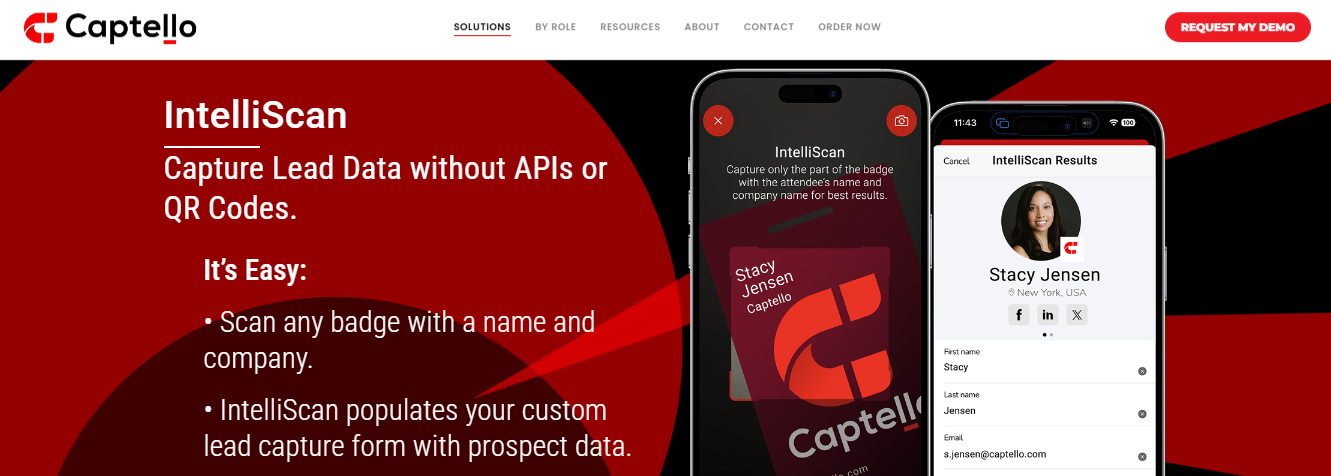
Captello's IntelliScan reads any badge without APIs or QR codes into custom lead forms.
⭐ Overview
Captello serves marketing teams that want traffic at the booth and structured lead data out of it. Its differentiator is a library of gamification tools (spin-to-win, quizzes, and leaderboards) layered on top of universal lead capture. That makes it strong for engagement, and heavier to configure than a plain scanner.
🛠️ Core Services
Badge, QR, and business-card scanning across devices.
Interactive booth games and lead-capture kiosks.
Custom, buildable lead-qualification forms.
CRM and marketing-automation integrations.
✅ Key Features Against Our Criteria
On-floor capture speed: fast for standard scans; game flows add setup time before the show.
Offline reliability: works best with a show-provided API kit; capture can break at events without one.
In-booth meeting booking: not a core function; Captello leads with engagement, not calendar booking.
CRM sync model: imports into the CRM with buildable forms; verify real-time behavior for your stack.
Pricing model: subscription plus per-show API or lead-kit fees, commonly cited at $700 to $1,200 per show.
💰 Why Companies Consider Captello
Teams pick Captello when foot traffic is the problem. Games and interactive kiosks pull attendees in, and the lead data flows into one place. Its structural trade-off is that the workflow centers on engagement and capture, so the pipeline and meeting-booking story for booth teams is still on you to build afterward.
👤 Ideal Customer Profile
Company size: mid-market to enterprise marketing teams.
Shows per year: 5 or more with large, staffed booths.
🏷️ Pricing
Subscription plus recurring per-show costs. One reviewer reports buying an API kit between $700 and $1,200 for each scanning show, so budget for per-event fees on top of the base plan.
⏰ When to Shortlist
Booth traffic is your bottleneck, and you want gamified engagement.
You run large, staffed booths and want capture plus interactive lead forms in one tool.
❌ When Not to Shortlist
Your KPI is meetings booked on the floor; Captello centers on engagement, not booking.
You want predictable all-in pricing without per-show API kit fees.
📣 Customer Reviews
"Every time we have a show with lead scanning, I have to purchase an API kit that costs between 700-1200. It's become costly." RebeccaGrace K.Captello G2 Verified Review (4/5)
"I like how it imports into our CRM and has a buildable form that we can create. It does not always work with every conference, if the conference does not provide an API kit for integration." Verified User in ConsultingCaptello G2 Verified Review (3.5/5)
Popl: Best for Individual Reps and Small Teams Centered on Digital Business Cards [toc=1.4 Popl]
Popl started as a digital business card and added event lead capture more recently. It leads with rep-side contact sharing (tap a card, share your info) and layers lead forms on top. It fits individuals and small teams networking more than booth teams chasing pipeline.
Popl leads with real-time AI data enrichment, turning scanned leads into fully enriched contact records.
⭐ Overview
Popl's core job is sharing your contact details fast. That makes it popular for one-to-one networking. As a booth lead-capture tool, reviews are mixed, with recurring friction around recipients needing an account and inconsistent badge scanning. If you are weighing options, our roundup of Popl alternatives compares the trade-offs.
🛠️ Core Services
Digital business card sharing (tap, QR).
Lead-capture forms via QR scan.
Contact management in-app.
CRM integrations on paid tiers.
✅ Key Features Against Our Criteria
On-floor capture speed: fast for card sharing; one reviewer found badge barcode scanning did not work as expected.
In-booth meeting booking: not a core function.
CRM sync model: available on paid tiers; the digital-card flow, not native pipeline sync, is the center of gravity.
Pricing model: per-seat subscription; one reviewer cites roughly $140/year, and multiple note there is no lasting free version.
💰 Why Companies Consider Popl
Reps like Popl for its clean card-sharing experience and low friction for one-off networking. Its structural trade-off for booth teams is that it is rep-led and card-first. Recipients are often prompted to create an account, and lead capture is a bolt-on rather than the core.
👤 Ideal Customer Profile
Company size: solo reps and small teams.
Buyer role: individual sellers, small field teams.
Use case: networking-heavy events over large staffed booths.
🏷️ Pricing
Per-seat subscription. One reviewer cites about $140 per year, and several note no lasting free tier, only a trial.
⏰ When to Shortlist
Your reps mainly network one-to-one and want a slick digital card.
You want lightweight capture for a small team, not a full booth pipeline system.
❌ When Not to Shortlist
You run a staffed booth where the goal is qualified meetings and attributable pipeline.
You do not want recipients prompted to create an account to exchange details.
📣 Customer Reviews
"Lead capture is likely the most positive element of Popl. However, it's far too cumbersome when all someone wants is your contact information." Vadim E.Popl G2 Verified Review (1/5)
"I didn't really use Popl because it didn't scan bar codes like I thought it would. Scanning badges should have given the name and contact info, but it didn't work when I tried it." Drew D.Popl G2 Verified Review (0.5/5)
Momencio: Best for Marketers Who Want Post-Capture Engagement Microsites [toc=1.5 Momencio]
Momencio pairs event lead capture with follow-up content. After a scan, it can fire a personalized follow-up email and a "LiveMicrosite" of assets to the prospect. It fits marketers who care about the after-event nurture as much as the capture.
Momencio automates post-event handoff, sorting notes and follow-up so no captured lead gets forgotten
⭐ Overview
Momencio's angle is engagement after the badge scan. Capture the lead, then push branded follow-up content automatically. Reviewers like the CRM integration and post-event follow-up, with some friction around login speed and single sign-on.
🛠️ Core Services
Business-card and badge capture.
Automated follow-up emails on scan.
LiveMicrosite personalized content assets.
CRM integration.
✅ Key Features Against Our Criteria
On-floor capture speed: fast card capture; one reviewer flags slow logins and broken SSO.
In-booth meeting booking: not a core function; the focus is post-capture engagement.
CRM sync model: integrates with the CRM, cited as a reason teams pick it.
Pricing model: subscription; pricing is not publicly disclosed.
💰 Why Companies Consider Momencio
Teams choose Momencio to close the follow-up gap. The automatic email and microsite mean a prospect hears back fast, which fights lead decay. Its structural trade-off is that engagement, not on-floor meeting booking or per-show pipeline attribution, is the center of the product.
👤 Ideal Customer Profile
Company size: mid-market marketing teams.
Buyer role: event and content marketers.
Use case: presentation-led and booth events with heavy nurture.
🏷️ Pricing
Subscription. Pricing is not publicly disclosed; request a quote.
⏰ When to Shortlist
Fast, branded post-event follow-up is your priority.
You want capture plus content nurture in one tool.
❌ When Not to Shortlist
Your KPI is meetings booked on the floor, not follow-up sends.
You need per-show pipeline attribution as a first-class report.
📣 Customer Reviews
"We were on the market for a lead acquisition software to replace our clunky incumbent solution. Momencio fit our needs perfectly in terms of CRM integration and capabilities." Martin D.Momencio G2 Verified Review (5/5)
"Business cards capture, once captured, it sends a follow up email. Logins are a little slow, and the single sign on does not work, it requires syncing on the mobile app." Jia Li T.Momencio G2 Verified Review (4/5)
Blinq: Best for Networking-Led Contact Sharing With Strong Social Proof [toc=1.6 Blinq]
Blinq is a digital business card platform with the largest review base in this category. It holds the #1 spot on G2 with 8,800-plus reviews, far ahead of any pipeline-focused tool. Its core job is sharing contact details, not booking meetings.
⭐ Overview
Blinq shines at one-to-one networking and clean contact sharing. For booth lead capture, reviewers report recurring friction: recipients often need the app, QR codes fail on poor WiFi, and post-event contacts scatter into the phone book.
🛠️ Core Services
Digital business card sharing (QR, link, tap).
Contact management and team admin backend.
Social and CRM integrations.
✅ Key Features Against Our Criteria
On-floor capture speed: fast card sharing; QR reliability drops on weak venue WiFi.
Offline reliability: a recurring complaint; one reviewer keeps printed cards as backup.
In-booth meeting booking: not a core function.
CRM sync model: available, but the flow is card-first, and post-event contacts can be hard to find.
Pricing model: freemium plus paid tiers.
💰 Why Companies Consider Blinq
The social-proof wall is real. With 8,800-plus G2 reviews, Blinq is the safe, popular pick for digital cards. Its structural trade-off for exhibitors is that it is a networking tool, not a pipeline system. It saves the contact and leaves the meeting and the attribution unanswered. If you are comparing digital-card tools head to head, see our HiHello vs Blinq breakdown.
I will be honest about the numbers here. B2Brain has 17 G2 reviews to Blinq's 8,800-plus, a gap we are closing through a deliberate review push. I would not ask you to weigh review count over outcome. The question is not who has the most reviews; it is who books the meeting and proves the pipeline.
👤 Ideal Customer Profile
Company size: individuals and teams of any size.
Use case: networking and contact sharing over booth pipeline.
🏷️ Pricing
Freemium with paid team tiers.
⏰ When to Shortlist
You want a widely adopted, polished digital business card.
Networking, not booth pipeline, is the main job.
❌ When Not to Shortlist
You need on-floor meeting booking and per-show pipeline attribution.
You need reliable offline capture on a hostile expo floor.
📣 Customer Reviews
"It doesn't always work reliably when scanning the barcode, especially in places with poor internet connectivity. This has made it necessary for me to consider purchasing printed business cards as a backup." Kasha A.Blinq G2 Verified Review (1.5/5)
"When you share your info, it saves the person's business card as contact info in their phone. This makes it tough to find again after a big tradeshow. All the follow ups are just in your sea of contacts." Madison Z.Blinq G2 Verified Review (2/5)
BoothIQ: Best for Booth Teams That Want a Booking-First Workflow [toc=1.7 BoothIQ]
BoothIQ is a meeting-booking challenger built to help booth staff qualify and schedule follow-ups on the floor. It sits closest to B2Brain's category, since booking, not just scanning, is its stated focus.
⭐ Overview
BoothIQ targets exhibitors who want a simple, booking-oriented workflow for non-technical booth staff. It captures leads and orients the team toward scheduling the next step. It is a focused challenger rather than a broad platform.
🛠️ Core Services
Lead capture at the booth.
Meeting-scheduling workflow for booth staff.
CRM and calendar integrations.
✅ Key Features Against Our Criteria
In-booth meeting booking: the core pitch; booking is the workflow, not a bolt-on.
On-floor capture speed: not clearly stated in available sources.
Pipeline attribution: ships the booking feature, but the three-phase shared layer, CRM-grounded pre-event briefing, and a tracked Leads-to-Meeting (LTM) metric are not part of the stated model.
Pricing model: subscription; pricing is not publicly disclosed.
💰 Why Companies Consider BoothIQ
BoothIQ appeals to teams that agree with the core thesis: book the meeting on the floor. This is exactly where I expect the fair objection, "BoothIQ also books meetings, so what is different?" My honest answer is architecture. Booking is one Next-Best-Action inside a three-phase layer that runs before, during, and after the show with a CRM-grounded briefing and an owned LTM number, not a standalone booking feature.
👤 Ideal Customer Profile
Company size: small to mid-market booth teams.
Buyer role: field marketing and sales.
Use case: teams wanting a simple booking-first tool.
🏷️ Pricing
Subscription. Pricing is not publicly disclosed.
⏰ When to Shortlist
You want a focused, booking-first workflow for non-technical staff.
You do not need pre-event CRM briefings or per-show LTM reporting.
❌ When Not to Shortlist
You need one shared layer across before, during, and after the show.
You need CRM-grounded pre-event briefings and a tracked LTM metric.
No verified customer reviews were available in the provided source set for this provider.
Mobly: Best for Teams Wanting AI-Assisted Scanning With Same-Day Follow-Up [toc=1.8 Mobly]
Mobly frames itself as AI-powered event marketing. It scans badges and cards, enriches the data, and can fire follow-up emails on scan. It fits teams that want enrichment and quick follow-up, with Salesforce sync as a common use.
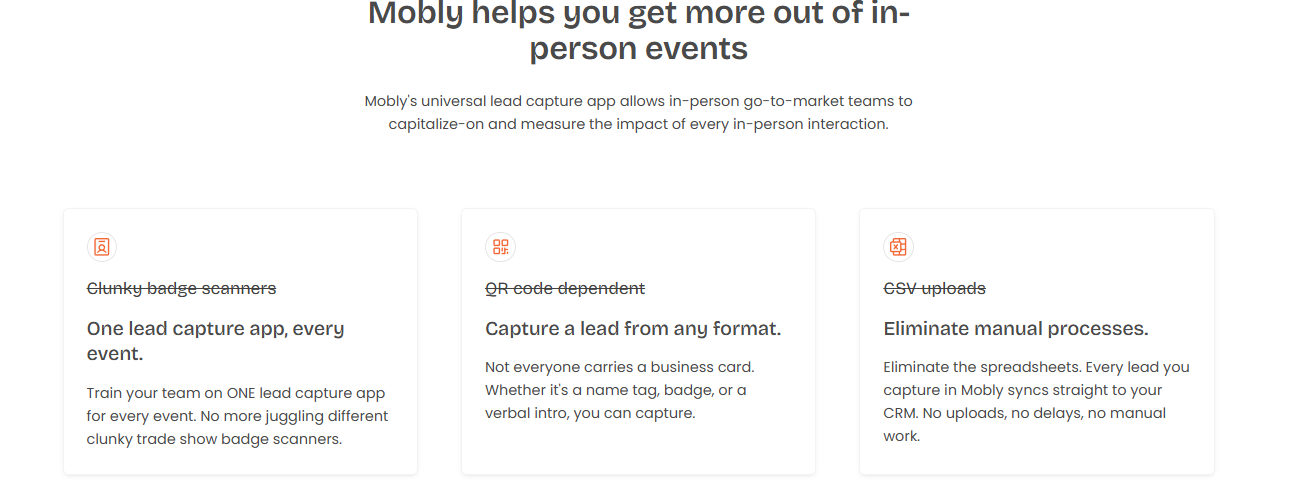
Mobly frames its universal lead capture app around scanning any format and syncing straight to CRM.
⭐ Overview
Mobly captures leads, enriches contact data, and pushes to the CRM. Reviewers praise the voice-notes feature and ease of use, while flagging finicky syncing, occasional missed scans, and per-match enrichment costs. Our detailed Mobly review digs into where it fits.
🛠️ Core Services
Badge and business-card scanning.
AI data enrichment and contact matching.
Voice notes on leads.
Salesforce and CRM sync; follow-up emails on scan.
✅ Key Features Against Our Criteria
On-floor capture speed: generally fast, but reviewers report scans that do not always sync through on weak WiFi.
Offline reliability: a noted friction point; some scans do not go through, and leads come up short.
In-booth meeting booking: not a core function; Mobly leads with enrichment and follow-up.
CRM sync model: Salesforce sync available; one reviewer found setup "challenging" and enrichment matches costly.
Pricing model: subscription plus per-match contact fees.
💰 Why Companies Consider Mobly
Teams pick Mobly for enrichment and same-day follow-up without manual entry. The voice-notes feature captures context at the booth, which reps like. Its structural trade-off is that it bolts follow-up onto capture; the meeting-booking and per-show pipeline story is not the core.
👤 Ideal Customer Profile
Company size: mid-market sales and events teams.
Buyer role: field sales and marketing ops.
Use case: enrichment-heavy capture with quick email follow-up.
🏷️ Pricing
Subscription plus per-match contact fees. One reviewer notes the cost per contact match is high.
⏰ When to Shortlist
You want enrichment and same-day email follow-up on scanned leads.
Voice-note context at the booth matters to your reps.
❌ When Not to Shortlist
Your KPI is meetings booked on the floor, not enriched contacts.
You need rock-solid offline sync, given reported finicky syncing.
📣 Customer Reviews
"We really like the voice notes feature. It was challenging to get it to sync with Salesforce. The cost of matches per contact, I think, is kinda high. The integration process was difficult for my team." Ece K.Mobly G2 Verified Review (4/5)
"Sometimes Mobly can be finicky, where it doesn't sync all the leads I've scanned. This can really affect the overall success of our event, because we end up with a lot fewer than we expected." Verified User in Events ServicesMobly G2 Verified Review (3.5/5)
Cvent LeadCapture is the default badge scanner many organizers rent to exhibitors at their shows. It is listed here as the displacement reference, not a peer SaaS product, because it is what most teams already use and what a dedicated tool is measured against.
Cvent's Attendee Hub powers attendee networking and virtual booths, an attendee-engagement app, not exhibitor capture.
⭐ Overview
Cvent LeadCapture is ubiquitous because the organizer offers it on-site. You rent it per device, scan badges, and export leads. It reliably saves the contact. The workflow then tends to end at the CSV export, which is the gap a pipeline tool exists to fill. For a closer look at that hand-held hardware, see our guide to the conference badge scanner choice.
🛠️ Core Services
Badge scanning at organizer-run shows.
Basic lead qualification fields.
Lead export after the show.
✅ Key Features Against Our Criteria
On-floor capture speed: reliable badge scanning at supported shows.
In-booth meeting booking: not a function; it captures the contact only.
CRM sync model: typically export or basic integration, not native real-time pipeline sync.
Pipeline attribution: minimal; you get a lead list, not per-show pipeline.
Pricing model: per-device rental, commonly around $600 per device per show as the reference anchor.
💰 Why Companies Consider Cvent LeadCapture
It is the path of least resistance. The organizer offers it, it works on that floor, and no procurement cycle is needed. Its structural trade-off is the whole reason this guide exists: it saves the lead, loses the conversation, and ends at the CSV. The pipeline question stays unanswered, which is the gap our offline to pipeline layer is built to close.
👤 Ideal Customer Profile
Company size: any exhibitor at a Cvent-run show.
Use case: one-off booths, minimal follow-up ambition.
🏷️ Pricing
Per-device rental. The commonly cited reference is around $600 per device per show; confirm current rates with the organizer.
⏰ When to Shortlist
You have a one-off booth and just need to save contacts.
You do not need meeting booking, native CRM sync, or per-show pipeline.
❌ When Not to Shortlist
Your KPI is meetings booked and attributable pipeline.
You run 8-plus shows a year and want one system across all of them.
No verified customer reviews were available in the provided source set for this provider.
Zuddl: Best for Teams That Also Run Virtual and Hybrid Events [toc=1.10 Zuddl]
Zuddl is a broad event platform covering virtual, hybrid, and in-person events, with lead-capture and on-site features. It fits teams that need one platform across event formats, not a focused booth pipeline tool.
⭐ Overview
Zuddl started in virtual and webinar events and expanded into on-site and field. Reviewers praise customization and support, with some noting occasional glitches and setup complexity. It is a platform play, broader and less booth-pipeline-specific than the dedicated capture tools. If your priority is the booth day, compare it against a focused lead capture app for trade shows.
🛠️ Core Services
Virtual, hybrid, and in-person event hosting.
Registration and agenda management.
On-site check-in and lead capture.
Analytics and CRM integrations.
✅ Key Features Against Our Criteria
On-floor capture speed: available within a broader platform; booth-specific speed not the core focus.
In-booth meeting booking: not a dedicated booth-booking workflow.
CRM sync model: integrations available across the platform.
Pipeline attribution: event analytics available; per-show booth-pipeline reporting is not the specialty.
Pricing model: custom enterprise quote.
💰 Why Companies Consider Zuddl
Teams pick Zuddl to run many event formats from one platform. That breadth is the appeal and the trade-off. It is an event-management platform first, so on-floor booth capture, meeting booking, and per-show pipeline attribution are not its center of gravity.
👤 Ideal Customer Profile
Company size: mid-market to enterprise events teams.
Use case: mixed virtual, hybrid, and in-person programs.
🏷️ Pricing
Custom enterprise quote.
⏰ When to Shortlist
You need one platform across virtual, hybrid, and in-person events.
Broad event management matters more than booth-pipeline depth.
❌ When Not to Shortlist
Your only job is exhibitor booth capture, on-floor booking, and per-show pipeline.
You want a focused, lightweight tool, not a full event platform.
📣 Customer Reviews
"Zuddl's webinar platform is pretty seamless once you learn the system. The customization elements are incredible. Their customer service is top-notch." Verified User in IT and ServicesZuddl G2 Verified Review (4.5/5)
"It can sometimes be a bit glitchy and work in unexpected ways. Often not anything that stops it working, but it can be frustrating, particularly when demo-ing the system to stakeholders." Verified User in AutomotiveZuddl G2 Verified Review (4/5)
How We Evaluated These Providers
Primary sources: verified G2 reviews from the B2Brain Competitor Reviews source set, provider documentation for self-claims, and industry benchmarks for lead decay and event ROI.
Criteria selected: on-floor capture speed, offline reliability, in-booth meeting booking, CRM sync model, pipeline attribution, and pricing model, because they decide exhibitor pipeline outcomes.
Criteria de-prioritized: attendee-engagement features (gamification, session polls) that matter to organizers, not exhibitors chasing pipeline.
Data gaps: no verified reviews were available in the source set for BoothIQ or Cvent LeadCapture; both are described from documented positioning only.
B2Brain's own gaps, stated honestly: the native app is iOS-first (web on Android), third-party enrichment depth is lighter than Popl, Mobly, or Momencio, there is no standalone digital business card, and the G2 review base is small (17) versus Blinq's 8,800-plus.
Which Provider Should You Shortlist?
The field marketer who must prove per-show pipeline to the CMO: shortlist B2Brain for the morning-after offline-to-pipeline report and the tracked LTM metric.
The VP Sales whose reps get paid on meetings booked: shortlist B2Brain or BoothIQ for on-floor booking; confirm the depth of the before-and-after workflow.
The enterprise team running 10-plus events a year: shortlist iCapture for reliable multi-device capture and event ROI metrics; verify your CRM sync path.
The marketer who lives on post-event follow-up: shortlist Momencio or Mobly for automated follow-up and enrichment.
The team that wants booth traffic and engagement: shortlist Captello for gamification, and budget for per-show API kit fees.
The rep who mainly networks one-to-one: shortlist Popl or Blinq for digital cards, not booth pipeline.
The team with a one-off booth on a Cvent floor: the rented organizer scanner may be enough; just know the workflow ends at the CSV.
If your goal is meetings booked and attributable pipeline, the fastest way to judge fit is to run a real show. You can Book a Demo to see the workflow end to end.
Q2. Why Do Most Event Leads Die in the "Shoe Box" Before Anyone Follows Up? [toc=2. Why Event Leads Die]
Most event leads die because follow-up is slow, not because capture failed. Roughly 79% of leads never get any follow-up, up to 80% never reach the CRM, and average response time runs around 42 hours. That is long after a prospect who converts at about 85% within two hours has decayed to roughly 9% after a week. Your app decides whether leads reach your inbox in minutes or a shoe box in March.
📦 The situation: the shoe box is real
Here is a scene I have watched too many times. A rep works a booth for three days and comes home with a stack of business cards and a phone full of badge scans. Monday morning, they pull out the three names they actually remember.
The rest sit in a drawer. Six months later, someone finds the shoe box while cleaning up. The money in a trade show is made in the follow-up, and the follow-up never happened. This is exactly the gap our offline to pipeline approach is built to close.
⏰ The complication: leads decay on a clock
The badge scan feels like progress. It is not. It saves a contact and loses the conversation, and the contact list mostly goes nowhere.
The numbers are brutal and worth stating with the comparison attached:
Follow-up almost never happens. Around 79% of event leads get no follow-up at all.
Leads never reach the system of record. Up to 80% never make it into the CRM (the Customer Relationship Management system where deals are tracked).
Speed collapses. Average response time is about 42 hours, while a lead worked within two hours converts near 85%, falling to roughly 9% after a week.
One operator put the odds bluntly: do not trust the badge scan, because maybe one in twenty businesses acts on that scanned list three months later. If reliable capture is your worry, our guide to the conference badge scanner workflow goes deeper.
💰 The resolution: score for speed-to-inbox, not stickers
So change what you grade an app on. The feature list on the vendor's site is not the point. Speed-to-inbox and native CRM sync are the point.
A simple buying rule helps here. If the tool cannot get a context-rich lead into your CRM and in front of a rep within minutes, it will not beat the shoe box, no matter how many features it has. See how lead capture into Salesforce should actually work.
At B2Brain, we built the offline-to-pipeline layer as the direct answer to that drawer. Instead of a scan that dies, you capture the conversation with context, book the meeting at the booth, and reframe the metric from leads scanned to Leads-to-Meeting (LTM), the share of booth conversations that become an actual booked meeting. That is the shift: a contact list becomes attributable pipeline before anyone flies home.
📣 What operators say
"Gone are the days of capturing leads manually. It eliminates the possibility of leads getting lost or misplaced." Kevin M.Mobly G2 Verified Review (4/5)
"When you share your info, it saves the person's business card as contact info in their phone. This makes it tough to find again after a big tradeshow. All the follow ups are just in your sea of contacts." Madison Z.Blinq G2 Verified Review (2/5)
The second quote is the digital shoe box. The contact got saved and still got lost.
Q3. What Are the 10 Best Apps for Events? Full Comparison [toc=3. The 10 Best Apps Compared]
The 10 strongest event apps for B2B exhibitors in 2026 are B2Brain, iCapture, Captello, Popl, Momencio, Blinq, BoothIQ, Mobly, Cvent LeadCapture, and Zuddl. They differ most on CRM sync model, in-booth meeting booking, offline reliability, and pricing (per-event versus annual). Match the app to your show volume, your CRM, and whether your goal is scanning contacts or booking meetings.
🧭 One honest debate before the table
There is a real argument in this category, and it is worth naming. One camp says buy a single all-in-one platform. The other says the best teams stitch together best-of-breed tools for capture, booking, and follow-up.
I lean toward a clear point of view here, and I might be wrong. Software features are becoming commoditized, so your CRM data and attribution, not the scanning widget, are the durable asset. That is why CRM sync and pipeline attribution sit at the top of the table.
📊 The 10 apps at a glance
The full detailed breakdown of all 10 providers, with core services, ICP, pricing, when-to-shortlist, and verified reviews, sits in the ranked listicle sections (1.1 through 1.10). This is the scan-friendly comparison, and our roundup of the best event lead capture software for 2026 covers the same field in depth.
The 10 Best Event Apps at a Glance
App
Best For
In-Booth Booking
CRM Sync
Offline
Pricing Model
B2Brain
On-floor meetings and per-show pipeline
Yes, dual-invite
Salesforce and HubSpot native
Yes
Per-event and annual; first event free
iCapture
Enterprise teams, 10+ shows/yr
No
Integrations (verify native path)
Multi-device
Annual (~$8K/yr range)
Captello
Booth gamification plus capture
No
Import plus buildable forms
API-kit dependent
Subscription plus per-show kit fees
Popl
Solo reps, digital cards
No
Paid tiers
Card-first
Per-seat subscription
Momencio
Post-capture content follow-up
No
Integrates
Not disclosed
Subscription (not disclosed)
Blinq
Networking, digital cards
No
Card-first
Weak on poor WiFi
Freemium plus paid
BoothIQ
Booking-first booth workflow
Yes
Integrations
Not disclosed
Not disclosed
Mobly
AI enrichment plus follow-up
No
Salesforce (setup effort)
Finicky sync
Subscription plus per-match fees
Cvent LeadCapture
Organizer default (displacement ref)
No
Export/basic
Reliable scan
Per-device rental (~$600/device/show)
Zuddl
Virtual and hybrid event teams
No
Integrations
Platform-level
Custom quote
Read the table by your job, not by row order. If reps are paid on meetings booked, weigh the booking and CRM columns. If you run one booth a year, the organizer's scanner may be enough. B2Brain and BoothIQ are the two that treat on-floor booking as the core, not a bolt-on, which is the axis this whole guide argues matters most. For the hands-on angle, see our take on the right lead capture app for trade shows.
📣 What operators say
"Mobly was a breath of fresh air compared to conference scanners! I was able to not have to put notes into a spreadsheet." Will N.Mobly G2 Verified Review (4/5)
"Every time we have a show with lead scanning, I have to purchase an API kit that costs between 700-1200. It's become costly." RebeccaGrace K.Captello G2 Verified Review (4/5)
Q4. Which Apps Book Meetings at the Booth and Sync Cleanly to Salesforce or HubSpot? [toc=4. Meeting Booking and CRM Sync]
Only a subset of event apps book a meeting while the prospect is still at your booth and sync it natively to your CRM. Booking-first tools fire a calendar invite to the prospect and route it to the right Account Executive (AE, the seller who owns the deal) before they walk away. They then sync every lead, note, and meeting to Salesforce or HubSpot with dedup and show attribution intact, not a CSV you import days later.
⚠️ The problem: scanning is not booking, and CSV is not sync
Two things get confused all the time. Scanning a badge is not the same as booking a meeting. Exporting a CSV is not the same as native CRM sync.
A scan gives you a contact. A native sync writes a clean record into the system where deals actually move. Those are different outcomes, and most tools only deliver the first. Our breakdown of universal lead capture unpacks why the sync model matters more than the scanner.
📉 Agitate: the floor meeting beats the follow-up email
Here is why booking on the floor matters so much. A meeting booked while the prospect stands at your booth converts far better than a cold email sent days later, after the lead has decayed.
This is the whole case for tracking Leads-to-Meeting (LTM), the share of conversations that turn into a booked meeting. In our own data, B2Brain sees about 52% LTM booked on the floor versus roughly 8% for typical post-event follow-up. No competitor tracks LTM at all, which tells you the category still measures scans, not meetings. You can model the impact with our event ROI calculator.
I watched what the alternative looks like once. A team's rental scanner did not talk to the sales system, names would not match on import, and the CRM turned into a mess. Slow, messy capture also drags deal velocity; I have seen a cycle stretch past 500 days when the first touch never got logged cleanly.
✅ Solution: what real native sync must include
If you are the RevOps lead (revenue operations, the person who owns CRM hygiene and attribution), grade sync on four things, not on the word "integrates."
Dedup: matches to the existing account or contact instead of creating a duplicate.
Attribution intact: stamps the show, booth area, rep, and segment onto the record.
Offline fallback queue: captures offline on dead expo WiFi and syncs on reconnect.
Visible confirmation: shows the rep the record landed, so nothing silently drops.
🗂️ Native versus CSV, side by side
Native Real-Time Sync Versus CSV Export
Factor
Native real-time sync
CSV export/import
Timing
Minutes
Days
Dedup
Automatic
Manual cleanup
Attribution
Stamped on record
Usually lost
Meeting booked
Yes, on the floor
No
💰 Payoff: the Monday-morning demo test
Run this test in any demo before you buy. It takes ten minutes and sorts booking-first tools from capture-only ones fast.
Scan a badge, add a voice note, and book a meeting in under 30 seconds.
Check that the prospect and the right AE both get a calendar invite.
Confirm the record appears in Salesforce or HubSpot, deduped, with show attribution.
Turn off WiFi, capture a lead, reconnect, and confirm it syncs.
B2Brain is built to pass that test as the booking-first, native-sync example: a sub-30-second scan-to-booked-meeting, a dual invite to prospect and AE, and native Salesforce and HubSpot writes with dedup and attribution. BoothIQ and Zuddl also address booking, and iCapture and Captello offer solid capture and integrations, so put two or three in the same demo and run the four steps on each. The tool that books the meeting and proves the pipeline, not the one with the longest feature list, is the one that answers your CFO's question. When you are ready to see it end to end, Book a Demo.
📣 What operators say
"We really like the voice notes feature. It was challenging to get it to sync with Salesforce. The integration process was difficult for my team to accomplish and took a long time." Ece K.Mobly G2 Verified Review (4/5)
"The AI Conversation Summarization and Auto-CRM Entry feature is a standout, it's significantly better than other tools we've tried. Reps actually rave about it." Ole O.B2Brain G2 Verified Review (4/5)
The pattern is consistent: teams love fast capture, and CRM sync is where tools stumble. Test sync hardest, because that is where the pipeline is won or lost.
Q5. Attendee-Engagement Apps vs. Exhibitor Lead-Capture Apps: Which One Do You Actually Need? [toc=5. Attendee vs Exhibitor Apps]
If you run the event, you need an attendee-engagement app (agenda, networking, live polls, and maps) like Whova, Cvent Attendee Hub, or Guidebook. If you exhibit to generate pipeline, you need a lead-capture app that scans, books meetings, and syncs to your CRM. They solve different jobs, and buying the wrong family is the most common event-app mistake.
⚠️ Why the two get confused
Both get called "the event app," so buyers assume one tool covers both jobs. It does not. An attendee-engagement app optimizes the experience for everyone in the room. An exhibitor lead-capture app optimizes pipeline for the team paying for a booth.
I have watched a team buy the wrong one and regret it fast. The engagement app made a lovely agenda and did nothing for the booth. The reps still went home with a shoe box of contacts and no meetings. If your job is the booth, start with a tool built for booth teams.
🧭 The two families, side by side
Attendee-Engagement Apps Versus Exhibitor Lead-Capture Apps
Factor
Attendee-engagement app
Exhibitor lead-capture app
Primary buyer
Event organizer
Exhibitor's revenue team
Core job
Agenda, maps, networking, polls
Scan, qualify, book meetings, sync to CRM
Success metric
Attendee satisfaction
Pipeline sourced, meetings booked
Example tools
Whova, Cvent Attendee Hub, Guidebook
B2Brain, iCapture, Captello, BoothIQ
Pricing shape
Per-attendee or platform license
Per-event or annual subscription
✅ The pick-this-if rule
Here is the clean fork. Pick an attendee-engagement app if you are running the show and your job is the room. Pick an exhibitor lead-capture app if you are working a booth and your job is pipeline. Our guide to a focused lead capture app for trade shows unpacks the second family in detail.
One contrarian note from the floor: the free-iPad raffle crowd inflates scan counts, but those visitors are rarely decision-makers. Engagement gimmicks fill a list; they do not fill a pipeline. B2Brain sits firmly in the exhibitor lead-capture family, built for teams whose success metric is meetings booked and pipeline proven, not attendee polls. We do not pretend to be an organizer's attendee-engagement suite, and if that is what you need, one of the tools above is the right call. If your goal is to generate new pipeline from events, we are built for exactly that job.
Q6. How Much Do Event Apps Cost, and What Is the Real ROI Math? [toc=6. Pricing and ROI Math]
Event apps price three ways: per-event, per-attendee, or annual platform subscription. Organizer badge-scanner rentals run around $600 per device per show, roughly $19,200 a year for a four-rep booth at eight shows, for a tool that returns only a contact list. The better ROI question is not sticker price. It is cost per booked meeting versus a post-show SDR chase.
💰 The three pricing shapes (and the hidden fees)
Cost structure matters more than headline price, because the fees hide in the structure. Watch for per-show add-ons and annual lock-in.
Per-device rental (organizer scanner): around $600 per device per show, and it ends at the CSV.
Per-event / Show Pass: you pay per show, good for low volume.
Annual subscription: one price across all shows, good for 8-plus events, but confirm the lock-in term.
Watch the add-ons: some tools charge per-show API kits ($700 to $1,200) or per-contact enrichment matches on top of the base plan.
The booth itself already costs real money. I have seen teams spend $35,000 just decorating a booth, and cost-per-attendee at a big show can run $300 to $450 per head. Against that, the app is small, but the app decides whether the whole spend converts. See what B2Brain costs per event for the exact shapes.
💸 The ROI math that actually matters
Do not compare app prices. Compare cost per booked meeting. Here is the chain, using round numbers.
Booth spend: about $70,000.
Target pipeline at 10x: $700,000.
At a 20% close rate, that is roughly 2x revenue ROI.
To hit a $1M pipeline target, you need about 50 opportunities and roughly 180 discovery calls, so about one in five booth visitors must become a qualified meeting.
A qualified event meeting costs roughly 60% of an outbound meeting and about 40% of paid acquisition, so booked meetings are the cheapest pipeline you can buy. B2Brain prices as one shape among these: a per-event Show Pass and an annual Pipeline plan, with the first event free for two people. That lets you test cost per booked meeting on a real show before committing budget, which is the only number that survives a procurement review. Model your own numbers with our event ROI calculator.
📣 What operators say about cost
"The cost is very high considering it's mostly a digital business card sharing app. It's not much different than adding a QR code to my business card." Brooke N.Popl G2 Verified Review (1/5)
"Every time we have a show with lead scanning, I have to purchase an API kit that costs between 700-1200. It's become costly." RebeccaGrace K.Captello G2 Verified Review (4/5)
The lesson in both quotes is the same. Read the pricing structure, not the sticker, because the per-show fees are where budgets quietly break.
Q7. How Do You Prove Trade-Show ROI to Your CMO or CFO After the Event? [toc=7. Proving Trade-Show ROI]
You prove trade-show ROI by attributing pipeline to each show, not by counting leads. Pick an app that syncs every lead, meeting, and opportunity to your CRM with show attribution intact. Then report per-show pipeline, Leads-to-Meeting (LTM) rate, and show-over-show comparison. That turns "we scanned 500 badges" into "this show generated $X in pipeline," the answer a CMO or CFO accepts.
🗣️ The situation: "where is the pipeline?"
I have sat beside a Field Marketer during the Monday pipeline review when the CEO asks that exact question. The team had a spreadsheet of 500 scanned badges. Nobody could say which ones turned into money.
That is the moment the budget gets questioned. A contact count is not an answer. Pipeline is where the buyer's world actually moves, and contact information is not where anything happens. This is the gap our lead capture into Salesforce flow is designed to close.
📉 The complication: lead counts do not prove ROI
Counting leads fails for three reasons, and each one is fixable with the right reporting.
No attribution: a raw scan list does not tell you which show, booth area, or rep sourced the deal.
No follow-up proof: slow capture means a 524-day deal cycle is easy to hit when the first touch never got logged cleanly.
No outcome metric: without LTM (the share of conversations that become booked meetings), you cannot compare one show to the next.
Attributable reporting needs three things: multi-touch attribution (crediting every touch on the path to the deal), per-show pipeline, and the LTM rate. LTM is to trade shows what cost-per-click is to advertising. It is the unit that makes spend comparable. Our primer on event intelligence shows how that unit fits the reporting.
✅ The resolution: the morning-after report
The payoff is a report waiting for you before the show even ends. B2Brain delivers a morning-after offline-to-pipeline report by 9am: pipeline sourced, meetings booked, LTM, and attribution by show, booth area, rep, and segment. That is the artifact the champion brings to the QBR (Quarterly Business Review, where budgets get defended) to answer the pipeline question with a number. See how this runs before, during, and after the show.
Here is the Monday-morning checklist to run after any show:
Confirm every lead synced to the CRM with show attribution intact.
Pull the LTM rate and compare it to your last show.
Report per-show pipeline sourced, not badge counts.
Flag the booked meetings and route them to the right AE.
The money at a trade show is made in the follow-up, so the report is not paperwork. It is the thing that renews next year's budget. I am still sitting with one open question, and I would genuinely like your read on it: if LTM became the category's standard unit the way CPC did for ads, would your CFO fund shows differently? Tell me how you measured your last show, and what your CMO actually asked for. When you want to see the morning-after report on a real show, Book a Demo.
FAQ's
What is the best app for events for B2B exhibitors?
The best app for events depends on your job. Organizers need attendee-experience apps for agendas, maps, and polls, while exhibitors building pipeline need a lead-capture app that scans badges, books meetings, and syncs to the CRM.
We suggest scoring every exhibitor app on six axes rather than a feature grid:
On-floor capture speed: how fast a scan becomes a context-rich record.
Offline reliability: whether capture survives dead expo-hall WiFi.
In-booth meeting booking: whether the app books the meeting before the prospect walks away.
CRM sync model: native real-time versus a CSV you import days later.
Pipeline attribution: whether pipeline traces to a show, booth, or rep.
Pricing model: per-event, annual, or per-device rental.
Attendee-engagement features matter to organizers, not to booth teams chasing pipeline. Our whole frame is meetings booked, not leads scanned, so we lean hardest on capture speed, booking, native sync, and attribution. You can see how event lead capture works across the show, then shortlist two or three tools for a real pilot before committing budget.
Why do most event leads never get followed up on?
Most event leads die because follow-up is slow, not because capture failed. Roughly 79% of event leads get no follow-up at all, up to 80% never reach the CRM, and average response time runs about 42 hours.
That timing matters because leads decay on a clock. A lead worked within two hours converts near 85%, falling to roughly 9% after a week. The badge scan feels like progress, but it saves a contact and loses the conversation, and the contact list mostly goes nowhere.
So we tell teams to change what they grade an app on:
Prioritize speed-to-inbox over the vendor's feature list.
Demand native CRM sync, not a CSV export you clean up later.
Capture the conversation with context, not just a name.
Our answer to the shoe box is the offline to pipeline layer: capture with context, book the meeting at the booth, and reframe the metric from leads scanned to Leads-to-Meeting. A contact list becomes attributable pipeline before anyone flies home. If a tool cannot get a context-rich lead in front of a rep within minutes, it will not beat the drawer, no matter how many features it lists.
How much do event apps cost, and how do we calculate the real ROI?
Event apps price three ways: per-event, per-attendee, or annual platform subscription. Organizer badge-scanner rentals run around $600 per device per show, roughly $19,200 a year for a four-rep booth at eight shows, for a tool that returns only a contact list.
Cost structure matters more than sticker price, because fees hide in the structure. Watch for per-show API kits ($700 to $1,200) or per-contact enrichment matches layered on top of a base plan.
The better question is cost per booked meeting. Here is the chain in round numbers:
Booth spend of about $70,000, targeting 10x pipeline.
At a 20% close rate, that is roughly 2x revenue pipeline ROI.
Hitting a $1M pipeline target needs about 50 opportunities and roughly 180 discovery calls.
A qualified event meeting costs roughly 60% of an outbound meeting and about 40% of paid acquisition, so booked meetings are the cheapest pipeline you can buy. Our Show Pass and Pipeline plans price as one shape among these, with the first event free for two people so you can test cost per booked meeting on a real show before a procurement review.
What is the difference between an attendee-engagement app and an exhibitor lead-capture app?
They solve different jobs, and buying the wrong family is the most common event-app mistake. An attendee-engagement app optimizes the experience for everyone in the room, while an exhibitor lead-capture app optimizes pipeline for the team paying for a booth.
Here is the clean fork:
Attendee-engagement apps (Whova, Cvent Attendee Hub, Guidebook): the organizer buys these for agendas, maps, networking, and polls. Success metric is attendee satisfaction.
Exhibitor lead-capture apps (B2Brain, iCapture, Captello, BoothIQ): a revenue team buys these to scan, qualify, book meetings, and sync to the CRM. Success metric is pipeline sourced and meetings booked.
Both get called the event app, so buyers assume one tool covers both jobs. It does not. The free-iPad raffle crowd inflates scan counts, but those visitors are rarely decision-makers, so engagement gimmicks fill a list, not a pipeline.
We sit firmly in the exhibitor lead-capture family, built for booth teams whose success metric is meetings booked and pipeline proven. If you are running the show and your job is the room, one of the attendee-engagement suites above is the right call instead.
How do we prove trade-show ROI to a CMO or CFO after the event?
You prove trade-show ROI by attributing pipeline to each show, not by counting leads. Pick an app that syncs every lead, meeting, and opportunity to your CRM with show attribution intact, then report per-show pipeline, the Leads-to-Meeting (LTM) rate, and a show-over-show comparison.
Counting leads fails for three reasons:
No attribution: a raw scan list does not tell you which show, booth area, or rep sourced the deal.
No follow-up proof: slow capture makes a 524-day deal cycle easy to hit when the first touch never got logged cleanly.
No outcome metric: without LTM, you cannot compare one show to the next.
LTM is to trade shows what cost-per-click is to advertising, the unit that makes spend comparable. We deliver a morning-after report by 9am with pipeline sourced, meetings booked, LTM, and attribution by show, booth area, rep, and segment. That is the artifact the champion brings to the QBR. To see the report on a real show, you can Book a Demo and run the four-step Monday-morning check yourself.
Enjoyed the read? Join our team for a quick 30-minute chat — no pitch, just a real conversation on how we’re rethinking Event Intelligence in B2b.

.png)




.png)

.png)
.png)





