Event Intelligence: Pre-Event Targeting, On-Site Routing, and Post-Event Attribution Gained Over Badge Scanners
Written by
Sridhar Ranganathan
Last Updated :
June 24, 2026
Skim in:
12
mins
TL;DR
- Event intelligence is exhibitor-owned attendee, conversation, and pipeline data across before, during, and after a show, not the organizer's rented badge scanner. - Badge scanners save a contact and end at a CSV; close to 80% of trade-show leads are never meaningfully followed up. - The three motions are pre-event targeting from your own CRM, on-the-floor capture with context plus booking, and post-event per-show attribution. - Capture has to beat a notebook at 2pm on day two, or reps revert to photos and the context dies. - Leads-to-Meeting (LTM) is the conversion metric to report, roughly 52% booked on the floor versus 8% from post-event follow-up. Run the checklist on any stack; we built B2Brain to run all three motions on one shared layer.
Q1: What is event intelligence (and how is it different from a badge scanner)? [toc=1. What Is Event Intelligence]
Search "event intelligence" today and you get three different worlds. IT teams mean server-alert monitoring. Event planners mean venue and guest-list software. Neither is what a field marketer means when she spends $70,000 on a booth and her CEO asks, "Where is the pipeline?"
For a B2B exhibitor, event intelligence means something specific. So let me define it plainly.
🎯 The plain definition
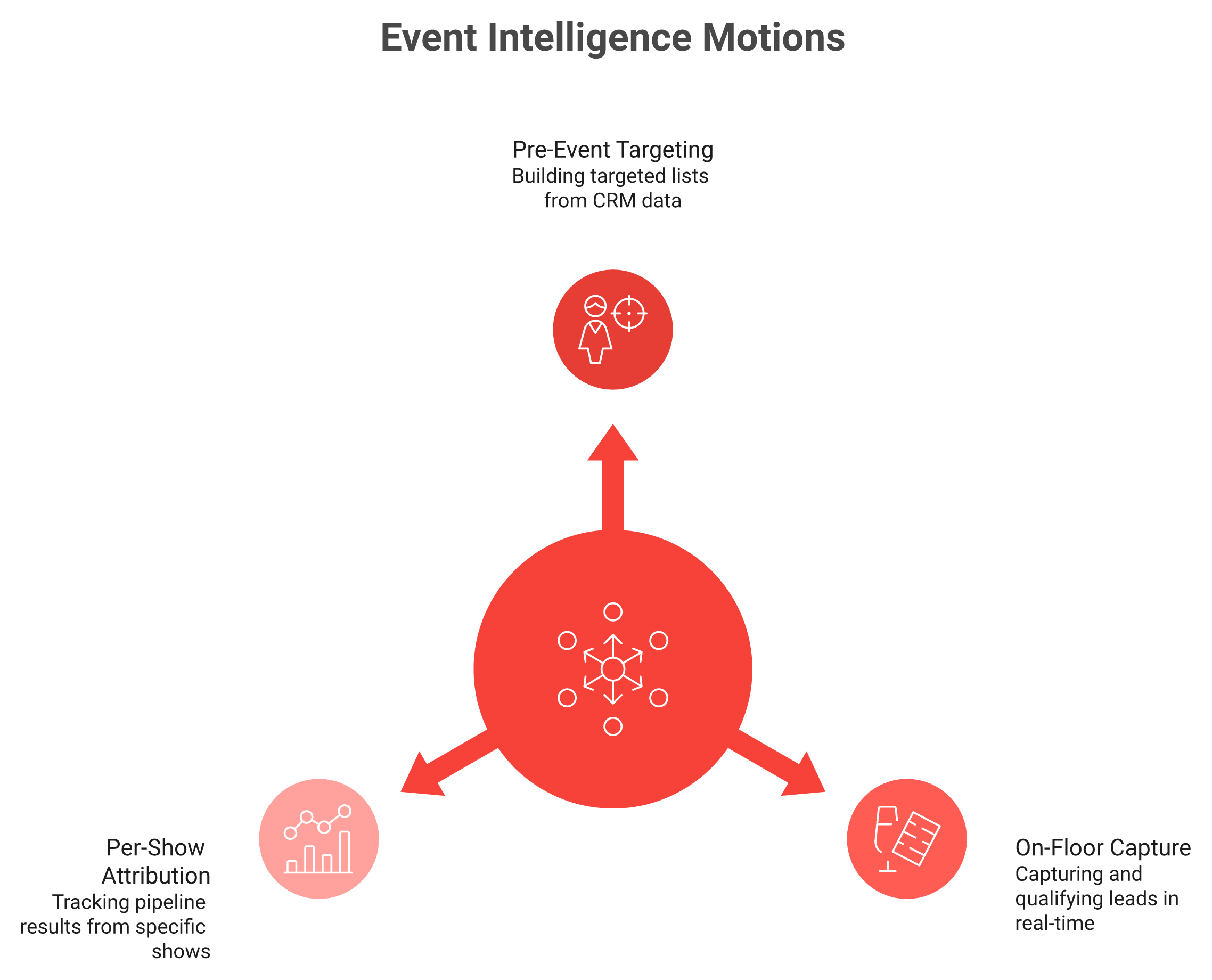
Event intelligence is the practice of owning attendee, conversation, and pipeline data across all three phases of a trade show. That means pre-event targeting, on-site qualification and routing, and post-event attribution. You own that data, instead of renting a contact list from the organizer's badge scanner.
Event intelligence owns data across all three show phases, where a badge scanner captures only a single contact.
A badge scanner records who stopped by. Event intelligence tells you who to chase, what was actually said, and what pipeline the show produced. If you want the mechanics, this is how event lead capture works end to end.
❌ Why the badge scanner is not "intelligence"
The badge scanner the organizer rents you is a data-collection tool for them, not for you. One operator put it bluntly:
"Do not trust the badge scan, you stupid little tag and the stupid lanyard they provide you. It collects leads for them, it does nothing for you. There's like one out of 20 businesses who get this lead list and then act on it, three months later."
That matches what I see. The scanner saves a contact and ends at a CSV. There is no record of why you talked to someone, no qualification, and no link to a CRM opportunity. You walk out of a six-figure room with 400 names and no story.
Badge Scanner vs. Event Intelligence Across the Three Phases
Phase
Badge scanner gives you
Event intelligence gives you
Before
Nothing
A CRM-grounded target list per rep
During
A scanned contact
A qualified conversation, with context
After
A CSV, days late
Pipeline attributed to that show
💰 The anxiety underneath the search
Here is the felt reality. You are in what one founder calls "a big, germ-filled room," spending real money, with no clean way to prove it was not a waste.
The math is unforgiving. On a roughly $70K booth, leadership often wants 10x pipeline coverage. At a 20% close rate, that is about 2x revenue ROI. If you do not know that math, you do not know what you are spending the money on. Contact information is not where anything happens. Pipeline is where your world moves, which is exactly the gap our offline to pipeline approach is built to close.
🧭 The three motions that follow
This is the layer B2Brain occupies: the space between the badge scanner and the CRM. We did not invent trade shows. We built the intelligence layer that sits on top of capture, so the conversation and the pipeline survive the show.
Before: build a target list from your own pipeline, not a guess.
During: capture the conversation with context, qualify it, and route it.
After: attribute pipeline to the show and report a number you can defend.
My read, after watching thousands of booth conversations: the exhibitors who win are not the ones who scan the most badges. They are the ones who own their data end to end. That is the whole game, and the next section shows why the scanner-only approach quietly fails.
Q2: Why does the badge-scan CSV dump fail to produce pipeline? [toc=2. Why Badge Scans Fail]
I once watched a sales rep type business cards into Salesforce in the cab back to the hotel. Half the context was already gone. He could not remember which "John from procurement" wanted a quote and which was just being polite. That cab ride is the badge-scan problem in miniature.
⚠️ The core failure: identity without intent
The badge-scan CSV fails because it captures identity, not intent. Reps get a spreadsheet days late, with no record of what was said, no qualification, and no tie to a CRM opportunity.
The numbers are brutal. Industry coverage consistently finds that close to 80% of trade-show leads are never meaningfully followed up. Another analysis pegs roughly 80% of captured leads dying inside CRMs, one writer calling it a "$270K leak." So a six-figure booth becomes a list nobody acts on, and finance sees a cost with no pipeline attached.
📦 The shoebox nobody opens
There is an old operator story that still describes most exhibitors:
"Jimmy brings the box back with all the leads. Monday morning he pulls out three business cards and calls three people. Then somebody says, 'Hey, want to go to lunch?' and he shoves the shoebox under the desk. Six months later they find the shoebox."
The modern shoebox is a CSV in someone's downloads folder. The format changed; the outcome did not.
💸 What reps actually say about the tools
This is not only the organizer's scanner. Even app-based scanners leak when they are clunky or slow:
"Sometimes Mobly can be finicky, where it doesn't sync all the leads I've scanned... without those leads that I scanned but apparently didn't go through, we end up with a lot fewer than we expected.." Verified User in Events ServicesMobly G2 Verified Review
"It takes quite a while for the app to populate captured leads within the conference list... hoping it improves soon." Kevin M.Mobly G2 Verified Review
"Still better than using a legacy conference badge scanner. I was able to not have to put notes into a spreadsheet." Will N.Mobly G2 Verified Review
That last line is the tell. The bar reps compare against is "at least it beats the legacy scanner and the spreadsheet." That bar is on the floor.
🔁 The real bottleneck is follow-up, not capture
Here is the part the standard playbook gets backwards. Everyone obsesses over capturing more. The actual bottleneck is speed and context after the handshake.
A scan count is a vanity metric. The number that matters is sourced versus influenced pipeline. A five-minute booth conversation costs roughly $200 of a prospect's attention. Reducing that to a badge with no notes wastes the most expensive thing you bought.
So the fix is not a faster scanner. It is a different model: capture with context, qualify on the spot, book the meeting before they leave, and attribute the pipeline. That model is what the next three sections build, motion by motion, and it is the core of how we generate new pipeline from events.
Q3: How does pre-event targeting work before the show floor opens? [toc=3. Pre-Event Targeting]
Most booth teams decide who to talk to by accident. Someone wanders up, a rep scans the badge, repeat. Pre-event targeting flips that. You decide who you want to meet before you ever pay for drayage.
🎯 What pre-event targeting actually means
Pre-event targeting means crossing the exhibitor and attendee lists against your CRM and your ICP (your ideal customer profile, the accounts you actually sell to). You pull open opportunities and intent signals, then hand each rep a ranked account list with deal context.
Instead of walking the floor hoping, your team walks in knowing which 30 conversations are worth their two days, and which booths to hit first. This is the part of the three-motion workflow that pays for the whole show.
🗺️ The five-step pre-event workflow
Here is the sequence I give operators. It fits on one page and you can run it this week.
Pull the lists. Get the exhibitor and attendee lists from the organizer or the show app.
Match against your CRM. Flag existing accounts, open opportunities, and closed-lost you want back.
Layer in intent. One operator described it well: "Throw the conference name into the platform, see which companies are researching that, and use that cohort to understand what pain points they're researching."
Assign accounts per rep. No two reps chasing the same logo. Each AE owns a named list.
Prep the talk track. One line per account: the deal stage, the last touch, the reason to talk now.
📊 Pick the right show with the ratio rule
Targeting starts before the booth, with show selection. A simple lens: exhibitors per attendee.
One operator compared a locksmith show with "1,700 attendees and only 18 vendors, so one vendor per 100 attendees," against a giant show with "60,000 people but 2,700 booths." The first is a baited field. The second drowns you. If you are one of 2,700, your pre-event list is the only way to not disappear.
🧠 Grounded in your pipeline, not a guess
Here is where the approach matters. Most "event intelligence" claims lean on a vendor's prediction database, telling you who is statistically likely to attend. That is a guess about strangers.
A pre-event briefing built from your own Salesforce or HubSpot pipeline is different. For booth teams, that briefing is assembled from your actual deals, so an AE reads it on the plane and knows that the buyer at booth 412 has an open $40K opportunity stuck in stage two. That is not a cold list. That is your pipeline, mapped to a floor plan, and it is just as useful for floor-walking teams working a show they do not exhibit at.
⏰ Why this is the cheapest motion to fix
I could be wrong on the exact weighting, but my read is that pre-event work has the best return of all three motions, because it costs almost nothing. You already paid for the booth. The lists are free. The CRM data is already yours.
The teams that skip this step are not short on tools. They are short on a decision: who are we actually here to meet? Answer that before the doors open, and the on-the-floor motion in the next section gets far easier.
Q4: How do you capture and qualify a booth conversation with context, not just a badge? [toc=4. On-Site Capture & Qualification]
It is 2pm on day two. The booth is slammed. A rep is mid-conversation with a real buyer, and three more people are waiting. This is the exact moment most capture tools break, and the rep quietly goes back to taking photos of badges.
🎤 Capture with context means recording the conversation
Capturing with context means recording what was said, not just who showed up. As the rep talks, they scan the badge, add a quick voice or text note, and score the lead against ICP criteria. In seconds. Offline, if the hall WiFi is dead.
The output is not a row in a CSV. It is a qualified lead with the conversation attached, ready to act on while the prospect still remembers your booth. That is the heart of what gets captured on the floor.
⚠️ The rush-hour failure mode
Here is the felt reality from watching reps behave at 4pm on day two. If the app hesitates, the rep abandons it. One slow loading spinner and they revert to a photo or a scribbled note. Then context dies on the cab ride, like that Salesforce-in-the-taxi rep from earlier.
Reviews say it out loud:
"Sometimes it doesn't scan leads properly, whether a blurry picture or the service made it delayed, or it's not syncing with the WiFi." Verified User in Events ServicesMobly G2 Verified Review
"It was challenging to get it to sync with Salesforce... the integration process was difficult for my team and took a long time." Ece K.Mobly G2 Verified Review
There is another friction nobody admits. The person working the booth often does not work for the company. They are a hired rep, or "the head honcho from corporate who hasn't sold anything since 1994." Either way, qualification has to be dead simple or it does not happen.
🔑 The one question that captures real context
A hot-lead checkbox tells you nothing in six weeks. Context does. My favorite qualifier is what I call the kryptonite question:
"What made now the right time to talk about growing your sales?"
Ask that, and the prospect hands you their actual pain, their timeline, and their trigger. That is the context worth capturing, far more than a "warm/hot" flag.
⏱️ Why speed is the whole design constraint
This is where the tool either earns its place or gets abandoned. The design target has to be 2pm on day two, not a quiet demo.
At B2Brain, capture is voice-first: tap once, talk for about 30 seconds, and a structured CRM record comes out in roughly 4.2 seconds. That is about one-fifth the time of typing notes. It runs offline and syncs on reconnect, and a "Recent Leads" view lets a rep scan now during rush hour and add the note two minutes later without losing the thread. You can see what B2Brain costs per event before you commit to a show.
I will be honest about the trade-off: our native app is iOS-first, and our third-party enrichment depth is lighter than tools like Popl or Mobly that lead with that. But capture speed and context are the points where shows are actually won or lost. Get a qualified, context-rich lead off the floor, and the next motion, routing and booking, is where it turns into pipeline. If you want to walk through it live, Book a Demo and bring your next show's attendee list.
Q5: What is on-site routing, and why book the meeting at the booth instead of chasing later? [toc=5. On-Site Routing & Booking]
On-site routing means assigning a qualified booth lead to the right account executive and booking the discovery meeting before the prospect leaves the booth. It works because conversion decays fast. Contact within minutes converts far higher than a follow-up sent days later. Booking on the floor locks the commitment while intent is highest, instead of dumping the lead into a post-show queue where most go cold.
⏰ Why later almost always means never
Here is the problem with "we'll follow up after." The lead-decay curve is brutal. Conversion probability sits near 85% within two hours, and falls to about 9% after a week. The prospect who loved your demo on Tuesday cannot recall your booth by Friday.
So the chase rarely works. Post-event email blasts land in an inbox with forty identical ones, and reply rates stay under 5%. One operator described the fix simply: send the warm note "within minutes of walking away from me," and the deal stays alive. The goal at a booth is not to scan a badge. It is to sell a meeting, which is the whole point of generating new pipeline from events.
"Trade show ROI has been basically zero for us three years running. The follow-up sequence goes nowhere." Exhibitor, r/salesReddit Thread
"We scanned 400 badges at the show and booked a handful of calls. Something is broken in the middle." Exhibitor, r/salesReddit Thread
✅ Book now versus chase later
On-Site Booking vs. Post-Show SDR Chase
Dimension
On-site booking
Post-show SDR chase
Speed
Meeting set in seconds
Days to weeks
Conversion
Highest, intent still warm
Decays toward single digits
Context
Conversation still fresh
Mostly lost
AE routing
Right AE, dual invite, on the spot
Generic SDR queue
⭐ The mechanics of routing
is not magic, it is plumbing done well. You pull the right AE's live calendar, book a 30-minute follow-up, and send a dual invite to both the prospect and the AE before they step away. That commitment, made face to face, is far harder to ghost than an email.
This is the motion B2Brain was built around, not bolted on. We capture, qualify, route to the correct AE, and fire the dual calendar invite in about 30 seconds, then sync it to Salesforce or HubSpot. Most challengers ship "book a meeting" as one feature. We treated the booked meeting as the whole point, which is exactly why this booth-day workflow sets up the metric in the next section.
Q6: How do you prove post-event ROI and attribute pipeline to a specific show? [toc=6. Post-Event Attribution]
Post-event attribution means every lead, note, and meeting syncs to your CRM tagged to the show that produced it. So you report sourced and influenced pipeline per event, not a scan count. Instead of telling your CFO "we scanned 500 badges," you show the morning-after report: meetings booked, opportunities created, and pipeline dollars tied to that specific show. The line item finally has a number, not a story.
💰 The number finance will actually accept
A booth is expensive. Decorating alone can run $35,000, and even a small 100 square foot booth costs $10,000 to $15,000. That spend needs a defensible return, and the golden rule most teams use is roughly 3x ROI on closed-won.
You cannot defend that with a scan count. You defend it with pipeline attributed to the show, which is the heart of the offline to pipeline shift.
⚙️ How attribution actually works
The mechanics are simple, but most stacks skip them. Three steps make the pipeline traceable.
Sync every lead, note, and meeting to the CRM with the show tag intact.
Dedupe across reps, so two scans of the same buyer do not double-count.
Split sourced pipeline (the show created it) from influenced pipeline (the show touched it).
📊 The morning-after report
Here is the artefact that changes the conversation. By 9am the day after the show, the CMO gets a report: pipeline sourced, meetings booked, and attribution by show, booth area, rep, and segment.
That is what B2Brain produces with near 100% event-to-CRM attribution, and it is the same reporting logic behind how event lead capture works. The question stops being "did the show work?" It becomes "which shows do we do more of?" That is a far better question to bring to a QBR.
Q7: What is the Leads-to-Meeting (LTM) metric, and why does it beat scan counts? [toc=7. The LTM Metric]
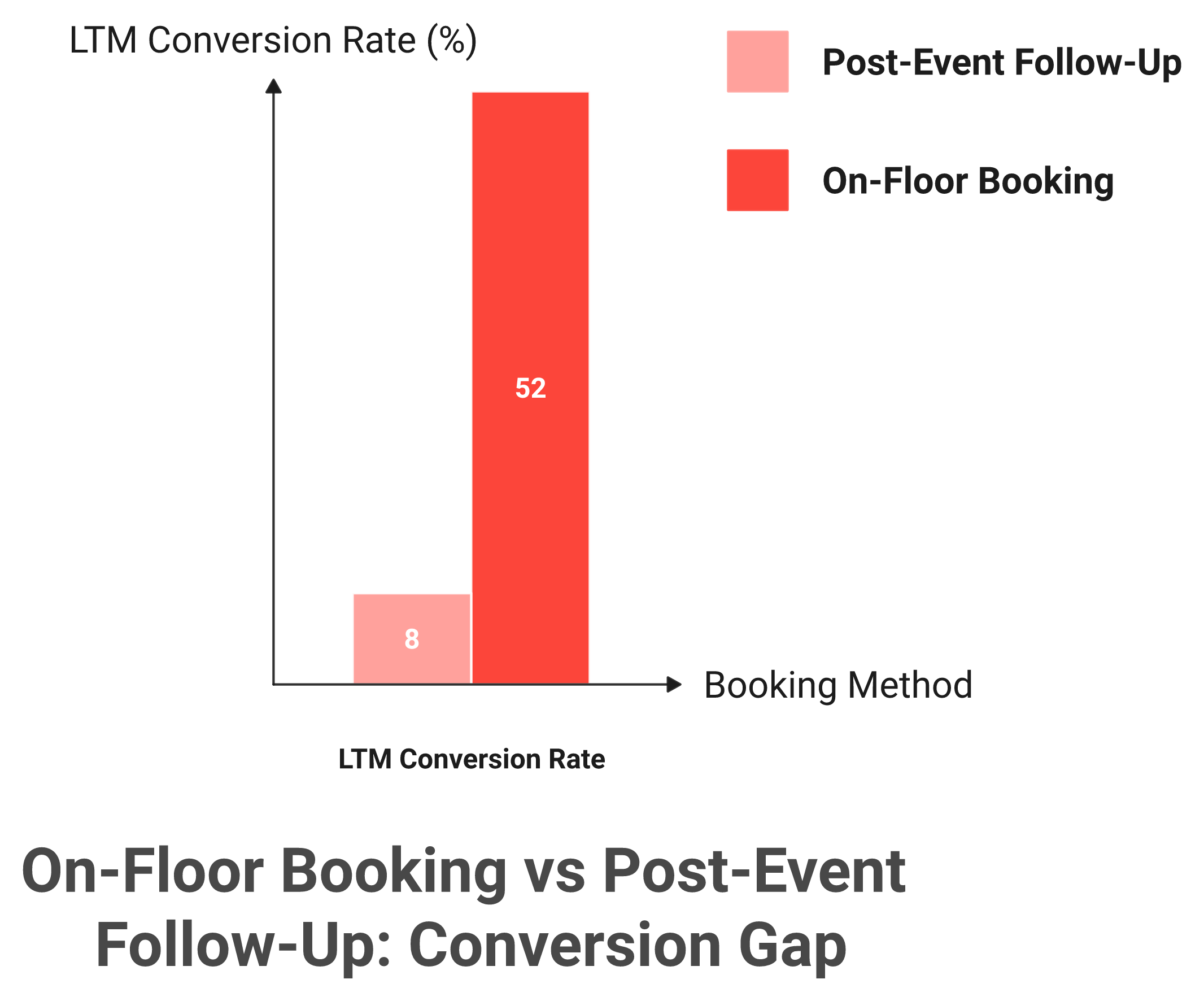
Leads-to-Meeting (LTM) is the percentage of qualified booth leads that convert into a booked meeting: meetings booked divided by qualified leads. It replaces the vanity metric of scan counts with a conversion rate you can benchmark and improve. Booking on the floor pushes LTM far above the norm, about 52% on the floor versus roughly 8% from post-event SDR follow-up. What CPC is to advertising, LTM is to trade shows.
Booking at the booth converts at about 52 percent versus roughly 8 percent for post-event follow-up.
🧮 The formula, in plain terms
LTM is one clean ratio. Meetings booked, divided by qualified leads, expressed as a percentage.
So if you qualify 100 real conversations and book 50 meetings, your LTM is 50%. It is tool-agnostic. Any team can calculate it today, and you should, because it is the through-line that connects pre-event targeting, on-site booking, and post-event attribution.
📈 Why scan counts mislead you
Scan counts reward volume, not outcome. You can scan 600 badges and book nothing, and the scan count still looks impressive on a slide.
LTM cannot be faked that way. As one operator put it, "your goal isn't just to scan badges, your goal is to sell meetings." LTM measures the meetings, which is why we built it into our three-motion workflow as the headline number.
⭐ Why B2Brain owns this metric
I will say this plainly: no competitor tracks LTM at all. We coined it, and the 52% on the floor versus 8% post-event gap is the number we report. You can read the full breakdown on the LTM and pipeline hub.
My honest read, and I could be wrong on the timing, is that LTM becomes the category's default within two years, the same way CPC became advertising's default. When a field marketer can answer "where is the pipeline?" with a clean conversion rate, the budget conversation changes. That is the shift the booth-day workflow is built to deliver.
Q8: Why does one shared intelligence layer beat stitching a scanner, an enrichment app, and a spreadsheet together? [toc=8. One Layer vs Stitched Stack]
A shared intelligence layer carries one account from a pre-event target list, to a context-rich booth conversation, to a booked meeting, to a CRM record with show attribution, and remembers it next year. Badge scanners reset every show. Bolting an enrichment app onto a scanner onto a spreadsheet leaves gaps where context and accountability leak out. One connected layer across all three phases is what makes pipeline defensible and compounds show over show.
🧩 Where the stitched stack leaks
A stitched stack looks fine on paper. In practice, every handoff drops something. The scanner has the contact, the enrichment app has the firmographics, and the spreadsheet has the rep's half-remembered notes, but nothing holds the whole story together.
Field marketing and event activations were often siloed, when everything the marketing team has been working on should be brought to the stage. A connected layer fixes that, the same way our floor-walking teams see one record instead of three disconnected ones.
Stitched Stack vs. One Shared Intelligence Layer
Capability
Badge-scanner only
Scanner plus enrichment plus spreadsheet
One shared layer
Context retention
None
Partial, scattered across tools
Full, one record
Attribution
None
Manual and error-prone
Automatic, per show
Cross-event memory
Resets every show
Rebuilt by hand each time
Compounds show over show
🧠 Cumulative memory is the real moat
Here is the part the category avoids saying. The value is not any single feature. It is the memory that builds up when one layer owns the account across every show, every year.
That is the architecture behind B2Brain, with per-customer Next-Best-Action steps that mirror your own sales process. Capture-and-enrich tools bolt meeting-booking on as a feature, which is a different architecture entirely. Once your funnel runs on the shared layer, you never pay the memory tax again, and you can see exactly what B2Brain costs per event against that compounding return. If you want to see it on your own pipeline, Book a Demo.
Q9: What can you do at your next show, a Monday-morning event-intelligence checklist? [toc=9. Your Next-Show Checklist]
Start before you book the booth: pull the attendee list against your CRM and pick your 30 target accounts. On the floor, capture every conversation with a note and qualify it on the spot, then book the meeting before they walk away. After the show, sync everything to your CRM with the show tag and report LTM and pipeline per show. Do these three things and your next show defends itself.
⭐ Before the show
Six to eight weeks out, do the work most teams skip. This is where the show is won or lost, long before the doors open.
Pull the exhibitor and attendee list, then match it against your CRM and ICP.
Pick the 30 accounts worth your reps' two days, and assign each one an owner.
Hand every rep a one-page briefing with deal stage and last touch, to read on the plane.
If you want a template for this step, our booth-day workflow lays out the pre-event list build in order.
⏰ During the show
On the floor, speed is everything. Capture has to be faster than a notebook, or it will not happen at 2pm on day two.
Capture every conversation with a voice or text note, qualified against ICP on the spot.
Book the discovery meeting on the right AE's calendar before the prospect walks away.
Stay to the end. One operator got some of their best demos in the final 40 minutes, after every other booth had packed up.
The morning after, turn the floor into a number your CFO will accept.
Sync every lead, note, and meeting to the CRM with the show tag intact.
Dedupe across reps, then split sourced from influenced pipeline.
Report your Leads-to-Meeting rate and pipeline per show, then compare it show over show.
That post-show number is the whole point of moving from a contact list to offline to pipeline reporting.
✅ The dream outcome, stated plainly
Here is what I want for you. You walk out with meetings booked and a pipeline number you can defend, not a CSV of 400 contacts nobody acts on. That is the whole shift from badge scanning to event intelligence.
This is the workflow B2Brain runs end to end, but the checklist is yours to use with any stack. My open question, the one I am still sitting with, is whether LTM becomes the category's CPC, the number every field marketer reports by default within two years. I think it does. You can see what B2Brain costs per event before your next show, or just Book a Demo and bring your attendee list. Tell me which show you are prepping for next, and what your follow-up actually looks like today. I would rather hear the real story than guess at it.
FAQ's
What is event intelligence for a B2B trade-show exhibitor?
For a B2B exhibitor, event intelligence means owning your attendee, conversation, and pipeline data across all three phases of a show. It is not the organizer's badge scanner, and it is not IT-observability or event-planning software that share the same search term.
We define it across three motions:
Before: a target account list built from your own CRM, not a guess.
During: a captured conversation with context, qualified on the spot.
After: pipeline attributed to that specific show.
A badge scanner records who stopped by. Event intelligence tells you who to chase, what was said, and what pipeline the show produced. The difference matters because a six-figure booth that ends at a CSV gives finance a cost with no pipeline attached.
This is the layer we occupy at B2Brain, the space between the scanner and the CRM. If you want the mechanics, here is how event lead capture works end to end, before, during, and after the show.
How is event intelligence different from a badge scanner?
A badge scanner is a data-collection tool for the organizer, not for you. It saves a contact and the workflow ends at a CSV that lands days late, with no record of why you talked to someone and no link to a CRM opportunity.
Event intelligence captures the conversation, qualifies it, books the meeting, and writes the CRM record with the show tag intact. The contrast shows up in the numbers:
Badge scanner: a list, and close to 80% of those leads are never meaningfully followed up.
Event intelligence: a qualified lead with context, routed to the right rep while intent is highest.
Anything a scanner captures, we capture with context, then we add the booked meeting and the attributable pipeline. That is the architectural difference, a contact list versus a booked-meeting-and-pipeline layer.
For booth teams weighing the swap, our booth-day workflow shows where the scanner-only model leaks and how the three-phase approach plugs the gap.
What is the Leads-to-Meeting (LTM) metric and why does it matter?
Leads-to-Meeting (LTM) is the percentage of qualified booth leads that convert into a booked meeting, calculated as meetings booked divided by qualified leads. It replaces the vanity metric of scan counts with a conversion rate you can benchmark and improve.
The number tells the story:
Booking on the floor pushes LTM to roughly 52%.
Post-event follow-up by an SDR queue lands closer to 8%.
What CPC is to advertising, LTM is to trade shows. It is the through-line that connects all three motions, and it is the number a Field Marketer can bring to the Monday pipeline review when the CEO asks where the pipeline is.
We coined LTM at B2Brain because no scanner tracks it, but the formula is tool-agnostic and you can adopt it on any stack. If you want to see how it ties into per-show reporting, this is how we help teams generate new pipeline from events.
How do you capture and qualify a booth conversation without slowing down the rep?
Capture has to be faster than a notebook, or it will not happen at 2pm on day two. If the app hesitates, the rep abandons it and reverts to photos of badges, and the context dies on the cab ride back.
The model that survives rush hour:
Scan the badge, add a quick voice or text note, and score against your ICP in seconds.
Work offline when the hall WiFi is dead, then sync on reconnect.
Ask one qualifying question, like what made now the right time, to capture real intent.
At B2Brain, capture is voice-first: tap once, talk for about 30 seconds, and a structured CRM record comes out in roughly 4.2 seconds, about one-fifth the time of typing notes. We are honest about the trade-off, our native app is iOS-first and our enrichment depth is lighter than some rivals.
How do you prove per-show pipeline and trade-show ROI to a CFO?
You prove it by tagging every lead, note, and meeting to the show that produced it, then reporting sourced and influenced pipeline per event instead of a scan count. The morning-after report turns the floor into a number finance accepts.
The math your CFO is running:
On a roughly $70K booth, leadership often wants 10x pipeline coverage.
At a 20% close rate, that is about 2x revenue pipeline ROI.
So the report has to show meetings booked, opportunities created, LTM, and pipeline dollars tied to that specific show. Then you compare show over show and decide which events to do more of. Contact information is not where anything happens; pipeline is where your world moves.
Before your next show, you can review what B2Brain costs per event against the pipeline you expect it to source, so the budget conversation starts with a comparison, not a guess.
Enjoyed the read? Join our team for a quick 30-minute chat — no pitch, just a real conversation on how we’re rethinking Event Intelligence in B2b.

.webp)
.png)

.png)
.png)