10 Best Cvent LeadCapture Alternatives for Trade Shows in 2026
Written by
Sridhar Ranganathan
Last Updated :
August 7, 2026
Skim in:
13
mins
TL;DR
The ten alternatives split into three camps: exhibitor-owned platforms that book meetings at the booth, capture-and-enrich apps, and badge-retrieval rentals you already know.
Cvent acquired iCapture in January 2024, so choosing iCapture to escape Cvent reduces dependency rather than removing it, which most shortlists miss.
Exhibitors leave for four structural reasons: Cvent-only badge reading, per-event licensing that scales with show count, context-free CRM records, and contact lists instead of pipeline numbers.
Third-party analysis puts year-one implementation at $5,000 to $50,000 plus $7 to $12 per registrant, while organizer scanner rentals run $200 to $600 per device.
Conversion probability sits near 85% within two hours and falls to roughly 9% after a week, yet average post-event response time is near 42 hours.
B2Brain reports 52% of qualified booth leads converting to a booked meeting on the floor against an 8% industry average achieved after the show.
Q1. What are the 10 best Cvent LeadCapture alternatives for trade shows in 2026? [toc=1. Top 10 Alternatives]
The ten best Cvent LeadCapture alternatives in 2026 are B2Brain, iCapture, Captello, Momencio, Validar, CompuLead, Popl, Mobly, BoothIQ, and Blinq. They split into three camps: exhibitor-owned platforms that book the meeting at the booth, capture-and-enrich apps that speed data collection, and badge-retrieval vendors that replace the organizer rental. Your camp depends on whether you need contacts or booked pipeline.
Here is the situation I hear most often. A team runs twelve shows a year across four different registration platforms. The tool reads badges cleanly at the two Cvent shows, and at the other ten the reps fall back to rented scanners, phone photos, and a paper list. Nobody planned that. It is just what happens when the capture tool belongs to the organizer instead of the exhibitor.
One clarification before the list, because it trips up almost every shortlist I see. Cvent acquired iCapture in January 2024. If you pick iCapture to escape Cvent, you have reduced your dependency, not removed it. That is worth knowing before you sign, not after.
This comparison is published by B2Brain, and I run it. The rubric in the evaluation section is applied to the three-motion workflow we sell too, including where we lose points.
Our Evaluation Criteria
This title is an alternatives search, so the criteria are about the structural trade-off you are escaping, not a feature count.
Works at any event. Does the app capture leads regardless of who runs registration? This is the single reason most teams start looking, and it is the whole premise of universal lead capture.
CRM sync model. Native real-time write to Salesforce or HubSpot, or a CSV you import later? The gap between those two is usually days, which is why Salesforce-native lead capture is scored separately here.
On-floor meeting booking. Can a rep put a real 30-minute discovery call on an AE's calendar before the visitor walks off?
Context capture speed. How long does it take to attach "why we talked" to a scan during a booth rush?
Offline reliability. Expo hall Wi-Fi fails. Does the app queue scans and sync on reconnect?
Cost shape. Per-event licensing, annual subscription, or per-device rental? Show count decides which one hurts.
Pipeline reporting. Can you show per-show pipeline and attribution, or only a contact count? If you have never run that math, the event ROI calculator is the fastest way in.
Who This Guide Is For
Field and Event Marketing heads who owe the CMO or CFO a per-show pipeline number.
VP Sales and CROs running the booth ROI math on a $20K to $200K spend.
RevOps leads who own dedupe, owner routing, and event attribution in the CRM.
Founders taking a vertical B2B team to a first major US show.
Teams whose calendar has outgrown one registration platform, and who now need the booth-day workflow to be theirs rather than the organizer's.
The Provider List
1.1 B2Brain: Best for B2B revenue teams that must convert booth conversations into booked meetings and prove per-show pipeline.
1.2 iCapture: Best for enterprise event programs wanting flat annual licensing and predictable reliability.
1.3 Captello: Best for demand-gen teams running booth activations and games.
1.4 Momencio: Best for teams whose value sits in post-capture content engagement.
1.5 Validar: Best for teams bridging organizer-side and exhibitor-side capture.
1.6 CompuLead: Best for one-off booths that just want the cheapest badge read.
1.7 Popl: Best for reps who lead with a digital business card.
1.8 Mobly: Best for teams wanting automated follow-up email triggered on scan.
1.9 BoothIQ: Best for individuals and small teams wanting voice-note capture on a free tier.
1.10 Blinq: Best for networking-heavy roles who value the largest review base.
Master Comparison Table
Cvent LeadCapture Alternatives Compared, 2026
Provider Name
Best For
Key Strength
Pricing Model
B2Brain
Revenue teams proving per-show pipeline to the CFO
Books the discovery meeting at the booth, then reports the pipeline it created
Per-event Show Pass or annual plan; first event free for two people
Reliable capture with rep-level activity reporting
Annual subscription; not publicly disclosed on site
Captello
Demand-gen teams running booth games and activations
Activation depth plus broad integration count
Annual license, plus per-show API kit fees reported by users
Momencio
Teams engaging prospects with content after capture
Per-prospect microsites and auto follow-up email
Subscription; not publicly disclosed
Validar
Teams needing both organizer-side and exhibitor-side capture
Works across both sides of the event
Custom quote
CompuLead
One-off booths on a tight budget
Straightforward badge read, no learning curve
Per-device, per-event rental
Popl
Reps who lead with a digital business card
Fast card sharing with deep third-party enrichment
Per-seat annual subscription
Mobly
Teams wanting scan-triggered follow-up email
Voice notes plus automated post-scan email
Subscription plus per-contact match fees
BoothIQ
Individuals and small teams testing voice capture
Voice-note-first capture with a free tier
Freemium, then paid tiers
Blinq
Networking-heavy roles wanting proven social proof
Largest review base in the category
Freemium, then per-seat
Cvent LeadCapture is the displacement reference here, not a peer entry. It works properly at Cvent-registered shows, hands you an export, offers no on-floor booking, and organizer scanner rentals sit near $600 per device per show.
1.1 B2Brain: Best for revenue teams that must turn booth conversations into booked meetings and provable pipeline [toc=1.1 B2Brain]
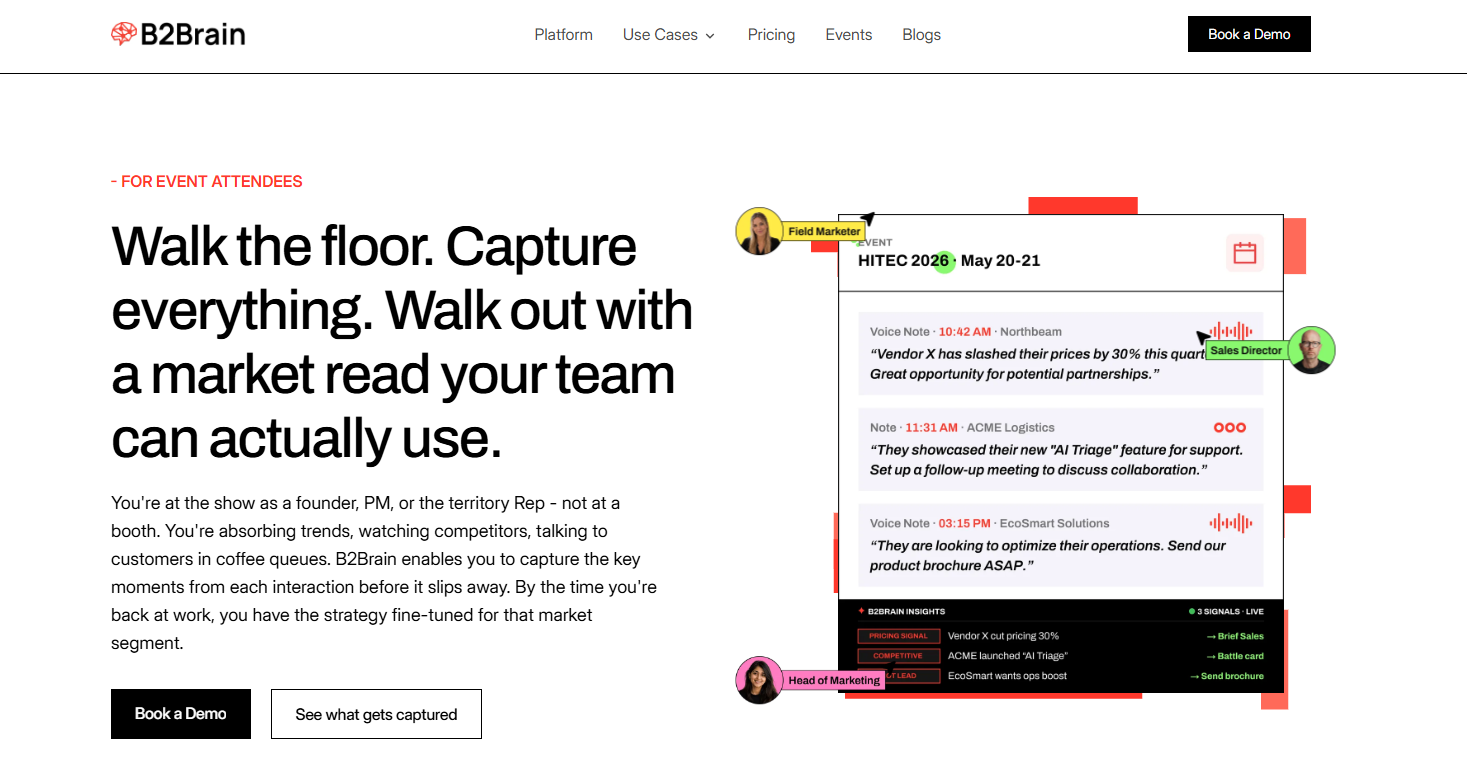
B2Brain records timestamped voice notes from attendee conversations, identifies pricing and competitive signals, and recommends follow-up actions that turn trade show observations into market intelligence.
🎯 Overview
B2Brain is an event lead capture platform built for exhibitor-side B2B revenue teams, and I co-founded it. It covers three motions on one shared layer: pre-event target lists, on-floor capture with meeting booking, and post-show pipeline reporting. The design bet is simple. Contact information is not where anything happens, and pipeline is where the buyer's world actually moves.
It is not a badge scanner, and lead retrieval is not our identity. That is the thing we replace, and the difference from a conference badge scanner is structural rather than cosmetic.
🧰 Core Services
Pre-event target list built by cross-referencing the attendee list against your own CRM pipeline.
Voice-first capture at the booth, with a structured CRM record produced in seconds.
On-spot meeting booking against the AE's live calendar, with a dual invite to prospect and rep.
Salesforce-native and HubSpot-native sync, offline-ready and syncing on reconnect.
Morning-after offline-to-pipeline report covering pipeline sourced, meetings booked, and attribution.
⚙️ How It Scores on the Criteria
Works at any event: Yes. Capture is exhibitor-owned, so it does not depend on who runs registration.
CRM sync model: Native to Salesforce and HubSpot, not a CSV import step.
On-floor meeting booking: Core to the product, not a bolt-on. The rep books the follow-up before the visitor leaves.
Context capture speed: Tap once, talk for about 30 seconds, get a structured record out in roughly 4.2 seconds.
Offline reliability: Built for hostile expo Wi-Fi, queuing scans and syncing later.
Cost shape: Per-event Show Pass or an annual plan for teams running eight or more shows, set out on the Show Pass and Pipeline plans page.
Pipeline reporting: Per-show pipeline, show-versus-show comparison, and LTM.
💰 Why Companies Consider B2Brain
B2Brain gets shortlisted when the pipeline question has already been asked and gone unanswered. The team spent real money on a booth, came back with a contact list, and had nothing to bring to the Monday review.
The number we track is LTM, short for Leads To Meeting. It is meetings booked divided by qualified booth leads. Our floor data sits at 52% against an industry average near 8% achieved after the show. My honest read is that the gap is mostly timing, not talent. A meeting agreed at the booth survives; an email sent Tuesday competes with everything else in the inbox, which is the core argument behind offline to pipeline.
👥 Ideal Customer Profile
Company size: growth-stage through mid-market and enterprise B2B.
Verticals: manufacturing, supply chain and logistics, energy, construction tech, and vertical SaaS.
Buyer roles: Field or Event Marketing head as champion, VP Sales, RevOps, and Founder.
Shows per year: roughly 5 to 15, with at least two booth reps.
Deal size: ACV above $25,000, with Salesforce or HubSpot already in the stack.
✅ When to Shortlist
Your shows run on more than one registration platform.
Reps come home with names but no record of why the conversation mattered.
You need per-show pipeline attribution for a QBR or budget defense, which is the job measuring event ROI properly is meant to do.
You want to test on one show first, since the first event is free for two people. If you would rather see it run end to end first, Book a Demo.
❌ When Not to Shortlist
Solo booths and one-off attendance, where the organizer scanner is genuinely enough.
Teams with no CRM, since the reporting depends on one.
Consumer-facing sellers and developer or AI-summit booths.
Teams that need a digital business card or the deepest third-party enrichment waterfall. Our native app is iOS-only, and we enrich from your CRM rather than a cold database.
⚠️ Watch-Outs From Reviewers
Our review base is small, at 17 on G2, against thousands for Blinq and Popl. That is a fair mark against us, and we are working on it. Weight recent reviews from exhibitors running a comparable show count over raw volume.
"The main thing is the contact data. It's just not very good. The accuracy of emails is hit or miss, around 60-70%." Jorgealfa P., B2Brain G2 Verified Review
"Reporting is basic. We can see usage and lead stats, but there are no rep performance dashboards, no clear ROI reporting like time saved or deals influenced." Ole O., B2Brain G2 Verified Review
"The AI Conversation Summarization and Auto-CRM Entry feature is a standout, it's significantly better than other tools we've tried. Reps actually rave about it instead of dreading another sales tool." Ole O., B2Brain G2 Verified Review
1.2 iCapture: Best for enterprise event programs wanting flat annual licensing [toc=1.2 iCapture]
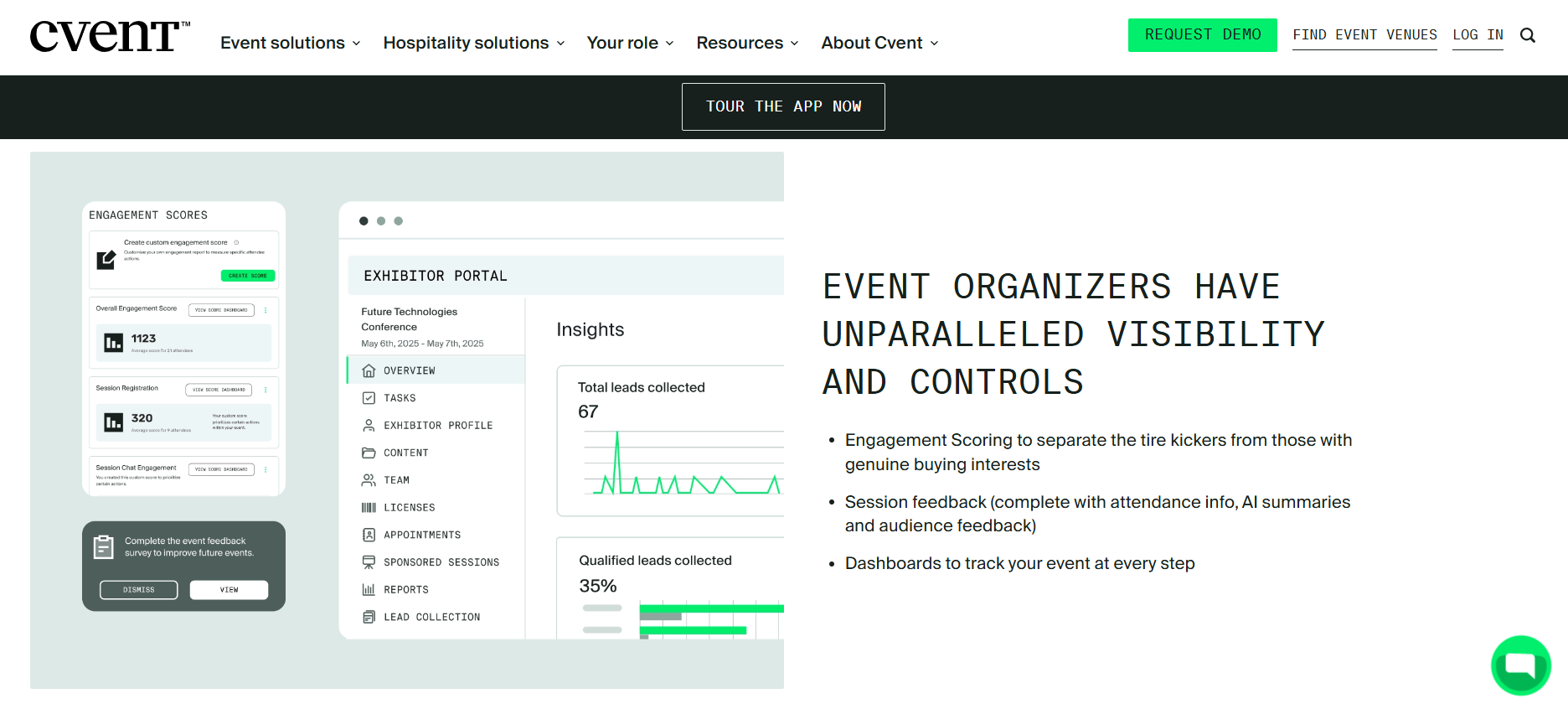
Cvent’s exhibitor portal combines engagement scores, session feedback, lead totals and qualification rates, giving organizers centralized visibility when evaluating trade show lead capture platform alternatives
🏢 Overview
iCapture is an exhibitor-side lead capture app used by large event programs running many shows a year. Cvent acquired it in January 2024, so it now sits inside the same company you may be trying to leave. It focuses on clean capture, form mapping, and rep-level activity reporting rather than on-floor conversion.
For a team that wants predictable cost and a tool their reps can learn in ten minutes, it is a reasonable pick.
🧰 Core Services
Badge and business card capture across multiple devices.
Custom qualification forms mapped from registration through to onsite capture.
Back-office analytics showing scan volume by rep, day, and time.
Lead routing and assignment after capture.
Support for company-hosted events alongside third-party shows.
⚙️ How It Scores on the Criteria
Works at any event: Mostly, but users report shows where the organizer's own software blocks it.
CRM sync model: Integrations exist, though at least one reviewer notes no native connector for their CRM.
On-floor meeting booking: Not a core capability in available sources.
Context capture speed: Manual entry is slower at events without an API integration, per reviewers.
Offline reliability: Not clearly stated in available sources.
Cost shape: Annual licensing. Pricing is not publicly disclosed.
Pipeline reporting: Strong event metrics and rep accountability, lighter on pipeline attribution.
💸 Why Companies Consider iCapture
The decision logic is usually cost predictability and staffing insight. Teams running ten-plus shows want one annual line item instead of a rental invoice per city. The busiest-hour analytics genuinely help you staff a booth properly, which is a real operational win.
Where I would push back is the ceiling. Better metrics on scan volume still leave the pipeline question open. Knowing which rep scanned most is useful; knowing which conversations turned into discovery calls is the number the CFO asks about, and that is the split covered in our lead retrieval app comparison.
👥 Ideal Customer Profile
Company size: mid-market to large enterprise.
Buyer roles: Event Marketing manager and marketing operations.
Shows per year: 10 or more, including company-hosted events.
Decision maker: Director of Event Marketing, often with procurement involved.
✅ When to Shortlist
You want flat annual licensing instead of per-event fees.
Rep activity reporting and booth staffing data matter to you.
Your event program is already standardized on Cvent and you want continuity.
❌ When Not to Shortlist
You are switching specifically to reduce Cvent dependency.
On-floor meeting booking is a requirement, not a nice-to-have.
You need a native connector to a CRM iCapture does not natively support.
"That some events have their own software so we can't use iCapture." Michelle H., iCapture G2 Verified Review
"Scanners complain it takes too long when having to do a manual entry for events that do not have an API integration." Beverly G., iCapture G2 Verified Review
1.3 Captello: Best for demand-gen teams running booth activations and games [toc=1.3 Captello]
🎮 Overview
Captello is a lead capture and engagement platform known for booth games, activations, and a large integration list. It suits teams whose booth strategy is built around drawing a crowd, not just scanning whoever walks past. Capture, forms, and CRM handoff sit alongside the activation layer.
If your booth plan includes a leaderboard or a prize wheel, this is the camp you are shopping in.
🧰 Core Services
Badge and business card capture with customizable qualification forms.
Interactive games, activations, and touchscreen experiences at the booth.
Universal lead capture across multiple shows in one workspace.
Integrations with major CRM and marketing automation systems.
Lead distribution and follow-up after capture.
⚙️ How It Scores on the Criteria
Works at any event: Depends on the show. Reviewers report it stops working when the organizer does not supply an API kit, which is the gap true universal lead capture is meant to close.
CRM sync model: Form-based import into the CRM, which users describe as reliable.
On-floor meeting booking: Not the product's center of gravity.
Context capture speed: Forms are configurable, though form-filling is slower than voice during a rush.
Cost shape: Annual license, plus per-show API kit costs reviewers put at $700 to $1,200.
Pipeline reporting: Engagement and capture metrics rather than sourced pipeline.
💰 Why Companies Consider Captello
The buying logic is usually engagement, not capture. A demand-gen team measured on booth traffic and MQLs wants a reason for people to stop walking. Games do that, and they do it better than a friendly rep waving a scanner.
My honest concern is what the crowd is made of. A prize draw pulls in the person who signs up for everything at the show, and that person rarely holds a budget. High capture volume and low pipeline is a pattern worth watching for, and it is exactly what measuring event ROI properly exposes.
👥 Ideal Customer Profile
Company size: mid-market to enterprise.
Buyer roles: demand generation, field marketing, and brand experience.
Shows per year: 5 or more with a mid-to-large booth footprint.
Booth setup: touchscreens, kiosks, or a staffed activation zone.
💸 Pricing
Annual licensing, with additional per-show integration kit costs reported by reviewers. Full pricing is not publicly disclosed.
✅ When to Shortlist
Booth engagement and dwell time are actual goals on your event brief.
You need one workspace covering many shows and many activations.
You already run games or contests and want capture built into them.
❌ When Not to Shortlist
Your show calendar includes organizers who do not provide API kits.
Booking the discovery meeting on the floor is the outcome you are buying.
Per-show add-on fees would blow a fixed annual budget.
⚠️ Watch-Outs From Reviewers
"Every time we have a show with lead scanning, I have to purchase an API kit that costs between $700-$1200. It's become costly." RebeccaGrace K., Captello G2 Verified Review
"It does not always work with every conference, if the conference does not provide an API kit for integration." Verified User in Consulting, Captello G2 Verified Review
1.4 Momencio: Best for teams whose value sits in post-capture content engagement [toc=1.4 Momencio]
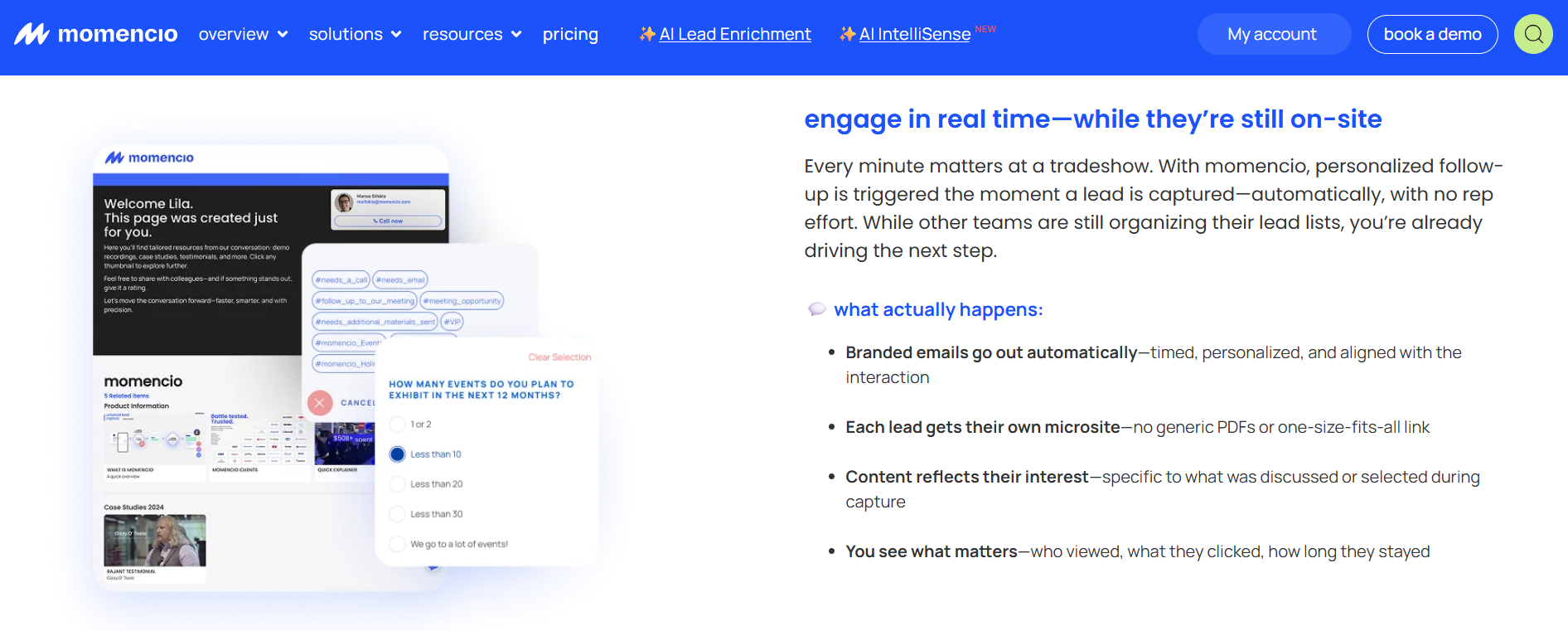
momencio triggers branded emails and personalized microsites immediately after capture, then tracks content views, clicks and dwell time for sales-ready follow-up at trade shows and events.
📩 Overview
Momencio captures leads and then focuses on what happens next. Its signature capability is a personalized microsite of content sent to each prospect after the scan. That makes it a fit for sellers whose deals move through collateral, specs, and product literature.
The category label it uses is event enablement, and the emphasis is genuinely on enablement rather than retrieval.
🧰 Core Services
Badge and business card capture with automatic follow-up email.
Per-prospect microsites assembled from your content library.
Engagement tracking showing which assets a prospect opened.
CRM integration for captured leads.
Presentation and on-stage lead collection for hosted sessions.
⚙️ How It Scores on the Criteria
Works at any event: Yes, with exhibitor-side capture across shows.
CRM sync model: Integration available, and reviewers describe setup as straightforward.
On-floor meeting booking: Not the primary design goal in available sources.
Context capture speed: Card capture is fast, with automatic email on capture.
Offline reliability: Not clearly stated in available sources.
Cost shape: Subscription. Pricing is not publicly disclosed.
Pipeline reporting: Engagement analytics, lighter on sourced pipeline attribution.
🎯 Why Companies Consider Momencio
The decision usually comes from a real content problem. A rep promises to send the spec sheet, the white paper, and the pricing tier, then forgets two of the three. Momencio removes that failure by sending a tailored page automatically.
Where I would set expectations is the difference between engagement and commitment. Knowing a prospect opened your deck is useful signal. It is not the same as a 30-minute discovery call already on an AE's calendar, and only one of those two shows up as new pipeline generated from events.
👥 Ideal Customer Profile
Company size: mid-market to enterprise.
Verticals: manufacturing, medtech, industrial products, and professional services.
Buyer roles: Head of Marketing, event marketing, and sales enablement.
Shows per year: 4 or more, including hosted sessions and keynotes.
💸 Pricing
Subscription-based. Pricing is not publicly disclosed.
✅ When to Shortlist
Your sales cycle depends heavily on sending the right collateral quickly.
You want asset-level engagement data on every captured lead.
You present on stage and want leads collected from the session.
❌ When Not to Shortlist
Your primary goal is a meeting booked before the prospect leaves the booth.
You need per-show pipeline attribution for a CFO conversation.
Your team is small and would use a fraction of the platform.
⚠️ Watch-Outs From Reviewers
"Logins are a little slow, and the single sign on does not work, it requires syncing on the mobile app." Jia Li T., Momencio G2 Verified Review
"There is so much value to be had using the tool. I feel like we're only utilising 60% of it right now." Martin D., Momencio G2 Verified Review
1.5 Validar: Best for teams bridging organizer-side and exhibitor-side capture [toc=1.5 Validar]
🌉 Overview
Validar sits between the two camps this article keeps separating. It supports organizer-side event operations and exhibitor-side lead capture in one vendor relationship. Teams that both host events and exhibit at third-party shows find that combination useful.
It is a practical pick when the same person owns both jobs.
🧰 Core Services
Lead capture at third-party trade shows.
Check-in and session tracking for company-hosted events.
CRM integration for captured event data.
Qualification forms and lead scoring.
Event data consolidation across both event types.
⚙️ How It Scores on the Criteria
Works at any event: Supported across exhibitor and host scenarios.
CRM sync model: Integration-based. Specific real-time behavior is not clearly stated in available sources.
On-floor meeting booking: Not clearly stated in available sources.
Offline reliability: Not clearly stated in available sources.
Cost shape: Custom quote.
Pipeline reporting: Event and attendance reporting rather than pipeline sourcing.
🧩 Why Companies Consider Validar
The logic is vendor consolidation. If you run a user conference and exhibit at eight industry shows, two separate tools mean two data sets and two invoices. One vendor covering both reduces the reconciliation work at year end.
That said, consolidation and depth pull in opposite directions. A tool built to serve both sides of an event rarely wins on the exhibitor-side conversion workflow, which is where the pipeline gets made or lost, and it is why we built the booth-day workflow for one side only.
👥 Ideal Customer Profile
Company size: mid-market to enterprise.
Buyer roles: event operations and marketing operations.
Shows per year: a mix of hosted events and third-party exhibits.
Decision maker: Director of Marketing Operations.
💸 Pricing
Custom quote. Pricing is not publicly disclosed.
✅ When to Shortlist
You own both hosted events and third-party booth programs.
Consolidating event data into one system is a stated goal.
Check-in and session tracking matter as much as booth capture.
❌ When Not to Shortlist
Your only job is exhibitor-side booth conversion.
You need voice-speed context capture during a booth rush.
On-floor meeting booking is a hard requirement.
1.6 CompuLead: Best for one-off booths that just want the cheapest badge read [toc=1.6 CompuLead]
📇 Overview
CompuLead is legacy lead retrieval, and it is honest about that. You rent a device or a license for the show, scan badges, and collect the data afterward. It is the rental incumbent most exhibitors have already used without choosing it, and it is the reference point for any conference badge scanner comparison.
There is a real use case here, and it is smaller than the vendor would like.
🧰 Core Services
Badge scanning at supported shows.
Basic qualifier codes attached to a scan.
Lead data export after the event.
Per-device rental for the show duration.
⚙️ How It Scores on the Criteria
Works at any event: Only at shows where it is the appointed retrieval vendor.
CRM sync model: Export and import. There is no real-time native write.
On-floor meeting booking: No.
Context capture speed: Qualifier codes only, so the reason for the conversation is not captured.
Offline reliability: Handheld devices function without exhibitor Wi-Fi.
Cost shape: Per-device, per-event rental, with the market reference near $600 per device per show.
Pipeline reporting: None on the exhibitor side.
💸 Why Companies Consider CompuLead
Two reasons, and both are legitimate. It is the default option in the exhibitor kit, and it is the cheapest way to get badge data at a single booth. For a founder attending one show to test a market, that is genuinely the right call.
The math changes fast though. Five reps across 20 shows can spend $30,000 to $40,000 a year on contextless scans locked in an organizer portal. At that point you are renting the same thing 100 times, and the event ROI calculator makes that swap obvious.
👥 Ideal Customer Profile
Company size: any, typically small teams.
Shows per year: one or two.
Booth setup: single table, one or two staff.
Buyer role: Founder, office manager, or whoever booked the booth.
💸 Pricing
Per-device, per-event rental through the show organizer. Rates vary by show and device count.
✅ When to Shortlist
You are attending one show and testing whether the market is worth it.
No CRM is in place yet, so sync depth is irrelevant.
Budget is the only real constraint.
❌ When Not to Shortlist
Your calendar has more than a handful of shows.
Anyone will ask you what pipeline the show produced.
Reps need to record why a conversation mattered.
1.7 Popl: Best for reps who lead with a digital business card [toc=1.7 Popl]
📱 Overview
Popl started as a digital business card company and added event lead capture later. That origin still shapes the product. The core motion is sharing your details, with badge capture and enrichment layered on top.
It has one of the largest review bases in the category, at over 4,400 on G2, and we cover the trade-offs in depth in our Popl alternatives breakdown.
🧰 Core Services
Digital business cards with QR and NFC sharing.
Lead capture forms and badge scanning.
Third-party data enrichment on captured contacts.
Team card management and branding controls.
CRM integrations for captured leads.
⚙️ How It Scores on the Criteria
Works at any event: Card sharing works anywhere. Badge scanning results vary, per reviewers.
CRM sync model: Integrations available. Depth varies by plan.
On-floor meeting booking: Not a core capability.
Context capture speed: Fast to share, though reviewers describe the recipient-side save flow as slow.
Pipeline reporting: Not a focus in available sources.
🤝 Why Companies Consider Popl
Rep adoption is the honest answer. Reps like the card, it looks modern, and nobody needs training. For networking-heavy roles, that is a real benefit.
Where the trade-off shows up is the direction of data flow. A digital card is built to push your information out. Event lead capture is about pulling their information in, with context attached, and those are different jobs, which is the whole point of how event lead capture works on the exhibitor side.
👥 Ideal Customer Profile
Company size: individual reps through mid-market teams.
Buyer roles: sales rep, sales manager, and marketing.
Shows per year: variable, often mixed with general networking.
Decision maker: often the individual rep or a sales manager.
💸 Pricing
Per-seat annual subscription. Reviewers cite roughly $140 per year at the individual tier.
✅ When to Shortlist
Your reps do heavy networking outside trade shows.
A branded digital card is genuinely part of your GTM.
You want deep third-party enrichment on captured contacts.
❌ When Not to Shortlist
Badge scanning is the primary job you are hiring the tool for.
You need the prospect's data without asking them to act.
You require pipeline attribution per show.
⚠️ Watch-Outs From Reviewers
"I didn't really use Popl because it didn't scan bar codes like I thought it would. Scanning badges should have given the name and contact info, but it didn't work when I tried it." Drew D., Popl G2 Verified Review
"Rather than simply adding a contact, Popl forces the recipient to complete numerous steps just to save the contact." Vadim E., Popl G2 Verified Review
"The only reason we use it is for the lead capture form. The ability for a lead to scan a QR code and then we get their information is huge." Verified User in Real Estate, Popl G2 Verified Review
1.8 Mobly: Best for teams wanting scan-triggered follow-up email [toc=1.8 Mobly]
✉️ Overview
Mobly is an exhibitor-side capture app that leads with automation after the scan. It captures the badge, enriches the record, and can trigger a follow-up email. It also offers voice notes, which reviewers consistently name as a favorite feature.
It is a genuine step up from a rented scanner, and reviewers say so directly. Our full Mobly review walks through where that ceiling sits.
🧰 Core Services
Badge, business card, and manual name capture with enrichment.
Voice notes attached to a captured lead.
Automated follow-up email triggered on scan.
Event tagging so you can see prior meetings with a prospect.
CRM sync, with Salesforce as the primary target.
⚙️ How It Scores on the Criteria
Works at any event: Yes, exhibitor-owned capture across shows.
CRM sync model: Salesforce integration, though reviewers describe setup as difficult and lengthy. Compare that against native Salesforce lead capture.
On-floor meeting booking: Not the primary motion. The default next step is an email.
Context capture speed: Voice notes are fast, and reviewers value them during busy periods.
Offline reliability: Reviewers report leads occasionally failing to sync on weak Wi-Fi.
Cost shape: Subscription plus per-contact match fees, which reviewers call expensive.
Pipeline reporting: Rep scorecards and capture analytics.
⏰ Why Companies Consider Mobly
Speed to first touch is the pitch, and it is a fair one. An email leaving within minutes beats an email leaving on Thursday. Given that average post-event response time runs near 42 hours, that is real improvement.
My read is that email is the ceiling, not the fix. Post-event email blasts see reply rates under 5%, so a faster version of a weak motion is still a weak motion. The decay curve rewards commitment, not correspondence.
👥 Ideal Customer Profile
Company size: mid-market to enterprise B2B.
Buyer roles: event marketing, marketing operations, and sales.
Shows per year: 5 or more.
Stack: Salesforce, with a team ready to invest in integration setup.
💸 Pricing
Subscription plus per-contact enrichment match fees. Full pricing is not publicly disclosed.
✅ When to Shortlist
Same-day follow-up email is your defined post-show motion.
Reps will actually use voice notes at the booth.
You want cross-event history on repeat prospects.
❌ When Not to Shortlist
You are buying a booked meeting, not a faster email.
Per-contact match fees conflict with a fixed budget.
Your team lacks the RevOps capacity for a long Salesforce setup.
⚠️ Watch-Outs From Reviewers
"It was challenging to get it to sync with Salesforce. The cost of matches per contact, I think, is kinda high." Ece K., Mobly G2 Verified Review
"Sometimes Mobly can be finicky, where it doesn't sync all the leads I've scanned. We end up with a lot fewer than we expected." Verified User in Events Services, Mobly G2 Verified Review
"Still better than using a legacy conference badge scanner. I was able to not have to put notes into a spreadsheet!" Will N., Mobly G2 Verified Review
1.9 BoothIQ: Best for individuals and small teams testing voice capture [toc=1.9 BoothIQ]
🎙️ Overview
BoothIQ is a newer exhibitor-side app built around voice-note capture with a free individual tier. It targets the rep who wants something better than a rented scanner without a procurement cycle. Meeting booking features have appeared in this camp recently.
The low barrier to entry is the main draw.
🧰 Core Services
Badge and card capture with voice-note context.
Free individual tier with paid team upgrades.
Lead export and CRM handoff.
In-booth follow-up scheduling.
Multi-show lead organization.
⚙️ How It Scores on the Criteria
Works at any event: Yes, capture is exhibitor-side.
CRM sync model: Integration-based. Depth by tier is not clearly stated in available sources.
On-floor meeting booking: Offered, though not paired with pipeline reporting in available sources.
Context capture speed: Voice-first, which suits booth rush conditions.
Cost shape: Freemium, moving to paid team tiers.
Pipeline reporting: Not clearly stated in available sources.
🧪 Why Companies Consider BoothIQ
The appeal is that you can try it before the next show without asking anyone for money. For a two-person booth, that removes the whole evaluation problem. Voice capture also gets adoption where typing does not.
I will be direct about my own bias here, since BoothIQ ships meeting booking too. B2Brain's view is that the feature converges quickly across this camp, and the difference sits in the layer underneath: pre-event briefing from your CRM, the LTM number, and configurable next-best-actions. Reasonable buyers will test that claim, and they should, so Book a Demo and check it against your last show.
👥 Ideal Customer Profile
Company size: individual reps through small teams.
Shows per year: 1 to 5.
Booth setup: one or two staff, small footprint.
Decision maker: the rep or a founder, with no procurement involved.
💸 Pricing
Freemium with paid team tiers. Full pricing is not publicly disclosed.
✅ When to Shortlist
You want to test voice capture at zero cost before a show.
Your team is too small for an enterprise contract.
Reps refuse to type notes and you need any workable alternative.
❌ When Not to Shortlist
You need enterprise reporting and per-show pipeline attribution.
CRM sync depth and dedupe rules are procurement requirements.
Your program spans many reps across many shows.
1.10 Blinq: Best for networking-heavy roles wanting proven social proof [toc=1.10 Blinq]
⭐ Overview
Blinq is the most-reviewed product in this comparison, holding the top G2 position with over 8,800 reviews. Its core is the digital business card, with lead capture and relationship features layered on. For sheer volume of verified feedback, nothing here matches it.
That review wall is a genuine asset when procurement wants proof of adoption.
🧰 Core Services
Digital business cards across QR, NFC, and email signature.
Lead capture forms at events.
Team card administration and branding.
Contact organization and integrations.
Social profile consolidation on the card.
⚙️ How It Scores on the Criteria
Works at any event: Card sharing works anywhere. Reviewers report QR reliability issues on weak connectivity.
CRM sync model: Integrations available. Reviewers note contacts landing in the phone rather than a follow-up queue.
On-floor meeting booking: Not a core capability.
Context capture speed: Sharing is quick, though the recipient must act.
Pipeline reporting: Not a focus in available sources.
🤝 Why Companies Consider Blinq
Social proof and simplicity. When a VP asks whether anyone else uses the tool, 8,800 reviews ends the conversation quickly. Setup is easy enough that adoption is rarely the blocker.
Here is where I would push back honestly, because the review count is the strongest card in the category and it is not mine to hold. Volume of reviews measures adoption, not the business outcome you are buying. B2Brain chooses to compete on the LTM number instead, which is the harder claim to make and the easier one to check against what B2Brain costs per event.
👥 Ideal Customer Profile
Company size: individuals through enterprise teams.
Buyer roles: sales, consulting, business development, and executives.
Shows per year: variable, often secondary to general networking.
Decision maker: often the individual, sometimes IT for team rollouts.
💸 Pricing
Freemium with paid per-seat tiers. Full pricing is not publicly disclosed.
✅ When to Shortlist
Card sharing across a large team is the actual requirement.
Procurement wants a heavily reviewed, widely adopted tool.
Your reps network far more than they exhibit.
❌ When Not to Shortlist
Badge capture with context is the core job.
Follow-up needs to sit in a queue, not scattered through phone contacts.
You must report per-show pipeline to a CMO or CFO.
⚠️ Watch-Outs From Reviewers
"When you do share your info, it saves the person's business card as contact info in their phone. This makes it tough to find again after a big tradeshow." Madison Z., Blinq G2 Verified Review
"It doesn't always work reliably when scanning the barcode, especially in places with poor internet connectivity." Kasha A., Blinq G2 Verified Review
"Blinq looks great and when it works it's a good user experience. Using the backend panel as an administrator is buggy and unreliable." Verified User in Hospitality, Blinq G2 Verified Review
How We Evaluated These Providers
Sources consulted: provider documentation, verified G2 reviews collected in our competitor review set, third-party cost analysis of Cvent pricing, CEIR exhibitor data, and practitioner threads in r/b2bmarketing.
Criteria selected: any-event capture, CRM sync model, on-floor booking, context speed, offline reliability, cost shape, and pipeline reporting. These are the seven that change the decision for a multi-show exhibitor.
Criteria de-prioritized: total integration count and enrichment provider count. Both inflate feature tables without changing whether a meeting gets booked.
Data gaps: no verified reviews for Validar, CompuLead, or BoothIQ were available in our source set, so those sections rely on documented capability only.
Our own gaps, stated plainly: B2Brain runs an iOS-only native app, carries lighter third-party enrichment than Popl or Momencio, ships no digital business card, and holds 17 G2 reviews against thousands for Blinq.
Which Provider Should You Shortlist?
The field marketer who must show per-show pipeline: test B2Brain on one show using the free first event, and check whether the report survives a CFO question.
The VP Sales whose reps are paid on meetings booked: shortlist the meeting-booking camp, and make each vendor demo a live booking at your booth.
The enterprise team standardized on Cvent: iCapture is the least disruptive continuation, provided reducing Cvent dependency is not your actual goal.
The demand-gen team measured on booth traffic: Captello, with the per-show API kit cost priced in before you sign.
The seller whose deals move on collateral: Momencio, for the microsite and asset-level engagement data.
The founder attending one show to test a market: rent the organizer scanner and spend the difference on booth staff.
The RevOps lead burned by a silent sync failure: run every finalist in airplane mode, then reconnect and watch the record write live. Our own trade show lead capture app guide sets out that test in full.
B2Brain publishes this comparison and sits first in it, so treat the rubric as the thing to reuse rather than the ranking. The number we stand behind is LTM: 52% of qualified booth leads converting to a booked meeting on the floor, against an 8% industry average achieved after the show. Test that against your own last show before you believe it.
Q2. Why do exhibitors leave Cvent LeadCapture, and when is it still the right call? [toc=2. Why Teams Switch]
Exhibitors leave Cvent LeadCapture for four structural reasons, not feature envy: it only reads badges at Cvent-registered events, it prices per license and per event so cost scales with show count, leads reach the CRM without conversation context, and it yields a contact list rather than a per-show pipeline number. It remains the right call for teams whose entire event program already runs on Cvent.
📦 The Shoe Box Problem
Twelve shows, four registration platforms, and four different export formats. That is the situation almost every team describes before they start shopping.
Leads come home in a box. On Monday, someone pulls out three cards, gets pulled into a lunch, and the box goes under the desk. It surfaces six months later, which is roughly when a rented scanner's data finally gets acted on anyway, and it is the exact failure collecting leads at a trade show properly is meant to prevent.
💸 Where the Cost Shape Breaks
Cvent LeadCapture is licensed per rep, per event. That structure is fine at two shows and painful at twelve.
The tipping point sits around eight shows. Past that, a flat annual exhibitor-owned tool usually costs less than the per-event stack, and the operators who standardized capture across 80-plus events a year abandoned patchwork licensing entirely. Compare that against Show Pass and Pipeline plans before your renewal call.
⚠️ What Reviewers Actually Report
The receipts here are dated and public. A May 2025 Google Play reviewer described a full scanning day at a $35,000 conference where leads never synced, and Cvent's iCapture app carries a 2.6-star rating there. A February 2026 Capterra review flagged UI and feature changes shipped without notice, and a November 2025 Trustpilot reviewer reported being billed for the remainder of a contract they never used.
Reliability is not an IT footnote at a booth. StatusGator has tracked more than 730 Cvent outages, with an acknowledged incident on April 6, 2026. Every minute of that window is a lead you do not get back, which is why offline behavior sits so high in our universal lead capture criteria.
"That some events have their own software so we can't use iCapture." Michelle H., iCapture G2 Verified Review
"Scanners complain it takes too long when having to do a manual entry for events that do not have an API integration." Beverly G., iCapture G2 Verified Review
This part matters, and most comparison pages skip it. At a Cvent-run show, badge data flows cleanly and lands beside registration and session data in one system.
That is real value, and a standalone capture app cannot replicate it. If your program is standardized on Cvent end to end, the integrated view is worth more than anything on my list.
⏰ The Monday Self-Audit
Run these five checks against your own calendar before you shop anything.
Your next twelve shows run on more than one registration platform.
Per-event license fees now exceed what a flat annual tool would cost.
Reps come home with names but no record of why the conversation mattered.
Leads reach the CRM more than 24 hours after the conversation.
Nobody can produce a per-show pipeline number when asked.
Three or more means you are shopping. Two means you are optimizing.
B2Brain was built for the opposite default: the note attaches to the scan at the booth on your own device, the meeting gets booked before the visitor leaves, and the record writes to Salesforce or HubSpot without waiting on an organizer export. Three motions, one shared layer, laid out in full on how event lead capture works.
Q3. How should you score a Cvent LeadCapture alternative before you shortlist? [toc=3. Evaluation Criteria]
Score alternatives on seven weighted criteria: works at any event regardless of registration platform (25%), CRM sync model, meaning native real-time versus CSV or middleware (20%), on-floor meeting booking (15%), offline reliability on the floor (15%), pricing transparency and cost shape (15%), rep accountability and pipeline reporting (10%), and consent capture for GDPR and CCPA as a pass-or-fail gate.
⚖️ Why Weights Beat Feature Lists
A tool can win on enrichment depth and still be useless to you. If it does not capture at ten of your twelve shows, the enrichment never happens.
Re-weight this rubric against your own show list before you read any ranking, including mine. The weights below reflect a multi-platform calendar, which is the most common reason people search for alternatives.
📋 The Seven Criteria
Weighted Scoring Rubric for Lead Capture Tools
Criterion
Weight
The testable question
Works at any event
25%
Does it capture at shows the organizer does not run on your vendor's platform?
CRM sync model
20%
Does the record write natively in real time, or land in a CSV you import later?
On-floor meeting booking
15%
Can a rep put a real 30-minute call on an AE's calendar before the visitor leaves?
Offline reliability
15%
Does it queue scans with no signal and sync on reconnect?
Pricing and cost shape
15%
Per-event, per-registrant, per-device, or flat annual?
Rep accountability and pipeline
10%
Can you see scans per rep per day and pipeline per show?
Consent capture
Pass or fail
Is marketing consent recorded inside the interaction for EU shows?
🔍 The Distinctions That Separate Serious Tools
Five details decide whether a tool survives contact with a real booth.
Enrichment routing. One provider waterfall for every field, or provider routing per data type? The second is more accurate and costs more.
Dedupe. Three reps scan the same buying-committee member. Does that create one record or three?
Owner assignment. Territory and owner set at the moment of capture, or a cleanup queue on Monday? This is where native Salesforce lead capture separates from an import.
Sync timing. Native real-time write, or batched through middleware on a schedule?
Consent. At an EU show, consent capture is legal exposure, not a nice-to-have.
🧭 What "Any Event" Really Means
There are five capture situations at a real show: badge scan, business card, floor-walking with no badge in reach, sidebar meetings outside the hall, and rush hour when nobody can stop. Organizer tools cover exactly one of the five, and the floor-walking case is covered separately in what gets captured on the floor.
B2Brain measures rep accountability against a published benchmark of 31 scans per productive rep per day, which is the number the activity row above is actually scored against. Pair activity with booking rate or the number tells you nothing.
🧪 The Five-Step Demo Script
Make every vendor run this live. It takes eight minutes and it exposes almost everything.
Put the phone in airplane mode and scan a badge.
Reconnect and watch the record enrich.
Scan the same person twice and see whether it dedupes.
Watch it assign an owner and write to your CRM in real time.
Ask to see the per-show pipeline report and the rep-level activity view.
Treat a failed step like a bug report. When code breaks, you debug to find the exact line, and a capture workflow is no different. The step that fails tells you which phase of your event motion will quietly fall off, so Book a Demo and run all five against us too.
B2Brain runs its own product through this same rubric in the comparison above and loses points on two rows: the native app is iOS-only, and third-party enrichment is lighter than Popl or Momencio because it enriches from your CRM rather than a cold database.
Q4. What does Cvent LeadCapture actually cost across a 15-show season? [toc=4. Real Cost Breakdown]
Cvent does not publish LeadCapture pricing. Third-party analysis puts Year-one implementation at $5,000 to $50,000 plus $7 to $12 per registrant per event, while organizer scanner rentals commonly run $200 to $600 per device per show. Across a 15-show season with three scanning reps, per-event licensing routinely costs more than a flat annual exhibitor-owned tool.
🔒 Why the Opacity Itself Is a Cost
No published price means every evaluation starts with a quote request. That adds two to four weeks before you can even compare options.
For a team with a show 45 days out, that delay is the decision. Plenty of exhibitors renew simply because they ran out of runway to evaluate anything else.
💰 The Cost Stack, Itemized
Four line items make up the real number, and only one of them shows up in a quote conversation early.
Implementation, Year one: $5,000 to $50,000, per a January 2026 third-party pricing analysis.
Per registrant, per event: $7 to $12, same source.
Per license, per event: varies by rep count and show, not publicly disclosed.
Device rental at non-covered shows: $200 to $600 per device per show, which is the standing case against a rented conference badge scanner.
A five-rep team across 20 shows can spend $30,000 to $40,000 a year on contextless scans locked inside an organizer portal. That is before anyone asks what pipeline resulted.
📊 Three Season Scenarios
Assumptions: three scanning reps, mid-sized industrial shows, per-event licensing at the low end of reported ranges, and one device rental at each show not covered by your platform. Substitute your own numbers before you trust any row.
Illustrative Capture Cost by Season Size
Season size
Illustrative software and rental cost
Cost per captured lead at 90 leads per show
8 shows
Low-to-mid five figures annually
Roughly $15 to $30
15 shows
Mid five figures annually
Roughly $20 to $40
30 shows
Six figures reported by some event managers
Roughly $25 to $45
The pattern matters more than the precision. Per-event cost shapes scale linearly with your calendar while a flat annual tool does not.
🧮 The Number a CFO Actually Runs
Cost per lead is a marketing metric. Cost per booked meeting is the one that survives a budget review, and the event ROI calculator is built around that second number.
Booth spend is the bigger variable anyway. Cost per attendee-facing head runs roughly $300 to $450 including travel, and one CPG operator spent over $35,000 decorating a booth, then $950 setting up the next one. Software is a rounding error next to that swing.
📝 The Five-Line Worksheet
Run this before your renewal call. It takes four minutes.
Shows next year, times reps scanning per show, equals license units.
License units, times per-event cost, equals capture software spend.
Add device rentals for shows your platform does not cover.
Divide total by expected qualified leads, equals cost per lead.
Divide total by meetings actually booked, equals cost per meeting.
Line five is the honest one. Most teams cannot fill it in, which is the real finding, and closing that gap is the whole point of treating events as offline to pipeline.
B2Brain prices as a per-event Show Pass or an annual plan for teams running eight or more shows, with the first event free for two people, and publishes the benchmark that a qualified event meeting costs roughly 60% of an outbound meeting and 40% of paid acquisition. Run your own numbers against it.
Q5. How much do capture speed and per-show attribution change your pipeline number? [toc=5. Speed and Attribution Math]
Conversion probability runs near 85% when a lead is contacted within two hours and falls to roughly 9% after a week, while the average post-event response time sits near 42 hours. Only about 47% of exhibitors track leads through the sales cycle, which is why sync model and per-show pipeline reporting outrank feature count when you score tools.
Timing and traceability move the number, not volume
Two variables decide your pipeline number. How fast the first real touch happens, and whether anyone can trace it later.
Lead count is not one of them. A booth that scans 400 badges and books four meetings had a timing problem, not a traffic problem.
⏰ The Decay Curve, With Sources
The follow-up numbers are grim and consistent across the category.
87% of trade-show leads are never properly followed up.
Only 13% get a follow-up inside 48 hours.
79% receive no follow-up at all.
Up to 80% never reach the CRM.
Average response time sits near 42 hours.
Conversion probability runs near 85% within two hours and falls to roughly 9% after a week.
Memory decays alongside it. Recall of a booth conversation drops from roughly 67% at 24 hours to about 8% after a week. The contact survives. The reason you talked stops existing, which is the case for event intelligence attached to every scan.
⚙️ Where Each Delay Actually Comes From
Three mechanisms remove delay, and each one has a specific failure mode it replaces.
Delay-Removing Mechanisms and Their Failure Modes
Mechanism
Delay it removes
What reintroduces it
Native real-time CRM write
Days between show and CRM
CSV export, middleware batch jobs
On-floor commitment
The whole follow-up gap
Emailing later and hoping
Same-day owner routing
Monday assignment queue
Manual dedupe and territory cleanup
B2Brain's voice-first capture produces a structured CRM record in about 4.2 seconds, roughly one-fifth the time of typed notes, which is why context survives rush hour. Recall does not have to compete with a queue, and that is the core of the three-motion workflow.
💰 Speed, Then Commitment, Then Pipeline
Speed alone buys you a faster email. That is better than a slow one, and it is still an email.
Commitment buys you a calendar entry, and a calendar entry survives contact with a busy buyer's Monday. Post-event email sequences reply at under 5%, which is the whole argument in one number.
Speed without human verification is not a win either. An automated nurture with a mismatched sender name and broken images is worse than silence. I would rather a rep send four lines by hand than trigger a sequence nobody proofread.
📊 The Attribution Half Nobody Solves
CEIR data puts the share of exhibitors tracking leads through the sales cycle at roughly 47%. That is the real reason event budgets get cut.
Contact-sync attribution collapses under CFO review because contacts are not pipeline. A per-show report needs opportunities created, meetings booked, and show-over-show comparison, or it is a traffic report with a logo on it. This is exactly what measuring event ROI requires.
B2Brain reports 52% of qualified booth leads converting to a booked meeting on the floor against an 8% industry average achieved post-event, and defines LTM plainly as meetings booked divided by qualified booth leads. What CPC is to advertising, LTM is to trade shows.
✅ What to Add to Your Scorecard
Two columns, and make every vendor prove both live.
Hours to first touch. Not "fast sync." An actual number, measured from scan to CRM record.
Per-show pipeline report. Ask to see one from a real customer, redacted.
B2Brain delivers the offline to pipeline report to the CMO by 9am the morning after, with attribution by show, booth area, rep, and segment. My read is that this half of the category, not capture, is where the next two years of differentiation happens.
Q6. What do verified reviews reveal about these alternatives? [toc=6. Verified Review Patterns]
Complaints cluster into four repeatable patterns: CRM sync arriving days late, app slowdown during booth rush hour, enrichment gaps on international or uncommon badges, and contract or support friction at renewal. Read for these four patterns rather than star averages. A 4.6-rated tool with a sync-delay pattern will still cost you a show.
One review that tells the whole story
A May 2025 Google Play reviewer described a full scanning day at a $35,000 conference where the leads never synced. The workaround was screenshotting each lead and retyping it by hand.
That app carries a 2.6-star rating on Google Play. The G2 average for the same vendor family sits far higher, which tells you the two audiences are not reviewing the same experience.
⚠️ Pattern One: Sync That Arrives Late Or Not At All
This is the most expensive pattern because you find out after the show. Native write behavior is the thing to test, as we set out in our notes on lead capture into Salesforce.
"Sometimes Mobly can be finicky, where it doesn't sync all the leads I've scanned. We end up with a lot fewer than we expected." Verified User in Events Services, April 2026, Mobly G2 Verified Review
Anything requiring the prospect to act fails at 4pm on Day 2.
"Scanners complain it takes too long when having to do a manual entry for events that do not have an API integration." Beverly G., July 2023, iCapture G2 Verified Review
"It requires immediate action from the other person at the point of contact, which creates a small period of attention away from the client contact." Andrew P., April 2025, Popl G2 Verified Review
💸 Patterns Three And Four: Enrichment Gaps And Renewal Friction
Enrichment quality varies badly on international and uncommon badges, and match fees stack up.
"I wish we were able to get more contact matches on attendee lists. The cost of matches per contact, I think, is kinda high." Ece K., April 2026, Mobly G2 Verified Review
Renewal friction is the fourth pattern. A November 2025 Trustpilot reviewer reported being billed for the remainder of a contract they never used, and auto-renewal complaints follow a similar shape on consumer complaint sites. Cost shape is worth comparing against what B2Brain costs per event before you re-sign.
⭐ The Counter-Read On Review Data
Positive reviews agree on one thing across every vendor: anything beats manual entry.
"Still better than using a legacy conference badge scanner. I was able to not have to put notes into a spreadsheet!" Will N., September 2024, Mobly G2 Verified Review
Two honest caveats. A small review count is absence of evidence, not evidence of weakness, and B2Brain's 17 reviews sit far below Blinq's 8,800, which is a fair mark against us. Weight recent reviews from exhibitors running a comparable show count over raw volume.
🎁 Why "Great Lead Volume" Praise Misleads
Reviews praising capture volume often describe raffle traffic. A prize draw attracts the employee who signs up for everything and decides nothing.
Capturing garbage faster is still garbage. One operator line I use carefully, because it is a practitioner assertion rather than a sourced statistic, is that most lost sales trace back to failure to qualify. Qualification at the table is the point of collecting leads at a trade show deliberately.
🔍 Three Questions Review Sites Cannot Answer
Ask a reference customer these, because no star rating covers them.
Were your reps still using the app on day three, or back to notebooks?
What did your CRM records look like the Monday after, field by field?
Could you produce a per-show pipeline number, and did anyone challenge it?
B2Brain's usage data shows the rep mobile app opened hundreds of times across a four-day show while the admin dashboard gets opened a handful of times. Any review complaining mainly about admin UI is measuring the wrong surface, which is a point we make in our trade show lead capture app breakdown.
Q7. How do you switch off Cvent LeadCapture, and which alternative fits your show calendar? [toc=7. Switching and Best Fit]
Switch in five steps: audit which of your next twelve shows are actually Cvent-run, check your auto-renewal notice window before committing anywhere, export historical scan data while access is live, run the new tool in parallel at one mid-sized show, then map CRM fields, dedupe rules, and owner routing before the next show cuts over.
The five-step runbook
1. Audit your calendar (Field Marketing). List your next twelve shows and mark which are actually run on Cvent. Most teams discover the number is lower than they assumed. Outcome: you learn how much of your spend buys coverage you do not use, which is the case for universal lead capture.
2. Check the notice window (RevOps). Find your renewal date and the written notice period. Document your cancellation request in writing, dated, before you sign anywhere else. A November 2025 Trustpilot reviewer was billed for an unused contract remainder, and that dispute starts here.
3. Export while access is live (RevOps). Pull historical scan data now, not after cancellation. Access ends when the contract does. Outcome: your show-over-show baseline survives the switch.
4. Parallel-run one show (Field Marketing plus Sales). Keep the old scanner as your fix-it kit for exactly one event. The teams that carry cable ties, velcro, and double-sided tape are the ones with a fallback when something fails on the floor. OCR reading printed badge text makes this possible even at a Cvent-run show.
5. Map fields before cutover (RevOps). Set CRM field mapping, dedupe rules for when three reps scan the same buying-committee member, and owner assignment at the moment of capture. Outcome: no Monday cleanup queue.
⚠️ The Risk Step Most Teams Skip
Auto-renewal disputes are the common own-goal here. Put the cancellation in writing, keep the timestamp, and name the contract clause.
B2Brain offers a first event free for two reps, which makes step four testable without adding a line item to the event budget. Test the Salesforce or HubSpot field mapping and AE routing at that one show, not at your biggest one, and Book a Demo if you want the mapping walked through first.
🏭 Profile One: Industrial Or Supply-Chain Exhibitor
Eight to fifteen industrial shows a year, Salesforce in the stack, and ACV above $25,000. Multi-platform show calendars make any-event capture the deciding criterion.
Shortlist B2Brain and iCapture. The criterion that decides it is whether you need a per-show pipeline number or just reliable capture, and the booth-day workflow is where that difference shows up.
🏢 Profile Two: Enterprise Standardized On Cvent
Your registration, sessions, and badge data already live in one system. That integration is genuine value, and breaking it has a cost.
Shortlist Cvent LeadCapture and iCapture. The deciding criterion is whether reducing Cvent dependency is an actual goal or just a budget line complaint.
🎮 Profile Three: Demand-Gen Team Measured On Engagement
If your booth brief says traffic and dwell time, you need engagement tooling, not meeting-booking tooling. One operator ran six iPads with headphones to kill background noise, held full attention, and produced 85 paying customers from a three-day show.
Shortlist Captello and Momencio. The criterion is whether your metric is engagement or booked meetings.
✈️ Profile Four: Growth-Stage Founder Flying Into US Shows
Building a first events machine from abroad, with a small team and real cash constraints. You cannot afford leads that die in a portal.
Shortlist B2Brain and BoothIQ, and note that the last 40 minutes of a show often produce the best conversations after every rental scanner has been returned. Owning your capture matters more than it sounds, which is the argument against a rented conference badge scanner.
❌ Not Recommended For Any Of These Tools
Some teams should skip this whole category and rent the organizer scanner.
Solo booths with one person working the table.
Teams with no CRM, since sync depth is the entire value.
One-off attendance at a single show.
Consumer-facing sellers, where the buying committee does not exist.
Developer or AI-summit events, where badge culture barely applies.
B2Brain fits profiles one and four: 5 to 15 shows a year, at least two booth reps, ACV above $25,000, and Salesforce or HubSpot in place. Outside that, we are the wrong purchase and I would rather say so.
The question I am still sitting with is whether booking stays the default next-best-action, or whether the next 18 months push the category toward per-customer action configurability instead. If you run a show calendar and have a view on that, I would genuinely like to hear it.
FAQ's
Why do exhibitors look for Cvent LeadCapture alternatives in the first place?
The trigger is almost never a missing feature. It is a structural mismatch between who owns the capture tool and who owns the pipeline number.
Four reasons come up repeatedly in our conversations with field marketing teams:
Coverage. It reads badges properly at Cvent-registered events. On a calendar spanning four registration platforms, reps fall back to rented scanners, phone photos, and paper lists at the rest.
Cost shape. Licensing is per rep, per event, so the bill scales linearly with show count. The tipping point sits around eight shows a year.
Missing context. Leads reach the CRM as names without any record of why the conversation mattered.
Reporting ceiling. You get a contact list, not a per-show pipeline number that survives a CFO question.
It stays the right call for one profile: teams whose registration, sessions, and badge data already live in one Cvent system, where the integrated view is worth more than any standalone app. B2Brain was built for the opposite default, capturing on your own device at any show and writing natively to your CRM, which is the whole premise behind universal lead capture.
What does Cvent LeadCapture actually cost across a 15-show season?
Cvent does not publish LeadCapture pricing, so every evaluation starts with a quote request that adds two to four weeks before you can compare anything. For a team with a show 45 days out, that delay often is the decision.
Four line items make up the real number:
Implementation, year one: $5,000 to $50,000 per third-party pricing analysis.
Per registrant, per event: $7 to $12, same source.
Per license, per event: varies by rep count and show, not publicly disclosed.
Device rental at non-covered shows: $200 to $600 per device per show.
A five-rep team across 20 shows can spend $30,000 to $40,000 annually on contextless scans locked inside an organizer portal. Across 15 shows with three scanning reps, per-event licensing routinely costs more than a flat annual exhibitor-owned tool.
Booth spend dwarfs software either way. Cost per attendee-facing head runs roughly $300 to $450 including travel. B2Brain prices as a per-event Show Pass or an annual plan for teams running eight or more shows, with the first event free for two people, and you can check what B2Brain costs per event against your own calendar.
How should I score a Cvent LeadCapture alternative before shortlisting?
Score on seven weighted criteria rather than a feature count. A tool can win on enrichment depth and still be useless if it does not capture at ten of your twelve shows.
Works at any event (25%): does it capture where the organizer does not run your vendor's platform?
CRM sync model (20%): native real-time write, or a CSV you import later?
On-floor meeting booking (15%): can a rep put a real 30-minute call on an AE's calendar before the visitor leaves?
Offline reliability (15%): does it queue scans with no signal and sync on reconnect?
Pricing and cost shape (15%): per-event, per-registrant, per-device, or flat annual?
Rep accountability and pipeline (10%): scans per rep per day and pipeline per show?
Consent capture: pass or fail for EU shows.
Then make every vendor run a live five-step demo: scan in airplane mode, reconnect and watch enrichment, scan the same person twice to test dedupe, watch owner assignment and the real-time CRM write, then ask for a per-show pipeline report. B2Brain scores its own product on this rubric and loses points on two rows, iOS-only native app and lighter third-party enrichment, as described in how event lead capture works.
Is iCapture a genuine alternative to Cvent LeadCapture?
Partly, and the caveat matters more than most shortlists acknowledge. Cvent acquired iCapture in January 2024, so choosing it reduces Cvent dependency rather than removing it. That is worth knowing before you sign, not after.
On its merits, iCapture suits enterprise event programs well:
Flat annual licensing instead of a rental invoice per city.
Back-office analytics showing scan volume by rep, day, and hour, which genuinely helps you staff a booth.
Custom qualification forms mapped from registration through onsite capture.
Verified reviewers flag the limits honestly. One notes it does not natively integrate with their CRM, another reports shows where the organizer's own software blocks it, and a third says scanners complain manual entry takes too long at events without an API integration.
The ceiling is reporting depth. Knowing which rep scanned most is useful operationally, but it does not answer which conversations became discovery calls. Shortlist iCapture when cost predictability and rep activity data are the goal, and skip it when reducing Cvent dependency or booking meetings on the floor is the actual requirement. Our comparison of Popl vs iCapture covers the capture-side trade-offs in more detail.
How do I switch off Cvent LeadCapture without losing data or getting billed twice?
Run five steps in order, and do not compress them into the fortnight before a show.
Audit your calendar. List your next twelve shows and mark which are actually Cvent-run. Most teams find the number lower than assumed, which tells you how much spend buys unused coverage.
Check the notice window. Find the renewal date and written notice period, then document your cancellation request in writing, dated, before signing anywhere else. Auto-renewal disputes are the common own-goal here.
Export while access is live. Pull historical scan data now. Access ends when the contract does, and your show-over-show baseline depends on it.
Parallel-run one mid-sized show. Keep the old scanner as a fallback for exactly one event.
Map fields before cutover. Set CRM field mapping, dedupe rules for when three reps scan the same buying-committee member, and owner assignment at the moment of capture, so no Monday cleanup queue appears.
B2Brain offers a first event free for two reps, which makes step four testable without adding a line item to the event budget. Test Salesforce or HubSpot mapping and AE routing at that one show, not your biggest one, or Book a Demo to walk the mapping through first.
Enjoyed the read? Join our team for a quick 30-minute chat — no pitch, just a real conversation on how we’re rethinking Event Intelligence in B2b.

.png)