How to Collect Leads at a Trade Show: The Setup Before the Show, the Capture on the Floor, and the Follow-Up After
Written by
Sridhar Ranganathan
Last Updated :
July 27, 2026
Skim in:
13
mins
TL;DR
Capture is treated as the finish line, so up to 80% of event leads never reach the CRM and conversion probability decays from about 85% within two hours to roughly 9% after a week.
Collecting leads is a three-phase system, before, during, and after the show, on one shared context layer, not a single badge scan.
Set up before the show: connect and test your CRM sync, build a CRM-grounded target list, fix seven-second signage, and staff the aisle, not the table.
On the floor, qualify while you talk, score hot, warm, or cold at the scan, capture the why by voice, and book the meeting before the prospect leaves.
Follow up within minutes to 48 hours with context, since post-show email blasts get about 5% reply rates while same-day contextual outreach converts.
Prove ROI with the Leads-to-Meeting metric, about 52% on the floor versus roughly 8% post-event, and report per-show pipeline the CFO can defend.
Q1. Why do 80% of trade show leads never turn into pipeline? [toc=1. Why Leads Die]
A buddy of mine describes the ritual perfectly. Jimmy walks the floor, collects business cards, drops them in a shoe box. Monday morning he pulls out the box, picks three cards, and calls them. Six months later, someone finds the shoe box under a desk. That box is where most trade show leads go to die.
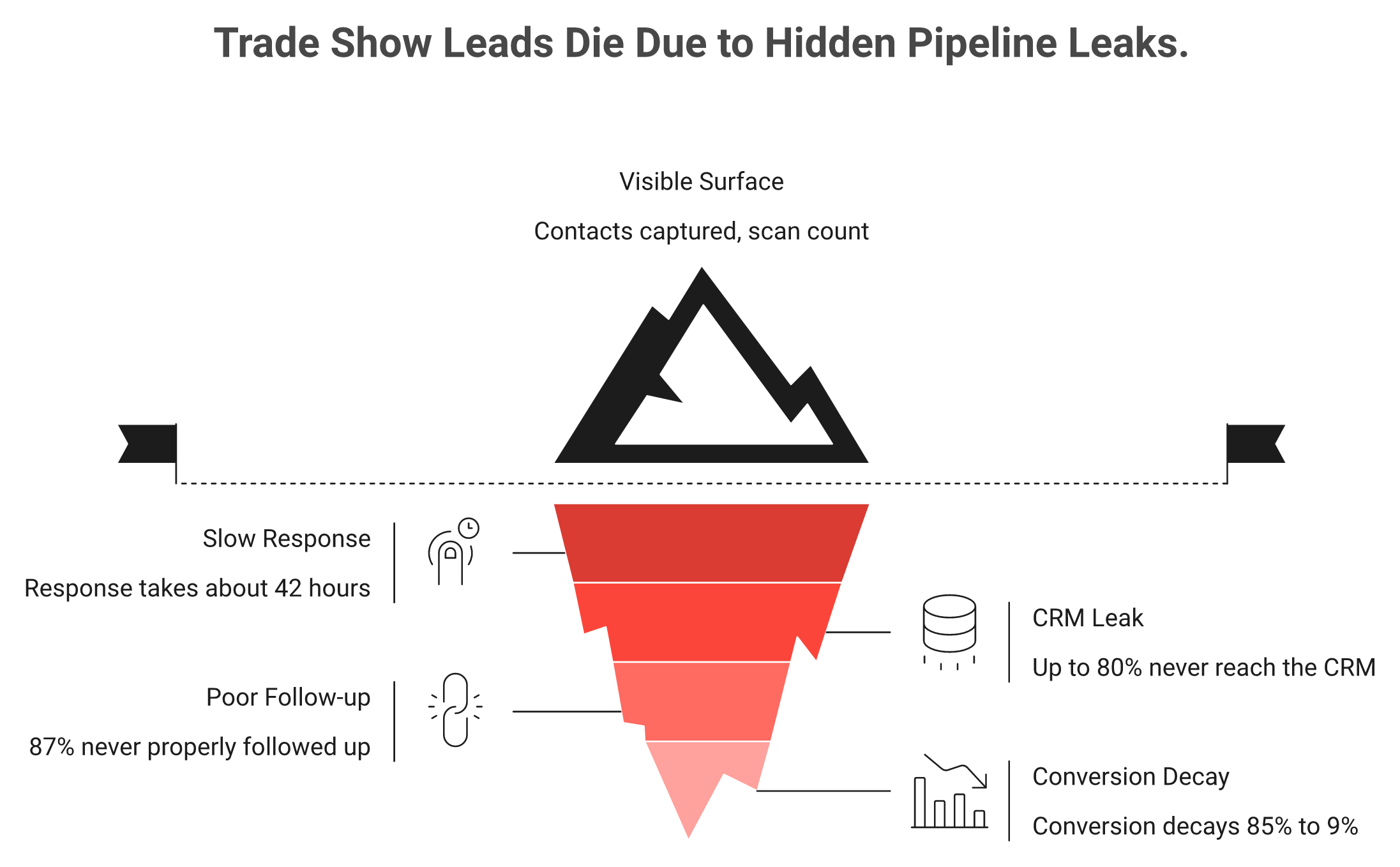
Because capture is treated as the finish line instead of the start. Up to 80% of event leads never reach the CRM, 87% are never properly followed up, and average response time sits around 42 hours. That is long after conversion probability collapses from about 85% within two hours to roughly 9% after a week. The leak is the gap between scanning a badge and booking a committed next step.
The badge scan is only the visible tip; most trade show pipeline leaks out through delayed follow-up and lead decay below the surface.
⚠️ The numbers behind the leak
Let me pair each stat with what it actually costs you.
A 2024 CEIR analysis found only about 47% of exhibitors track leads through the sales cycle. The other half lose the thread entirely.
Around 80% of event leads never make it into a CRM. So the booth spend buys contacts nobody can act on.
Conversion probability decays from about 85% within two hours to roughly 9% after a week. Speed is not a nice-to-have. It is the whole game.
One founder tested this by hand. He gave away 100 business cards at a show. One week later, two people had followed up. Within 30 days, maybe five or six reached out. The money in a trade show, as operators keep saying, is made in the follow-up.
💸 What the leak sounds like from the buyers
Reps and marketers say the quiet part out loud in reviews.
"Sometimes Mobly can be finicky, where it doesn't sync all the leads I've scanned... we end up with a lot fewer than we expected." Verified User in Events Services, Mobly G2 Verified Review
"I noticed it takes quite a while for the app to populate captured leads within the conference list." Kevin M., Mobly G2 Verified Review
When leads sync late or drop silently, the shoe box just goes digital. This is exactly the problem a universal lead capture app is built to solve.
✅ Reframing the job
Here is my read, and I have earned the right to say it. The job was never "collect contacts." Contact information is not where anything happens. Pipeline is where your world moves.
So the real target is different. You want to walk out of the show with meetings booked and a pipeline number you can defend when the CEO asks, "Where is the pipeline?" A CSV of 400 names cannot answer that question. A calendar full of scheduled discovery calls can.
At B2Brain, we call this the offline to pipeline model. The decay curve is exactly why capture-only tools fall short. They save the lead and stop. They never close the gap between the aisle and the pipeline, and that gap is where 80% of your budget quietly leaks.
Q2. What does it actually mean to collect leads at a trade show? [toc=2. The Three-Phase System]
Think of sales like fishing. Sales is the moment your rod is cast and the bait is in the water. It is far easier to catch a fish when a thousand fish already surround your bait. Collecting leads at a trade show is not the cast. It is everything you do to make sure the fish you hook actually lands in the boat.
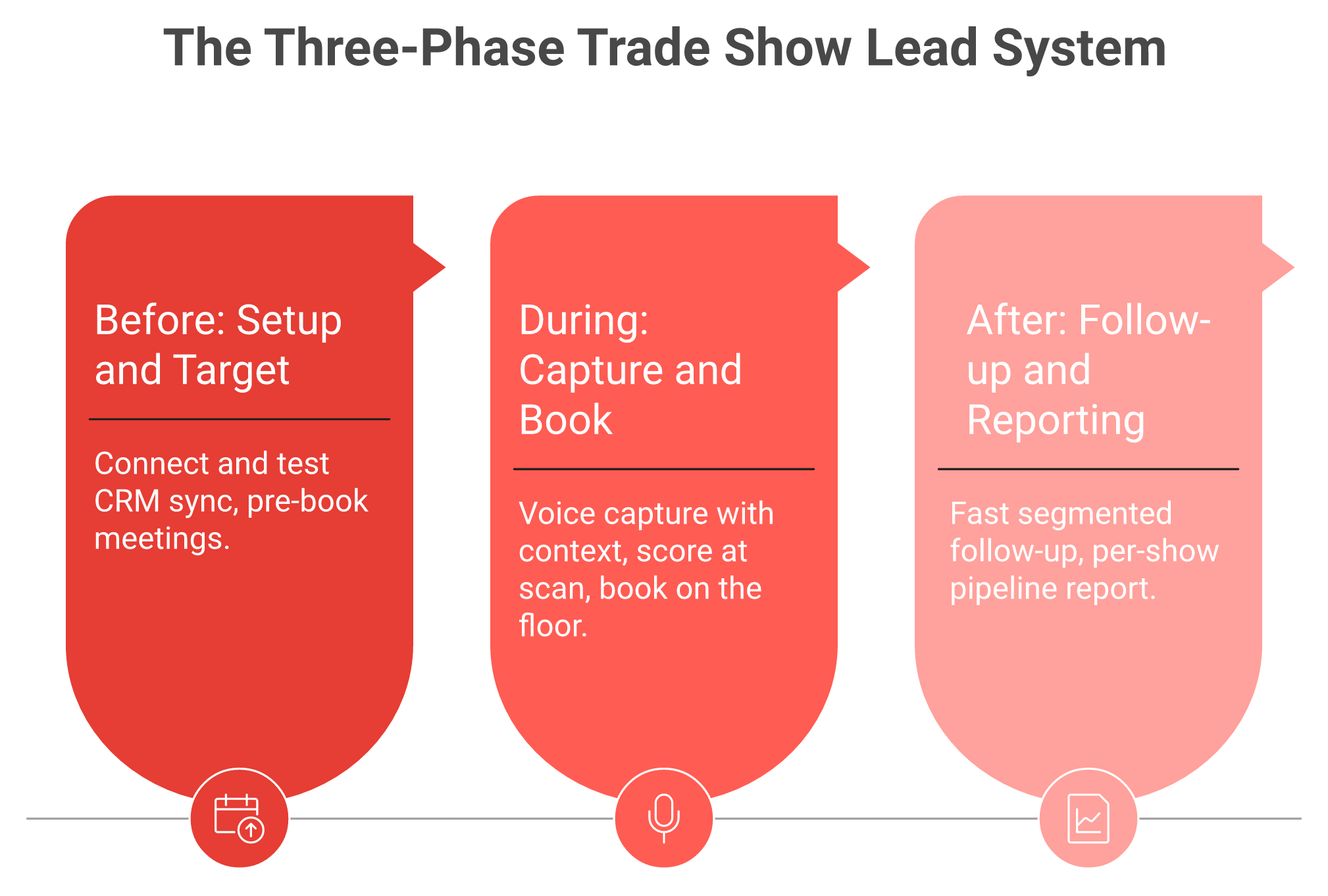
Collecting leads means running one connected system across three phases. A Before phase (CRM-connected setup and a target list). A During phase (capture the conversation context and book the next step on the floor). An After phase (fast, scored follow-up and per-show pipeline reporting). A badge scan captures a contact. A system captures a committed meeting.
Collecting leads is one connected system across Before, During, and After, not a single badge scan.
🎯 The three phases, in plain terms
Wave Connect's team put it well: the capture method matters far less than the system you build around it. Here is how event lead capture works across the system this article walks through.
Before. You connect your capture tool to Salesforce or HubSpot, build a target-account list, and pre-book meetings with priority attendees. Setup is where most of the pipeline is either won or lost.
During. You capture why you talked to someone, not just their badge, then book the next step before they walk away. Capture is the easy 20%. The committed next step is the 80% everyone loses.
After. You follow up fast, segmented by the score you set on the floor, and report per-show pipeline so the budget owner can prove it worked.
🧠 Why the "system" framing changes everything
Most teams optimize the wrong phase. They obsess over scan speed and ignore what happens to the scan afterward. That is like buying a faster fishing rod and forgetting the net.
The three phases share one thing: context. The reason you talked to someone in the During phase is what makes the After phase follow-up land. Lose that context, and every downstream step gets weaker.
This is the frame we built B2Brain around. We are the only layer that covers before, during, and after the show on one shared intelligence layer, so the context you capture at the booth flows straight into the meeting and the pipeline report. That is the difference between a scanner and a system.
Q3. What should you set up before the show so no lead slips through? [toc=3. Setup Before the Show]
I once watched a founder set up her own booth solo. Seven straight hours. Lights were off when she arrived, samples scattered, an Ikea order cancelled the morning of. Her whole plan fell apart before a single visitor showed. The show floor punishes teams that improvise. So does the pipeline.
Before the show: connect your capture tool to Salesforce or HubSpot and test the sync, build a target-account list and pre-book meetings with priority attendees, design booth signage a passerby understands in seven seconds, and assign roles so nobody hides behind the table. Setup done right means every scan on day one already has a home in your pipeline.
🔌 Step 1: Connect and test your CRM sync
Wire your capture tool into your CRM, then run a live test scan. Watch the record land in Salesforce or HubSpot with the fields you expect. A native lead capture to Salesforce setup is what makes this reliable.
The failure this prevents is the worst one. A tool that "integrates" but drops fields turns Day 1 into a data-repair job you discover only after the show.
📋 Step 2: Build a target list and pre-book meetings
Pull the exhibitor and attendee list, cross-reference it against your CRM, and hand each rep a ranked target list. Book meetings before you arrive.
This is the highest-leverage prep step there is. Skipping it means your reps walk in blind and hope the right buyers wander by.
👁️ Step 3: Earn seven seconds of clarity
The brain takes about seven seconds to decide if it is attracted to something. When I walk past your booth, I should instantly know what you sell and whether to stop.
So kill the clever signage. A sign that says "synergizing your dynamics" tells a passerby nothing. Say what you do, plainly, big enough to read from the aisle.
🧍 Step 4: Assign roles and get out from behind the table
Standing behind the table feels safe. It also builds an invisible wall between you and the buyer.
Assign one person to prep samples behind the table all day. Everyone else stands in front, in the aisle, ready to greet people. And remember the booth economics: the operator who spent $35,000 decorating did worse than the one who spent $950 and stood out front.
💰 The B2Brain angle on prep
This is where we start the offline-to-pipeline chain. Our pre-event briefing is grounded in your own CRM pipeline, not a cold prediction database. Each rep gets a one-page briefing to read on the plane, so every booth-day workflow starts already knowing who matters and why.
Q4. What are the real methods for capturing leads on the floor, and which should you trust? [toc=4. Capture Methods Compared]
Here is a contrarian take that will annoy some event organizers. "Do not trust the badge scan, the little tag and the lanyard they provide you." I have heard operators say it for years: that scan collects leads for them, and it often does very little for you. The data goes to a broker, who hands it to someone else, and you act on it three months later.
Five methods dominate: organizer badge scanners (about $300 to $600 per device, but the data is theirs and reaches you late), universal lead-capture apps (real-time, CRM-native, you own the data), NFC and QR digital cards (cheap, best for hallway meetings), business-card photo-to-VA (fast, manual), and paper (highest data loss). The deciding question is not "which scans fastest." It is "who owns the data, and how fast does it reach your CRM."
📊 The five methods, side by side
Trade Show Lead Capture Methods Compared
Method
Rough cost
Who owns the data
CRM sync
Best for
Main limitation
Organizer badge scanner
About $300 to $600 per device per show
The organizer
Delayed CSV export
One-off booths
You rent access to your own leads
Universal capture app
About $100 to $500 per month
You
Native, real-time
Multi-show teams
Requires setup before the show
NFC or QR digital card
About $15 to $50 one-time
You
Varies
Hallway meetings
Recipient friction (app or form)
Business-card photo to VA
VA cost only
You
Manual entry
Small teams
Slow, human error
Paper forms
Free
You
Manual entry
Backup only
Highest data loss
⚖️ Reading the trade-offs honestly
Some practitioners still swear by taking a photo of a card and sending it to a VA to transcribe, right as they walk away. It is manual, but it beats a scanner CSV that arrives cold. A useful field hack: photograph the person holding their card, so later you remember who was who. If you rely on the organizer's kit, our take on the conference badge scanner explains where it falls short.
The digital-card tools have real friction, and buyers say so plainly.
"Rather than simply adding a contact, Popl forces the recipient to complete numerous steps just to save the contact... far too cumbersome for networking." Vadim E., Popl G2 Verified Review
"It doesn't always work reliably when scanning the barcode, especially in places with poor internet connectivity." Kasha A., Blinq G2 Verified Review
✅ The data-ownership verdict
Match the method to the job, but the deciding axis is ownership plus speed. Rented scanners save the lead and lose the conversation. Digital cards solve the wrong problem (your card, not their pipeline).
B2Brain sits in the universal-capture-app row, and that is deliberate. Anything a scanner captures, we capture too, with the context of why you talked, then sync it native to Salesforce or HubSpot in real time. We are a lead capture app for trade shows, not a badge scanner and not "lead retrieval" as an identity. The organizer's scanner is the thing we displace, not a peer we compete with on scan speed. If you want to see it live on your next show, Book a Demo.
Q5. How do you qualify and score a lead during booth rush hour? [toc=5. Qualify and Score On-Site]
It is 4pm on Day 2. Your booth is slammed, three conversations deep, and a rep is trying to remember the buyer he talked to an hour ago. He cannot. The badge got scanned, but the reason it mattered is already gone.
Qualify while you talk, not later. Ask one or two intent questions, mark the lead hot, warm, or cold at the moment of the scan, and capture why you talked to them in a voice note before the next conversation erases it. Booth-conversation memory decays from about 67% recall at 24 hours to roughly 8% after a week. Scoring in the moment is the only version that survives.
⏰ Why rush hour breaks capture
Nobody can stop to type notes when the aisle is three deep. So reps scan and promise themselves they will "add context later." Later never comes.
This is what I call the memory tax. Every hour you wait, the detail that made a lead worth chasing quietly evaporates. The scan survives, but the story does not. A purpose-built lead capture app is the only way to beat that decay.
⚠️ The proof: memory decay and lost deals
The numbers are brutal on this. Booth-conversation recall drops from about 67% at 24 hours to about 8% after a week. By Friday, most of what your reps learned is simply gone.
And poor qualification is expensive. Operators cite that roughly 60% of lost sales trace back to leads that were never properly qualified in the first place. One buyer on Reddit put the failure plainly.
"We scanned 400 badges at FABTECH and booked 4 meetings." u/anon, r/b2bmarketing Reddit Thread
That is a scanning success and a pipeline disaster in one sentence.
✅ The score-at-scan workflow
Here is the move. Scanner apps are for scoring, not just collecting. Mark every lead hot, warm, or cold the instant you scan the badge.
Then pair the score with one or two qualifier questions that fit your vertical:
Manufacturing or supply chain: "What volume are you moving today, and what breaks at scale?"
SaaS or platform: "What tool are you replacing, and who owns that decision?"
Energy or construction: "Which project timeline is this tied to?"
The answer, not the badge, is what tells sales who actually wants to buy. That is the difference a true universal lead capture workflow makes.
💰 How B2Brain kills the memory tax
This is exactly the problem we built the on-the-floor capture around. With B2Brain, a rep taps once, talks for about 30 seconds, and a structured CRM record comes out in roughly 4.2 seconds, about one-fifth the time of typed notes.
The score and the voice-captured context ride together into Salesforce or HubSpot. Our "Recent Leads" view solves the scan-now-note-later gap, so nobody hands sales a pile of garbage to filter Monday morning.
There is a deeper design choice here. We do not call it "add notes." Voice and text are just vehicles. The captured context is the intellectual property, and it is what makes every later step, the follow-up and the meeting, actually convert.
Q6. Why is booking the meeting at the booth better than chasing leads after the show? [toc=6. Book Meetings On the Floor]
A friend runs the last-call play at Adobe Summit every year. In the final 40 minutes before the floor closes, his team pushes hardest, and that window produces some of their best leads and demos. Why? Because the buyer is still standing there, still in the mood, and still willing to say yes to a time.
Because a scheduled meeting is a commitment, and a scanned contact is only a hope. Conversion probability is highest in the first two hours, and roughly half of deals go to the first vendor that responds. So booking a follow-up on the floor, with a calendar invite to both the prospect and the right account executive, converts far better than a post-show sequence that starts days later.
🎯 The claim, stated plainly
Do not collect and chase. Book and confirm. The standard read gets this backwards: it treats capture as the win and the meeting as a follow-up chore.
I think that is the single most expensive mistake in event marketing. The moment of highest intent is the moment you are face to face. You never get it back. This is the heart of the booth-day workflow.
⚡ The three pillars behind it
The evidence stacks up cleanly.
Speed-to-lead. One operator books meetings so fast that a prospect gets an email within 15 minutes. His line: "I don't think it's possible to lose money" at that speed.
Decay math. Conversion probability falls from about 85% within two hours to about 9% after a week. A meeting booked on the floor beats the decay entirely.
First-responder advantage. About 50% of sales go to the vendor that responds first (Salesforce). A booked calendar slot makes you first by default.
Deals are long anyway. I have seen a 524-day cycle start from a single booth conversation. The sooner the clock starts with a real meeting, the sooner it closes.
📈 The number that proves it: LTM
Here is where I introduce the metric the whole category avoids. Leads-to-Meeting (LTM) is the share of qualified booth leads that turn into scheduled meetings.
Booking on the floor can hit about 52% LTM, versus roughly 8% for the industry's post-event average. That gap is the difference between a shoe box and a new pipeline generated from events.
Booking the meeting at the booth reaches about 52% Leads-to-Meeting versus roughly 8% for post-show chasing.
💰 How B2Brain books it on the spot
This is the strongest thing we do. B2Brain pulls the AE's live calendar at the booth and books the 30-minute follow-up before the prospect walks away.
Both the prospect and the right AE get the invite, and it syncs to Salesforce or HubSpot instantly. That is the offline-to-pipeline outcome in one motion: a booked meeting, not an "interested" checkbox. B2Brain owns LTM because no other tool even tracks it. If you want to see it work, you can Book a Demo.
Q7. What does a follow-up that actually converts look like, and how fast must it be? [toc=7. Follow-Up After the Show]
Picture the rep in the cab back to the hotel, typing business cards into Salesforce from memory. Half the context is already gone. Then the "follow-up" goes out four days later as a batch email blast, and it gets a reply rate under 5%. That is not follow-up. That is a formality.
Send the first touch within minutes to 48 hours, while the conversation is fresh and your name still means something. Segment by the score you set on the floor, personalize with the context you captured, and route hot leads to the right AE first. Post-show email blasts get about 5% reply rates. Contextual same-day follow-up is where the money is actually made.
😴 The pain: the "give them a few days" myth
The polite instinct is to let leads "settle" before reaching out. That instinct kills deals. No, you do not want to give them a few days.
By day three, the buyer has met 40 other vendors and forgotten your booth. The blast you send lands as noise, and noise gets that sub-5% reply rate. A native lead capture to Salesforce flow is what closes that window fast.
⏰ The proof: the timing rules that work
There is a field rule I love, call it the 48-hour drinking rule. Organize and act on your contacts within 48 hours, because before you go out celebrating, your brain will lose the information that made each lead worth chasing.
Here is the window, ranked by payoff:
Minutes to 2 hours: hottest leads. Conversion probability is at its peak. Send the confirmed meeting details now.
Same day to 24 hours: warm leads. Personalize with the captured context while it is fresh.
24 to 48 hours: everyone else. After this, reply rates fall off a cliff.
And personalization is not optional. Around 82% of buyers now expect it, so a generic "great meeting you" note reads as a form letter.
📱 The context is what converts
The reason fast follow-up works is the context behind it. A field hack proves it: snap a selfie with the prospect at the booth, then attach it to the follow-up so they instantly remember the conversation.
That only works if you captured the "why" in the first place. Buyers notice when a tool loses that thread.
"Sometimes contacts disappear from the app, but still show in our CRM." Verified User in Computer Software, Mobly G2 Verified Review
"It takes quite a while for the app to populate captured leads within the conference list." Kevin M., Mobly G2 Verified Review
When leads sync late or vanish, your 48-hour window is already gone.
💰 How B2Brain carries the context forward
This is where the During phase pays off in the After phase. Because B2Brain captured the context and the score at the booth, the follow-up writes itself and routes automatically.
Hot leads land on the right AE's desk first, CRM-native, with the conversation attached. The rep does not rebuild the story from memory in a cab. It is already there, ready to send, which is the whole point of a real lead capture app for trade shows.
Q8. How do you prove trade show ROI and defend the pipeline number to your CFO? [toc=8. Prove Pipeline ROI]
Every Field Marketer I know dreads the same Monday meeting. The CEO leans in and asks, "We spent $70,000 on that booth. Where is the pipeline?" If your answer is "we got 400 leads," you have already lost the room. Leads are not pipeline, and the CFO knows it.
Work backwards. Booth cost times your target ROI equals required pipeline. Divide by average deal size for required meetings. Divide by your LTM rate for required qualified scans. Track Leads-to-Meeting (meetings booked divided by qualified booth leads) per show, compare show over show, and report cost per booked meeting. A qualified event meeting can cost about 60% of an outbound meeting and roughly 40% of paid acquisition.
Work backwards from booth cost to the qualified-scan target, ending at roughly one in five visitors becoming a meeting.
🧮 The backwards math, worked out
Let me run the real numbers. If you don't know this math, you don't know what you're doing, and that is the person this section is for.
Booth costs about $70,000. The boss wants 10x pipeline, so you need about $700,000 in pipeline.
At a roughly 20% close rate, that is about 2x revenue ROI, which is a healthy show.
To hit a $1M pipeline target at about 12% discovery-to-close, you need about 50 opportunities and about 180 discovery calls.
The punchline: roughly 1 in 5 booth visitors must become a qualified meeting. That ratio is your whole event, reduced to a number. Our event ROI calculator runs this for you.
📊 The metric the CFO trusts: LTM
Contact information is not where anything happens. Pipeline is where their world moves. So report the metric that connects the two.
Leads-to-Meeting (LTM) is meetings booked divided by qualified booth leads. On-floor booking hits about 52% LTM versus a roughly 8% post-event industry average. Then show the cost story:
A qualified event meeting costs about 60% of an outbound meeting.
It costs about 40% of a paid-acquisition meeting.
The blended cost per trade-show lead runs about $283 to $450 per head (Exhibit Surveys).
One operator's rule keeps it honest: for every event, aim for 3x return on closed-won. Spend $10K on a happy hour, expect to see $30K closed. You can see how the three-motion workflow works end to end on the platform.
💰 The report that answers "where is the pipeline?"
This is exactly what we built the After phase to deliver. B2Brain sends a morning-after offline-to-pipeline report to the CMO by 9am.
It shows pipeline sourced, meetings booked, LTM, and multi-touch attribution broken out by show, booth area, rep, and segment. We are the brain, the Field Marketer is the face. The report is deliberately built to make them the hero in that Monday review, with a defensible number instead of a lead count. Say pipeline, never revenue, and you will win the budget conversation.
Q9. What common mistakes quietly kill trade show leads? [toc=9. Mistakes to Avoid]
Walk any industrial show and you will see the same avoidable deaths. A booth giving away an iPad. A team standing shoulder to shoulder behind their table. A sign nobody can decode. None of it fails loudly. It fails quietly, and you only notice when the pipeline never shows up.
The quiet killers are relying on the organizer's badge scanner (their data, delayed to you by months), running raffles that attract prize-hunters instead of buyers, standing behind the table, using vague signage nobody decodes in seven seconds, and "giving leads a few days to settle" before following up. Each one turns an expensive booth into a shoe box of dead contacts.
❌ Mistake 1: leaning on the organizer's badge scanner
This is the meta-mistake, the one that spawns the rest. The rented scanner collects leads for the organizer, and the data reaches you months later.
By then, the conversation is dead. The fix is to own your capture in real time, on your own device, not to rent access to your own leads. Our take on the conference badge scanner explains exactly where the rental model breaks.
❌ Mistake 2: raffles that attract prize-hunters
The free iPad works, just not the way you hoped. The only people who chase it are non-decision-makers padding your scan count.
You end up with 400 badges and 4 buyers. One buyer said it flatly on Reddit.
"Trade show ROI has been basically zero three years running." u/anon, r/b2bmarketing Reddit Thread
The fix is to give away something that only your buyer wants, and to qualify at the scan with a purpose-built lead capture app for trade shows.
❌ Mistake 3: hiding behind the table
Standing behind your table builds an invisible wall between you and the aisle. Buyers read it as "do not approach."
One operator's "Kick the Pig" setup pulled 85 paying customers out of a three-day show, precisely because the team stood out front and engaged. The fix is to staff the aisle, not the table, as part of a deliberate booth-day workflow.
❌ Mistake 4: signage nobody decodes in seven seconds
If your sign says "synergizing your dynamics," you have already lost the passerby. The brain decides in about seven seconds whether to stop.
⏰ Mistake 5: letting leads "settle" before follow-up
The instinct to give leads a few days is a pipeline killer. Reply rates on delayed blasts fall under 5%.
The fix is the minutes-to-48-hour window. Speed is the whole game, and a native lead capture to Salesforce flow is what makes that speed possible.
💰 The correction, in one line
Most of these mistakes share one root: treating the badge scan as the finish line. That is the shoe box waiting to happen.
At B2Brain, we frame scanner dependence as the mistake to fix first. Self-owned, real-time, context-rich capture is the correction, because a contact you cannot act on for three months is not a lead. It is a receipt. That is the core of universal lead capture.
Q10. Do you need a lead capture app, or is the free badge scanner enough? [toc=10. App vs Free Scanner]
Let me be honest in a way vendors rarely are. Sometimes the free badge scanner is the right call, and you should not spend a dollar more. The trick is knowing which situation you are actually in before the show, not after.
If you attend one show a year with no CRM and no follow-up team, the free scanner is fine. If you run 5 to 15 shows a year, spend $20,000 or more per show, and sell on 3-to-12-month cycles, a dedicated app pays for itself the moment it books one extra meeting. A single defended meeting outweighs a season of contextless CSVs.
✅ When the free scanner is genuinely enough
Do not force-fit a tool you do not need. Stick with the organizer's scanner if:
You attend one show a year, one-off, with no repeat cadence.
You have no CRM to sync into and no sales team to route leads to.
You are consumer-facing or running a solo booth where context barely matters.
In these cases, the extra software is overhead. Buyers of digital tools say as much when the fit is wrong.
"The price, $140 a year? No way, I would rather print thousands of business cards." Fabian T., Popl G2 Verified Review
💰 When a dedicated app pays for itself
The math flips fast once you attend regularly. A dedicated app earns its keep if:
You run 5 to 15 shows a year with real repeat spend.
You spend $20,000 or more per booth and sell on 3-to-12-month cycles.
You have Salesforce or HubSpot and a team that follows up.
The break-even is one extra booked meeting. On a $70,000 booth targeting 10x pipeline, a single defended discovery call covers the app for the season. You can see what B2Brain costs per event before you commit.
⚖️ The consolidation question
There is a real debate here. Some operators want everything in one house. Others happily run five tools and wish AI would stitch them together.
"It doesn't always work with every conference, if the conference does not provide an API kit for integration." Verified User in Consulting, Captello G2 Verified Review
I will be straight about our own gaps too. B2Brain is iOS-only on native capture, our third-party enrichment is lighter than Popl or Mobly, and we do not ship a digital business card. If those are your must-haves, we may not be your fit.
🤔 Where I think this goes
Here is the question I am sitting with. As booking and attribution become table stakes, the edge stops being capture and moves up the stack to pipeline activation.
For teams that fit the profile, B2Brain is the consolidated layer covering before, during, and after the show on one shared intelligence layer, with LTM as the number the CFO trusts. If that sounds like your event motion, Book a Demo and see whether the meetings you book beat the CSV you would have gotten.
FAQ's
How do you collect leads at a trade show so they actually turn into pipeline?
We treat lead collection as one connected system, not a single badge scan. A scan saves a contact, but a system captures a committed next step.
The workflow runs across three phases:
Before: connect your capture tool to Salesforce or HubSpot, test the sync, and build a CRM-grounded target list.
During: capture why you talked to someone by voice, score them hot, warm, or cold at the scan, and book the meeting before they walk away.
After: follow up fast, segmented by the score you set, and report per-show pipeline.
The reason this matters is decay. Conversion probability falls from about 85% within two hours to roughly 9% after a week, and up to 80% of event leads never reach a CRM. A CSV of names cannot answer the question leadership actually asks, which is where the pipeline is.
We built the three-motion workflow to keep context flowing from the booth into the meeting and the pipeline report. That is the difference between a scanner and a system.
Do you need a lead capture app, or is the free organizer badge scanner enough?
We will be honest here. If you attend one show a year with no CRM and no follow-up team, the free scanner is fine, and you should not spend more.
A dedicated app pays off when the profile fits:
You run 5 to 15 shows a year with real repeat spend.
You spend $20,000 or more per booth and sell on 3-to-12-month cycles.
You have Salesforce or HubSpot and a team that follows up.
The break-even is one extra booked meeting. On a $70,000 booth targeting 10x pipeline, a single defended discovery call covers the app for the season.
The trade-off with the rented scanner is ownership and speed. The data is the organizer's, and it often reaches you months later, long after the conversation is cold. A real lead capture app for trade shows keeps the data yours, in real time, synced native to your CRM. Match the method to the job, but the deciding axis is who owns the data and how fast it lands.
How do you qualify and score a lead during booth rush hour?
We qualify while we talk, not later. At 4pm on Day 2, nobody can stop to type notes, so the reason a lead mattered evaporates unless you capture it in the moment.
The move is simple:
Ask one or two intent questions that fit your vertical.
Mark the lead hot, warm, or cold at the moment of the scan.
Capture why you talked to them by voice before the next conversation erases it.
This matters because memory decays. Booth-conversation recall drops from about 67% at 24 hours to roughly 8% after a week, and operators cite that around 60% of lost sales trace back to poor qualification.
Scanner apps are for scoring, not just collecting. When you score at the scan, sales does not inherit a pile of garbage to filter on Monday.
With our approach to what gets captured on the floor, a rep taps once, talks for about 30 seconds, and a structured CRM record comes out in roughly 4.2 seconds. The captured context, not the badge, is what tells sales who actually wants to buy.
How fast should trade show follow-up be, and what makes it convert?
We send the first touch within minutes to 48 hours, while the conversation is fresh and your name still means something. Speed is the whole game.
Here is the window, ranked by payoff:
Minutes to 2 hours: hottest leads, when conversion probability peaks. Send the confirmed meeting details now.
Same day to 24 hours: warm leads. Personalize with the context you captured.
24 to 48 hours: everyone else, before reply rates fall off a cliff.
The mistake is letting leads settle for a few days. By day three, the buyer has met 40 other vendors and forgotten your booth. Post-show email blasts get about 5% reply rates, and around 82% of buyers now expect personalization, so a generic note reads as a form letter.
Fast follow-up only works if you captured the why at the booth. With a native lead capture to Salesforce flow, the context and the score ride with the lead, so hot leads route to the right rep first and the follow-up nearly writes itself.
How do you prove trade show ROI and defend the pipeline number to your CFO?
We work backwards from the money. Booth cost times your target ROI equals required pipeline, divided by average deal size for required meetings, divided by your Leads-to-Meeting rate for required qualified scans.
A worked example makes it real:
A $70,000 booth at 10x pipeline needs about $700,000 in pipeline.
At a roughly 20% close rate, that is about 2x revenue pipeline ROI.
Roughly 1 in 5 booth visitors must become a qualified meeting.
The metric that connects capture to the CFO is Leads-to-Meeting, meetings booked divided by qualified booth leads. On-floor booking hits about 52% LTM versus a roughly 8% post-event industry average. A qualified event meeting can cost about 60% of an outbound meeting and roughly 40% of paid acquisition.
We built our event ROI calculator to run this math, and the morning-after report shows pipeline sourced, meetings booked, LTM, and attribution by show, rep, and segment. Say pipeline, never revenue, and you win the budget conversation.
Enjoyed the read? Join our team for a quick 30-minute chat — no pitch, just a real conversation on how we’re rethinking Event Intelligence in B2b.

.png)


.webp)

.png)





