Why we walk the floor
The best way to learn how exhibitors capture leads is to stand in their booth and ask. A survey tells you what people think they do. A booth conversation shows you what they actually do, with the scanner in their hand and the badge queue in front of them.
So this fall, our team walked the floor instead of emailing questionnaires. We asked every exhibitor the same simple questions. How many shows do you do a year? How do you capture leads today? What gets in the way? The answers shape what we build next, because we would rather solve the problems exhibitors live with than the ones we imagine.
Who we met
Between 1 September and 30 October 2026, our team met 934 exhibitor companies at 21 trade shows across North America. The shows covered a wide range of industries: safety, security, manufacturing, packaging, semiconductors, batteries, water, printing, construction, telecom and automotive testing.
The list includes IMTS, PACK EXPO International, FABTECH, SEMICON West, WEFTEC, The Battery Show, Greenbuild, PRINTING United, CAMX, NSC Congress and Expo, and GSX, among others. In 379 of these conversations, the exhibitor told us exactly how they capture leads today. Those 379 accounts are the basis for the numbers below.
How exhibitors capture leads today
The show's own scanner is still the default. Of the 379 exhibitors who told us how they capture leads, 246 (65%) use the scanner or app the show sells or provides. Another 64 (17%) bring their own lead capture app. Only 7 (2%) have built something with AI or a vibe-coding tool, and 22 (6%) run some other in-house system. The remaining 40 (11%) use no tool at all, just business cards, phone photos or a notepad.

The mix changes from show to show. At SEMICON West, four in ten exhibitors brought their own app. At LOUPE Americas, 20 of 21 used the show's system.
What exhibitors told us gets in the way
The scan itself is rarely the problem. What hurts is everything that happens after it. Among show-scanner users, the most common complaint was moving leads from the show's system into their own CRM by hand. Cost came second, and leads arriving without the notes sales needs came third.
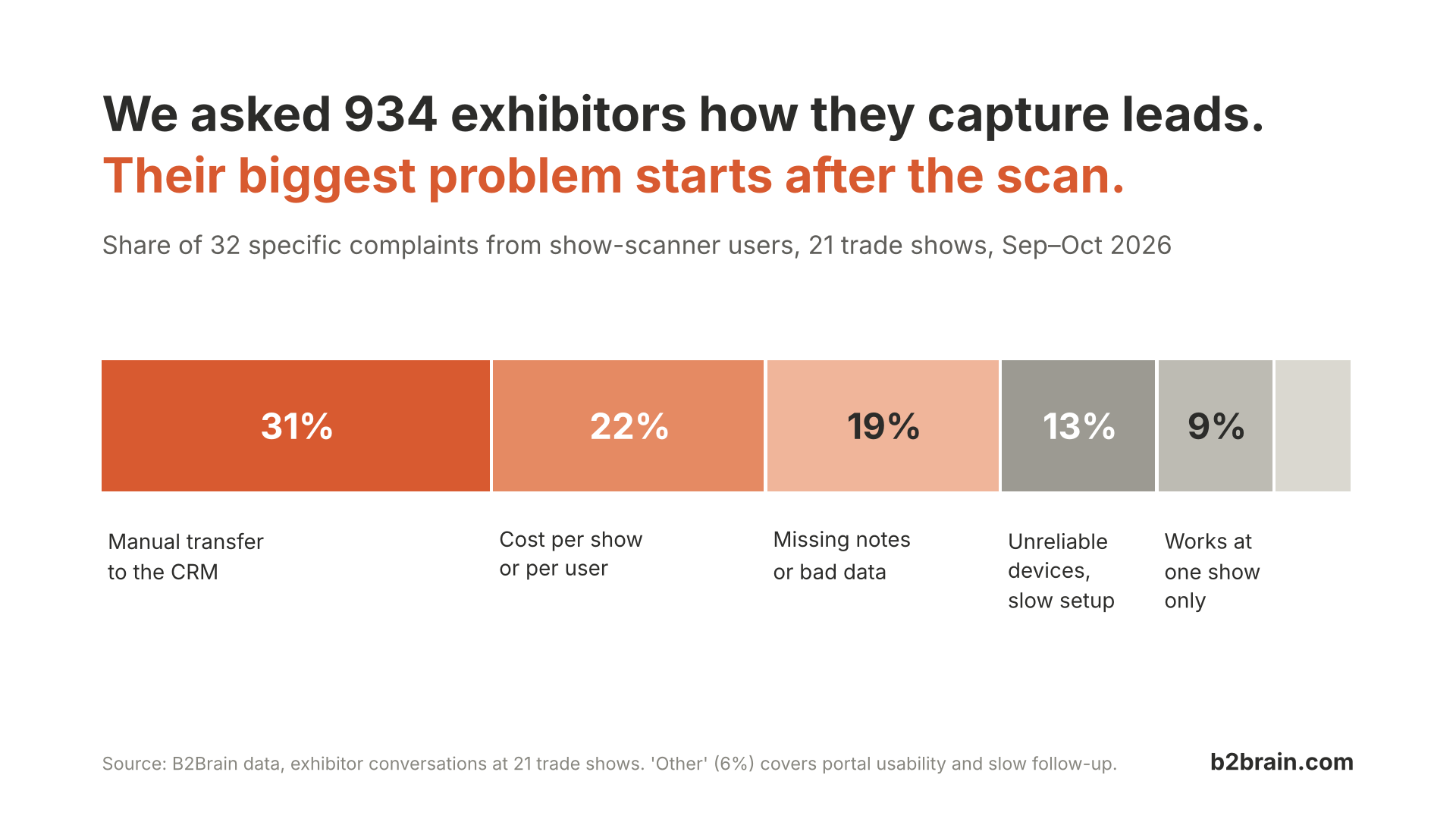
Here is how exhibitors described it, in the words our reps wrote down at the booth:
- On getting leads out: the exhibitor "has to screenshot to get their information into their system to be able to give quotes."
- On the CRM: they are "annoyed that they have to manually transfer lead info from excel sheet to crm."
- On cost: "$150 per person at the trade show to have access to the scanner app."
- On the conversation itself: "Have to have your phone out to do it. And not interacting with people."
- On notes: "Doesn't allow note taking for the leads." Another said the notes section "is too small."
- On reliability: "Only 2 of the 3 worked." At another show, the scanner was "extremely slower now than it was last year."
- On consistency: one exhibitor wanted "another platform that can be utilized outside of" that one show.
Users of other lead capture apps raised fewer complaints, and the ones they raised were about ease of use. Exhibitors who built their own tool, with AI or without, mostly said they were content with it.
What B2Brain focuses on
Most exhibitors do not want to stop using the show scanner. They want what happens after the scan to work. So B2Brain focuses on one job: getting every scanned lead into your CRM, with the conversation notes attached, at every show you attend.
In practice, that means three things.
- One app across every show. Your team scans badges and business cards the same way at a 50,000-person expo and at a regional show with no lead retrieval package.
- Notes that travel with the lead. Reps type or speak their notes on the spot, and the notes stay attached to the contact instead of living in a phone gallery.
- Follow-up while the conversation is fresh. Reps can book the next meeting from the booth, and the lead lands in the CRM the same day, not a week later.
How to think about 2027 planning
Event budgets are going up in 2027, and so is the scrutiny on them. Every booth, badge and flight now has to show the pipeline it produced. Leadership also wants that pipeline faster, within weeks of the show, not a quarter later.
That changes what to plan for. The question is no longer how many leads you scanned. It is how many reached the CRM with enough context for sales to act, and how many turned into meetings. Three questions are worth answering before you lock next year's show calendar:
- How long does it take today for a scanned lead to reach the CRM, and who does the work?
- What share of your leads arrive with notes a salesperson can use?
- Does your capture process work the same way at every show, or only at shows that sell a lead retrieval package?
Try it before your 2027 calendar is locked
If you are planning next year's shows now, this is the right time to test a better way to capture leads. Run B2Brain at your next event, compare it with the show scanner side by side, and see how many leads reach your CRM with notes attached.