B2Brain vs Blinq: Compared on Capture Method, CRM Sync, and Attribution
Written by
Sridhar Ranganathan
Last Updated :
August 19, 2026
Skim in:
13
mins
TL;DR
Blinq is a digital business card platform with event scanning added on. B2Brain is a booth-first platform built to book meetings on the floor and prove per-show pipeline.
Both sync to major CRMs, but object depth differs. B2Brain writes leads, notes, meetings, and opportunities to Salesforce and HubSpot with dedup, not just contact records.
Blinq Business runs 4.99 dollars per card monthly billed annually with a five-card minimum, plus 9.99 dollars per captured and enriched lead metered in arrears.
Four reps at 31 scans a day across three days is 372 leads, roughly 3,715 dollars in metered capture alone. Volume, not unit price, is the surprise.
Blinq holds about 4.8 out of 5 across roughly 9,200 G2 reviews. B2Brain carries 17, so its case rests on the Leads-to-Meeting benchmark and a free first event.
B2Brain reports 52 percent Leads-to-Meeting booked on the floor against roughly 8 percent booked post-event, and no competitor in the category publishes an LTM number.
Q1. B2Brain vs Blinq: which one should your booth actually use? [toc=1. Verdict and Criteria]
A Field Marketing head I work with keeps a screenshot on her phone. It is the Slack message her CEO sent the Monday after a $70K industrial show. Three words: "where's the pipeline?"
She had 412 scanned contacts. She did not have an answer.
⭐ The short verdict
Choose Blinq if the primary job is polished digital card sharing with occasional event scanning, since it is the most-reviewed tool in the category. Choose B2Brain if the booth is measured on meetings booked and per-show pipeline. B2Brain captures conversation context, books the discovery meeting on the floor, and writes leads, notes, meetings, and opportunities into Salesforce or HubSpot with show-level attribution.
That is not a dodge. These two tools were built for different jobs.
Blinq starts from the rep's identity. B2Brain starts from the exhibitor's pipeline. Once you see that, most of the feature argument settles itself.
💸 The failure mode both tools claim to fix
An old friend in field sales described the pre-software version to me perfectly. All the cards go in a shoe box. Jimmy carries the box home, pulls out three cards on Monday, and calls them.
Six months later, somebody finds the box.
Software changed the container, not the outcome. A 2025 CEIR analysis found only about 47% of exhibitors track leads through the sales cycle at all. A 2026 field study across 20 major US shows measured 80% of trade show leads receiving zero follow-up, which is the same gap we walk through in how to collect leads at a trade show.
✅ The seven criteria that actually decide this
I added the organizer's rented badge scanner as a third column, because that is what most teams are really switching from.
B2Brain vs Blinq vs the organizer's rented badge scanner
Criterion
B2Brain
Blinq
Organizer's rented scanner
Capture method
Badge photo, business card, LinkedIn screenshot, no organizer dependency
Universal Scanner (badge, card, QR, LinkedIn, kiosk) plus card share
Badge only, on rented hardware
CRM sync
Native Salesforce and HubSpot writeback of leads, notes, meetings, opportunities, with dedup
Native multi-CRM push, staging before sync, credit-metered export
CSV export, often days later
On-floor booking
Yes, dual invite to prospect and routed AE
No, follow-up after the conversation
No
Attribution
Per-show pipeline report, LTM by show, rep, segment
Capture activity reporting
Lead counts
Cost shape
Per-event Show Pass from $200, annual Pipeline plan
$4.99 per card monthly billed annually (5-card minimum) plus $9.99 per enriched lead
"Blinq looks great and when it works it's a good user experience and good branding for the person showing their business card. Using the backend panel as an administrator is buggy and unreliable." — Verified User in Hospitality, Blinq - G2 Verified Review
"Reporting is basic. We can see usage and lead stats, but there are no rep performance dashboards, no clear ROI reporting." — Ole O., B2Brain G2 - Verified Review
Read the table against your own calendar, not against a feature count. If you run two shows a year and reps mostly network, the card wins. If you run eight shows and owe a CFO a number, rows three and four decide it.
B2Brain is judged on Leads-to-Meeting, meetings booked divided by qualified booth leads, which is why every row above reads as an outcome rather than a feature and why we built the offline to pipeline motion around it. That is the number we ask to be measured on, and it is also the number nobody else in this category publishes.
Q2. How does each tool capture a lead when someone walks up to the booth? [toc=2. Capture Method Compared]
Half the comparison tables on the internet still mark Blinq with a dash under badge scanning. That was true once. It is not true in 2026, and I would rather say so than let you catch me being out of date.
🔍 What each app actually does in the moment
Blinq captures through its Universal Scanner. That covers badges, business cards, QR codes, LinkedIn profiles, and a kiosk mode, alongside card sharing that starts from the rep's identity. B2Brain captures through badge photo, business card, or LinkedIn screenshot, queues scans for back-to-back capture, and attaches a voice note so the reason for the conversation survives the walk back to the hotel.
Both get a contact into a database. The difference is what rides along with it.
📸 Blinq's mechanics, dated August 2026
Blinq's scanner works across events, which matters because organizer badge formats vary wildly. A third-party audit published this year found each Universal Scanner contact consumes five credits, with another five per native CRM export.
So capture is real. It is also metered.
The card-first origin still shows in the small stuff. Reviewers report recipients needing an App Clip or app to open a shared card, which is fine at a networking dinner and awkward at a booth.
🎙️ B2Brain's three channels and the queue
B2Brain does not depend on an event organizer's badge system, so the same app works at a rented-scanner show and at a no-badge sidebar dinner, which is the whole idea behind universal lead capture across any badge and any event. There is no hardware to collect at registration and nothing to return.
The queue is the part reps actually notice. You photograph four badges in a row during a rush, then add context after.
Voice is the second half. Tap once, talk for roughly 30 seconds, and a structured CRM record comes out in about 4.2 seconds, which is roughly one fifth of the time typed notes take.
⏰ The 4pm-on-Day-2 test
Ask any vendor this one question. What happens when four people arrive at once and nobody can stop to type?
That is the honest capture test. Contact information is not where anything happens, and a badge without a reason attached is a row in a spreadsheet.
One field seller I rate highly refuses OCR business card scanners entirely. His workflow is faster: photograph the front and back, hand it to an assistant, done before he walks away. His other habit is smarter than most software. Take a photo of the person holding their card, so you never ask yourself later which card belonged to whom.
Card-first tools capture the contact well and leave the qualification to memory.
B2Brain captures context but has an honest gap. The native app is iOS-first, with a web app alongside it, so an Android-only field team should raise that on the first call.
Third-party enrichment depth at B2Brain is lighter than Popl, Mobly, or Momencio. Our position is to enrich from your own CRM instead of a cold database.
My read, and I could be reading it too strongly, is that capture stopped being the differentiator around 2024. Everyone can get a name now.
B2Brain treats capture as the cheapest step in the workflow, which is why the app is built around what happens in the next 30 seconds rather than around the scan itself. Scan, add context, execute the next best action. The scan is just the doorway.
Q3. What does each tool give your team before the show opens? [toc=3. Pre-Show Intelligence]
The most expensive mistake in trade shows happens weeks before the doors open. Nobody decides who they are there to meet.
🧠 The claim, stated plainly
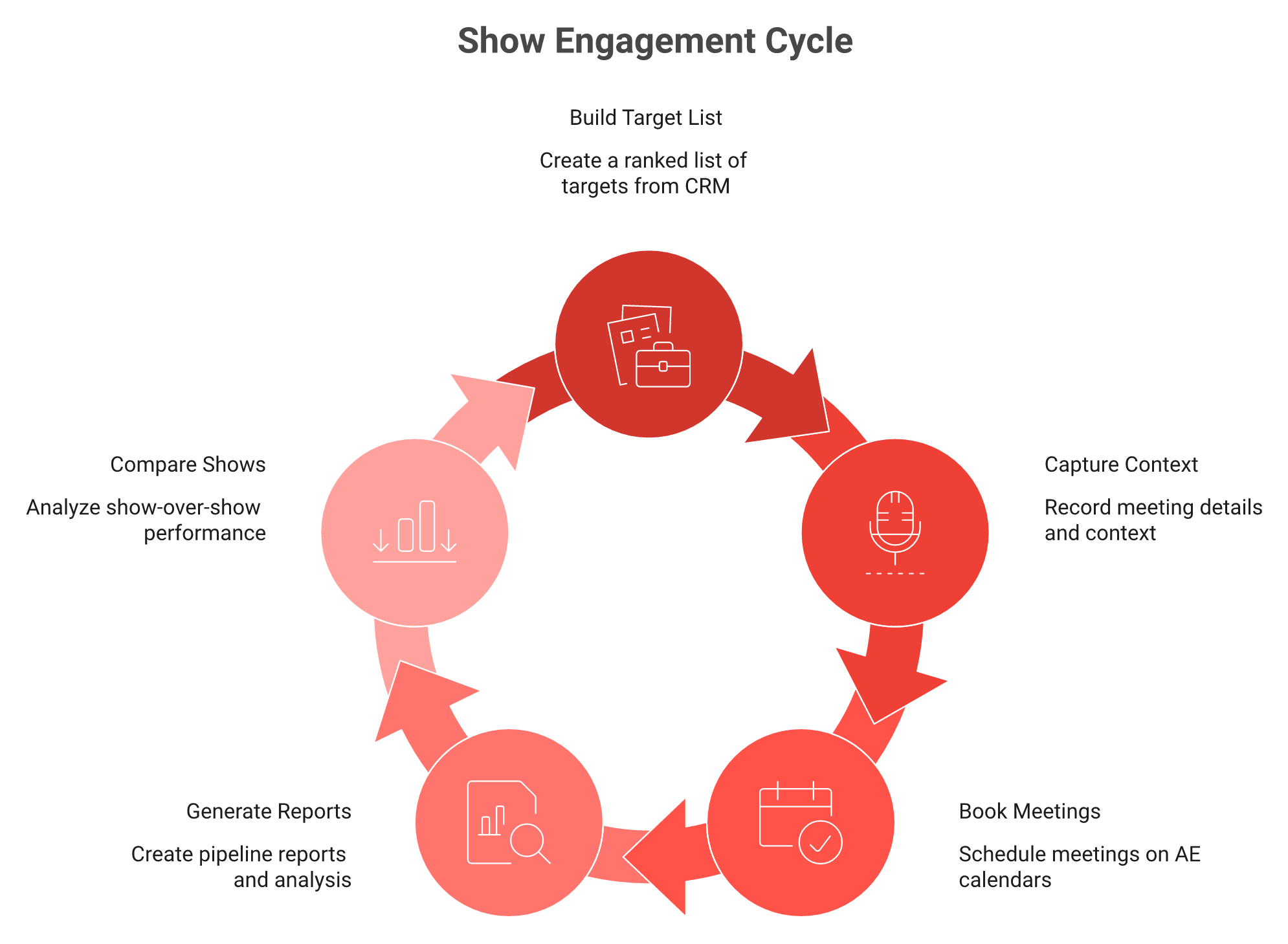
Blinq's value begins at the moment of contact, because there is no pre-show briefing motion. A digital card has nothing to brief on. B2Brain briefs reps before the doors open using the company's own CRM pipeline, so a rep knows which open opportunities and target accounts are on the floor, and that same layer carries through capture and post-show reporting.
This is the structural argument in the whole comparison. Everything else is features.
The structural argument in one image: the briefing feeds the capture, and the capture feeds the pipeline report.
📋 What a real pre-event briefing contains
Not an attendee list. A ranked target list, cross-referenced against your CRM, with a one-page brief per account.
Open opportunity, stage, last touch, who owns it, what stalled. That is the page an AE reads on the plane.
Several tools in this category now sell pre-event intelligence built on a prediction database, which guesses who might attend from third-party data. B2Brain grounds the briefing in the buyer's own pipeline instead, because a rep trusts their own CRM and argues with a vendor's guess.
🎣 Why position beats effort
There is an old sales analogy I keep coming back to. It is much easier to catch a fish when you are in the right spot with a thousand fish around your bait.
Floor-walking without a target list is fishing in an empty lake with excellent equipment. B2Brain's first-party data shows 2.4 times more booth meetings versus cold floor-walking when reps arrive briefed, and next-best-action rules are configured per customer so the briefing mirrors that team's sales process.
Three disconnected tools: a card app for capture, a spreadsheet for targets, a BI dashboard for reporting. Nothing joins them, so nobody can trace a booked meeting back to a pre-show target.
One layer: the target list, the captured conversation, and the pipeline report read from the same data. The show becomes measurable end to end.
One field marketer running close to 100 shows a year told me she uses five different technologies at any given time to do her job. She was not bragging. She was describing tax.
✅ The briefing checklist you can build this week
Do this even if you never switch tools.
Pull the exhibitor and attendee list as soon as the organizer publishes it.
Cross-reference it against open opportunities and target accounts in your CRM.
Rank the list by open pipeline value, not by logo recognition.
Assign each account to a named AE before travel, not on day one.
Write one page per top account: stage, last touch, the one question to ask.
That checklist is worth more than most software. It is also the honest test of any vendor pitching pre-event intelligence, because if their briefing cannot read your CRM, it is a guess with a nice interface.
B2Brain covers before, during, and after on one shared intelligence layer, which is the part competitors have not replicated even where they have shipped booking buttons, and it is what the booth-day workflow for exhibitors is built around. The briefing feeds the capture, and the capture feeds the report. That continuity is the moat, not any single screen.
Q4. Can either tool book the meeting before the prospect leaves the aisle? [toc=4. On-Floor Meeting Booking]
The prospect says "send me something." The rep says "will do." Both of them walk away, and the deal is now competing against a hundred inbox emails and a flight home.
⏰ Where the two tools diverge
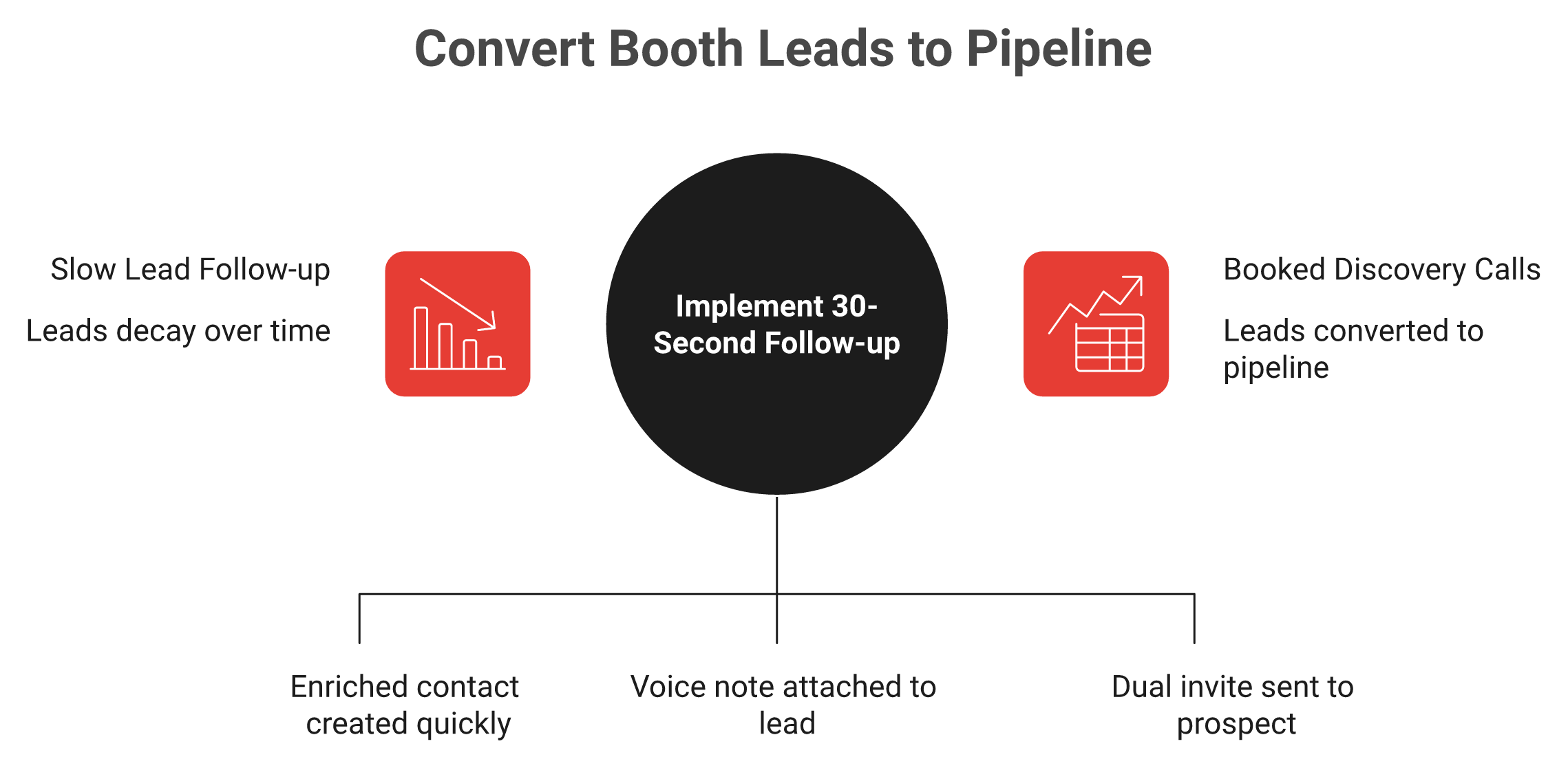
Blinq's post-capture motion is follow-up: enriched contact, AI notes, then manual or sequenced outreach after the conversation ends. B2Brain closes the loop on the floor with a voice note and a dual calendar invite to both the prospect and the routed account executive in under thirty seconds, which is the difference between a lead record and a booked discovery call.
💸 The decay curve nobody prices in
Response speed is the whole game here. CEIR data puts the average exhibitor follow-up time at roughly 42 hours after the show.
Conversion probability collapses across that window. Roughly 85% within two hours falls to about 9% after a week.
A speaker I heard on this put it bluntly. Organize your contacts within 48 hours, at the hotel, before you go out drinking, because your brain is going to lose the information.
He is right, and that is exactly why post-show workflows fail. They depend on tired people remembering.
Same conversation, two paths. The window closes the moment they walk away from the booth.
🗓️ What happens inside the 30-second window
B2Brain pulls the AE's live calendar at the booth, books the 30-minute follow-up, and sends a dual invite to the prospect and the right AE, then syncs the meeting to Salesforce or HubSpot, exactly as described in our guide to event lead capture with Salesforce. The rep never leaves the conversation to do it.
Blinq's flow ends with a well-enriched contact and a follow-up task. One tested review scored Blinq 7 out of 10 for events and noted the follow-up is manual.
I will concede something here. Booking buttons are shipping across this category now, from BoothIQ to BoothMaven to Zuddl.
The feature is not the difference anymore. The published outcome rate is.
⚠️ What users report about follow-through
"It's supposed to be a convenient way to transfer your business card but every time I've tried to use it, the recipient never actually gets the card." — Lupita E., Blinq - G2 Verified Review
"The AI Conversation Summarization and Auto-CRM Entry feature is a standout, it's significantly better than other tools we've tried. Reps actually rave about it instead of dreading another sales tool." — Ole O., B2Brain G2 - Verified Review
"The main thing is the contact data. It's just not very good. The accuracy of emails is hit or miss, around 60-70%." — Jorgealfa P., B2Brain G2 - Verified Review
✅ Run your own number before the next show
Take your last show. Count qualified booth conversations, then count meetings that actually happened within 14 days.
Divide the second by the first. That is your Leads-to-Meeting rate, and most teams computing it for the first time land in single digits. If you want the arithmetic done for you, run it through the event ROI calculator.
B2Brain reports 52% Leads-to-Meeting booked on the floor against roughly 8% booked post-event industry-wide, both first-party figures we publish and expect to be challenged on. LTM is to trade shows what cost per click is to advertising. If your vendor cannot report it, you are still guessing. Book a Demo if you want to see the number built from your own show data.
Q5. How deep does each CRM sync actually go, contacts, or pipeline objects? [toc=5. CRM Sync Depth]
Every vendor in this category says "real-time CRM sync." Almost nobody says which objects get created. That gap is where RevOps teams lose three days after every show.
🔗 The distinction that matters
Both tools claim real-time CRM sync; the object depth differs. Blinq syncs natively to major CRMs, can push to several systems at once, and can stage leads for review before they land. B2Brain writes leads, notes, meetings, and opportunities to Salesforce and HubSpot with deduplication, so a show appears as pipeline objects rather than a contact list.
Object depth is the whole argument. Everything else is logo grids.
📊 The four levels of "sync"
Ask any vendor which level they operate at. The answer takes ten seconds and saves a quarter.
The four levels of event CRM sync
Level
What lands in the CRM
Who does it
1. Export
A CSV a human uploads later
Organizer's rented scanner
2. Contact create
Lead or contact record, enriched
Blinq, Popl, most card-first tools
3. Activity logging
Notes, transcripts, tasks against the record
Blinq (AI notes), B2Brain
4. Opportunity creation
Meeting and opportunity objects tied to a campaign
B2Brain
Level two feels like success on demo day. It fails in the pipeline review, because a contact record proves attendance, not intent. The mechanics of level four are walked through in our guide to event lead capture with Salesforce.
⚙️ Blinq's model, stated fairly
Blinq's staging feature is genuinely useful. Leads sit in a review queue before they touch your CRM, which protects field hygiene when reps scan in a hurry.
Multi-CRM push is real too. One capture can land in two systems.
The cost sits in the mechanics. A 2026 third-party audit found native CRM export consumes five credits per contact, on top of the five spent capturing it. Sync is a metered line item, not a flat feature, as the full Blinq pricing breakdown sets out.
🧹 Dedup and the four-reps-one-account problem
Here is the failure nobody demos. Four reps scan the same buying committee from the same account across three days.
You now have four leads, no account roll-up, and an AE who calls a prospect twice. B2Brain deduplicates on writeback and attaches every conversation to one account record, which is what makes per-account roll-up possible later, and it is a core part of how event lead capture works before, during, and after the show.
A marketing operator I heard describe a broken stack put it plainly. The rental system did not talk to the sales system, the sender names did not match, images were missing, and the CRM was a mess.
That is what shallow integration feels like from the inside. Nobody notices until a prospect notices first.
⚠️ What buyers report about data actually surviving
"There is no support. Because I lost my phone and as a result lost my Blinq contacts and couldn't retrieve them." — Verified User in Mining & Metals, Blinq - G2 Verified Review
"I find the limited Zapier/Make automation for U.S. workflows frustrating. We can't build simple no-code workflows that align with our distributed U.S. sales process." — Jesse Berf D., B2Brain G2 - Verified Review
That second one is fair criticism of us, and it is the honest limit of the current automation layer.
✅ Three fields to verify in a sandbox
Do this before you sign anything. Twenty minutes, not a procurement cycle.
Scan a test badge, then check whether a meeting object exists in the CRM, not just a contact.
Scan the same person twice from two devices, then confirm one record survives.
Check whether the campaign ID and show name populate automatically or need manual entry.
If field three fails, your attribution will be manual forever. That is the tell.
B2Brain targets full event-to-CRM attribution through opportunity creation rather than contact sync, because a contact record cannot be defended in a pipeline review. Contact information is not where anything happens. Pipeline is where the buyer's world actually moves.
Q6. Which one produces attribution your CFO will accept? [toc=6. Attribution and Reporting]
The CFO does not ask how many leads you scanned. She asks what the show returned. Those are different questions, and most event tools only answer the first one.
📈 The claim
Blinq reports capture activity, including leads collected, enrichment, and team usage, which answers how busy the booth was. B2Brain reports per-show pipeline: an offline-to-pipeline report delivered the morning after, plus show-over-show comparison, so the question of whether a show earned its budget carries a number rather than an anecdote.
Busy is not the same as effective. A packed booth with no attribution is an expensive party.
💸 Why the category fails this test
The numbers here are grim and well documented. A 2025 CEIR analysis found only about 47% of exhibitors track leads through the sales cycle at all.
A 2026 study across 20 major US shows measured 80% of leads receiving zero follow-up. Not slow follow-up. None.
So the reporting problem is not a dashboard problem. Most teams have no data to report because the workflow leaked before the CRM, which is the gap we unpack in measuring event ROI.
🗂️ What each tool actually outputs
A senior field marketer I trust gave me the cleanest rule on this. Every event lives in Salesforce, organized by campaign, tracking every lead and every conversation, so you can separate sourced pipeline from influenced pipeline.
Sourced means the show created the opportunity. Influenced means the show touched an opportunity that already existed.
Reporting outputs compared, B2Brain, Blinq, and the organizer's scanner
Output
Blinq
B2Brain
Organizer's rented scanner
Leads captured count
Yes
Yes
Yes
Meetings booked per show
No
Yes
No
Sourced pipeline value
No
Yes
No
Influenced pipeline
No
Yes
No
Leads-to-Meeting rate
No
Yes
No
Show-over-show comparison
No
Yes
No
I will hedge one thing. B2Brain's own G2 reviewers have called our reporting basic, and that critique came from the account-intelligence product rather than the event report, but I am not going to pretend the feedback does not exist.
⏰ The artefact that changes the Monday meeting
The report matters because of who reads it. B2Brain delivers the offline-to-pipeline report to the CMO by 9am the morning after, covering pipeline sourced, meetings booked, LTM, and attribution by show, booth area, rep, and segment.
We built it that way on purpose. We are the brain, the field marketer is the face.
That report exists so the person who funded the booth walks into the pipeline review with a number instead of a story, which is the entire premise of generating new pipeline from events.
✅ The four-row model to build this week
You can configure this even with no new software. It works in Salesforce or HubSpot campaigns.
Cost row. Total show spend: booth, drayage, travel, software, and staff time.
Meeting row. Qualified booth conversations, and meetings actually held within 14 days.
Sourced row. Opportunities created with the show as first touch, by value.
Influenced row. Open opportunities where a show conversation appears in the activity timeline.
One operator I know sets a 3x return rule. Spend 10K on a happy hour, expect 30K in closed won.
You cannot enforce that rule without rows three and four. That is the whole reason attribution beats lead counts.
B2Brain treats Leads-to-Meeting as the event equivalent of cost per click in advertising, a single conversion rate you can defend, compare, and improve. No competitor in this category publishes it. That absence is the interesting part.
Q7. What does each one really cost across a ten-show season? [toc=7. True Cost Compared]
A founder I follow spent over $35,000 decorating a booth, before rental. At her second Expo West she spent $950 and did better.
Keep that ratio in mind while reading any software price in this category.
💰 The headline numbers
Blinq Business runs $4.99 per card per month billed annually with a five-card minimum, and lead capture is metered on top at $9.99 per captured-and-enriched lead billed in arrears. B2Brain sells a per-event Show Pass from $200 plus an annual Pipeline plan, with the first event free for two people. Compare on cost per booked meeting, not cost per lead.
The meter runs hardest exactly when the booth is busiest, which is the opposite of what you want.
Credits are where the invoice surprises you. A 2026 third-party audit documented the consumption rates.
5 credits per Universal Scanner contact
5 credits per native CRM export
0.15 credits per minute of AI Notetaker use
500 one-time free Business credits
A competing founder published his own teardown confirming the $9.99 per lead charge lands monthly in arrears, on top of seats, with bulk discounts unpublished. He sells a rival product, so weigh it accordingly. The number matches Blinq's own page.
⚠️ The rush-hour burn model
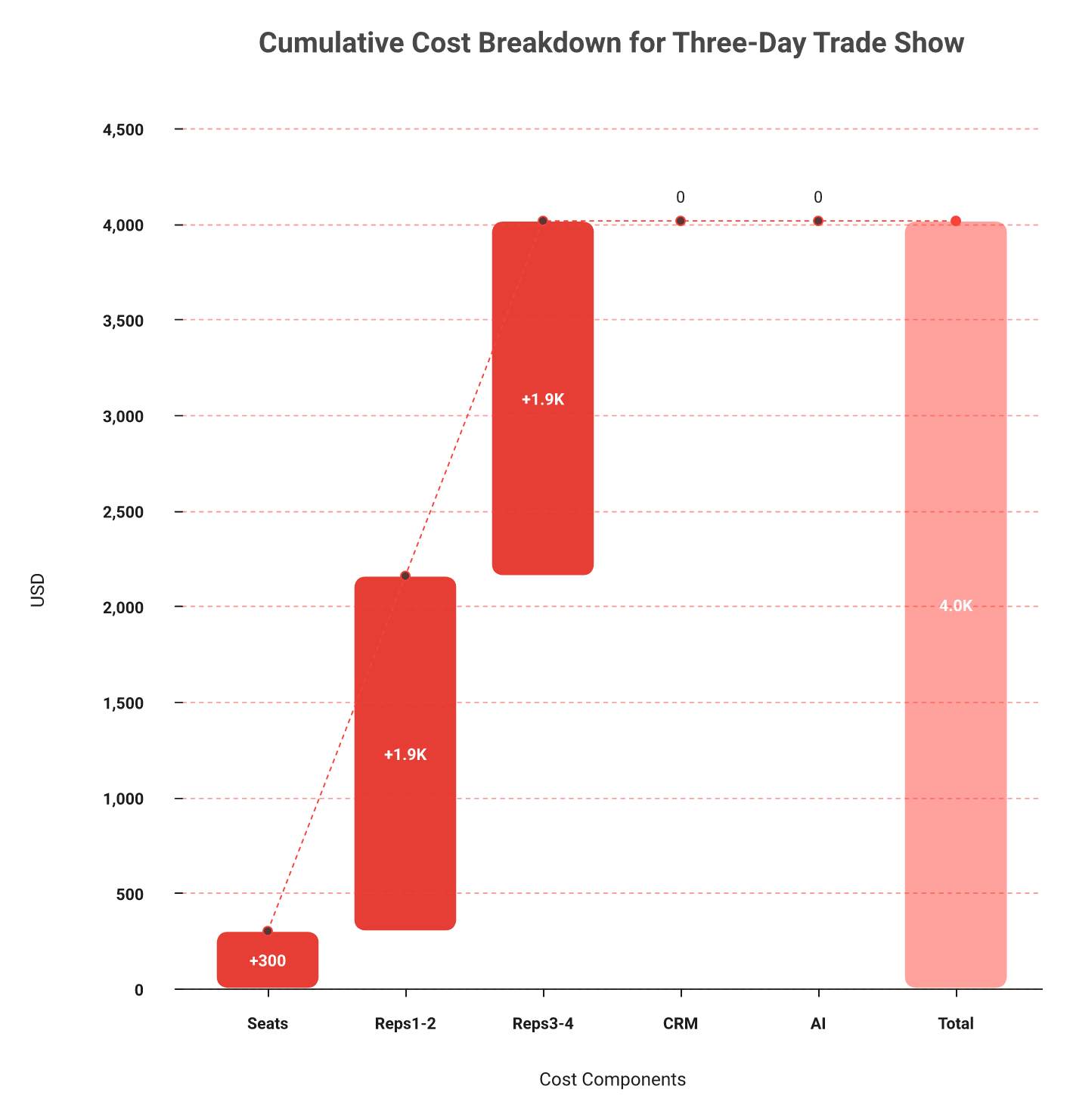
Here is the math nobody on this search page runs. Four reps, three days, at the 31 scans per day productive-rep benchmark B2Brain publishes.
That is 372 captured leads. Metered at $9.99 each, capture alone is roughly $3,715, plus five annual seats at about $300.
Blinq's raw per-lead price is not the problem. Volume is. A busy booth is precisely when the meter runs hardest, which inverts the incentive.
💸 Where price sensitivity shows up in reviews
Card-first pricing draws consistent fire across this whole segment, a pattern visible across the Popl pricing teardown as well.
"The price, $140 a year? No way, would rather print thousands of business cards." — Fabian T., Popl - G2 Verified Review
"I think the biggest issue is charging a monthly fee to use and needing to 'invite' people to include them in my contacts in the app." — Verified User in Architecture & Planning, Popl - G2 Verified Review
"The main thing is the contact data. It's just not very good. The accuracy of emails is hit or miss, around 60-70%." — Jorgealfa P., B2Brain G2 - Verified Review
That last quote is about us, and it is a fair hit on enrichment depth.
✅ Divide by meetings, not by leads
Rebuild this in five minutes. It changes the conversation with procurement, and the event ROI calculator does the arithmetic if you would rather not build the sheet.
Total software cost for one show, seats plus metered charges included.
Meetings actually held from that show within 14 days.
Divide line one by line two.
Do the same for your last post-show SDR chase. Include the SDR hours honestly.
Most teams land somewhere between $80 and $400 per meeting, and they have never once calculated it. B2Brain publishes that a qualified event meeting costs roughly 60% of an equivalent outbound meeting and about 40% of paid acquisition, which is the frame we want procurement to use.
That is the honest comparison. Software price is a rounding error against a $70K booth. Cost per meeting is not.
Q8. What do verified reviewers say about each tool? [toc=8. Review Verdicts]
I will lose this section on volume, so let me lose it up front.
⭐ The asymmetry, stated plainly
Blinq holds roughly 4.8 out of 5 across about 9,200 G2 reviews and 4.9 on Capterra, the largest social-proof wall in this category, with recurring notes that event follow-up is manual and credits burn faster than expected. B2Brain has a fraction of that volume, so weigh its claims on demo evidence and pilot results rather than on rating count.
Read the five-star Blinq reviews closely and a pattern appears. They praise card design, setup speed, and brand consistency.
Those are card outcomes, not booth outcomes. Nine thousand people rating a card-sharing experience tells you the card works, which I believe.
The one-star cluster is where the booth-relevant risk sits: recipient friction, admin panel bugs, and contacts that vanish with a lost phone.
⚠️ Three reviews worth reading before you buy
"I find it problematic that Blinq requires the person receiving my information to download the app for effective use. This additional step can make the process feel cumbersome." — Sarah H., Blinq - G2 Verified Review
"Rather than simply adding a contact, Popl forces the recipient to complete numerous steps just to save the contact. This is far too cumbersome for networking." — Vadim E., Popl - G2 Verified Review
"The AI Conversation Summarization and Auto-CRM Entry feature is a standout. Reps actually rave about it instead of dreading another sales tool." — Ole O., B2Brain G2 - Verified Review
Note what all three share. Every one of them is about friction at the moment of contact, not about features on a pricing page.
❌ The complaint that repeats across every scanner
Step back from brands and one pattern dominates this category. Buyers get a contact list with no signal of who wants to buy, and leads that reach the CRM days after the show, which is exactly what we found reviewing conference badge scanner apps.
One field seller said it more bluntly than any analyst would. Do not rely on the badge scanner, because roughly one in twenty businesses ever act on that lead list, and they act on it three months later. It collects leads for the organizer, not for you.
That is the real prior every reader brings to this comparison. Reviews measure whether an app is pleasant. They do not measure whether pipeline appeared.
✅ Three questions for a reference call
Skip the ratings. Call a customer and ask these.
What percentage of your booth conversations became a held meeting, and how do you know?
How many days after the show did the last lead reach your CRM?
Who reads your post-show report, and what decision did it change?
Question three is the one that separates tools. If nobody senior reads the report, the tool is a scanner with better fonts.
B2Brain carries roughly 17 G2 reviews against Blinq's thousands, so our case rests on the published LTM benchmark and a free first event rather than a wall of ratings. Run one show against your own numbers, or Book a Demo and we will build the model with you. That evidence outranks any review count, including ours.
Q9. Which team should pick which, and who should not switch at all? [toc=9. Which Team Fits Which]
I have talked plenty of teams out of buying from us. It is the fastest way to find the ones who should.
⭐ The two-line decision
Pick Blinq if reps share cards daily, events are occasional, and brand-consistent identity matters more than booth attribution. Pick B2Brain if you run 5 to 15 shows a year at $20K to $200K per show, sell $25K-plus ACV into industrial markets on Salesforce or HubSpot, and owe someone a pipeline number after every show.
That is the fit test. Everything below is detail.
👥 Three profiles, three answers
Which tool fits which booth team
You are
Your real problem
Better fit
Field Marketing head, 8 shows a year
You fund the booth and must show pipeline in the QBR
B2Brain
VP Sales, 40 reps networking weekly
Reps need a clean card and consistent branding
Blinq
Founder at a first US show
You need meetings booked before you fly home
B2Brain
RevOps at a card-led company
Contact hygiene across daily sharing
Blinq
Consultant, one conference a year
You need a contact saved, nothing more
Neither, use your phone
B2Brain sees roughly 500 app uses per four-day show against about four dashboard sessions, which tells you exactly who the product is built for. It is a rep tool with a marketer's report attached, and the split is laid out on the booth-day workflow for exhibitors page.
⏰ The between-events question nobody asks
Here is the part comparison articles skip. A digital card gets used every week.
A booth platform gets used roughly fifteen times a year. That changes how renewal feels, and it is a genuine argument in Blinq's favour, which is why we set out Show Pass and Pipeline plans as per-event and annual options rather than seats alone.
One field marketer told me she runs five different technologies at any moment just to do her job. She was not proud of it. But she also could not consolidate, because each tool owned a different phase.
❌ Who should not switch
I would rather say this now than in a QBR later.
Solo booths and one-person consultancies. The overhead is not worth it.
Teams with no CRM. There is nothing to write pipeline into.
Consumer-facing sellers. LTM math assumes a sales cycle.
Developer and AI-summit events. Different buying motion entirely.
Android-only field teams. B2Brain has no digital business card and is iOS-first with a web app alongside, so raise both points on the first call.
⚠️ What buyers say about fit
"The cost is very high considering it's mostly a digital business card sharing app, it's not much different than adding a QR code to my business card." — Brooke N., Popl - G2 Verified Review
"They have a good depth of tools on the backend to manage a team of users." — Verified User in Hospitality, Blinq - G2 Verified Review
"We were up and running with a production-ready sales intelligence hub, complete with CRM integrations, niche prospect filters, and team access, all in under 30 minutes." — Jesse Berf D., B2Brain G2 - Verified Review
✅ The two-question filter
Answer these honestly and the decision makes itself.
Does anyone senior ask you what a specific show returned in pipeline?
If yes, can you answer with a number today?
Yes then no means you have a booth attribution problem, not a card problem. Yes then yes means you already have a system, so do not break it. If you are still mapping the field, our roundup of the best event lead capture software for B2B teams covers the wider shortlist.
B2Brain's read is that most teams buy the wrong layer because they diagnose the wrong problem. The card was never the leak. The 30 seconds after the conversation was.
Q10. How do you switch and prove it inside one show? [toc=10. Switching and Pilot Plan]
Software rollouts fail at trade shows for a boring reason. Someone buys in October and expects reps to learn it in the taxi to the convention centre.
⏰ The honest timeline
Switching is a two-week job, not a quarter. Export existing contacts, map CRM fields and campaign IDs, run one scan test against a sandbox, train reps on the queue-and-voice-note habit in fifteen minutes, then pilot at one show before committing the season. Begin six to eight weeks before your next floor date.
Six to eight weeks is not caution. It is because CRM field mapping always takes longer than the demo suggested, as anyone who has wired up event lead capture into Salesforce will recognise.
⚙️ What actually breaks
Four things, in my experience, and none of them are the app.
Dedup rules. Multiple reps scan the same account, and your CRM creates duplicates unless matching rules are set first.
Campaign IDs. If the show name and campaign do not populate automatically, attribution becomes manual data entry forever.
Multi-rep ownership. Decide before the show who owns a lead scanned by a marketer, not an AE.
Next-best-action rules. B2Brain configures the post-scan action per customer, so map it to your actual sales stages rather than accepting a default.
That last one matters more than it sounds. Booking a meeting is just today's most common next action, not the only one.
Assign an owner to every line. CRM field mapping always takes longer than the demo suggested.
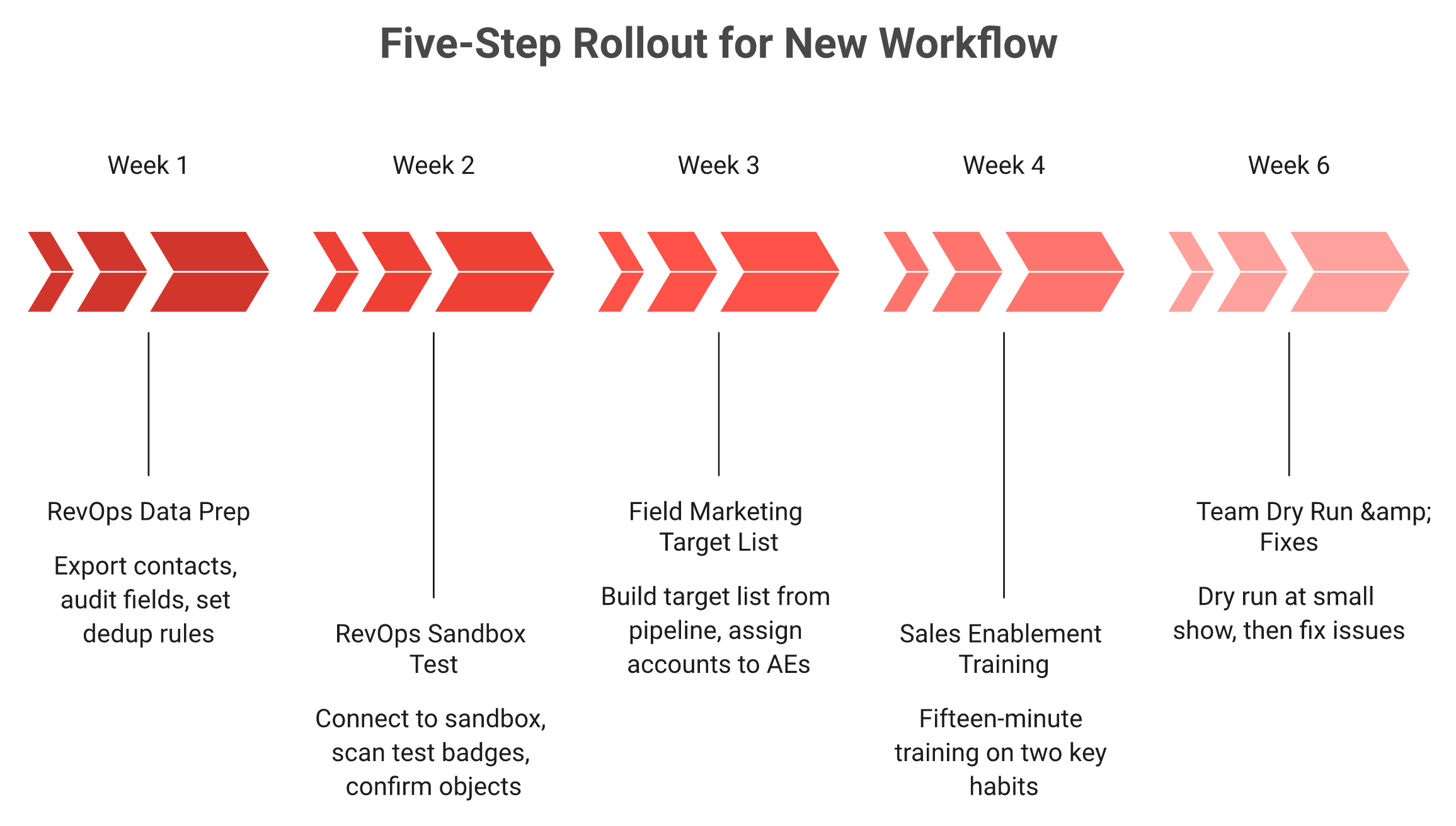
📋 The five-step rollout
Assign an owner to each line. Timings assume a show eight weeks out, and the sequence mirrors the three-motion workflow we run with new teams.
Week 1, RevOps. Export current event contacts, audit field names, and define dedup and matching rules in Salesforce or HubSpot.
Week 2, RevOps. Connect the app to a sandbox, scan five test badges, and confirm meeting and campaign objects appear.
Week 3, Field Marketing. Build the pre-show target list from open pipeline, and assign accounts to named AEs.
Week 4, Sales enablement. Fifteen-minute rep training on two habits only: queue the scan, add the voice note before you walk away.
Week 6, everyone. Dry run at a small regional show or internal event, then fix what broke.
🔍 Debug the workflow, do not blame the reps
A sales trainer I rate uses a coding parallel that fits this perfectly. When code breaks you debug it, and you find the exact place it went wrong.
A capture workflow behaves the same way. It tells you which phase fell off.
If notes are missing, capture failed. If meetings are missing, the booking step failed. If the CRM is empty, sync failed. Do not run a post-mortem on rep motivation until you have checked all three.
✅ The pilot that produces a defensible answer
Run one show, split the booth. This is the design I would use.
Half the reps on the new workflow, half on your current process.
Same shift patterns, same booth zone rotation, and the same qualification definition.
Measure three things: qualified conversations, meetings held within 14 days, and Leads-to-Meeting rate for each group.
B2Brain offers the first event free for two people, which turns a pilot into a scheduling decision rather than a procurement cycle. Run it against your own control group, not our benchmark.
💰 What I am still unsure about
Where I think this category goes in the next 18 months is up the stack, into pipeline activation rather than capture. Booking buttons are already commoditising, and the pipeline question is the one we keep returning to in the offline to pipeline motion.
My open question is whether the next-best-action after a booth conversation stays a meeting at all. For some sellers it might be a sample shipment, a site visit, or a quote request.
If you run an industrial booth and your best next step is not a calendar invite, I would genuinely like to hear what it is. Book a Demo and tell me. That answer shapes what we build next.
FAQ's
What is the real difference between B2Brain and Blinq for trade shows?
The two products were built for different jobs, which is why the feature comparison keeps missing the point.
Blinq starts from the rep's identity. It is a digital business card platform, now with a Universal Scanner that captures badges, cards, QR codes, and LinkedIn profiles. B2Brain starts from the exhibitor's pipeline, capturing the conversation with context, booking the discovery meeting on the floor, and writing the record into Salesforce or HubSpot with show-level attribution.
Pick Blinq if reps share cards weekly and events are occasional.
Pick B2Brain if the booth is measured on meetings booked and pipeline reported.
We are honest about the gaps on our side. B2Brain has no digital business card, the native app is iOS-first with a web app alongside, and third-party enrichment depth is lighter than Popl or Momencio. Our position is to enrich from the CRM you already trust.
The clearest test is the question your boss asks after the show. If it is "how many contacts did we get," a card tool is fine. If it is "where is the pipeline," you need the layer that runs before, during, and after the show on one shared data spine.
Does Blinq scan event badges, and how does that compare to B2Brain?
Yes, Blinq scans event badges. Its Universal Scanner captures badges, business cards, QR codes, LinkedIn profiles, and kiosk-mode entries, and it consumes credits per captured contact. Comparison tables that still mark Blinq with a dash under badge scanning are out of date, and we would rather say so than let a reader catch us being stale.
The mechanics differ in what rides along with the contact.
Blinq: scanner-based capture across events, with AI notes available afterwards.
B2Brain: badge photo, business card, or LinkedIn screenshot, with no dependency on the organizer's badge system.
Queue behaviour: B2Brain lets a rep photograph four badges during a rush, then add context after.
Voice: tap once, talk for roughly 30 seconds, and a structured CRM record comes out in about 4.2 seconds.
That last point matters at 4pm on day two, when nobody can stop to type. A badge without a reason attached is a row in a spreadsheet, which is exactly the failure mode we describe in universal lead capture across any badge and any event.
Ask any vendor the same question on a demo: what happens when four people arrive at once?
How much does Blinq cost compared to B2Brain across a full show season?
Blinq Business seats run 4.99 dollars per card per month billed annually, with a five-card minimum, which puts the floor near 300 dollars a year. Event lead capture is metered on top at 9.99 dollars per captured and enriched lead, billed monthly in arrears. Third-party audits document five credits per scanned contact and another five per native CRM export.
B2Brain sells a per-event Show Pass from 200 dollars plus an annual Pipeline plan, and the first event is free for two people.
Model it at real booth volume rather than list price.
Four reps, three days, at 31 scans per rep per day is 372 leads.
Metered at 9.99 dollars, capture alone lands near 3,715 dollars.
A busy booth is precisely when the meter runs hardest.
The number that matters is cost per booked meeting, not cost per lead. B2Brain publishes that a qualified event meeting costs roughly 60 percent of an equivalent outbound meeting and about 40 percent of paid acquisition. Compare current terms on Show Pass and Pipeline plans, then divide by meetings actually held within 14 days.
Which tool gives per-show pipeline attribution a CFO will accept?
Blinq reports capture activity: leads collected, enrichment, and team usage. That answers how busy the booth was. It does not answer what the show returned.
B2Brain reports per-show pipeline through an offline-to-pipeline report delivered the morning after, covering pipeline sourced, meetings booked, Leads-to-Meeting rate, and attribution by show, booth area, rep, and segment. Show-over-show comparison sits alongside it.
The structural problem is well documented. A 2025 CEIR analysis found only about 47 percent of exhibitors track leads through the sales cycle, and a 2026 study across 20 major US shows measured 80 percent of leads receiving zero follow-up.
Four rows make the argument defensible in any CRM.
Cost: booth, drayage, travel, software, and staff time.
Meetings: qualified conversations, and meetings held within 14 days.
Sourced: opportunities created with the show as first touch.
Influenced: open opportunities the show touched.
Contact information is not where anything happens. Pipeline is where the buyer's world moves, which is the whole premise of generating new pipeline from events.
Can we switch event lead capture tools before our next trade show?
Yes, and it is a two-week job rather than a quarter, provided you start six to eight weeks before the floor date. CRM field mapping always takes longer than the demo suggested.
Four things break, and none of them are the app.
Dedup rules: several reps scan the same account, so matching rules must exist first.
Campaign IDs: if the show name does not populate automatically, attribution becomes manual forever.
Multi-rep ownership: decide who owns a lead scanned by a marketer rather than an AE.
Next-best-action rules: B2Brain configures the post-scan action per customer, so map it to your real sales stages.
Prove it inside one show. Run half the reps on the new workflow and half on the current process, keep shift patterns and qualification definitions identical, then measure qualified conversations, meetings held within 14 days, and Leads-to-Meeting rate for each group.
The first event is free for two people, so a pilot is a scheduling decision rather than a procurement cycle. If you want the model built against your own show data, Book a Demo and bring last season's numbers.
Enjoyed the read? Join our team for a quick 30-minute chat — no pitch, just a real conversation on how we’re rethinking Event Intelligence in B2b.

.png)

.png)





