10 Best Lead Scanning Apps: Badge Scanning, Business Card OCR, CRM Integration, and Offline Reliability
Written by
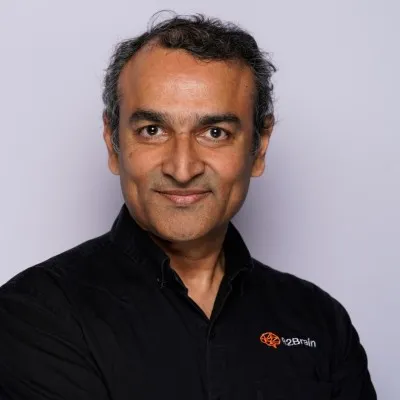
Sridhar Ranganathan
Last Updated :
July 23, 2026
Skim in:
13
mins
TL;DR
The ten strongest lead scanning apps for B2B exhibitors in 2026 are B2Brain, iCapture, Captello, Popl, Momencio, Blinq, BoothIQ, Mobly, Cvent LeadCapture, and CompuLead.
Every serious app reads a badge, so treat scanning as table stakes; the real spread sits on offline reliability, business card OCR accuracy, and the native CRM sync model versus a delayed CSV.
Lead scanning is only the first step; lead retrieval returns an organizer CSV days later, while lead capture is the full workflow of scan, qualify, add context, and sync to CRM.
Lead value decays from roughly 85% conversion within two hours to about 9% after a week, so on-floor meeting booking beats raw scan volume for building pipeline.
Pricing takes three shapes: organizer rental near $600 per device per show, per-event app pricing, and annual SaaS such as iCapture around $8,000 a year; compare on cost per booked meeting, not sticker price.
B2Brain prices on the pipeline plan, captures by voice, books the meeting on the floor, and proves per-show pipeline with Leads-to-Meeting at 52% on the floor versus an 8% industry average post-event.
Q1. What Are the 10 Best Lead Scanning Apps for B2B Trade Shows in 2026? [toc=1. Best Lead Scanning Apps]
The ten strongest lead scanning apps for B2B exhibitors in 2026 are B2Brain, iCapture, Captello, Popl, Momencio, Blinq, BoothIQ, Mobly, Cvent LeadCapture, and CompuLead. They separate less on whether they scan a badge and more on four axes: on-floor capture speed and offline reliability, business card OCR (optical character recognition, the tech that reads a card into text) accuracy, native real-time CRM sync versus CSV export, and whether a scan becomes a booked meeting and attributable pipeline.
📉 Why This Buying Decision Is High-Stakes
The booth spend is already gone before you scan a single badge. Most B2B teams spend $20K to $200K per show, so the money is sunk on day one.
Here is the trap. The organizer hands you a badge scanner, and the workflow ends at a CSV file. A CEIR study found exhibitors follow up on fewer than half the leads they collect at a show.
Then the leads rot. Conversion runs from roughly 85% within two hours of contact down to about 9% after a week, per widely cited lead-response research. By the Monday review, the boss asks "where is the pipeline?" and the team has a contact list, not meetings.
⚠️ The Real Question Behind "Lead Scanning"
I have sat beside a Field Marketer during that Monday pipeline review. The panic is not about scan counts. It is about proving the show paid for itself.
So the real search is not "which app scans fastest." It is "how do I own my lead data in real time, on my own device, so I can hit a prospect's inbox while they are still in the aisle?"
🧭 Our Evaluation Criteria
We picked criteria that actually move the purchase decision for a team running 5 to 15 shows a year. We ignored vanity features.
On-floor capture speed: scan-to-note latency, because at 4pm on Day 2 nobody can stop to type.
Offline reliability: whether it captures with no Wi-Fi and syncs later, since convention halls have hostile connectivity.
Business card OCR accuracy: how often the parsed email or phone is actually correct.
CRM sync model: native real-time sync to Salesforce or HubSpot versus a CSV you import days later.
In-booth meeting booking: whether the app books the follow-up before the prospect walks away.
Pipeline attribution: whether you can report per-show pipeline, not just scan volume.
Pricing shape: per-event, annual, or organizer per-device rental (around $600 per device per show).
👥 Who This Guide Is For
VP Sales or CRO running the booth-ROI math, where reps get paid on meetings booked.
Field or Event Marketing heads proving per-show pipeline to the CMO or CFO.
Founders taking a vertical B2B company to its first major US show.
RevOps leads owning CRM hygiene, dedup, and event attribution.
Teams switching off an organizer badge scanner, iCapture, Captello, Popl, Momencio, or Blinq.
🗂️ The Shortlist at a Glance
Here is the full field on the four axes that matter. Treat badge-scan parity as table stakes; nearly every tool does it.
10 Best Lead Scanning Apps for B2B Trade Shows in 2026
Provider
Best For
Key Strength
Pricing Model
1.1 B2Brain
Field marketers proving per-show pipeline to the CMO
Books the meeting on the floor; scores the scan on Leads-to-Meeting, not lead count
Annual pipeline plan / first-event-free trial
1.2 iCapture
Enterprise teams doing 10+ events a year, ROI-focused
AI badge, NFC, QR, and OCR capture with gamification
Annual license; per-event API kits (~$700 to $1,200)
1.4 Popl
Reps who want a digital business card first
Universal badge scanning, AI enrichment, clean UX
Freemium / per-seat subscription
1.5 Momencio
In-person GTM teams wanting scan plus content
Scan, enrich, score, and follow-up microsites
Annual / custom quote
1.6 Blinq
Networkers wanting fast digital card exchange
Fast card capture, AI notetaker, #1 G2 social proof
Freemium / per-seat subscription
1.7 BoothIQ
Teams that want AI-assisted follow-up
AI-positioned post-event follow-up
Not publicly disclosed
1.8 Mobly
Teams wanting human-validated enrichment
Enriches scans into CRM-ready records
Not publicly disclosed
1.9 Cvent LeadCapture
Exhibitors inside the Cvent ecosystem
Organizer-ecosystem badge scanning
Per-event / organizer rental
1.10 CompuLead
One-off booths needing a basic scanner
Legacy badge and lead retrieval
Organizer per-device rental (~$600/show)
🔍 How to Read This Table
Do not shortlist on the scan. Every app reads a badge. The real spread sits on offline reliability and the CRM model.
My read is simple. Weight offline reliability if you exhibit on big industrial floors. Weight the CRM sync model if RevOps has been burned by silent sync failures before.
One contrarian note I keep coming back to. Software is getting commoditized, and anyone can spin up a scanner now. The data, and what you do with it in the first 15 minutes, is the real asset.
1.1 B2Brain: Best for Field Marketers Proving Per-Show Pipeline [toc=1.1 B2Brain]
Post-event lead scanning report mapping badge scans to pipeline, showing total leads synced to CRM, meetings booked, deals created, LTM rate, and $1.45M revenue at 17X ROI.
🧩 Overview
I am the co-founder of B2Brain, so read this section with that in mind. We are not a badge scanner and not "lead retrieval" as an identity. We are an event lead capture app that adds context, books the meeting, and proves the pipeline.
The frame we work from is offline to pipeline. Anything a badge scanner captures, we capture with context, then book the meeting and write the CRM record.
🛠️ Core Services
Pre-event target lists built from the customer's own CRM pipeline, plus one-page account briefings.
Voice-first on-floor capture, tap once and talk, structured record out in seconds.
On-spot meeting booking against the AE's live calendar, with a dual invite.
Salesforce-native and HubSpot-native sync, not "integrates with."
A morning-after offline-to-pipeline report showing pipeline sourced, meetings booked, and attribution.
⚙️ Key Features Against the Criteria
Capture speed: voice capture aims for a structured CRM record in about the time it takes to say goodbye, roughly a fifth of typing.
Offline reliability: offline-ready in bad Wi-Fi, syncs on reconnect.
OCR accuracy: we enrich from the customer's own trusted CRM data, not a cold prediction database.
CRM sync: native real-time to Salesforce and HubSpot, with dedup.
Meeting booking: books the 30-minute follow-up before the prospect leaves.
Attribution: per-show pipeline and Leads-to-Meeting (LTM), the share of qualified booth leads that become a scheduled meeting.
💡 Why Companies Consider B2Brain
The buyer math is why. Picture a ~$70K booth where the boss wants 10x pipeline. At a ~20% close rate, that is ~2x revenue ROI, and to hit it, roughly 1 in 5 booth visitors must become a qualified meeting.
If you do not know that math, a contact list does not help you. Contact information is not where anything happens; pipeline is. So teams pick us to answer the "where is the pipeline?" question with a number, not a spreadsheet.
🎯 Ideal Customer Profile
Company size: growth-stage to enterprise B2B.
Vertical: manufacturing, supply chain, logistics, energy, construction, and vertical SaaS.
Buyer role: Field Marketing head as champion, with VP Sales and RevOps.
Shows per year: 5 to 15.
Stack: Salesforce or HubSpot already in place.
💰 Pricing
B2Brain runs on an annual pipeline plan with a first-event-free trial to lower the risk before you commit. Public per-seat pricing is not disclosed; teams get a custom quote.
✅ When to Shortlist
You must prove per-show pipeline to a CMO or CFO.
Your reps get paid on meetings booked, not badges scanned.
You want CRM-grounded briefings before the show, not just capture on the floor.
❌ When Not to Shortlist
You run a solo booth or a one-off event with no CRM.
You sell consumer-facing and do not run a B2B pipeline.
You need a native Android app today (our native app is iOS-first) or heavy third-party enrichment depth like Popl or Mobly, and we do not ship a digital business card.
⭐ Customer Reviews
Our review count is small and honest about it; we have a young review base while competitors have thousands. We counter on the outcome, not the volume. The reviews we do have flag both a strength and a real gap.
"The AI Conversation Summarization and Auto-CRM Entry feature is a standout, it's significantly better than other tools we've tried. Reps actually rave about it instead of dreading another sales tool." Ole O. B2Brain G2 Verified Review (4/5)
"Reporting is basic. We can see usage and lead stats, but there are no rep performance dashboards, no clear ROI reporting like time saved or deals influenced." Ole O. B2Brain G2 Verified Review (4/5)
"The main thing is the contact data. It's just not very good. The accuracy of emails is hit or miss, around 60-70%. That's not reliable enough, so we end up using a separate tool for enrichment." Jorgealfa P. B2Brain G2 Verified Review (3.5/5)
That last one is fair, and it is exactly why we lean on CRM-grounded data over cold enrichment.
1.2 iCapture: Best for Enterprise Teams Running 10+ Events a Year [toc=1.2 iCapture]
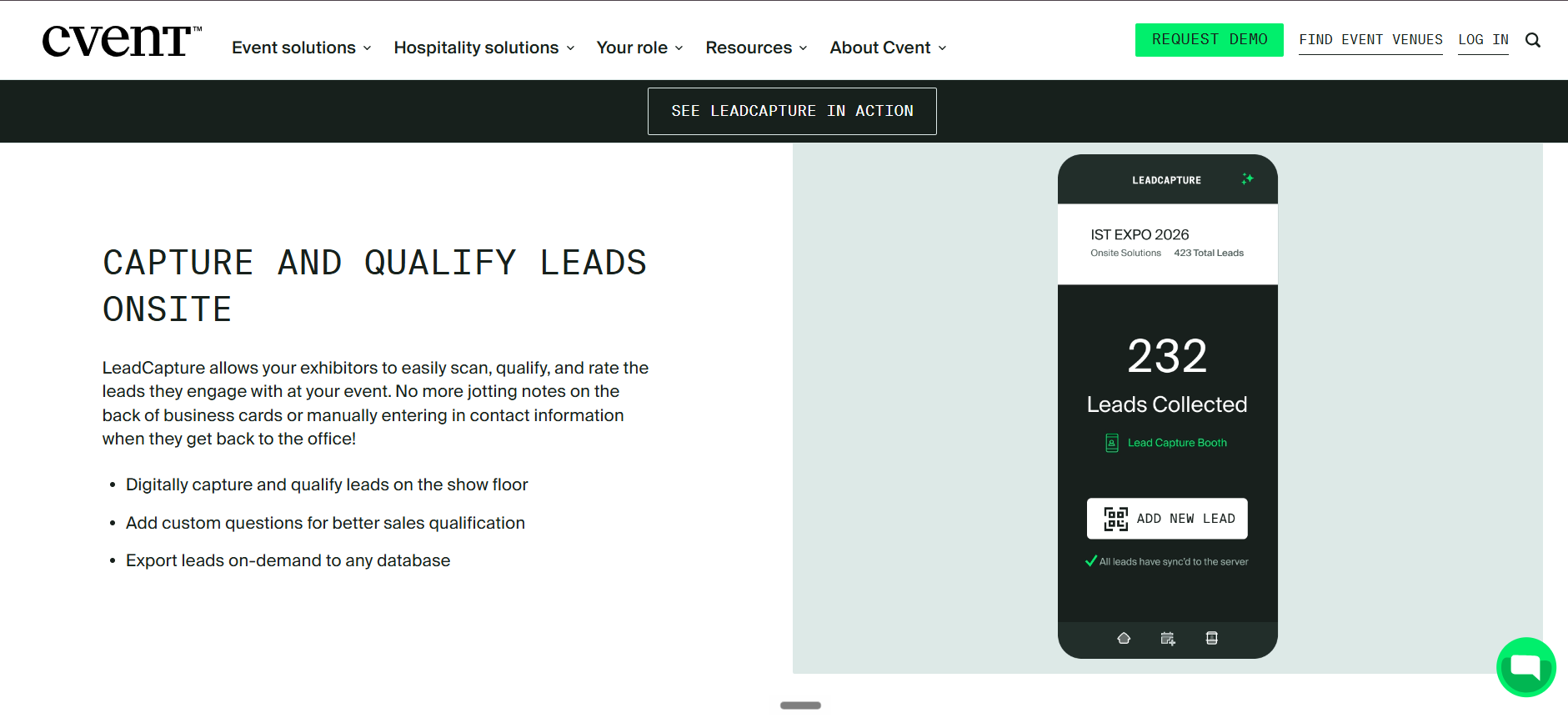
Cvent LeadCapture lead scanning interface on a phone displaying 232 badge-scanned leads collected onsite, custom qualification questions, server-synced reliability, and on-demand export to any CRM database.
🧩 Overview
iCapture sits in the enterprise-reliability lane. It is a mature lead capture platform built for organizations that exhibit at many shows a year and care about consistent, cross-device capture.
It leads with reliability and event metrics rather than an AI narrative. Think of it as the dependable workhorse of the category.
🛠️ Core Services
Badge and business card capture across multiple devices.
A BackOffice analytics layer for event metrics and staff performance.
Configurable lead forms and field mapping.
Event ROI reporting.
⚙️ Key Features Against the Criteria
Capture speed: designed for fast speed-to-lead, with auto-assignment to a rep.
Offline reliability: manual entry is possible for shows without an API kit, though reps say it is slower.
OCR accuracy: business card scanning exists but users report occasional errors.
CRM sync: integrates with CRMs, but one reviewer notes it does not natively integrate with theirs.
Meeting booking: not a native on-floor meeting-booking tool.
Pricing shape: annual subscription, reported around $8,000 a year, with per-event kits.
💡 Why Companies Consider iCapture
Teams pick iCapture when event ROI reporting is the priority and they run enough shows to justify an annual contract. The pull is accountability across a large events calendar.
The structural trade-off to weigh is that capture and metrics are the core. Booking a meeting on the floor is not the design center, so the follow-up still lands on an SDR later. A tool built for booth teams that books the meeting on the floor answers a different question.
🎯 Ideal Customer Profile
Company size: mid-market to enterprise.
Shows per year: 10 or more.
Buyer role: Field Marketing and events teams focused on ROI reporting.
💰 Pricing
iCapture uses an annual subscription model, reported at roughly $8,000 per year, plus per-event API kits for badge integration. Confirm current pricing directly, as it is not fully public.
✅ When to Shortlist
You run a heavy events calendar and want years of comparable metrics.
Staff-performance and busiest-time reporting matter to you.
You need capture that works across many device types and skill levels.
❌ When Not to Shortlist
You need native, real-time CRM sync without extra mapping work.
On-floor meeting booking and per-show pipeline (LTM) are your priority.
You want a per-event price rather than an annual commitment.
⭐ Customer Reviews
iCapture's reviews skew positive on reliability and ROI reporting, with honest flags on CRM fit and card accuracy.
"iCapture solves a major problem for us... inability to calculate event ROI... it allows us to keep our events sales teams accountable." Mcallaster M. iCapture G2 Verified Review (4.5/5)
"Business card transactions can be inaccurate at times, which has caused incorrect email addresses or phone numbers in a few cases." Verified User in Transportation/Trucking/Railroad iCapture G2 Verified Review (4.5/5)
1.3 Captello: Best for Booth Teams Wanting Scan Flexibility Plus Engagement [toc=1.3 Captello]
🧩 Overview
Captello is a lead capture and engagement platform built around flexibility. It captures via AI badge reading, NFC (near-field communication, the tap-to-share chip in phones), QR codes, and business card OCR.
Its real signature is gamification. Captello ships interactive games and activations to pull traffic into the booth, then folds those interactions into the lead record.
🛠️ Core Services
Multi-format lead capture (AI badge, NFC, QR, and OCR).
Buildable, customizable lead forms.
Booth games and interactive activations.
CRM import and event data consolidation.
⚙️ Key Features Against the Criteria
Capture speed: fast multi-format capture, praised by users for speeding up scanning.
OCR accuracy: business card OCR supported; accuracy not deeply detailed in reviews.
CRM sync: imports into the CRM with buildable forms, though it depends on conference API kits.
Meeting booking: not a native on-floor meeting-booking tool.
Pricing shape: annual license plus per-event API kits users report at $700 to $1,200 each.
💡 Why Companies Consider Captello
Teams pick Captello when foot traffic is the bottleneck. If your booth is quiet, games and activations earn attention, and that is a real, honest use case.
The structural trade-off is the API-kit dependency and cost. Capture and engagement are the design center, so pipeline attribution and on-floor booking are not where it leads.
🎯 Ideal Customer Profile
Company size: mid-market to enterprise.
Vertical: consumer-adjacent B2B and experiential marketing teams.
Buyer role: Field Marketing and brand-activation owners.
Shows per year: 5 or more with sizeable booths.
💰 Pricing
Captello uses an annual license, and reviewers report per-event lead-scanning API kits costing roughly $700 to $1,200 per show. Confirm current pricing directly with the vendor.
✅ When to Shortlist
Booth traffic is your problem and games can fix it.
You want one place to consolidate leads from many conferences.
You need multi-format capture across varied badge types.
❌ When Not to Shortlist
Per-event API-kit costs would stack up painfully across a full season.
You need on-floor meeting booking and per-show pipeline reporting.
A conference does not provide an API kit, which reviewers say breaks integration.
"Every time we have a show with lead scanning, I have to purchase an API kit that costs between $700 to $1,200. It's become costly." RebeccaGrace K. Captello G2 Verified Review (4/5)
"It does not always work with every conference, if the conference does not provide an API kit for integration." Verified User in Consulting Captello G2 Verified Review (3.5/5)
1.4 Popl: Best for Reps Who Want a Digital Business Card First [toc=1.4 Popl]
🧩 Overview
Popl started as a digital business card. You tap or scan to share your details, and event lead capture came later as an add-on.
That origin matters. Popl leads with the rep-side card, and universal badge scanning plus AI enrichment sit on top of that foundation.
🛠️ Core Services
Digital business card sharing (tap or QR).
Universal event badge scanning.
AI-assisted contact enrichment.
CRM sync and lead capture forms.
⚙️ Key Features Against the Criteria
Capture speed: clean, quick UX, though reviewers say the exchange interrupts the conversation.
Offline reliability: one reviewer reported badge scanning simply not working at a conference.
CRM sync: supported, with lead-capture forms as the strongest praised feature.
Meeting booking: not a native on-floor meeting-booking tool.
Pricing shape: freemium and per-seat subscription; several reviewers call the cost high.
💡 Why Companies Consider Popl
Teams pick Popl when reps want a modern, paperless way to share contact info. For a small booth, that alone can feel like an upgrade.
The structural trade-off is that the design center is the rep's card, not the pipeline. The recipient often has to take action to save the info, which reviewers say adds friction at the exact wrong moment. If a digital card is your must-have, our Popl alternatives guide covers the trade-offs.
🎯 Ideal Customer Profile
Company size: SMB to mid-market.
Buyer role: individual reps and small sales teams.
Shows per year: a few, plus general networking.
💰 Pricing
Popl uses a freemium model with per-seat paid subscriptions. One reviewer cited about $140 a year, and several flag the cost as high for a card-sharing tool.
✅ When to Shortlist
Reps want a clean digital business card as the primary tool.
You network heavily outside trade shows, not just at booths.
A simple lead-capture form covers your needs.
❌ When Not to Shortlist
You need badge scanning that reliably works on the floor.
You want on-floor meeting booking and per-show pipeline attribution.
The recipient-must-act flow would slow your reps during rush hour.
⭐ Customer Reviews
"The only reason we use it is for the lead capture form. The ability for a lead to scan a QR code and then we get their information is huge." Verified User in Real Estate Popl G2 Verified Review (1/5)
"The cost is very high considering it's mostly a digital business card sharing app." Brooke N. Popl G2 Verified Review (1/5)
"I needed it for scanning, but it didn't seem to perform that function. It really didn't work for me." Drew D. Popl G2 Verified Review (0.5/5)
1.5 Momencio: Best for In-Person GTM Teams Wanting Scan Plus Content [toc=1.5 Momencio]
🧩 Overview
Momencio is an event lead capture and engagement platform for in-person go-to-market (GTM) teams. It scans, enriches, scores, and follows up.
Its signature is the follow-up content layer, sometimes called a LiveMicrosite. After a scan, it can send a personalized landing asset and an automated follow-up email.
🛠️ Core Services
Business card and badge capture.
Lead enrichment and scoring.
Personalized follow-up microsites and emails.
CRM integration.
⚙️ Key Features Against the Criteria
Capture speed: effortless card capture, with an auto follow-up email once captured.
CRM sync: users specifically chose it for CRM integration fit.
OCR accuracy: business card capture praised; deep accuracy detail not disclosed.
Meeting booking: not a native on-floor meeting-booking tool; follow-up is content-led.
Pricing shape: annual or custom quote; not fully public.
💡 Why Companies Consider Momencio
Teams pick Momencio when they want capture plus a polished post-event nurture in one tool. Reviewers replaced clunky incumbents and liked the CRM fit.
The structural trade-off is that the follow-up is content and email, not a meeting booked on the floor. The pipeline still forms after the show, not during it. A workflow built to generate new pipeline from events closes that gap on the floor.
🎯 Ideal Customer Profile
Company size: SMB to enterprise.
Buyer role: Head of Marketing, in-person GTM owners.
Shows per year: several, plus keynotes and workshops.
💰 Pricing
Momencio pricing is not publicly disclosed and is quoted based on need. Confirm directly with the vendor.
✅ When to Shortlist
You want capture plus automated, personalized follow-up in one place.
CRM integration quality is a top requirement.
You run interactive presentations and want on-stage lead collection.
❌ When Not to Shortlist
You need the meeting booked on the floor, not a follow-up email after.
Per-show pipeline attribution and LTM are your priority.
Your team wants a very fast, no-login onsite login flow (reviewers flag slow logins).
⭐ Customer Reviews
"We found that Momencio fit our needs perfectly in terms of CRM integration and capabilities... they showed us not just the lead scanning that we needed but also the engagement opportunities." Martin D. Momencio G2 Verified Review (5/5)
"Logins are a little slow, and the single sign-on does not work, it requires syncing on the mobile app." Jia Li T. Momencio G2 Verified Review (4/5)
1.6 Blinq: Best for Networkers Wanting Fast Digital Card Exchange [toc=1.6 Blinq]
🧩 Overview
Blinq is a digital business card and relationship-intelligence tool. It shares your details fast and adds an AI notetaker for context.
Blinq owns the loudest social proof in this field. It holds the #1 spot on G2 with more than 8,800 reviews, so its brand presence is real.
🛠️ Core Services
Digital business card sharing.
AI notetaker for capturing context.
Contact and team management backend.
Social-media and tool integrations.
⚙️ Key Features Against the Criteria
Capture speed: fast to share, but reviewers report QR scans failing and slow load times.
Offline reliability: one reviewer flags unreliable scanning in poor connectivity.
CRM sync: exists, but the backend admin panel is described as buggy by some users.
Meeting booking: not a native on-floor meeting-booking tool.
Pricing shape: freemium and per-seat subscription.
💡 Why Companies Consider Blinq
Teams pick Blinq for polished, modern card exchange and strong brand trust. The AI notetaker is a genuine nod toward context capture.
The structural trade-off is the recipient-download friction. Several reviewers say the other person often has to download an app or fill a form, which stalls a busy booth exchange. For teams weighing card tools against capture, our universal lead capture primer helps.
🎯 Ideal Customer Profile
Company size: individuals to mid-market teams.
Buyer role: sales reps and networkers.
Shows per year: a few, plus heavy general networking.
💰 Pricing
Blinq uses a freemium model with per-seat paid tiers. Confirm current pricing directly.
✅ When to Shortlist
Fast, branded digital card exchange is the main job.
You value an AI notetaker for light context.
Brand trust and a large review base reassure your buyer.
❌ When Not to Shortlist
Recipient-download friction would cost you leads at the booth.
You need reliable badge scanning and per-show pipeline attribution.
On-floor meeting booking is a requirement.
⭐ Customer Reviews
"Blinq looks great and when it works it's a good user experience and good branding for the person showing their business card." Verified User in Hospitality Blinq G2 Verified Review (1/5)
"It doesn't always work reliably when scanning the barcode, especially in places with poor internet connectivity. This has made it necessary for me to consider purchasing printed business cards as a backup." Kasha A. Blinq G2 Verified Review (1.5/5)
"With Blinq, all the follow-ups are just in your sea of contacts you have to try and remember." Madison Z. Blinq G2 Verified Review (2/5)
1.7 BoothIQ: Best for Teams That Want AI-Assisted Follow-Up [toc=1.7 BoothIQ]
🧩 Overview
BoothIQ is a meeting-booking-and-follow-up challenger positioned around AI. It captures leads and pushes toward faster, smarter post-event follow-up.
It is a newer name in the category with strong roundup and content presence. Its public footprint is lighter than the incumbents.
🛠️ Core Services
Event lead capture.
AI-assisted follow-up.
Meeting-booking features.
⚙️ Key Features Against the Criteria
Meeting booking: positioned as a booking-capable tool, one of its headline claims.
Capture speed: not clearly detailed in independent sources.
CRM sync: not clearly stated in available sources.
Offline reliability: not publicly disclosed.
Pricing shape: not publicly disclosed.
💡 Why Companies Consider BoothIQ
Teams look at BoothIQ when they want booking and AI follow-up without an enterprise contract. It reads as modern and lightweight.
The structural trade-off to test is depth. Shipping a booking feature is not the same as owning the three-phase workflow, the CRM-grounded briefing, and a pipeline metric, so probe how far it goes beyond the scan. Our best event lead capture software roundup frames those questions.
🎯 Ideal Customer Profile
Company size: SMB to mid-market.
Buyer role: sales and field teams wanting quick follow-up.
Shows per year: a handful.
💰 Pricing
BoothIQ pricing is not publicly disclosed. Request a quote directly.
✅ When to Shortlist
You want AI-assisted follow-up as a core feature.
On-floor booking is a priority and you want a lightweight tool.
You are comparing modern challengers, not legacy scanners.
❌ When Not to Shortlist
You need proven, documented CRM sync depth today.
You require verified offline reliability at large-show scale.
Per-show pipeline attribution and a tracked conversion metric are must-haves.
No verified customer reviews were available in the provided source set for this provider.
1.8 Mobly: Best for Teams Wanting Human-Validated Enrichment [toc=1.8 Mobly]
🧩 Overview
Mobly is an AI-framed event marketing and lead capture tool. It scans a badge, business card, or typed name, then enriches the record for the CRM.
Its signature is enrichment, sometimes human-validated. It also offers a voice-notes feature that reviewers like for fast context. Our full Mobly review goes deeper on the trade-offs.
🛠️ Core Services
Badge, business card, and manual capture.
Contact enrichment with CRM-ready records.
Voice notes for lead context.
Salesforce and CRM sync.
⚙️ Key Features Against the Criteria
Capture speed: user-friendly and streamlined, with voice notes praised.
Offline reliability: reviewers report sync issues when Wi-Fi is patchy.
OCR accuracy: enrichment is a strength, but users report duplicates and enrichment lag.
CRM sync: Salesforce link exists, though several users found setup difficult.
Meeting booking: not a native on-floor meeting-booking tool.
Pricing shape: not publicly disclosed; per-contact match costs flagged as high.
💡 Why Companies Consider Mobly
Teams pick Mobly to turn thin scans into fuller records automatically. Reps call it a breath of fresh air compared to legacy conference scanners.
The structural trade-off is the enrichment lag and match cost. Records can take time to populate, and one reviewer said scans that seemed captured did not all sync through.
🎯 Ideal Customer Profile
Company size: mid-market to enterprise.
Vertical: B2B teams using Salesforce.
Buyer role: Field Marketing and sales ops.
Shows per year: several.
💰 Pricing
Mobly pricing is not publicly disclosed, and reviewers describe per-contact match costs as high. Confirm directly.
✅ When to Shortlist
You want automatic enrichment into CRM-ready records.
Voice notes for fast context appeal to your reps.
You are replacing a legacy organizer scanner.
❌ When Not to Shortlist
Silent sync gaps or enrichment lag would hurt you at a live show.
You need on-floor meeting booking and per-show pipeline attribution.
Per-contact match costs would strain the budget at scale.
⭐ Customer Reviews
"We really like the voice notes feature because when you're short on time between talking to people, it's very easy to get information on a lead." Ece K. Mobly G2 Verified Review (4/5)
"Sometimes Mobly can be finicky, where it doesn't sync all the leads I've scanned... we end up with a lot fewer than we expected." Verified User in Events Services Mobly G2 Verified Review (3.5/5)
"It was challenging to get it to sync with Salesforce... The cost of matches per contact, I think, is kinda high." Ece K. Mobly G2 Verified Review (4/5)
1.9 Cvent LeadCapture: Best for Exhibitors Inside the Cvent Ecosystem [toc=1.9 Cvent LeadCapture]
🧩 Overview
Cvent LeadCapture is the badge-scanning tool inside the Cvent event-management ecosystem. It is often the organizer's default option at a show.
It is a displacement reference here, not a peer SaaS pick. It saves the contact, and the workflow leans toward export.
🛠️ Core Services
Badge scanning at Cvent-powered events.
Lead qualification fields.
Lead export and reporting.
⚙️ Key Features Against the Criteria
Capture speed: solid badge scanning within the Cvent ecosystem.
CRM sync: export-leaning; often a file rather than deep native sync.
Meeting booking: not an on-floor meeting-booking tool.
Offline reliability: not clearly detailed in independent sources.
Pricing shape: per-event, often bundled with the organizer package.
💡 Why Companies Consider Cvent LeadCapture
Teams use it because it is right there, offered by the organizer. If you already live inside Cvent, it is the path of least resistance.
The structural trade-off is the core critique of this whole article. It saves the lead, loses the conversation, and the workflow ends at the CSV, leaving the pipeline question unanswered. A lead retrieval app for trade shows that you own changes that equation.
🎯 Ideal Customer Profile
Company size: any exhibitor at a Cvent-powered show.
Buyer role: event teams using the organizer's stack.
Shows per year: varies.
💰 Pricing
Cvent LeadCapture is typically priced per event and often bundled with the organizer or Cvent package. Confirm at the show.
✅ When to Shortlist
Your event runs on Cvent and you want the default option.
You need a basic contact list, not a pipeline engine.
Speed of setup matters more than downstream workflow.
❌ When Not to Shortlist
You need native, real-time CRM sync rather than an export.
On-floor meeting booking and per-show pipeline are priorities.
You want to own your lead data in real time on your device.
No verified customer reviews were available in the provided source set for this provider.
1.10 CompuLead: Best for One-Off Booths Needing a Basic Scanner [toc=1.10 CompuLead]
🧩 Overview
CompuLead is a legacy badge and lead-retrieval provider. It is often the rented scanner an organizer hands you at the booth.
Like Cvent LeadCapture, it is a displacement reference, not a modern SaaS peer. It captures a contact and returns a list.
🛠️ Core Services
Rented badge scanning hardware and app.
Lead retrieval and export.
Basic qualification fields.
⚙️ Key Features Against the Criteria
Capture speed: basic badge scanning.
CRM sync: export-leaning; typically a CSV, not native sync.
Meeting booking: not an on-floor meeting-booking tool.
Offline reliability: not clearly detailed in independent sources.
Pricing shape: organizer per-device rental, referenced around $600 per device per show.
💡 Why Companies Consider CompuLead
Teams use it for a one-off booth when they just want the cheapest scanner and no commitment. For a single show, that logic holds.
The structural trade-off is severe for a serious program. It is a rental that returns a delayed list, so leads decay while you wait, and the pipeline never gets built on the floor. A free lead capture app you keep on your own device avoids that rental trap.
🎯 Ideal Customer Profile
Company size: any exhibitor at a one-off booth.
Buyer role: teams with no CRM workflow for events.
Shows per year: one or two.
💰 Pricing
CompuLead is typically an organizer per-device rental, referenced at roughly $600 per device per show. Confirm at the show.
✅ When to Shortlist
You have a single one-off booth and no CRM plans.
You want the cheapest possible badge scanner.
You do not need same-day follow-up.
❌ When Not to Shortlist
You run 5 to 15 shows a year and rental costs would compound.
You need real-time data ownership on your own device.
On-floor booking and per-show pipeline are priorities.
No verified customer reviews were available in the provided source set for this provider.
🔬 How We Evaluated These Providers
Primary sources: the space's "B2Brain Competitor Reviews" file (G2 verified reviews with exact URLs), provider documentation for self-claims, and CEIR and lead-response benchmarks for the industry data.
Criteria selected: the four title axes (badge scanning, business card OCR, CRM integration, and offline reliability), plus on-floor meeting booking and pipeline attribution, because they decide the buy for a 5-to-15-show B2B team.
Criteria de-prioritized: booth-design and virtual-event features, since they do not affect the lead-scanning decision for this reader.
Data gaps: BoothIQ, Cvent LeadCapture, and CompuLead had no verified reviews in the provided source set, so their sections rely on documented positioning, not reviews.
Our own gaps, stated honestly: B2Brain's native app is iOS-first, our third-party enrichment depth is lighter than Popl, Mobly, or Momencio, and we do not ship a digital business card.
🧭 Which Provider Should You Shortlist?
The field marketer who must prove per-show pipeline: shortlist B2Brain for its LTM number and morning-after report, and test it against Momencio's follow-up layer.
The VP Sales whose reps get paid on meetings booked: shortlist tools that book on the floor, starting with B2Brain, and pressure-test BoothIQ's booking depth.
The founder taking a 5-rep booth to a first MODEX: shortlist B2Brain's first-event-free trial, and consider Mobly if enrichment matters more than booking.
The RevOps lead burned by a silent CRM sync failure: shortlist native-sync tools like B2Brain and iCapture, and read the Mobly and Blinq sync complaints closely.
The team that just wants the cheapest scanner for one booth: the organizer's CompuLead or Cvent LeadCapture rental is fine, as long as you accept the CSV ends the workflow.
If pipeline is the number your boss asks for, Book a Demo to see the offline-to-pipeline workflow in action.
📚 References
Sridhar Ranganathan (Co-founder and CEO, B2Brain), operator positions and LTM benchmark (52% on-floor versus 8% industry), 2026.
iCapture, Captello, Popl, Momencio, Blinq, and Mobly verified customer reviews, G2, 2019 to 2026 (exact URLs linked inline).
Center for Exhibition Industry Research (CEIR), lead follow-up and event ROI benchmarks (verify exact figure and year before publishing).
Lead-response decay research (~85% within two hours to ~9% after a week); confirm exact source and year before publishing.
Q2. What Is Lead Scanning, and How Is It Different From Lead Retrieval and Lead Capture? [toc=2. Lead Scanning Defined]
Lead scanning turns a rep's phone into a capture device that reads an event badge (QR, barcode, or NFC, the tap-to-share chip in phones) or a business card via OCR (optical character recognition, the tech that reads a card into text). It creates a contact record on the spot. "Lead retrieval" usually means the organizer's rented scanner that returns a CSV days later. "Lead capture" is the wider workflow of scanning, qualifying, adding context, and syncing to CRM. Lead scanning is the first step, not the whole job.
🔤 The Three Terms People Mix Up
These words get used as if they mean the same thing. They do not, and the difference decides whether your leads turn into pipeline.
Lead retrieval: the organizer's rented scanner. It saves a badge and hands you a file later.
Lead scanning: your own phone reading a badge or card in real time, on your device.
Lead capture: the full workflow, scan plus context plus qualification plus CRM sync.
A quick history helps here. We went from paper business cards, to rented barcode scanners, to phone apps that read almost any badge with AI. Each step moved data closer to you and further from the middleman. If you want the deeper breakdown, our guide to universal lead capture unpacks how a single app reads any badge on the floor.
📱 Can a Phone Replace the Rented Scanner?
Yes, and that is the whole point. A modern app on your own phone captures the badge in real time and drops it straight into your workflow. That is the model behind a purpose-built conference badge scanner that lives on your device, not the organizer's.
The rented device does the opposite. It collects the lead for the organizer, then routes it back to you through a broker, so the list often gets acted on months later.
⚠️ Why the Distinction Costs You Money
Here is the blunt version I hear from operators. A veteran once told the crowd, do not trust the badge scan, it collects leads for them and does nothing for you.
That rented-scanner CSV is where leads go to die. You paid the organizer to access your own leads, then waited days for a file nobody opens on time. This is exactly the gap a lead retrieval app for trade shows that you own is meant to close.
For context, B2Brain sits in the lead-capture bucket, not the scanner or lead-retrieval bucket. It is an event lead capture app that adds context and writes the record, not a badge that ends at a file.
Q3. How Should You Score a Lead Scanning App? [toc=3. How We Scored Them]
Score lead scanning apps on four axes. Business card OCR: accuracy plus a fast verify path before sync. Offline reliability: full capture with no Wi-Fi, syncing on reconnect. CRM sync: native real-time bidirectional (two-way) with dedup (removing duplicate records) and event attribution, versus a CSV you import days later. Badge scanning: compatibility with the formats on your floor. Weight the axis your show reality stresses most, offline for big industrial halls, CRM depth for RevOps-heavy teams.
🪪 Axis 1: Business Card OCR Accuracy
The trap with OCR is not the read. It is the wrong email that silently poisons your CRM.
Look for a fast verify step. The rep should confirm the parsed fields in seconds before the record syncs, so a blurry card does not become a dead contact. Our roundup of the best card scanner app options weighs OCR accuracy across tools.
🧾 The Manual Counterpoint
Some sharp operators skip OCR entirely. Perry Belcher takes a photo of the card and hands it to an assistant to type up, as soon as he walks away, to dodge OCR errors.
Another simple hack: take a photo of the person holding their card. You will never wonder later which card belonged to whom.
📶 Axis 2: Offline Reliability
Convention halls have hostile Wi-Fi. Weight this heavily if you exhibit at large industrial shows like MODEX or FABTECH.
Here is the failure scene. It is 4pm on Day 2, the booth is slammed, and a web-only app stalls, so the rep reverts to photos and half the context is lost.
"Sometimes Mobly can be finicky, where it doesn't sync all the leads I've scanned... we end up with a lot fewer than we expected." Verified User in Events Services Mobly G2 Verified Review (3.5/5)
🔗 Axis 3: CRM Sync Model
This is where RevOps gets burned. Native real-time sync means the lead lands in Salesforce or HubSpot clean, deduped, and tagged with show attribution. Our walkthrough of lead capture into Salesforce shows what native sync looks like in practice.
A CSV import is the opposite. You get a file days later, then someone hand-cleans duplicates and guesses which show sourced what.
"It was challenging to get it to sync with Salesforce... The integration process was difficult for my team to accomplish and took a long time." Ece K. Mobly G2 Verified Review (4/5)
🏷️ Axis 4: Badge Scanning Compatibility
Every serious app reads a badge now, so treat this as table stakes. The real question is whether it reads the formats on your specific floor.
Test it before the show. One reviewer expected badge scanning and it simply did not work when it mattered.
"I needed it for scanning, but it didn't seem to perform that function. It really didn't work for me." Drew D. Popl G2 Verified Review (0.5/5)
💡 How I Weight These Axes
My read is that qualification quality sits underneath all four. Poor qualification is expensive, since a large share of lost sales trace back to leads that were never properly qualified.
On this scoring, here is where we land B2Brain honestly. We aim for a sub-5-second scan-to-record with voice, we are offline-ready as a native iOS app (our Android is a web app today, a real gap), and we sync native to Salesforce and HubSpot with dedup and show attribution built in. You can see how event lead capture works across the full workflow.
Q4. How Much Do Lead Scanning Apps Cost? [toc=4. Pricing & Cost Shape]
Pricing takes three shapes: the organizer's rented scanner at roughly $600 per device per show, per-event app pricing, and annual SaaS subscriptions (iCapture runs around $8,000 a year plus per-show kits). For a multi-rep booth across 8 to 15 shows a year, device rentals quietly become the most expensive and least useful option, because you pay to access your own leads. Compare on cost-per-booked-meeting, not sticker price, and check free-trial or first-event-free terms.
💰 The Three Pricing Shapes
Get these clear before you compare vendors. Each shape hides its cost in a different place.
Organizer rental: around $600 per device per show, paid again at every event.
Per-event app pricing: a show pass you buy per event, flexible but repetitive.
Annual SaaS: one yearly fee, sometimes with extra per-show API kits.
Captello reviewers, for example, report per-event API kits at $700 to $1,200 each, on top of the license. Those add-ons stack up fast across a season.
🧮 The Season Math Nobody Runs
Do the multiplication before you sign. Rent two or three devices across 10 shows and you are well past what an annual plan costs.
That is the quiet trap. The rental feels cheap per show, but a full 8-to-15-show season turns it into the priciest option, and you still only get a delayed CSV. Run the numbers yourself with our event ROI calculator before you commit.
⏰ Reframe: Cost Per Booked Meeting
Sticker price is the wrong lens. The number that matters is cost per qualified meeting, because that is what feeds pipeline.
Here is the founder math I keep coming back to. On a roughly $70,000 booth, the boss wants 10x pipeline, and at a ~20% close rate that is ~2x revenue ROI, so about 1 in 5 booth visitors must become a qualified meeting.
If you do not know that math, a cheap scanner does not save you. Contact information is not where anything happens; pipeline is.
This is why B2Brain prices on the pipeline plan, not the scan, and offers a first-event-free trial to lower your risk. An event meeting tends to cost far less than an outbound or paid-acquisition meeting, so the honest comparison is per-meeting value, not the rental sticker. If pipeline is the metric that decides the buy, Book a Demo to see the offline-to-pipeline workflow.
Q5. Which Lead Scanning Apps Turn a Scan Into a Booked Meeting and Provable Pipeline? [toc=5. From Scan to Pipeline]
Most lead scanning apps stop at the contact record. A smaller set books the meeting while the prospect is still at the booth and reports the pipeline it created. Conversion probability decays from roughly 85% within two hours to about 9% after a week, so on-floor booking is where pipeline is won. The metric that proves it is Leads-to-Meeting (LTM), the share of qualified booth leads that become a scheduled meeting, paired with per-show attribution.
🪜 Three Different Jobs, Not One
People lump these together, but they are three separate jobs. Only the third one answers your boss.
Capture-and-CSV: save the contact, export a file. The workflow ends there.
On-floor booking: book the discovery meeting before the prospect walks away.
Pipeline reporting: tie every scan to attributable pipeline the CFO can see.
The money at a trade show is made in the follow-up, not the scan. As one operator puts it, the scan is the start of the job, not the finish. This is the core of how we help teams generate new pipeline from events.
⏰ Why Speed Beats Volume
Here is the decay curve that should drive your choice. Lead value collapses fast, from around 85% conversion within two hours to about 9% after a week.
Most teams lose to that curve without noticing. A common pattern: 100 cards collected, and maybe two emails sent within a week, because the follow-up sits in a shoebox. A purpose-built lead capture app for trade shows is designed to beat that curve.
🐛 The Debugging Analogy
Think of a stalled deal like a bug in code. You want to find the exact phase where it fell off, then fix that phase.
Slow capture kills velocity everywhere downstream. When the record is thin and late, the AE cannot act, and a deal that could close in weeks drifts for a year or more.
🧮 The LTM Math That Wins the QBR
Leads-to-Meeting is simple. It is qualified booth leads divided into scheduled meetings, tracked per show.
Now run the founder math. On a ~$70,000 booth, if the boss wants 10x pipeline and you close at ~20%, roughly 1 in 5 booth visitors must become a qualified meeting. Our event ROI calculator lets you plug in your own numbers.
This is exactly the lane B2Brain is built for. We capture by voice in seconds, book the meeting on the AE's live calendar before the prospect leaves, and hand the Field Marketer a morning-after report with per-show pipeline, attribution, and the owned LTM number (52% on the floor versus an 8% industry average post-event). You can see how event lead capture works across before, during, and after the show. Contact information is not where anything happens; pipeline is where their world moves.
Q6. What Do Real Reviews Reveal About Each Lead Scanning App's Limitations? [toc=6. Reviews & Limitations]
Across G2, Capterra, and Reddit, complaints cluster in four places: CRM sync that silently fails for days, offline capture that drops at rush hour, enrichment tools that generate duplicate or wrong emails, and gamification-first tools that add friction reps skip. No app is complaint-free, so the honest question is not which tool is perfect. It is which failure mode your team can least afford at a live show.
🗂️ The Four Complaint Clusters
Read enough verified reviews and the same four problems repeat. Each one maps to a real moment at the booth.
Silent CRM sync failure: leads scanned but not synced, discovered days later.
Offline drop: capture stalls when Wi-Fi dies at rush hour.
Enrichment errors: duplicates and wrong emails poison the CRM.
Friction reps skip: extra steps that get abandoned when the booth is busy.
🔎 Named Patterns From Verified Reviews
Here is where the clusters show up by name. These are real reviews, not vendor claims.
"Sometimes Mobly can be finicky, where it doesn't sync all the leads I've scanned... we end up with a lot fewer than we expected." Verified User in Events Services Mobly G2 Verified Review (3.5/5)
"It doesn't always work reliably when scanning the barcode, especially in places with poor internet connectivity. This has made it necessary for me to consider purchasing printed business cards as a backup." Kasha A. Blinq G2 Verified Review (1.5/5)
"Every time we have a show with lead scanning, I have to purchase an API kit that costs between $700 to $1,200. It's become costly." RebeccaGrace K. Captello G2 Verified Review (4/5)
⚠️ A Word on Raffle Bait
One contrarian note from the floor. Gamification and raffles pull traffic, but they also attract lead garbage, people scanning for the prize, not the product.
That is not a bug, it is a design trade-off. More scans can mean worse pipeline if qualification slips. For teams weighing capture tools honestly, our best event lead capture software roundup breaks down the trade-offs.
✅ Choose Your Failure Mode Honestly
Every tool fails somewhere, so pick the failure you can survive. If a live show breaks your sync, that is worse than a slightly slower onboarding. Reliable, native lead capture into Salesforce is the failure mode most RevOps teams cannot afford to compromise.
I will hold B2Brain to the same standard. Our native app is iOS-first, our Android is a web app today, and our third-party enrichment depth is lighter than Popl, Mobly, or Momencio, so if deep enrichment is your top axis, weigh that honestly.
Q7. Which Lead Scanning App Should You Choose for Your Show and Stack? [toc=7. Choosing for Your Show]
Choose by your show reality and stack, not the longest feature list. For big industrial floors with bad Wi-Fi, weight offline reliability. For a HubSpot startup running its first events machine, weight easy onboarding and per-event pricing. For an enterprise Salesforce team, weight native attribution and dedup. If the metric your boss asks about is pipeline, weight in-booth booking and Leads-to-Meeting reporting over raw scan volume.
🎯 Match the Tool to Your Situation
There is no universal winner here. There is only the right fit for your floor, your CRM, and your season.
The 7-second rule from booth design applies to tool choice too. If the tool's core job is not obvious to a busy rep fast, adoption dies. That is why the booth-day workflow matters as much as the feature list.
🧭 Four Scenarios, Four Choices
Find the row that sounds like you, then shortlist accordingly.
Big industrial floor, hostile Wi-Fi (MODEX, FABTECH): weight offline-first capture. Test any tool's no-Wi-Fi mode before you commit.
HubSpot startup, first events machine: weight easy onboarding and per-event pricing, so a light program is not locked into an annual contract.
Enterprise Salesforce team, RevOps-heavy: weight native real-time sync, dedup, and clean show attribution over flashy capture.
Pipeline is the metric your boss asks about: weight in-booth meeting booking and LTM reporting, since a contact list will not answer "where is the pipeline?"
🎣 Be Where the Fish Are
One last principle, borrowed from fishing. Put your effort where the buyers actually are, and match your gear to that water.
That fourth scenario is where B2Brain fits, as the offline-to-pipeline and LTM choice for a 5-to-15-show team on Salesforce or HubSpot. It is not the pick for a solo booth, a consumer-facing seller, or a one-off show, and I would rather tell you that than force the fit. When pipeline is the number that decides the buy, Book a Demo to see it work on your stack.
So here is the question I am sitting with, and I would genuinely like your answer: which show are you prepping for next, and is your boss asking for a contact count or a pipeline number? Tell me that, and the shortlist gets a lot shorter.
FAQ's
What is lead scanning, and how is it different from lead retrieval and lead capture?
We see these three terms mixed up constantly, and the difference decides whether your scans become revenue pipeline.
Lead retrieval: the organizer's rented scanner that saves a badge and hands you a file days later.
Lead scanning: your own phone reading a badge or business card in real time, on your device.
Lead capture: the full workflow of scan, plus context, plus qualification, plus CRM sync.
Lead scanning is the first step, not the whole job. A rented scanner collects leads for the organizer and routes them back through a broker, so the list often gets acted on months later, long after the value has decayed.
We sit in the lead capture bucket, not the scanner or lead retrieval bucket. We are an event lead capture app for trade shows that adds context and writes the CRM record, rather than a badge that ends at a file. For the deeper mechanics, see how a single app handles universal lead capture across any badge on the floor.
How should we score a lead scanning app before buying?
We score lead scanning apps on four axes, then weight the one our show reality stresses most.
Business card OCR accuracy: the read plus a fast verify path, so a blurry card does not silently poison the CRM with a wrong email.
Offline reliability: full capture with no Wi-Fi, syncing on reconnect, which matters most on hostile industrial floors.
CRM sync model: native real-time bidirectional sync with dedup and event attribution, versus a CSV you import days later.
Badge scanning compatibility: table stakes now, but confirm it reads the formats on your specific floor.
Weight offline reliability for large halls like MODEX or FABTECH, and weight CRM depth for RevOps-heavy teams that have been burned by a silent sync failure. On this scoring we hold ourselves honest: we aim for sub-5-second voice capture, we are offline-ready as a native iOS app while our Android is a web app today, and we sync native to Salesforce and HubSpot with dedup built in. See how lead capture into Salesforce works end to end.
How much do lead scanning apps cost for a full trade show season?
Pricing takes three shapes, and each hides its cost in a different place.
Organizer rental: around $600 per device per show, paid again at every event.
Per-event app pricing: a show pass you buy per event, flexible but repetitive.
Annual SaaS: one yearly fee, such as iCapture at roughly $8,000 a year, sometimes with extra per-show API kits.
For a multi-rep booth across 8 to 15 shows a year, device rentals quietly become the most expensive and least useful option, because you pay to access your own leads and still get only a delayed CSV. Captello reviewers, for example, report per-event API kits at $700 to $1,200 each on top of the license, and those add-ons stack up fast.
We prefer comparing on cost per booked meeting rather than sticker price, since an event meeting tends to cost far less than an outbound or paid-acquisition meeting. We price on the pipeline plan, not the scan, and offer a first-event-free trial to lower your risk. See our Show Pass and Pipeline plans for what B2Brain costs per event.
Which lead scanning apps turn a scan into a booked meeting and provable pipeline?
Most lead scanning apps stop at the contact record. A smaller set books the meeting while the prospect is still at the booth, then reports the pipeline it created.
This matters because lead value collapses fast, from roughly 85% conversion within two hours to about 9% after a week. A common failure pattern is 100 cards collected and maybe two emails sent within a week, because the follow-up sits in a shoebox. On-floor booking is where pipeline is won, not lost.
Capture-and-CSV tools: save the contact, export a file, and the workflow ends there.
On-floor booking tools: book the discovery meeting before the prospect walks away.
Pipeline reporting tools: tie every scan to attributable revenue pipeline the CFO can see.
We built B2Brain for the third job. We capture by voice in seconds, book the meeting on the AE's live calendar, and hand the Field Marketer a morning-after report with per-show attribution and the Leads-to-Meeting metric, 52% on the floor versus an 8% industry average post-event. See how we help teams generate new pipeline from events.
Which lead scanning app should we choose for our show and CRM stack?
We choose by show reality and stack, not the longest feature list. Match the tool to your floor, your CRM, and your season.
Big industrial floor with hostile Wi-Fi (MODEX, FABTECH): weight offline-first capture, and test any tool's no-Wi-Fi mode before committing.
HubSpot startup running its first events machine: weight easy onboarding and per-event pricing, so a light program is not locked into an annual contract.
Enterprise Salesforce team, RevOps-heavy: weight native real-time sync, dedup, and clean show attribution over flashy capture.
Pipeline is the metric your boss asks about: weight in-booth meeting booking and Leads-to-Meeting reporting over raw scan volume.
That last scenario is where we fit, as the offline-to-pipeline and LTM choice for a 5-to-15-show team on Salesforce or HubSpot. We are honest that we are not the pick for a solo booth, a consumer-facing seller, or a one-off show. If pipeline is the number that decides the buy, Book a Demo to see it work on your stack.
Enjoyed the read? Join our team for a quick 30-minute chat — no pitch, just a real conversation on how we’re rethinking Event Intelligence in B2b.

.png)

.webp)

.png)





