What Is Lead Retrieval? How It Works, What It Costs, and When to Use Your Own App
Written by
Sridhar Ranganathan
Last Updated :
November 20, 2026
Skim in:
19 min read
mins
TL;DR
Lead retrieval is the show's own system: you rent a scanner or license an app from the official contractor and collect the registration record behind each badge.
The organizer decides which fields a scan returns. ATD26's scan data has name, organization, address, phone, fax, email and an ID, but no job title.
On six 2026 and 2027 order forms, one app license or handheld cost $295 to $685 per show, and API access $440 to $1,330.
When leads arrive depends on the vendor: CMR, Maritz SWAP and Informa show them live, while Cvent's guide exports after the event.
Some shows forbid scanning badges with another program; others sell an API so your own capture app can receive the show's data.
Lead retrieval covers one show's records. Lead capture, which is what B2Brain does, carries your questions and CRM history across every show and conversation.
If you run field or event marketing, the exhibitor services kit lands in your inbox six weeks before the show. Somewhere between the drayage form and the carpet order sits a line called "lead retrieval". It is priced per device, and its deadline is closer than you think. This guide explains what that line buys and what six real order forms charge for it. It also shows when your own event lead capture app is the better buy.
Q1. What is lead retrieval? [toc=1. What Lead Retrieval Is]
Lead retrieval is the system a trade show sells so exhibitors can scan attendee badges and keep the registration details behind them as sales leads. The show's official lead retrieval contractor runs it, and exhibitors buy it per device or per app license, for one event. CEIR found that 74% of exhibitors used organizer-provided lead retrieval in its 2012 study, against 59% who also collected paper forms or business cards.
What "retrieval" actually means
The word is literal. The attendee's record already exists in the show's registration system, because they typed it in when they signed up. The scan does not create a lead. It retrieves a record that the organizer collected months earlier and lets you attach it to your booth.
Fourteen years after that CEIR study, the habit has barely moved. B2Brain asked 934 exhibitors at 21 North American shows how they capture leads in September and October 2026. Of the 379 who answered, 65% used the show-provided scanner or app, against 17% who ran their own lead capture app.
Who provides lead retrieval at a show?
The organizer picks one contractor and sells that contractor's tool to every exhibitor. On the 2026 forms reviewed for this guide, the contractors were Maritz (SWAP and XPress Leads) and Convention Management Resources (CMR). Cvent LeadCapture and Informa's own Visit Connect app also appear. Organizers sell it because exhibitors ask for it and because it is sold per device, per show.
What is a lead retrieval device?
A lead retrieval device is a handheld or tablet scanner you rent from that contractor for the length of the event. You collect it at the exhibitor services desk and return it when the show closes. The alternative is an app license that runs the contractor's software on your own phone. Both read the same badge code and pull the same registration record.
The device is on loan, with terms
ATD26's form from CMR asks you to return the handheld within one hour of the event closing. It lists a $2,000 replacement cost per unit and a $100 abandonment fee, against a rental price of $495 to $545.
B2Brain is not lead retrieval. B2Brain is an event lead capture app that a booth team runs at every show, alongside or instead of the show's system. That is why this guide treats the two separately.
Q2. How does lead retrieval work at a trade show? [toc=2. How It Works]
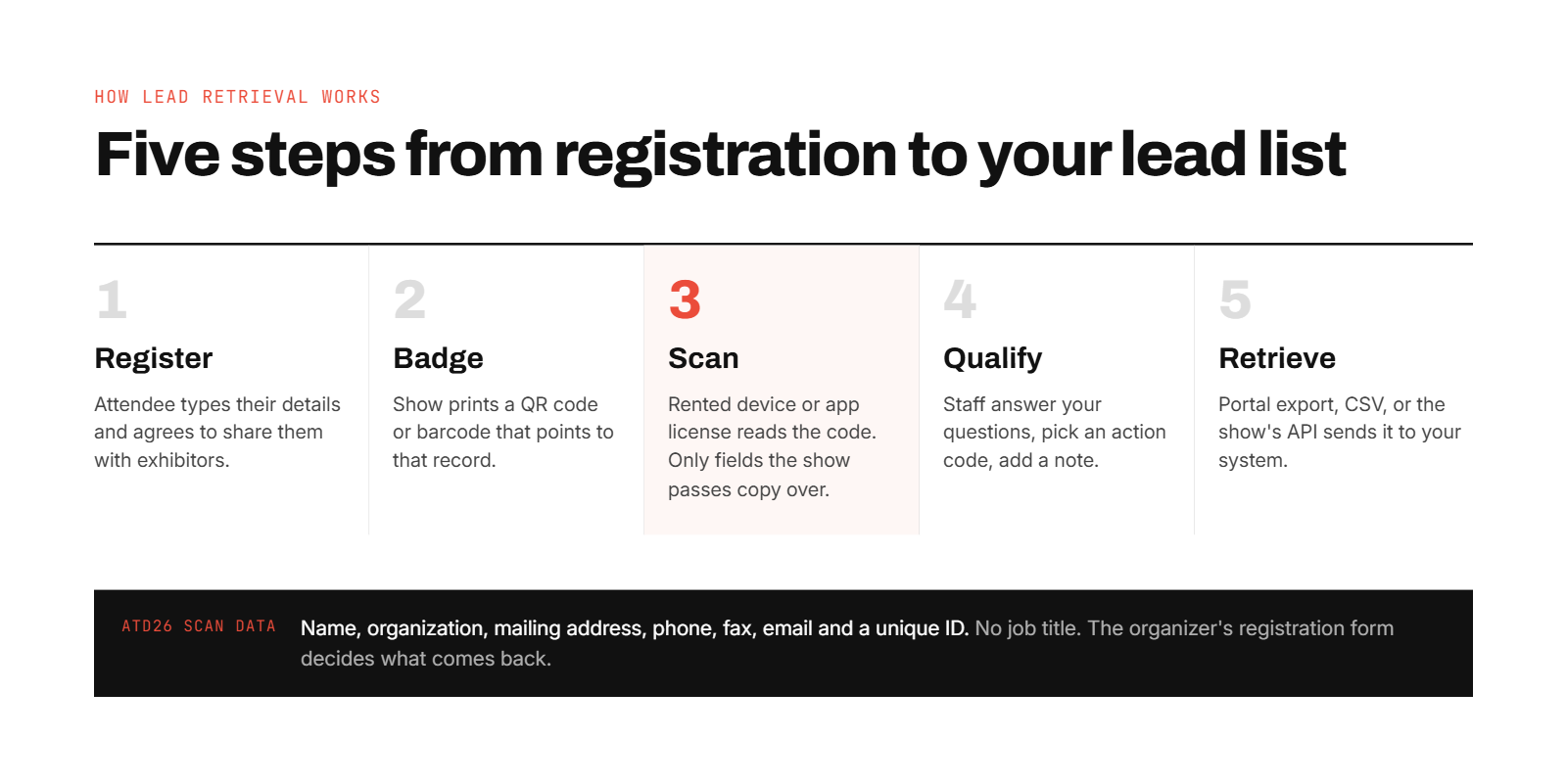
An attendee registers, and the show prints a badge with a code tied to that record. Booth staff scan the code with the show's device or app. Staff then add answers and notes, and the record lands on the vendor's portal for export or API delivery. The organizer decides which fields a scan returns, not the exhibitor.
The five steps, in order
Register. The attendee gives their details and agrees to share them. Maritz's ASI Show Chicago 2026 form says guests agree to share "their personal information with exhibiting companies via lead retrieval."
Badge. The show prints a code on the badge, usually a QR code or barcode, linked to that registration record.
Scan. Your staff scan the code with a rented device or the app on their phone. You only see attendees you scan, never the full list, as Webex Events' help page puts it.
Qualify. Staff answer the custom questions you loaded, pick an action code, rate the lead, or type a note.
Retrieve. The record appears in the vendor's portal, where you export a CSV, or it flows to your system through a paid API.
Interactive · step through it
Follow one badge from registration to your lead list
The attendee's badge (example person)
Dana Reyes
Example Manufacturing Co.
Attendee
Organizer's registration record
Example person and answers are made up. Field list from the ATD26 order form (CMR); action codes are from its list of 21 standard codes; delivery options from the ATD26, Maritz and Cvent documents cited in this article.
The five steps, and the one thing the exhibitor does not control: which fields the organizer passes.
What information does a badge scan give you?
It gives you whatever the registration form asked for, and nothing else. ATD26's terms list the scan data: attendee name, organization, mailing address, phone, fax, email, and a unique ID. There is no job title, so routing by role needs your own question.
Other shows pass more. Webex Events shows a photo, title, company, and social handles on each scanned profile. Before you plan lead routing, find the field list on your own show's order form.
The data is only as good as registration
One 2025 M Events form, hosted by GES, puts it plainly. The provider "cannot guarantee the amount or accuracy of the user data collected." That caveat is fair, because attendees type their own details. An iCapture user on G2 describes the same chain from the exhibitor's side.
"It's essential to ensure that the fields are mapped properly from the registration form all the way to badge creation and onsite capture." Natalie S., 4 stars, iCapture G2 Verified Review
Which badge technologies do shows use?
QR codes and barcodes are the standard on 2026 badges. Some shows issue RFID or NFC badges that attendees tap on a reader. Magnetic stripes still appear on older systems, as Wikipedia's lead retrieval entry lists.
B2Brain fills the gap the badge leaves. When a badge carries only a name and company, B2Brain's enrichment queries more than 15 data providers in sequence. It resolves the job title, a working business email, and a LinkedIn profile.
Q3. What lead retrieval options will you see on the order form? [toc=3. Order Form Options]
Most 2026 order forms offer three things: an app license for your phone, a rented handheld or tablet, and an API or developer kit. The API sends the show's attendee data into your own system. Custom qualifying questions, booth delivery, printers, and literature fulfillment are priced as add-ons.
Lead retrieval options on a 2026 order form
Option
What it is
Who it suits
The catch
App license
The contractor's app on your own phone or tablet
Teams with several people scanning
One license per device, one login per license (ATD26); activation covers one event (SWAP)
Handheld or tablet rental
A dedicated scanner collected at the services desk
Staff who won't use phones, or one shared device
Pickup line, return deadline, replacement cost
API or developer kit
The show's attendee data sent to your own tool
Teams that already run their own lead capture app
A separate line item, not offered at every show
Add-ons
Custom questions, delivery, printer, literature, content QR codes
Anyone who needs them
Each one priced per show
The line most teams skip: the API
On Maritz forms it is called "Event API", described as "YOUR developers integrate with OUR API with YOUR lead system." The NAMM Show 2027 form prices it at $950. CMR sells two versions at ATD26: a Post-Show Data Merge ($440 to $490) and a Real-Time API ($990).
What the API buys is simple. You scan with your own tool, and the show returns the full registration record for those badges. CMR says sample badges, API documentation, and a key arrive within 48 hours of the order.
Cvent calls it a badge kit
The Cvent LeadCapture exhibitor guide hosted by GES covers outside tools. Exhibitors using one should "purchase access to the API and integrate the badge kit." Without that route, a third-party app falls back to typing. An iCapture user on G2 describes exactly that.
"Scanners complain it takes too long when having to do a manual entry for events that do not have an API Integration." Beverly G., 4.5 stars, iCapture G2 Verified Review
What add-ons do the forms sell?
Custom qualifiers or surveys run $99 to $205 a show on the forms in this guide. Booth delivery runs $135 to $230, and Bluetooth printers $100 to $195. AAPEX 2026 also sells a $500 "Digital Backpack" that turns your content into QR codes. If you are weighing the app route against these lines, B2Brain's guide to lead retrieval apps compared lays the tools side by side.
B2Brain sits on the other side of the API line: it is the exhibitor's own capture app. B2Brain can take in a show's lead retrieval API or data-kit data. That makes the API line worth ordering at shows that sell one.
Q4. How much does lead retrieval cost in 2026? [toc=4. 2026 Costs]
On six 2026 and 2027 order forms, one app license or rented handheld cost $295 to $685 per show before tax. Extra users cost $110 to $200 each, and API access $440 to $1,330. Prices step up at each order deadline, and you pay again at every show.
Lead retrieval prices on six 2026 and 2027 order forms (early / middle / late tier)
Prices are early, middle, and late order tiers as printed, in US dollars before tax. The late app tier on the 2026 NAMM form did not extract cleanly, so it is left out.
The deadlines are real money
The cheapest handheld on these forms is $365, at ASI's early tier. That is above the "$200 to $500+" range Google's AI Overview gives for a rental. ASI's one-activation app jumps from $295 to $435 after June 25, and PRI's handheld goes from $525 to $685 after November 12.
What does the fine print say?
One license, one device. ATD26 allows one license per device and one login per license, and licenses are not transferable.
One event. Maritz forms say "App activation applies to singular event."
Cancellation. Maritz SWAP forms charge $100 if you cancel more than 30 days out and refund nothing inside 30 days. CMR charges $75 on or before May 7, 2026 and refunds nothing after.
Unused equipment. CMR gives no refund for equipment not picked up or not used.
Who can scan. Cvent's guide says booth staff must be registered attendees to get a license.
Late leads. Maritz forms say leads from badge images and handwritten badge IDs arrive within 14 days post-event, for a data services fee.
Processing. Maritz's SWAP forms add $9.99 to paper orders and waive it online. AAPEX's XPress Leads form charges $25, or $10 less online.
Loss and damage. AAPEX lists a $1,000 replacement cost per rented device and sells a $95 loss/damage waiver per rental item.
What does it add up to over a year?
Use the estimator below. Pick a show, an option, the order tier, and how many people scan at once. It prices the bundle the way the form does.
Interactive · priced from real 2026 and 2027 order forms
What will lead retrieval cost your team?
What you order
This show
$0
Per year
$0
Prices as printed on each show's order form, in US dollars before sales tax and processing fees (SWAP forms add $9.99 to paper orders; AAPEX adds $25). Six shows a year is the default because CEIR's 2026 spend report puts the median at six for the largest group of exhibitors.
The yearly view
CEIR's 2026 spend report found that the largest group of exhibitors does a median of six B2B shows a year. At NAMM 2027's three-activation app price of $549 to $599, six shows like it cost about $3,300 to $3,600 in lead retrieval alone. Add your booth, travel, and staff time in B2Brain's event ROI calculator to see the full cost of a show.
B2Brain prices its own app per event or per year, with the first event free for two users. The current plans are on what B2Brain costs per event.
Q5. When do you get your lead retrieval data? [toc=5. When Leads Arrive]
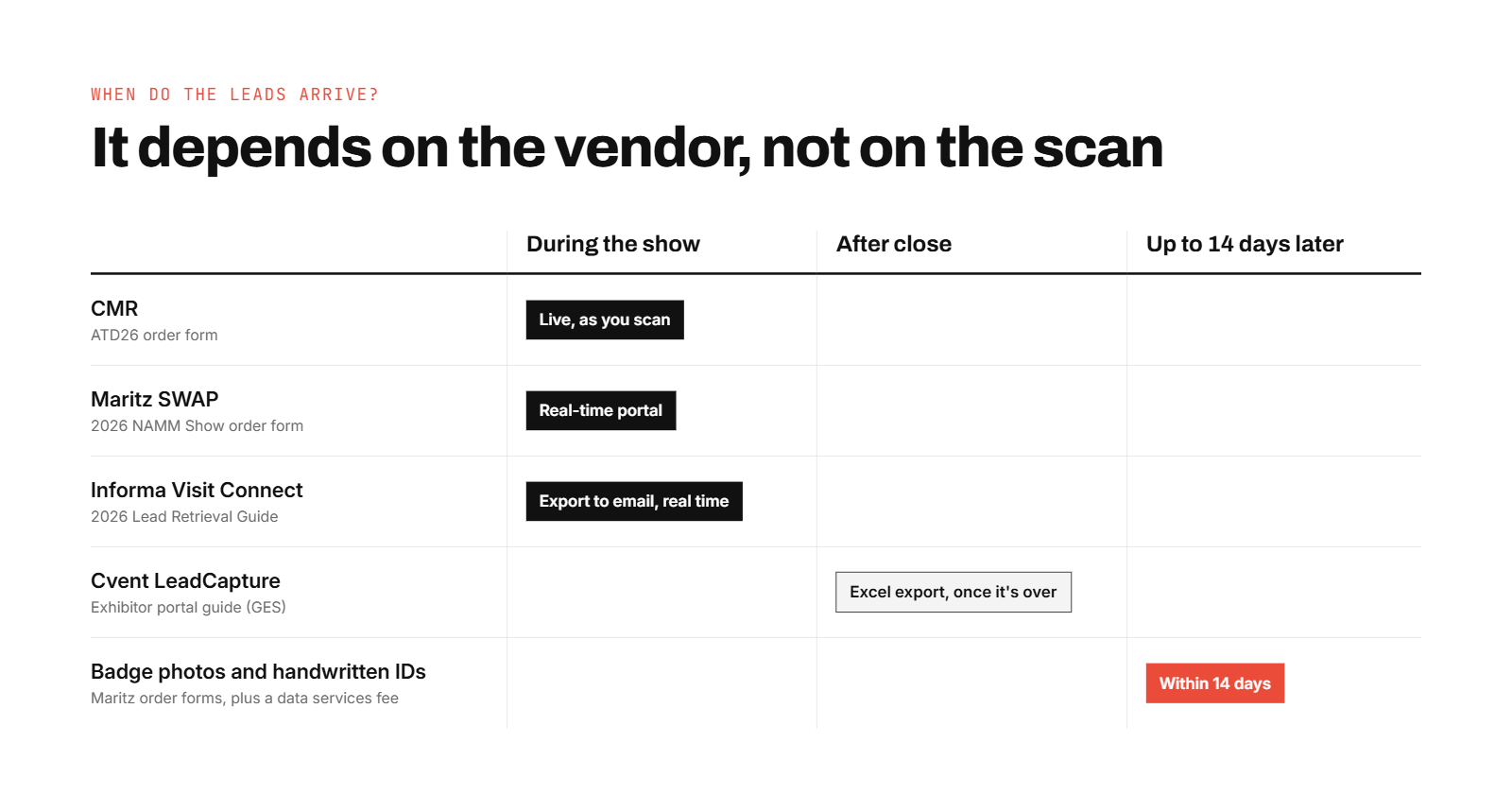
It depends on the vendor, not on lead retrieval itself. CMR, Maritz SWAP, and Informa's Visit Connect show leads in an online portal while the show is running. Cvent's LeadCapture guide describes exporting after the event, and leads captured from badge photos or handwritten badge IDs can take up to 14 days.
The claim that needs correcting
Several pages that rank for this keyword say organizers release your leads days after the show. Wikipedia says the same. For many 2026 vendors, that is out of date, and their own forms say so.
CMR (ATD26): leads appear at retrievemyleads.com "as you scan, even while the expo is still open", as a CSV.
Maritz SWAP (2026 NAMM): every option lets you "view and edit data in real time" and download from a secure portal.
Informa Visit Connect (2026 guide): scanned leads "can be exported to your email in real time" or pulled from the portal.
Cvent LeadCapture (GES-hosted guide): the export step runs "once the event is over", to an Excel file.
Maritz, all forms: badge-image and handwritten-ID leads arrive within 14 days post-event.
When leads become usable depends on the vendor's own rules, taken from each 2026 form or guide.
Who can export matters too
Cvent limits exporting to the Exhibitor Admin. Informa lets admins turn export rights on or off for each staffer. If the one person with export rights is on a flight, the leads wait with them.
Ask exhibitor services one question before you order: "Can my team see and export leads during the show, and in what format?" The answer decides whether follow-up starts on day two or the week after.
B2Brain removes the timing question for the leads it captures. B2Brain syncs each capture to Salesforce or HubSpot from the note screen. If your CRM team wants to check first, Standalone Mode holds captures for review and CSV export.
Q6. Does lead retrieval work without Wi-Fi? [toc=6. Offline Scanning]
Some systems do and some don't, so check yours before the show. The Maritz SWAP form for the 2026 NAMM Show says every option scans "with or without data connection." ATD26's CMR app needs a cellular or Wi-Fi connection. Only CMR's rented handheld stores leads locally when the signal drops.
Why the hall network is the weak link
Exhibition halls are hard places for wireless. Thousands of phones share the same access points, and concrete walls block signal. A capture tool that stops scanning when the network drops loses the busiest hour of the day, which is exactly when queues form.
Exhibitor-owned apps are not immune. A Mobly user on G2 describes sync failures during a busy event.
"Sometimes Mobly can be finicky- where it doesn't sync all the leads I've scanned" Verified User in Events Services, 3.5 stars, Mobly G2 Verified Review
The M Events Lion Leads form lists "offline scanning" and says data syncs to the portal "when your device is connected to the internet." That pattern, store now and sync later, is what you want written on the form.
How do you test it before doors open?
Run this two-minute test on every device on setup day:
Put the phone in airplane mode.
Scan a colleague's badge and add a note.
Turn airplane mode off.
Check that the lead appears in the portal with the note attached.
If the app needs a connection, budget for a hotspot or rent the handheld. A hotspot is a backup, not a plan.
B2Brain's app is offline-first. Captures, notes, and scoring work in airplane mode, and everything syncs when the device reconnects, even hours later on the flight home. B2Brain's native app runs on iOS. On Android it runs as a web app with nothing extra to install, as B2Brain's getting started help page explains.
Q7. Do you have to use the show's lead retrieval system? [toc=7. Show Rules]
Not always, but some shows require it. Informa's 2026 guide says exhibitors cannot scan badges with another program, and Expo Pass offers no API. Maritz SWAP and CMR sell an API or developer kit so your own tool can receive the show's attendee data. Cvent sells a badge kit for third-party lead tools.
How it used to work
For years the answer was simple. You ordered the show's scanner, picked it up on day one, and downloaded a file after close. At one or two shows a year, that still works well.
What changed
CEIR's median exhibitor now does six shows a year, often each with a different contractor, app, and set of questions. In B2Brain's 2026 survey, show-scanner users named moving leads into the CRM by hand as the top complaint (31%). Cost per show or per user came next (22%). The rules also split. Some shows lock capture down, and others sell the API that lets your tool in.
Open, for a fee: Maritz forms sell an Event API ($850 to $1,330), CMR a developer kit ($440 to $990), and Cvent a badge kit.
Check the lead retrieval section of the exhibitor manual when you book the stand, not the week before.
When does each choice make sense?
When to rent the show's system, run your own app, or both
Your situation
Rent the show's system
Run your own app
Run both
One or two shows a year
Yes
Optional
Rarely worth it
Five or more shows a year, one CRM
Only where required
Yes
Where the show sells an API
Leads met away from the booth (receptions, floor walking)
No scanner there
Yes
-
Sales wants leads in the CRM during the show
Only if the vendor's portal or API allows
Yes
Yes
Where B2Brain fits
B2Brain captures a lead from a badge photo, a business card, or a LinkedIn screenshot, without depending on the organizer's badge code or hardware. So the same app, questions, and CRM mapping carry from show to show, and to the reception after it.
Q8. What is the difference between lead retrieval and lead capture? [toc=8. Retrieval vs Capture]
Lead retrieval is the show's licensed access to its own registration records for the badges you scan at that event. Lead capture is your company's process and tool for recording every conversation, at any show or outside one, in your own format and CRM. B2Brain is a lead capture app.
Why people mix them up
At the booth they look identical. A rep points a phone at a badge and a name appears. The difference shows up later, when someone asks where that lead came from, what was said, and what happens next.
The old picture paints lead retrieval as a bare contact list. That is not fair to the 2026 tools. Every form in this guide sells custom qualifiers, action codes, or surveys, and ATD26 includes 21 standard action codes free. The real line is ownership and scope, not features.
Lead retrieval vs lead capture
-
Lead retrieval
Lead capture
Scope
One show
Every show and every conversation
Whose fields
The organizer's registration fields
Your fields and questions
Where data lives
The vendor's portal
Your app and your CRM
Works on
Official badges at that show
Badges, cards, and people with no badge
How long it lasts
Bought again each show
Carries history across shows
Qualification
Questions and codes you load per show
The same questions at every show
Retrieval is bought per show. Capture carries the same questions and the same CRM from show to show.
What changed
Phones became good enough scanners, and CRMs became the place pipeline reviews happen. That moved the job from "collect who stopped by" to "record what they need and what happens next." Sridhar Ranganathan, B2Brain's co-founder, puts it in one line: "Contact information is not where anything happens. Pipeline is where their world moves."
B2Brain covers the three parts of that job. Before the show it builds the target list and briefings. On the floor it captures with voice or typed notes, and afterwards it writes the CRM record and report. Each capture is tagged to the event and sub-activity, enriched, and deduplicated across reps and shows. See how event lead capture works for the full flow.
Q9. What should you set up before the show so scans turn into follow-up? [toc=9. Pre-Show Setup]
Order before the first deadline, and buy one license per person who scans at the same time. Load three to five qualifying questions agreed with sales. Test every device with the signal off. Decide who owns each lead and which CRM fields the export maps to before the doors open.
The five-item checklist
Order at the first tier. Put the form's deadlines in your calendar the day the kit arrives. ASI 2026 had steps on May 14 and June 25; ATD26 on April 9 and May 7.
Count scanners per shift, not booth headcount. Licenses don't move between devices at ATD26, and Maritz prices extra activations per user. Four staff on two shifts need two to four licenses, depending on who carries a phone.
Load the questions early. Limits differ by show. Informa allows unlimited questions of 100 characters, editable up to the event. NAMM's $99 survey support covers five questions with two edits.
Run the airplane-mode test from the offline section on every device on setup day.
Agree ownership and field mapping. Decide which CRM field each export column fills, who gets which lead, and what "qualified" means. Write it down and share it with sales.
Write the questions with sales, not for them
Three to five questions is enough to route a lead: what they need, when, and who decides. Ask sales which answer would make them call today. Build the questions backwards from that answer.
B2Brain keeps that qualification setup in one place. The questions you write once carry to the next show, instead of being rebuilt in each contractor's portal.
Q10. What happens to lead retrieval data after the show? [toc=10. After the Show]
You export the leads from the vendor's portal or receive them through the API. Then you import them into your CRM with an owner and a next step. You also become responsible for them as personal data. Attendees agree at registration to share their details with exhibitors, and some forms name the exhibitor as data controller.
The Monday file
The show ends on Thursday. On Monday someone downloads the CSV and maps its columns to the CRM. They delete the colleague scanned as a test and merge the prospect two reps both scanned. Then the leads wait for an owner. B2Brain's 2026 survey heard this from show-scanner users. 31% named moving leads into the CRM by hand as their top problem, and 19% said leads arrived without notes or with bad data.
The privacy part is yours
The forms are clear about who holds the risk. Maritz forms say attendees agreed to share their information via lead retrieval. Maritz also "recommends all customers seek their own expert advice for privacy compliance concerns." The M Events form makes the exhibitor acknowledge its "role as data controller" under GDPR. Informa asks attendees a consent question in the app and lets you add your own. This is not legal advice, so take the forms' suggestion and get your own.
Follow-up has a clock
CEIR's 2012 study found that 64% of exhibitors followed up by customized email and 59% by phone. Over 70% of them finished within two weeks. Your team's speed depends on when the data reaches the person who acts on it. That is why the timing question in Q5 matters more than the scan.
What B2Brain does after the show
B2Brain writes each booth capture into Salesforce or HubSpot as a record tagged with the show name, the rep, and the note. When two reps capture the same person, or the same prospect turns up at a later show, B2Brain recognizes the match and merges the records. Across the market, about 52% of qualified booth leads become meetings when the meeting is booked on the floor. When follow-up waits until after the event, the industry average is 8%. Teams that want a review step use Standalone Mode to check and export a CSV first. To see a capture land in your CRM, Book a Demo.
FAQ's
What is lead retrieval at a conference?
At a conference, lead retrieval works the same way it does at a trade show, but the buyers are often sponsors rather than booth exhibitors. The conference sells a scanner rental or an app license from its official contractor. Sponsor staff scan attendee badges at their table, at a sponsored session, or at a reception the sponsor hosts.
Two differences matter at conferences:
Fewer booth hours. Conversations happen in hallways and at meals, where nobody carries a rented scanner.
Narrower data. Conference registration forms often ask for less than trade show forms, so check the field list before you rely on it.
B2Brain captures those hallway and reception conversations from a badge photo, a business card, or a LinkedIn screenshot, so they land in the same CRM as the table scans. See what gets captured on the floor for how floor-walking teams use it.
What is the difference between lead retrieval and lead generation?
Lead generation is everything that brings the right people to your booth: pre-show outreach, meeting invitations, a session slot, the booth itself. Lead retrieval is the narrower step that records who came and what they said, usually by scanning their badge.
Generation answers: did the right people stop by?
Retrieval answers: do we have their details and the context to follow up?
The two fail in different ways. A booth with strong generation and weak retrieval has busy days and a thin lead list. A booth with weak generation has a clean list of the wrong people.
B2Brain works on both sides of that line. Before the show, B2Brain builds a target list and briefings from the accounts already in your CRM, which is the generation side. On the floor, it captures each conversation with notes and context, which is the retrieval side done your way. Generate new pipeline from events explains how the two connect.
Can one lead retrieval license be shared across a booth team?
Usually not at the same time. The forms in this guide tie licenses to devices and logins:
CMR at ATD26 allows one license per device and one login per license, and licenses are not transferable between devices.
Maritz SWAP sells app packages with a set number of activations and charges per additional activation. Its extra-activation pricing applies to single booths only, and pavilion exhibitors are told to contact exhibitor services.
Informa's Visit Connect gives each registered staffer access and lets admins switch capture and export rights per person.
Plan licenses by how many people scan in the same hour, not by booth headcount. A shared handheld or tablet suits small booths where one person scans and others talk.
B2Brain prices by user rather than by device, so each rep captures on their own phone. The plans are on what B2Brain costs per event.
What happens if you lose or don't return a rented lead retrieval scanner?
You pay for it, and the amounts are on the order form. Two 2026 examples:
ATD26 (CMR): a $2,000 replacement cost for the Lead Plus handheld. If you don't pay at once, a weekly rental fee equal to the original service fee is added. Equipment must go back to the service desk within one hour of the event closing, and abandoned equipment costs a $100 fee.
AAPEX 2026 (Maritz XPress Leads): a $1,000 replacement cost per rental device and $1,000 per Bluetooth printer. An optional loss/damage waiver costs $95 per rental item.
CMR also gives no refund for equipment that is not picked up or not used. So a scanner ordered for a staffer who then misses the show is still paid for.
Assign one person to collect and return every device, and put the return time in the teardown plan. Teams that capture on their own phones with B2Brain skip the pickup and return lines entirely. The booth-day workflow shows how that runs.
Is lead retrieval GDPR compliant?
The system can be. Your use of the data is what has to comply. The forms in this guide set it up like this:
Maritz says attendees agree, at registration, to share their information with exhibitors via lead retrieval. It also recommends that exhibitors seek their own expert advice on privacy.
Informa asks attendees a consent question when they first log in to the event app, and lets exhibitors add their own consent question.
M Events makes the exhibitor acknowledge its role as data controller under GDPR on the order form itself.
In practice: keep only the fields you need, record where each lead came from, and honor opt-outs in your follow-up. This is not legal advice, so check with your own privacy team.
B2Brain records consent at badge scan, applies retention windows you configure, and handles subject access requests in one click. Voice notes are redacted and transcripts purged on the schedule you set. Details are on B2Brain's Security & Compliance help page.
Enjoyed the read? Join our team for a quick 30-minute chat — no pitch, just a real conversation on how we’re rethinking Event Intelligence in B2b.