You run the event calendar. You should also own what it produces.
Written by
Sridhar Ranganathan
Last Updated :
November 11, 2026
Skim in:
4 min read
mins
TL;DR
Event marketers can say what a show cost, but rarely which accounts it produced or which rep met them.
The B2Brain Event Manager puts the event calendar, the team and the leads in one dashboard.
Add shows from a shared event list, assign reps, and get a warning when someone is booked at two overlapping shows.
Every lead arrives with job title, work email and LinkedIn profile, and records who scanned it.
Compare shows by the accounts they produced, not the badges they scanned.
Most event marketers can tell you what a show cost to the dollar. Few can tell you which accounts it produced, or which rep produced them. That gap is not a skill problem. It is a tooling problem.
Today: the calendar lives in one place, the results live everywhere else
Here is how a typical show runs. The event marketer books the booth and builds the calendar in a spreadsheet. Sales decides who travels, often by email, often the week before. At the show, reps scan badges into the organiser's app, or into their own phones, or onto business cards. After the show, someone merges three exports into one list and sends it to sales. By then it is a week later, and nobody can say which rep met which account.
This causes three problems.
Reps get double-booked. Two shows overlap by two days, and the same rep is on both lists. Nobody notices until travel is booked.
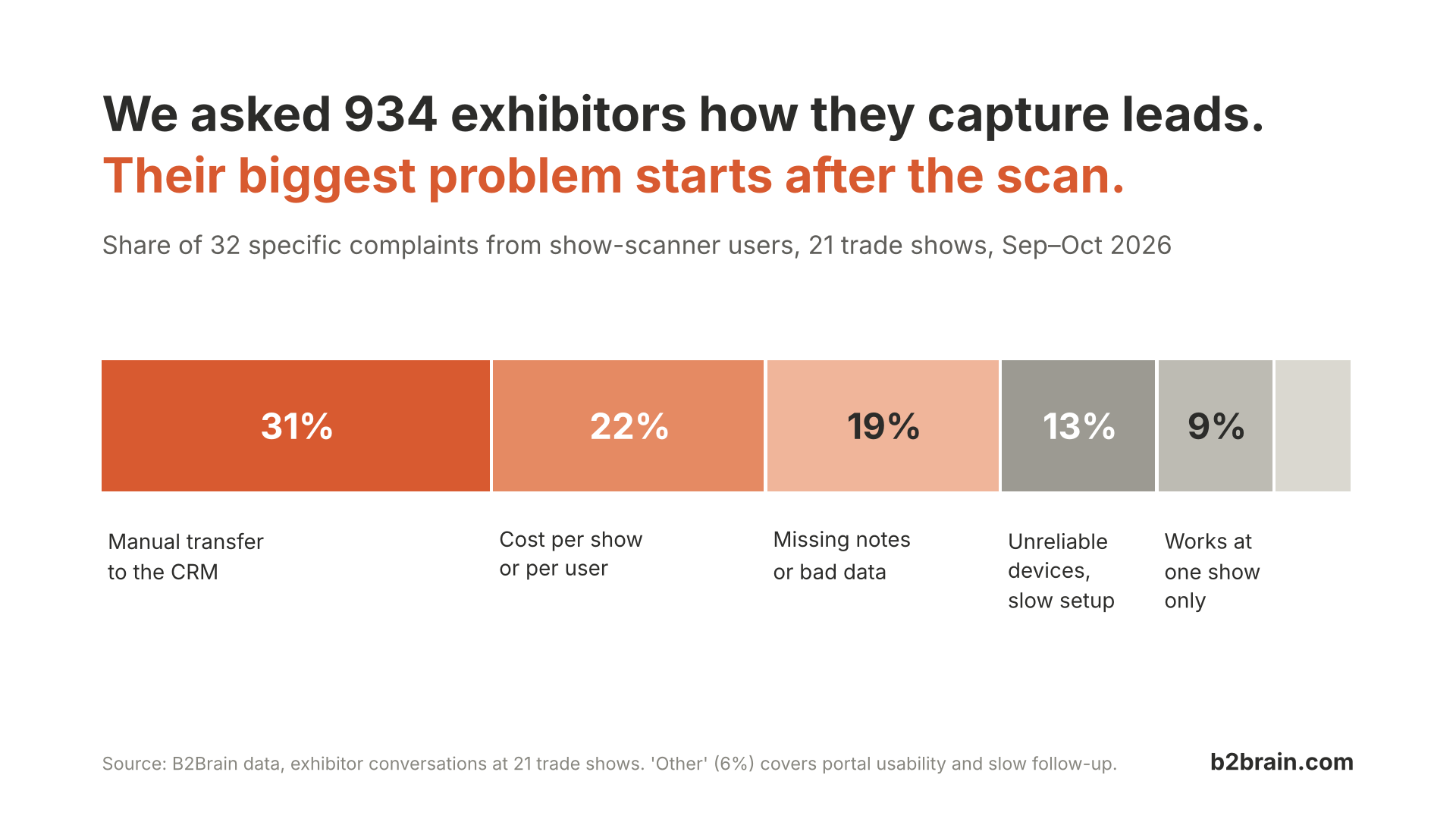
Leads arrive late and thin. A badge scan gives you a name and a company. Sales needs a title, a work email and a reason to call. Without them, follow-up waits on research.
The event marketer cannot defend the budget. When leadership asks which show to cut, the answer is a lead count. A lead count does not separate 40 students from 40 buyers.
What we built: the B2Brain Event Manager
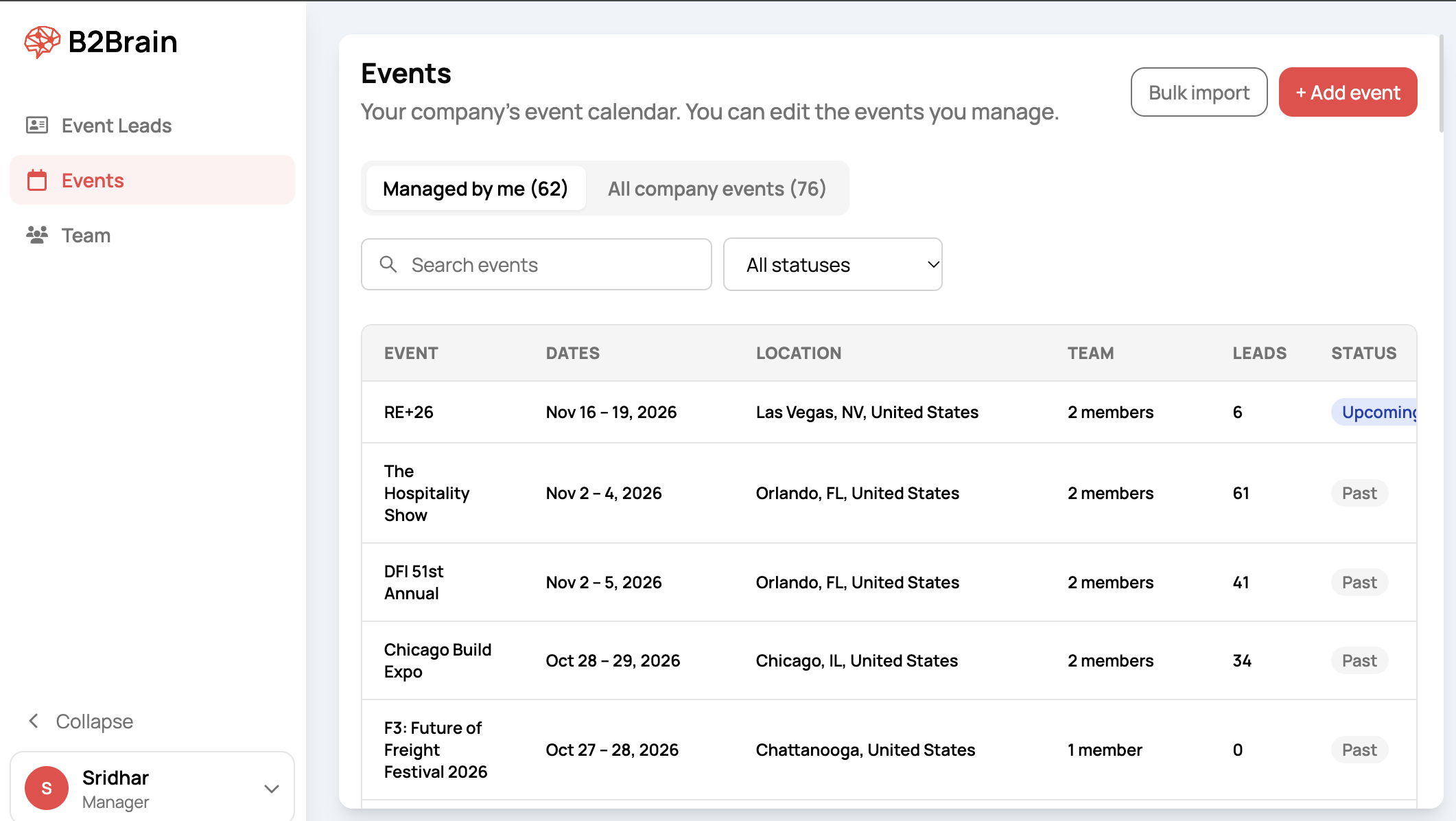
The Event Manager is a dashboard for the person who runs the company's event calendar. It puts planning and results in one place.
Build the calendar from a shared list. Search B2Brain's event list by name, and add the show in one click. If a show is missing, create it once, and every B2Brain customer can find it.
Invite the team. Add a rep with their work email, pick their events, and send the invite. Their events are waiting in the app when they sign in.
Choose who goes where, and see clashes. Tick the people attending each event. If someone is already booked at an overlapping show, B2Brain flags it in orange before you save.
See enriched leads per event. Every scan arrives with job title, work email and LinkedIn profile. Filter by event, account, rep or day, and download the view as a CSV for your CRM.
See each rep's contribution. Every lead records who scanned it. Filter by person and by show to see who met which accounts.
The benefit: decisions you can defend
Take a team of two at a four-day show in Las Vegas. Before the show, the Event Manager shows that one rep is also booked at a show that overlaps by two days. You swap in someone else before flights are booked. During the show, every scan lands under that event with contact details attached. The morning after, you filter by account and send sales a list of the target companies your team actually met, with who met them.
At the end of the quarter, you compare shows by the accounts they produced, not by the badges they produced. That is the number that keeps a show in next year's budget, or takes it out.
Try it
The Event Manager is live for B2Brain customers today. Open Events in your dashboard to build your calendar. New to B2Brain? Download the app to get started.
FAQ's
What is the B2Brain Event Manager?
It is a dashboard in B2Brain for the person who runs a company's event calendar. From one screen, they add events from a shared list, invite the team, choose who goes to each event, and see enriched leads per event and per rep.
How does B2Brain flag double-booked reps?
When you assign people to an event, B2Brain checks their other events. If someone is already booked at a show with overlapping dates, a warning appears in orange under their name, naming the other show and its dates, before you save.
How do I see which rep produced which leads at a show?
Every lead records who scanned it. Filter the Event Leads page by event and by the Scanned by field to see each rep's leads and the accounts they met. You can also download the view as a CSV file.
How do I stop two colleagues adding the same show twice?
Search B2Brain's event list first. In the search results, events already on your calendar are marked On your calendar, and events a colleague already added are marked On your company's calendar. Neither can be added twice, so every lead from that show lands under one event.
What if an event is not in B2Brain's event list?
Click Create a new event at the bottom of the search. Enter the event name, a short label, the start and end dates, the city and the country. The event goes onto your calendar and also joins B2Brain's shared event list, so other teams attending the same show can find it.
Enjoyed the read? Join our team for a quick 30-minute chat — no pitch, just a real conversation on how we’re rethinking Event Intelligence in B2b.